


With just around a week left for the Christmas, TechPP Mega Christmas Giveaway has yet another “Free-for-all” giveaway for all you wonderful readers of TechPP! DiskRescue 2009 from Uniblue is an useful defragmentation and optimization tool for Windows PC.
It is so very obvious that when you go buy a new PC with the exact same specifications as your current PC, you will immediately notice that the new one bots faster, applications open faster and the system just seem much more responsive! This isn’t anything to do with the hardware components, it’s more to do with the clean version of Windows that’s install on the system.

Using any PC over a period of time means that there will be lot of addition and deletion of files to and from the hard drive. Installing and uninstalling applications, moving files around the drive and much more. What all these results in, is fragmentation of your hard disk. Fragmentation means that files and their data are stored in an unconventional manner, requiring your drive to spend longer searching for and loading the information.
DiskRescue is the effective solution to the fragmentation of your hard disk. Able to run on command, or launch defrags proactively when scheduled, DiskRescue fixes your disk fragmentation problems leaving you free to enjoy improved performance. The name Disk Rescue might sound like it is a data recovery software, but it is not. The developers are just attempting to convey that you can bring back your drive to full health be defragmenting the contents.

Uniblue Disk Rescue Features
1. Powerful disk defrag engine
2. Speed up and optimize
3. Detailed scan results reports
4. Scan and defrag scheduler
5. In depth analysis
6. A contemporary and intuitive interface
7. Safe and trusted
8. Windows Vista, XP compatible
Uniblue Disk rescue 2009 has a very intuitive and simple to use user interface (just like any other Uniblue product). You simply open the tool, select the drive you want to analyse and perform the scan. You can then choose to defragment. You can also schedule a defragmentation process, say overnight, whilst you are away from your computer.
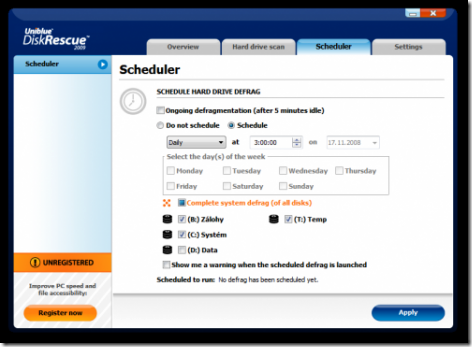
This is something I don’t like about DiskRescue. I wish it had a pro-active approach towards disk defragmentation, by running the process in the background, defragmenting your drive on-the-fly, generally when CPU use is low. I hope they implement this in upcoming releases. So I would say, DiskRescue 2009 is a useful tool for running a complete drive check and then running a defragmentation process on the contents, so you can keep your drive in top condition, with some minor chinks in its armory.
Uniblue Disk Rescue 2009 – Free Licenses Giveaway
We have teamed up with Uniblue to give away unlimited number of free licenses for Disk Rescue 2009!
Enter the details in the form below and let us know which software you use currently for disk management.
http://mag.uniblue.com/onlinepromo/dr/signup/
Feel free to promote this giveaway so that more and more people get benefited.
You can subscribe to TechPP newsletter or RSS feed to get to know about more such offers and giveaways and other technology updates every day!
Martin is giving away free accounts of Giganews. Be sure to check it out.

