

Quick Answer
From user-friendly mobile apps like Travelboast and TravelAnimator to web-based tools like Pictramap and advanced software like SmartSHOW 3D, there’s an option for everyone. Each tool offers unique features and customization options, making it easy to create engaging and visually appealing travel map animations for sharing on social media or incorporating into video content.
Are you a content creator who wants to create fun animated travel maps that show a plane or car gliding through the route? Thanks to modern video editing software, there are countless ways you can make your videos more exciting and entertaining. A bit of animation in a video is good for audience engagement. Plus, animated travel map videos make it easy for viewers to understand the itinerary.

An animated travel map video may look like hours of work, but it’s not. That’s because in this guide, we’ll show you some of the best apps you can download to your smartphone to create great animated travel map videos on the go. Let’s get right to it.
Table of Contents
Best apps to create animated travel route map
Here are some of the best apps and tools that you can use to create an amazing animated travel route map. The best part is that most of the apps allow you to create an animation for free with just a few taps. Let’s take a look at some of the best animated travel route map apps picked by TechPP.
App/Tool | Description | Platform | Download (Click) |
|---|---|---|---|
Travelboast | An app trusted by millions, offering beautiful animated videos with customizable itineraries. | Android, iOS | |
TravelAnimator | Highly-rated app with easy-to-use interface, allowing users to highlight key points of travel and choose from various animation styles. | Android, iOS | |
Travel Video Map Maker Boast | Despite some glitches, this app provides visually appealing animated travel maps with customizable routes and vehicles. | Android | |
Pictramap | A web-based tool offering free creation of animated travel maps, allowing users to choose map types, add pictures, and select from a variety of vehicles. | Web | |
SmartSHOW 3D | Software for Windows PCs providing granular control over animation creation, with options for effects, slideshow animations, and various export formats. | Windows |
Travelboast – Trusted by millions
As the tagline of this app says, “SHOW PEOPLE YOUR TRIP, ITINERARY, OR JOURNEY IN A COOL WAY”, that’s exactly what this app does. If you want to create an animated travel route map, then you can rely on the Travelboast app. It is available for both Android and iOS and has been downloaded by more than 10 million users.

All you have to do is enter the details, such as your country of origin or city, your destination, and everything in between. Travelboast then creates a beautifully animated video with the itinerary. This is a fun way to share your trip around the world with your friends and family on social media, or you can save the video to your phone.
The app offers 100 different modes of transportation to choose from, both real and fictional. Also, Travelboast adds more vehicles at regular intervals. You can even leave a comment to let us know which vehicle is still missing, and who knows, maybe it will be added in the next update. Travelboast can import GPX tracks from virtually any tracker and turn them into beautiful animated maps.
Pros:
- Trusted by millions, indicating reliability and popularity.
- Offers 100 different modes of transportation, both real and fictional.
- Easy to use with a straightforward interface.
- Allows importing GPX tracks from virtually any tracker.
Cons:
- Limited customization options compared to other apps.
- Some users may find the variety of transportation modes overwhelming.
TravelAnimator – The best of the lot

TravelAnimator gets your job of creating fun animated travel maps pretty easily. It is a highly-rated app on the Play Store and App Store. It allows you to create stunning animated travel routes that could be pretty good for your travel video.
You can also highlight the important parts of your travel, such as the places you visited, and show key landmarks, activities, and hidden gems during your trip. TravelAnimator lets you share your created videos directly with social media apps or save the video to your phone. The interface is quite easy to use and boasts a good number of animation styles.
With this app, you can choose maps according to your taste; some apps are locked behind a paywall. You can also choose different types of vehicles, such as a sports car, a plane, a helicopter, a mini truck, etc., although some vehicles can only be unlocked after paying a fee.
Pros:
- Highly rated with positive user feedback.
- Easy-to-use interface suitable for beginners.
- Offers a good number of animation styles.
- Allows direct sharing to social media platforms.
Cons:
- Some features and maps are locked behind a paywall.
- Additional vehicles may require payment to unlock.
Travel Video Map Maker Boast – A decent visualizer

Even though it doesn’t have as many five-star ratings in the Play Store, the app works well for the most part. Just like other apps on this list, it lets you create great animated travel map routes with a vehicle that maps the entire route.
You can choose among different means of transport, enter your route along with the different stops you took during your travel, and hit the Start button to create a great, visually appealing animated travel route map video. You can share your created trip videos on your social media profiles and gain traction.
Sometimes, the app doesn’t register gestures like pinch to zoom and often loads the map upside down, but after a restart, it works again. That’s it. The number of vehicles to choose from is great; you even get some animated vehicles as well.
Pros:
- Visually appealing animated travel maps.
- Customizable routes and vehicles.
- Allows sharing on social media platforms.
Cons:
- Occasionally experiences glitches, such as upside-down map loading.
- Limited number of five-star ratings compared to other apps.
Download: Android
Pictramap – Create animated maps on the web

If you are looking for a tool that will create awesome animated travel route maps but do not want to download any app for it, then Pictramap could be your option. Pictramap, a website created by travel aficionados, allows you to build interesting animated travel maps and show your friends where you’ve been.
The best part is that you can use it for free. Of course, some premium features won’t be unlocked until you pay a fee. But the free version is enough to get you started. You can choose from different map types, easily drag and drop to route your map, add pictures to the stops or destinations you want to highlight, and much more.
There is a good list of vehicles to choose from that will guide your viewers across the various stops in your route. The free version lets you create 2 projects, add 10 locations, and upload up to 20 pictures. Overall, this is a great option if you want something online.
Pros:
- Web-based tool accessible without the need for downloads.
- Free version available with basic features.
- Offers a variety of map types and vehicles.
Cons:
- Premium features require payment.
- Limited project and upload allowances in the free version.
Visit: Pictramap
SmartSHOW 3D – A tool for granular controls

For users who wish to have a bit of granular control for creating an animated travel route map, they can download the SmartSHOW 3D software. There is a bit of a learning curve involved if you wish to use this software to create animated travel routes, but as already said, it isn’t for everyone.
You get access to different travel map effects, the ability to add photos to every location in your route, add voice comments to highlight things and add music to your videos. SmartSHOW 3D comes with over 700 effects and slideshow animations to make your animation great.
The program lets you export video, select from the 15 different export options to choose from, and export the video in different screen sizes. The SmartSHOW 3D software is available for Windows PCs but isn’t available for other devices, so that is a restriction.
Pros:
- Provides granular control over animation creation.
- Offers a wide range of effects and slideshow animations.
- Various export formats available.
Cons:
- Learning curve involved, not suitable for beginners.
- Only available for Windows PCs, limiting accessibility for other devices.
Download: SmartSHOW 3D
How do I create an animated travel route map?
The apps and tools listed above are all good, but how do you use them to create an amazing animated travel route map using one of these apps? Below, we have shown how you can create an animated travel route map video. To explain the steps, we have used the TravelAnimator app on an Android device.
- After you download the TravelAnimator app, open it.
- Click on the Starting Point field and type the name of the place from where your trip started.

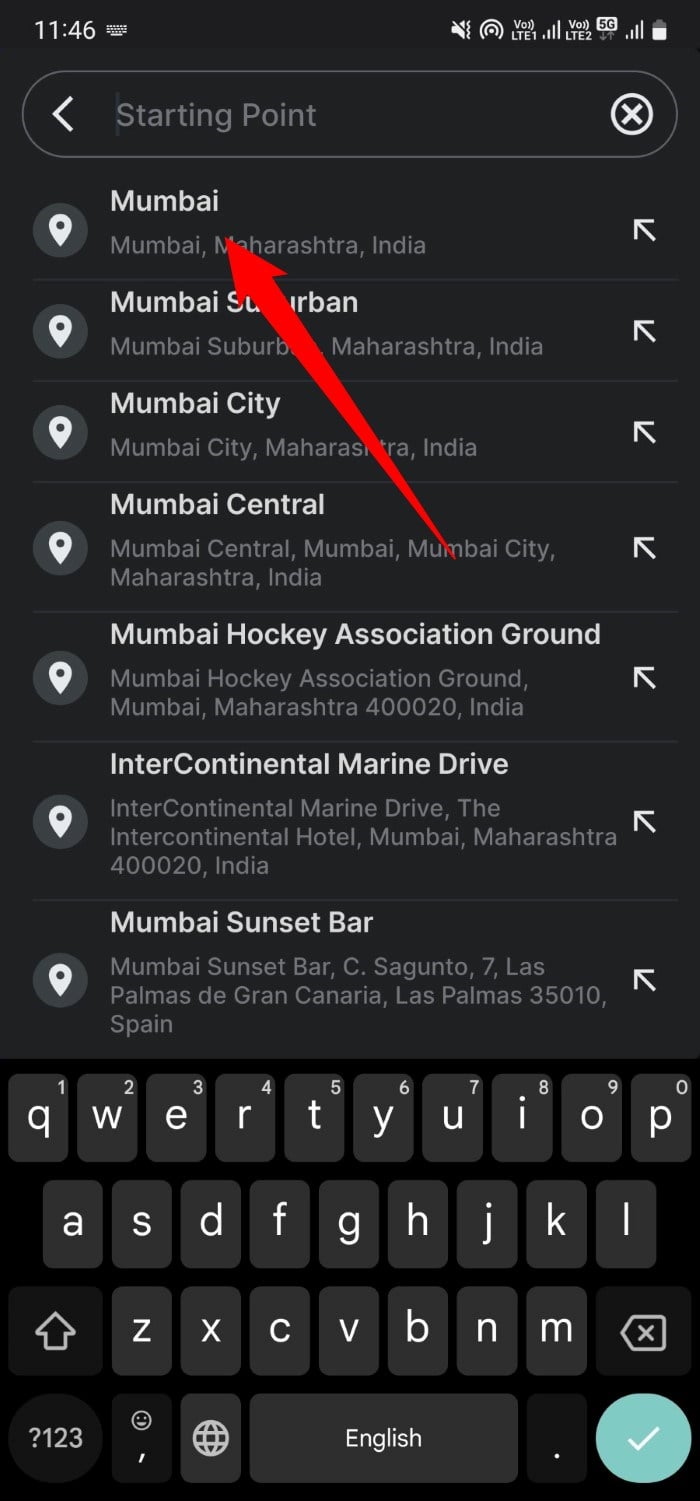
- Similar to the Starting Point, enter the destination name in the Destination Point field.

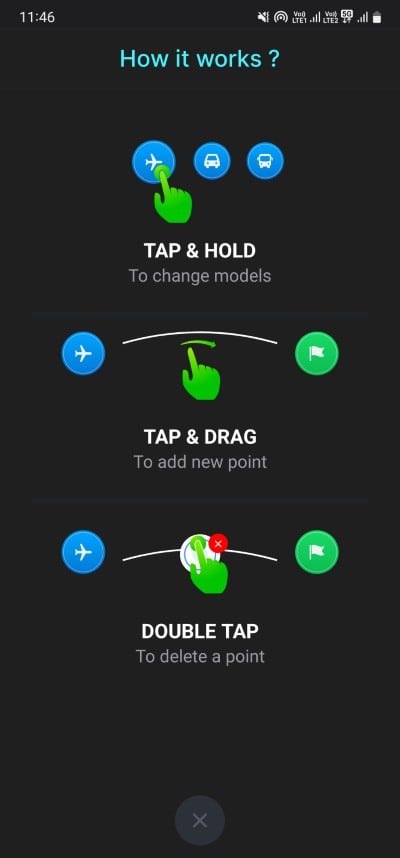
- If you are using the app for the first time, it will show you a “How it works?” page that explains how you can change the models, add a new point, and delete a point.
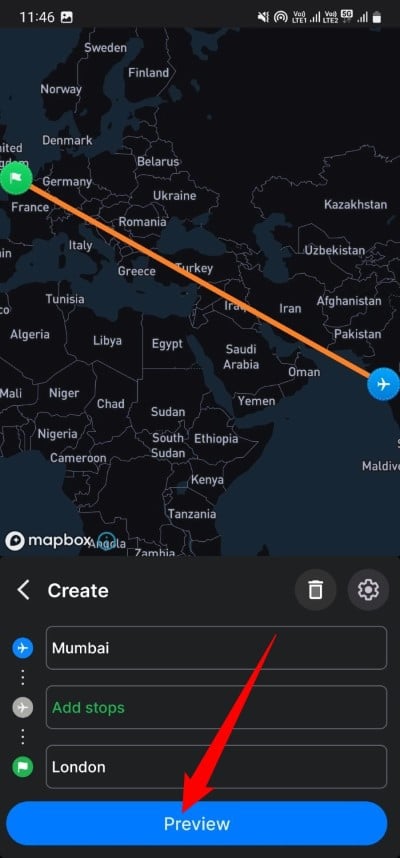
- Tap on Add Stops to add any stop that you took on your travel route.

- Hit the Preview button to view the created animation.
- In the Preview page, you can change the video duration and adjust the model size as well. Here are the other changes that you can make on this page:

- Style: Tapping on Style will give you the option to select the different types of map models. Some map models are locked behind a paywall.

- 1:1: When you tap on the 1:1 button, it will show you the different aspect ratios to choose from.
- Country: Tapping on the Country button highlights the origin country in the video.
- Unit: Changes the unit from miles to km and vice versa.
- Style: Tapping on Style will give you the option to select the different types of map models. Some map models are locked behind a paywall.
- Once you are all set, hit the Export video button to share the video to your social media accounts or download it locally on your phone.

The above steps will help you create a fun and unique animated travel map that you can use in your video when creating content or share with your friends when you want to woo them away.
FAQs about the best apps to create travel route map
1. Is it possible to create free animated travel map videos?
Yes, absolutely. There are quite a few apps that will let you create an animated travel map for free. Even though the features available to you in the free version are limited, you shouldn’t complain because creating such animated travel map videos could cost you hours, and you would have to mess around with complicated video editing software to create them.
2. Can we create an animated travel video for a custom route?
Many would think that tools that offer the ability to create animated travel maps are limited to a few routes. But that’s not the case. All the tools we discuss in this guide allow you to create an animated travel map video for a custom route. You can choose a different number of stops between your starting point and destination.
3. Can I animate a route using Google Maps?
The answer is yes, but only if you are a professional. Google Maps doesn’t directly allow you to create an animated map video for your itinerary with a few clicks. You need to take the help of Google Maps, Google Earth, and professional video editing software and combine all these tools to create an animated route. This may be fine if you’re a pro and know your way around a video editing program. However, casual content creators and even professionals use easy-to-use tools these days, which we will discuss in this guide.
4. Is it possible to create an animated travel route map using Canva?
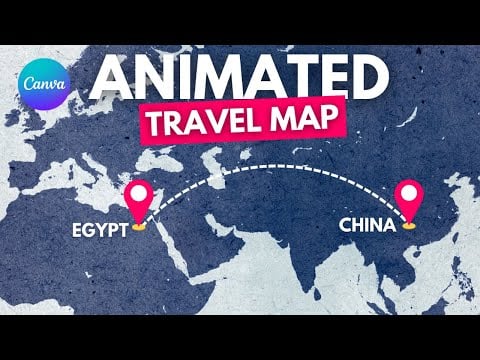
Since Canva is a popular photo and video editing website, the question is quite legitimate. The answer to this is yes; you can create animated travel route map videos using Canva. The downside to this is that it is a bit complicated, as you need to create multiple layers positioning the vehicle in your route at different stops to make it appear in motion. For your reference, here is a video explaining the same. All in all, we would suggest you take advantage of the above-mentioned apps to create awesome animated travel route map videos and ditch Canva.

