

In Summary
- The Asus ExpertBook B5 [B5404CMA] is a refreshed addition to Asus’s business lineup, now featuring the Intel Core Ultra 7 processor.
- It prioritizes fundamentals like build quality, battery life, performance, display, and software without venturing into cutting-edge territory.
- Bundled with the Asus Pen 2.0, it enhances the touchscreen experience effectively.
- Though pricey, its customizable options make it ideal for tailored business needs.
Being the business-centric lineup that it is, Asus’ ExpertBook lineup has always been a preferred option among corporates and businesses. Asus is known for its value-for-money propositions and for updating its models regularly. The ExpertBook series is no different in this regard.

Following the update cycle, Asus updated its ExpertBook series to match the current laptop standards. In that, tipped to be the “Advanced” business laptop in the lineup, the ExpertBook B5 also received an update, which Asus claims is now AI-ready to handle the corporate workload.
Ditching my trusty M1 MacBook Air entirely, I’ve been living with the latest Asus ExpertBook B5 laptop, the B5404CMA, for a little under three weeks. The model I received comes with updated specifications, the most prominent being the Intel Core Ultra 7 processor under the hood, a touch-screen WUXGA display, and Windows 11 Pro.
The ExpertBook B5 lineup with the Intel Core Ultra 5 processors starts at INR 110,200 plus taxes, and being a business laptop, businesses can reach out to Asus India and customize the laptop however they like. This review outlines my experience of using the Asus ExpertBook B5 [B5404CMA] as my primary laptop.
Table of Contents
Asus ExpertBook B5: General Specifications
To have an idea about the laptop before you continue reading the review, here are the general specifications of the Asus ExpertBook B5 [B5404CMA]:
- Intel Core Ultra 7 155U with integrated Intel Arc Graphics
- 16GB LPDDR5 RAM and 1 TB PCIe 4.0 NVMe M.2 SSD
- 14-inch WUXGA (1,920 x 1,080 pixels) IPS LCD screen with a 60Hz refresh rate and 300 nits of peak brightness
- 63Wh battery with 65W fast charging
- 31.37 x 22.68 x 1.89 cm and weighs 1.29KG
- Windows 11 Pro and Wi-Fi 6E
- Dolby Atmos-tuned bottom-firing speakers
- 1080p webcam
- 2 x Thunderbolt 4, 2 x USB 3.2 Gen 2 Type-A, Kensington Nano lock, full-sized HDMI, audio combo jack, RJ45, and smart card reader.
- A variety of first-party software is catered to businesses, enterprises, and regular users.
In-Box Contents: Everything You’d Need, Plus More
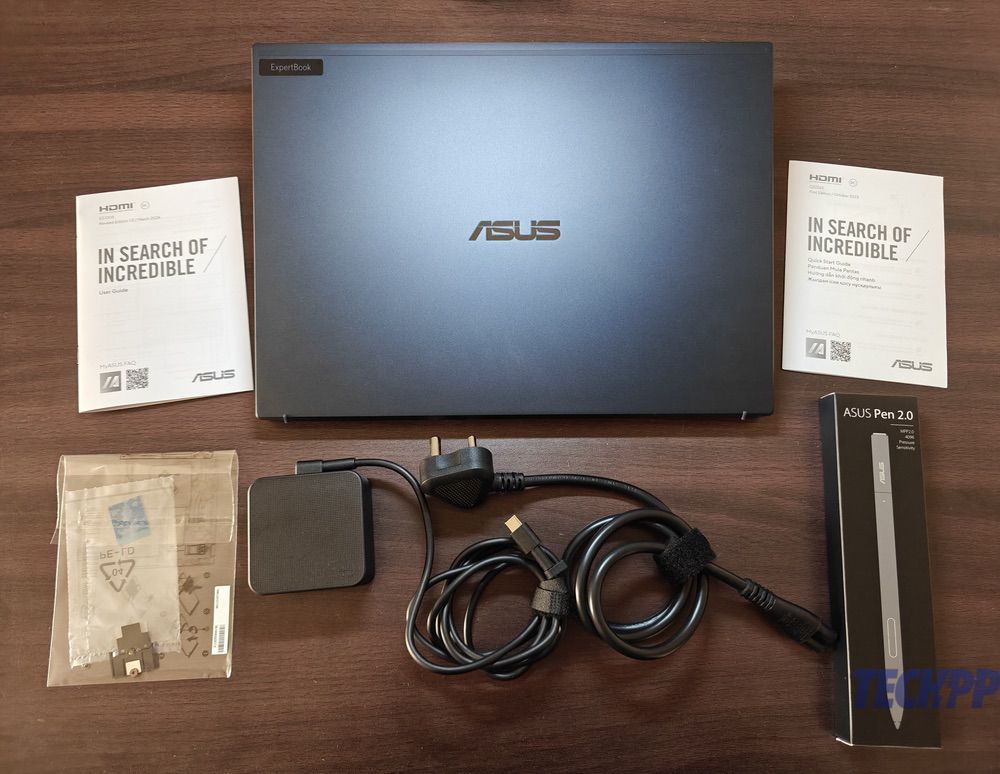
Kicking things off with the unboxing experience, I was happy to see a substantial box that included everything you would need, plus thoughtful extras. Besides the nicely wrapped Asus ExpertBook B5 [B5404CMA], the recycled packaging included a 65W USB Type-C power adapter, the Asus Pen 2.0, tools for the smart card reader, and instruction manuals.
I would have loved to see a sleeve inside the box or an accompanying backpack, which business personnel would have appreciated a lot. In fact, Asus bundles a sleeve in the packaging of its premium Zenbook lineup, so skipping out on one for the ExpertBook lineup feels a little odd to me. Nevertheless, the box contents are nothing to complain about.
Design and In-hand Feel: Classy but Not a Head-Turner

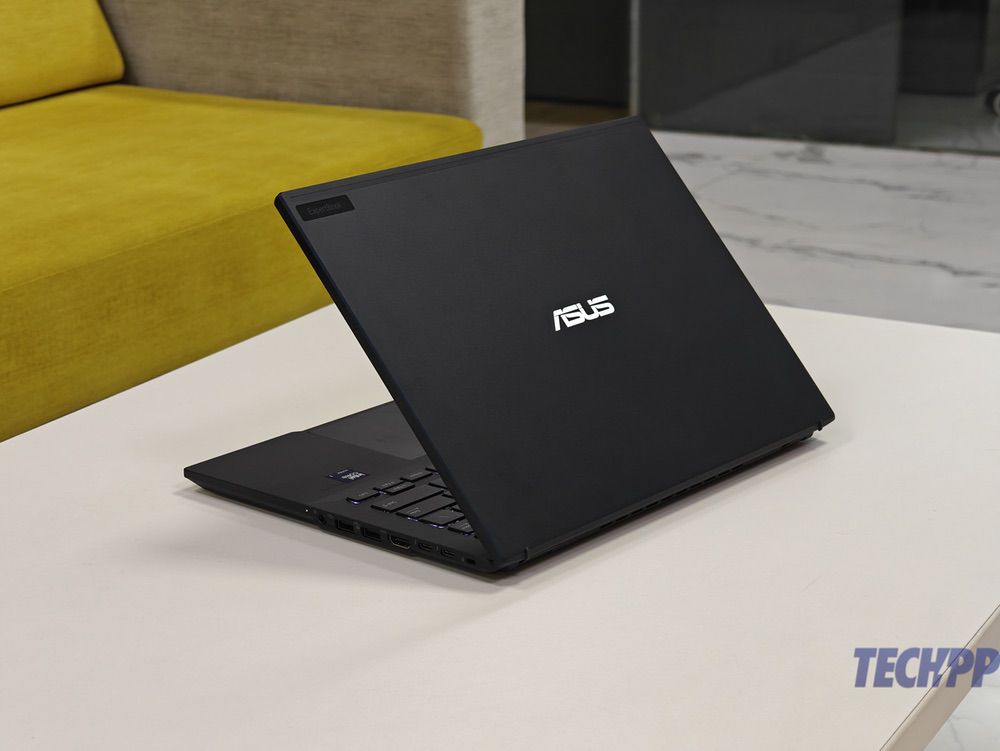
The Asus ExpertBook B5 follows an uninspiring design language for a 2024 laptop, which is mainly due to the basic looks of the laptop. The color I received for review is the Star Black color, which does have a starry sparkling paint job all throughout the lid and inside when looked at from specific angles. The paint finish was not as smooth, which, on a more positive note, provided a good grip to hold the lap. I would have still preferred a smoother finish on the lid, at least, as it’s not as much of a fingerprint magnet and much easier to maintain. On the contrary, you will love to rest your palms on the sublime inner finish.
The build feels solid, thanks to an all-metal construction of aluminum and magnesium-based alloys. At 1.29 kg, the laptop weighs about as much as a regular Windows laptop, and I faced no issues carrying it to my classes inside a backpack. The Asus ExpertBook B5 measures 31.37 x 22.68 x 1.89 cm, and with the weight in check, I had no problems using it on my lap for some time, which is often a problem with many bulky laptops. The ExpertBook B5 has also passed a suite of durability tests to achieve the MIL-STD-810H US military grade certification, which is assuring.

My main gripe with the design is that it’s outdated and reminiscent of old Asus laptops from several years ago. Granted, businesses hardly care about design, but it’s tough to look past the fact that the ExpertBook B5 carries the old Asus branding instead of the newer arrow-shaped logo present on the company’s other laptops. And with no color choices besides Star Black, the design aficionado inside me was left unexcited.
That said, I must appreciate the Asus ExpertBook B5’s sturdy hinge. You do lose out on the not-so-useful one-hand-opening factor, which is only a minor bummer if you ask me. On the other hand, the lid doesn’t wobble while typing, which is a good thing. Other functional bits include long rubber supports at the bottom and a lid opening indentation similar to the one found on MacBooks. You also get Asus’ signature ErgoLift hinge that automatically raises the base for better airflow when you open the lid past 90 degrees or so. Although it’s somewhat helpful, the laptop loses out on a 360-flip mechanism and resolves to a 180-degree lay-flat design.
I/O Ports: Pretty Much Sorted

The MacBook user in me was elated to see a healthy collection of I/O ports on the Asus ExpertBook B5. Starting from the left, there’s an RJ45 port on the left for all your ethernet needs, alongside a cooling vent with a split-grill design that does look very good indeed. Furthermore, there’s a smart card reader below for those who need it. The port is to be used with the in-box smart card reader accessories.
On the right, you get an array of useful ports. Starting with a Kensington nano security lock, two Thunderbolt 4 ports for charging, data transfer, and display output, a full-sized HDMI port, two USB 3.2 Gen 2 Type-A ports for connecting accessories, and a 3.5mm combo jack for connecting audio devices and microphone. Specific variants of the ExpertBook B5 also come with a SIM card slot on the rear edge, but our variant had that port blocked. There are additional cooling vents at the bottom and rear.

While everything is sorted, I have two small nitpicks. Firstly, the arrangement of ports could have been a little more uniform. In other words, I would have loved it if the USB Type A and Thunderbolt ports were present on both sides instead of one. Albeit rarely used, the addition of an SD or micro-SD card slot would have completed the otherwise perfect collection of I/O ports.
Keyboard and Trackpad: Flawless Execution
The Asus ExpertBook B5 follows a 75% keyboard layout with single-level backlighting. That means you don’t get a dedicated number pad section on the right, which might bother you if your job involves slamming numbers regularly. The first four number keys (1, 2, 3, and 4) have a blue border around them as a styling element and depict the Asus ExpertWidget functionality, which we will cover in the software section later.

The overall typing experience was excellent, thanks to the 1.5mm key travel and next to no keyboard flex. The typing feedback was a little too springy for me, so my fingers bounced off almost automatically. Nevertheless, my typing speed wasn’t compromised a bit, which should explain why the keyboard is easy to get used to. Besides a separate Microsoft Copilot key, I found the dedicated microphone and trackpad disabling, screenshot, and the MyASUS app keys the most useful. The backlit keyboard made working in low-light situations an easy affair.
Spanning an area almost that of a MacBook Air’s trackpad, the mighty trackpad deserves equal appreciation. It offers subtle clicks, making the operation silent and responsive, which I greatly admire. There is support for all of Windows’ multi-finger swipe gestures. A few noteworthy bugs I faced while using the trackpad had to do with the trackpad behavior. At times, clicking the middle portion of the trackpad brought up the right-click menu, which felt a little irritating. Furthermore, the trackpad would often register a three-finger swipe gesture while I was scrolling using the two-finger swipe gestures.
With an integrated fingerprint scanner in the power key, IR-based Windows Hello face unlock that works even in pitch-dark conditions, and a claimed spill resistance of 66cc, which you shouldn’t take seriously, the Asus ExpertBook B5 has its keyboard and trackpad experience sorted.
Display and Multimedia: Gets the Job Done

To start off the back with the display specifications, the Asus ExpertBook B5 gets a 14-inch IPS LCD panel with a WUXGA resolution (1,920 x 1,200 pixels), 16:10 aspect ratio, 300 nits of peak brightness, 84% screen-to-body ratio, and a 60Hz refresh rate. As for the other details, the screen is capable of showing 8-bit colors and has an NTSC color coverage of 45%. The display has an anti-glare coating for fighting reflections and supports 10-point touch input, hence the presence of the Asus Pen 2.0 inside the box.
Simply put, the display specifications for the asking price of well over a lakh stand unjustified. While you may not run into significant troubles while using the display in daily life, it’s tough to pass by the fact that Asus provides some of the most excellent displays on its other laptops. I consider Asus as the democratizer of OLED screens on laptops across every price range, be it sub-70k INR or over 1.5 lakh INR, so skimping on the ExpertBook lineup entirely sank my heart. The beefy bezels, 60Hz refresh rate, and 300 nits of peak brightness are the final nail in the coffin.
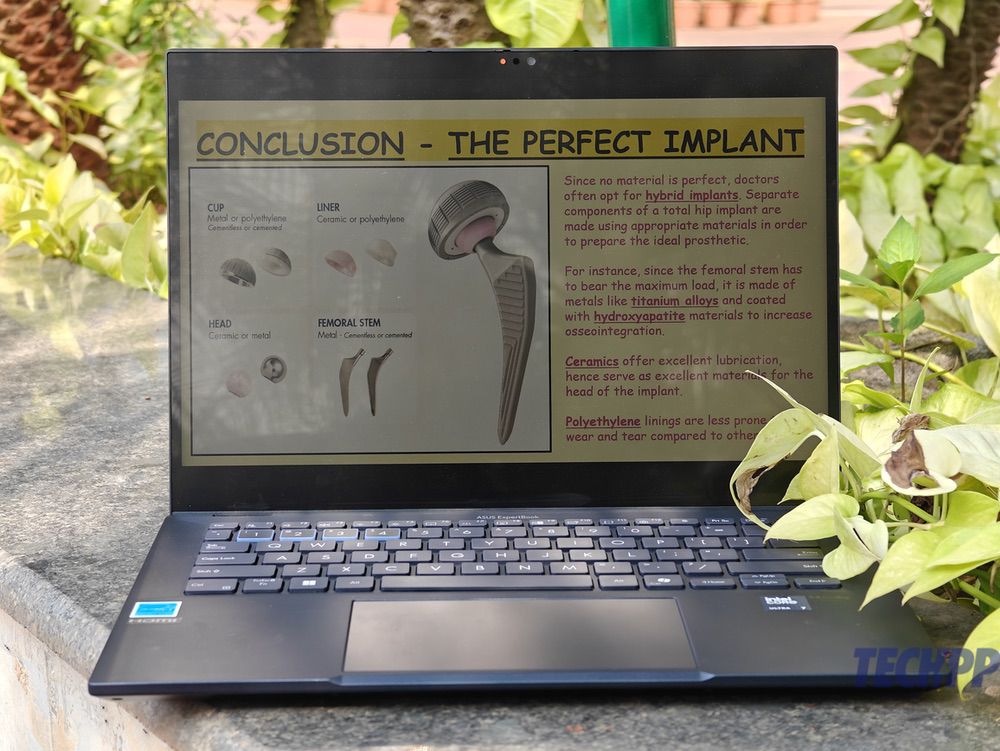
Indeed, it’s not something you can’t live without, as the IPS LCD panel is rather high quality. Despite the rant, using the ExpertBook B5 didn’t invite much trouble. The anti-glare coating really helped in this regard and deserves all the appreciation. The coating does hamper the color reproduction faintly, but I don’t think it will bother business personnel a lot. With excellent viewing angles, using the laptop indoors was a pleasant experience, which is what most businesses want from a laptop’s display.
However, things take a U-turn if you try working outdoors. I could barely see the screen and was constantly hunting for a shade or tree to at least be able to view what was on the screen. Other than that, the addition of a stylus in the box, let alone a touch-screen display on a business laptop, is quite a thoughtful move from Asus. Signing documents is something every workperson appreciates, and it is well taken care of on the ExpertBook B5. As a student, I used it to annotate PDFs and images, but I missed the presence of a 360-degree form factor when using the laptop as a writing tablet. It wasn’t very convenient to use the stylus at regular lid angles of 90-100 degrees, and opening it all the way back to 180 degrees wasn’t always possible due to space constraints.
While my gripe for not providing a nicer screen for the price remains, the experience of using what I had wasn’t plain bad. Albeit a WUXGA screen with a 60Hz refresh rate in 2024 is barely acceptable, using it shouldn’t bother you at all if you mostly plan on using it indoors.
Camera, Microphone, and Speakers: Usual Meh Stuff

Hidden behind the privacy shutter beneath the chunky bezels lies a full HD webcam, a refreshing change from the usual 720p occurrences on most Windows laptops. Asus calls it AiSense Camera due to its AI features, which include motion tracking, real-time background blurring, appearance filters, gaze corrections, and lighting optimization. The features must be turned on within the MyASUS app, but you can’t have multiple AI features enabled simultaneously, which is a bummer. The motion tracking feature worked admirably in my testing, but it drops the image quality and crops the frame significantly.
The microphones on the Asus ExpertBook B5 worked decently well in my use. However, the AI enhancement features, namely Al Noise-Canceling Microphone and Al Clear Voice Speaker, worked wonders. They will prove fruitful during meetings and when recording voice notes. The speakers, however, left me utterly disappointed. Despite the Dolby Atmos branding, poor placement and tiny overall output made the bottom-firing dual speakers feel low on volume and bass. MacBooks, let alone the MacBook Air, have so much better speakers that it’s not even funny anymore.
Performance and Thermals: Under Check!

To remind you of the specifications again, the Asus ExpertBook B5 [B5404CMA] houses the Intel Core Ultra 7 155U processor with 12 cores and 14 threads, paired with 16GB of LPDDR5 (8GB x 2) and a 1TB PCIe 4.0 M.2 SSD. As for the GPU, there’s the integrated Intel Arc Graphics with dual channel memory for all your graphics needs, alongside an integrated NPU for handling AI tasks. The processor has a peak frequency of 4.8GHz and a base frequency of 2.1GHz. There’s a single fan on the inside to keep things cool.
Before jumping into the benchmark scores, let me tell you about my experience with the laptop’s performance. I’m not a performance-hungry user by any means, so you will rarely find me doing intensive work on my laptop. With Microsoft Edge, WhatsApp, and Apple Music being my most-used apps, you can tell I’m not a power user. Ideally, this is a similar usage pattern to that of corporate employees. For testing purposes, I played a couple of Valorant games and ran a simulation on ANSYS, a software I use at my university.
With this kind of power demand, the Asus ExpertBook B5 handled everything with ease. I faced no slowdowns in my regular usage, which should tell about the consistency of the laptop’s performance. Even when I had over two dozen tabs open in Microsoft Edge once, there was a minimal drop in performance, as websites took a little longer to load and refresh. In fact, I never exhausted the RAM capacity or felt it as a bottleneck in my usage, so the 16GB RAM inside should suffice most workloads.

While the day-to-day performance was very consistent, I cannot say the same for the gaming performance. In Valorant, I was getting over 100fps with the graphics set to high and over 120fps with the graphics set to medium, but my excitement vanished when I saw the fps drop below 80-90fps during gunfights. The laptop was plugged in and was set to performance mode when I played the games. Thankfully, businesses would be least interested in gaming tests, so this shouldn’t bother many.
As for the thermal efficiency, it was all good on the ExpertBook B5. The single cooling fan didn’t go crazy except for when I was gaming and installing a Windows update, and it did a good job keeping the thermals in check. Besides, when I was using the laptop outdoors, running an ANSYS simulation, and gaming, the temperatures rarely soared high. Overall, I didn’t face any issues related to thermal efficiency on the Asus ExpertBook B5.

I also ran a couple of synthetic benchmarks to help you understand the laptop’s raw output numbers. I ran the Geekbench, Cinebench, and Uniengine Superposition benchmarks to test the performance and the CrystalDiskMark benchmark to test the ExprtBook B5’s otherwise fine storage speeds. Unfortunately, I couldn’t get the Geekbench AI benchmark running on the laptop to benchmark its AI capabilities. Even after running a back-to-back Geekbench test, the performance drop was minimal.
Thanks to the Wi-Fi 6E protocol, I faced no issues related to network speeds or connection stability. Truth be told, you can get consumer laptops with far better processors and dedicated GPUs for the price, which is an obvious con for the ExpertBook B5. However, since this is a business laptop, you can configure it to meet your power requirements and pay the price accordingly.
Battery Life and Charging: Unsurprisingly Good

When it comes to battery life, my experience with the Asus ExpertBook B5 has been nothing short of excellent. Since battery performance heavily depends on how you use your laptop, let me share my typical usage pattern. My laptop sees nearly twice the daily use of my smartphone, though my overall usage is fairly moderate. I keep my browser of choice, Microsoft Edge, running constantly whenever the laptop is in use. During my time with the ExpertBook B5, I averaged over a dozen open tabs, primarily for ongoing research work.
I also had other regular apps running in the background, such as Apple Music for streaming music, WhatsApp for communication, File Explorer to access files, and more. Furthermore, I had my Bluetooth earphones connected most of the time, and keyboard backlighting was turned on for the entirety of the testing period. With this kind of workload, the 63Wh cell inside the Asus ExpertBook B5 managed to last over 7 hours of continuous usage in balanced mode and at around 70% screen brightness.
Thanks to the efficiency of the newer Intel chipsets, Windows laptops have been churning out admirable efficiency numbers, and the ExpertBook B5 was no different. Besides the relatively quick battery rundown from 100% to 90%, I noticed no sudden battery drops. Safe to say, the laptop will last an entire office workday without breaking a sweat, provided you don’t push the laptop to its extremes. Otherwise, you can always enable the battery-saver mode to get even more out of the battery. Moreover, I didn’t report any alarming idle drain numbers.
With the bundled 65W power adapter, the laptop with its lid closed juiced up from 10% to 80% in about an hour, which is adequately fast for most lunch-break top-ups. In my testing, a full charge from 5% battery power took around 100 minutes, so you can consider the 0-100 charging time to be under two hours, which is passable. I would also recommend using the battery protect feature in the MyASUS app that limits the charge to 80% to preserve battery health.
Software and First-Party Apps: Pro-Grade Stuff

Coming to the software front, the Asus ExpertBook B5 boots Windows 11 Pro out of the box. Being a business laptop, it makes sense to have Windows 11 Pro instead of the Windows 11 Home edition to gain more manual control over the laptop. Windows 11 Pro offers several enterprise-level features that businesses need no introduction to. To name a few, there’s a built-in BitLocker drive encrypter, Windows Information Protocol (WIP), and more. However, the ExpertBook B5 doesn’t come with a Microsoft Office subscription, which is a letdown.
Besides the hand-me-down features of Windows 11 Pro, Asus’ first-party apps deserve equal credit. The commercial-grade BIOS enhancement, Image Maker, and Configuration Tool software from Asus are the real aces for businesses and IT departments to customize the laptop as per their preferences. The former enables custom BIOS defaults, power event logs, system diagnostics, and other valuable features for BIOS management and performance optimizations. Businesses can optionally opt for the Intel vPro platform, which improves the security and manageability of business laptops.
Since it’s something IT managements take care of, the student inside me had no use for the plethora of aforementioned features. Despite using the ExpertBook B5 as a personal laptop with my Microsoft account signed in, I can only praise the tailored feature set available for businesses and enterprises.
To cater for the countless meetings you would attend, there’s a handy little app called Asus ExpertMeet that includes thoughtful features like real-time AI translation, real-time on-screen watermark while screen sharing, AI Meeting Minutes that enable meeting summaries and transcriptions, and AI Audio that enables improved audio reception and speaker output. Unfortunately, I couldn’t test any of it because the app is yet to be made available on the ExpertBook B5 series.
However, I had a few other utilitarian apps in my unit that were equally praiseworthy. Firstly, the MyASUS app not only lets you tweak several valuable settings but also has an in-built system diagnostics tool. You can play around with additional audio, camera, battery, and display settings within the apps. The Asus ExpertWidget app lets you assign custom functions to certain key combinations, which was damn useful to toggle quick settings or open a particular app.
Lastly, the Asus Business Manager app is a fruitful first-party offering for businesses, thanks to features like the USB port functionality limiter, system registry edit blocker, storage device encrypter, system backtrack that lets you roll the system to previous versions, boot logo customizer, and a native file shredder.
Asus Pen 2.0: Noteworthy Addition

The most underrated thing inside the packaging was undoubtedly the Asus Pen 2.0 in all its glory. Despite not having a 360-degree flip mechanism, the only reason I liked having a touch-screen panel was because of this fabulous accessory. Presented in an excellent package, the box included not only the stylus but also three additional tips, a nib changing tool, a USB Type-C to C charging cable, and instruction manuals.
The stylus offers an all-metal build, which is something I liked a lot. The form factor is close to an actual pen, which is an underrated benefit. Although I would’ve loved to have something that prevented it from rolling, be it a clip or a flat edge, but it is what it is. There are three buttons in total: two on the side and one at the top. The charging poth is cleverly hidden under a sliding mechanism that reveals it, below which is also an LED indicator light.

Thanks to support for 4,096 pressure points, I had a pleasant experience writing on the laptop and annotating PDFs. There was minimal latency as well. However, I’d have preferred a textured section to grip on, as the metal body is a little too smooth. I’m not an artist, so I couldn’t report any noticeable difference when using the different tips provided, but I’m sure it would be helpful to professionals. The stylus’s battery life and charging speeds were nothing to worry about, either.
Since the laptop connects via Bluetooth, you can use the buttons for various purposes. Firstly, as an eraser and lasso tool while sketching, writing, or annotating, and as a remote to flip through presentation slides in Microsoft PowerPoint. Single-pressing the top button opens Microsoft Whiteboard, whereas double-pressing opens the snipping tool to take screenshots. Overall, the Asus Pen 2.0 is easily the best laptop I’ve used on a laptop.
Asus ExpertBook B5 Review Verdict and Conclusion
To conclude my findings after using the laptop, here’s my verdict. As a whole, the Asus ExpertBook B5 [B5404CMA] felt like a jack of all trades and a master of none. The screen should have been better, the design could have been more inspiring, and the performance was adequate enough to handle most tasks. Sure, there are redeeming qualities, like the build quality, keyboard, trackpad, the bundled Asus Pen 2.0, and not to mention the truckload of software tricks within the MyASUS, ExpertWidget, and Business Manager apps.
Ignoring that this is a business laptop and looking at the overall notebook market, I’d say there are much better laptops in the market at this price, even from Asus. But the enterprise laptop market revolves differently, so if you manage to grab the laptop at a suitable price and configuration for your business or enterprise, it’s not a bad deal by any means. Overall, I had a pleasant experience reviewing the Asus ExpertBook B5.
- Well-built and a robust hinge
- The keyboard and trackpad are some of the nicest you can find
- Anti-glare coating is a definite plus
- Decently good performance numbers
- Good battery life and charging speeds
- A valuable selection of business-centric software features
- Asus Pen 2.0 is among the best styluses you'll ever use
- Screen brightness isn't adequate for outdoor usage
- Sub-par speakers
- Dull and old design language
- No 360 degree flip mechanism
- Not suitable for heavy workloads
| Design & Build |
|
| Display |
|
| Performance |
|
| Battery Life |
|
| Price |
|
|
SUMMARY
The Asus ExpertBook B5 is a solid choice for businesses seeking a laptop that excels in basics like battery life, build quality, enterprise BIOS management, and useful software features. However, it lacks standout features and comes at a high price. Unless discounted, exploring other Windows laptops or MacBooks may be worthwhile. |
3.8
|

