

In Summary
- The 2026 Edition of the Asus Zenbook S14 adds some very powerful hardware to Asus’ eye-catching Zenbook design.
- The Zenbook S14 gets a high-end Intel Core Ultra 9 chip, lots of RAM and storage, while retaining the Ceraluminium design and lightweight of the Zenbook series.
- Its price tag is a premium one, but the Asus Zenbook S14 (2026) is one of the few notebooks out there that can actually take on the MacBook Pro in terms of productivity, portability, and even design.
The Asus Zenbook A14 was one of our favorite notebooks of 2025, bringing back the spirit of the OG MacBook Air with its stress on form, premium design and portability rather than insane levels of processing power. There was, however, a part of us that wished there was some more hardware muscle inside its sleek frame – even more so because our unit was powered by the then-limited Qualcomm Snapdragon X chip.
Well, Asus did come out with other Zenbooks with much more powerful specs and has continued that tradition in 2026. Perhaps one of its best blends of power and portability is the 2026 edition of the Zenbook S14. If the Zenbook A14 laid siege to the MacBook Air, the S14 challenges the MacBook Pro, with a price tag to match. It has the specs, it has the design, but can it rattle the Mac cage?
Asus Zenbook S14 Design and Appearance: Sleek, with Ceraliminium outside
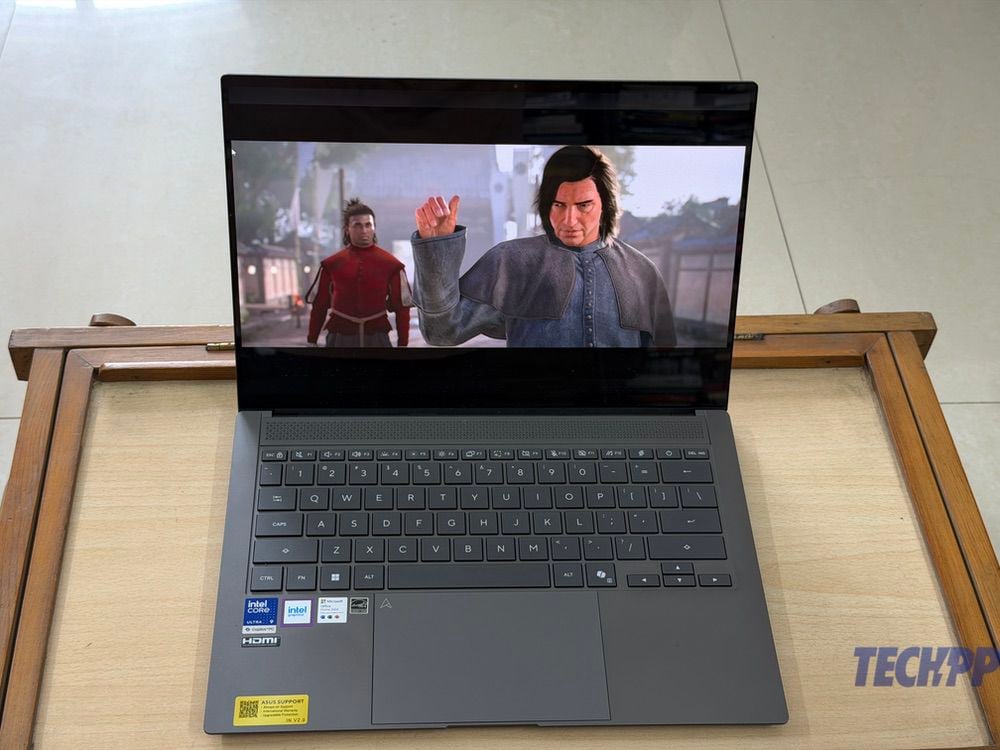
At first glance, the Zenbook S14 does not stray from the classic Zenbook design template. In fact, it looks just like the Zenbook A14, which we reviewed in 2025. And that is a good thing. Last year’s Zenbooks had impressed us with their Ceraluminium finish, which was a blend of ceramic and aluminum. It gives the notebook a smooth, slightly matte finish that keeps scratches and stains away, even while giving the notebook a very premium finish. We found we could easily wipe smudges off it.
We got the Gray unit, and it cut an understated, elegant figure with the ‘Zenbook’ on its cover shining discreetly. There is no way you can mistake the Zenbook S14 for a mid-segment notebook – there is something like the well-tailored tuxedo about the Zenbook S14 – it is not radically different but still stands out. And exudes class without screaming “look at me.”
It is also very impressively slim and light. Our S14 was a mere 1.1 cm thick, which is only slightly more than some of the smartphones out there, and at 1.2 kg is light for a notebook with a 14-inch display (although not as light as the 985-gram A14). There is nothing fragile about the notebook, however. It has a very solid feel to it. The hinge opens smoothly without any jerks, and the display does not wobble. The notebook also comes with military-grade US MIL-STD 810H certification, and also has a very handy carrying bag in the form of a large faux-leather envelope.
Asus Zenbook S14 Specs and hardware: Powerful, with Intel inside
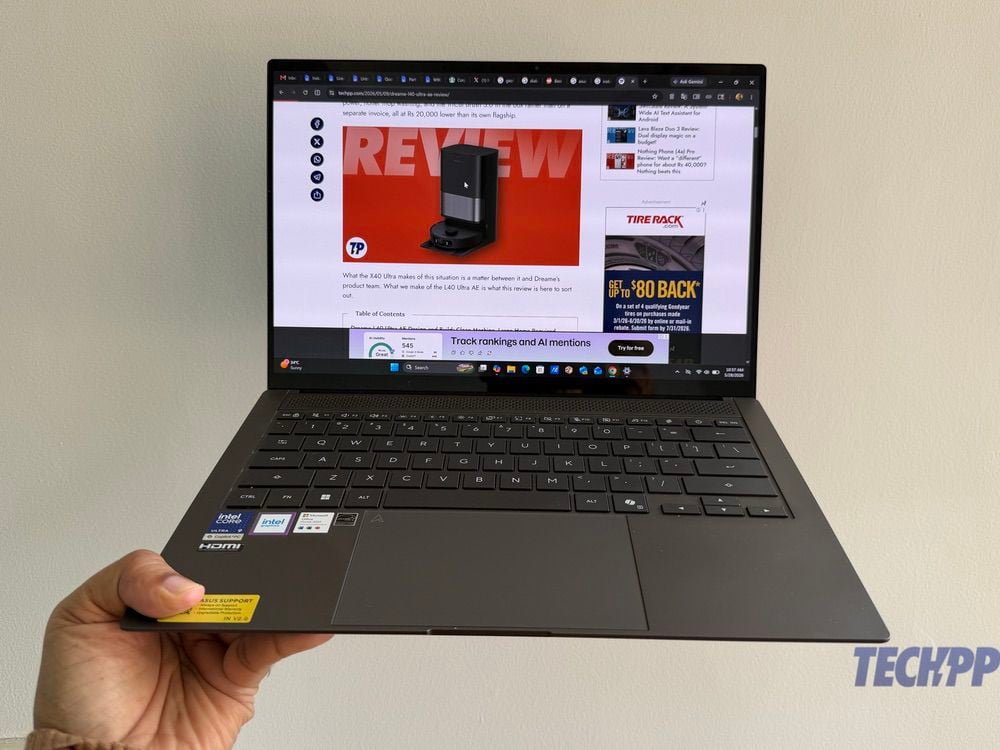
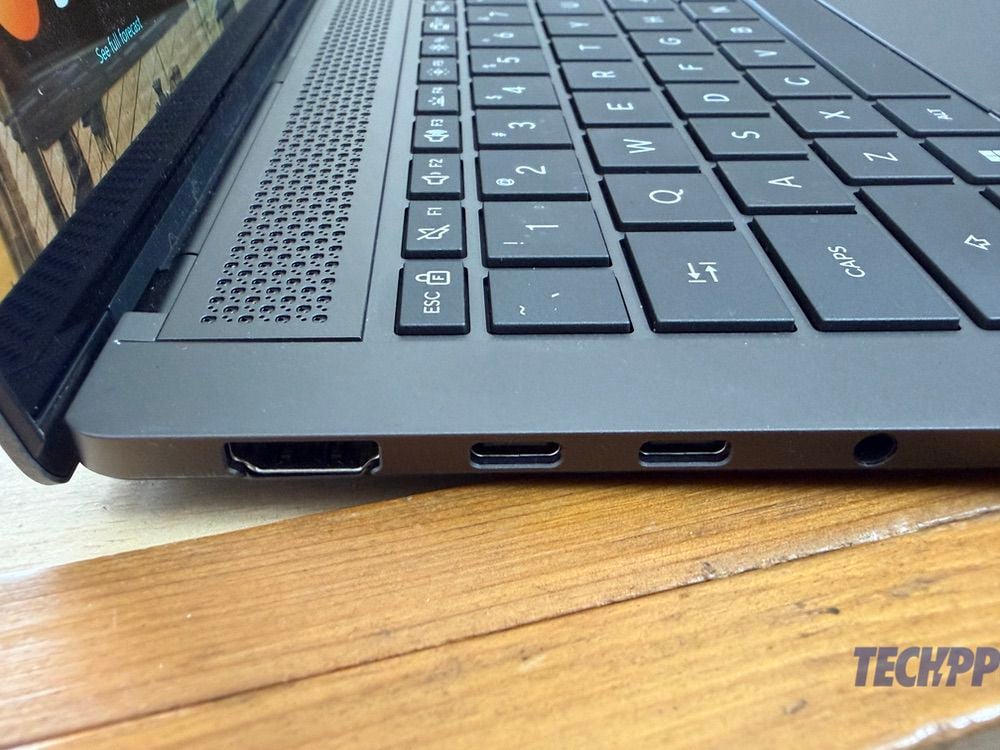
Opening the notebook shows one a spacious, six-row keyboard and a large trackpad. However, after that sleek Ceraluminium exterior, perhaps the most striking feature of the Zenbook S14 is the magnificent 14-inch 3K (2880 x 1800) Lumina OLED display with a 120Hz refresh rate, which is also touch-enabled. There is also some extremely high-end hardware inside that sleek frame – our unit came with a high-end Intel Core Ultra 9 386H (2.10 GHz) chip, accompanied by 32GB LPDDR5x RAM and 1TB PCI 4.0 SSD storage. There are also plenty of ports – a couple of Thunderbolt 4 Type-C ports, an HDMI 2.1 port, a USB Type-A, and an audio combo jack. The absence of a card scanner is a bit of a surprise, considering that even the port-hating Apple has included one in the Pro. Sound is handled by speakers with Dolby Atmos support. And to keep all this going is a 77 wH battery with support for 100W charging, although the brick in the box is a 68W one.
The absence of a graphics card (graphics are handled by integrated Intel Graphics) and a fingerprint scanner in a device that is so well-suited to productivity are downers, but not deal breakers. Some might also feel a little let down by the FHD camera (great for video calls, but little else) and the fact that such a powerful system runs on Windows 11 Home rather than Professional, but in spec terms, the Zenbook S14 ticks most boxes.
Asus Zenbook S14 performance: Bringing Pro Performance to Portable!
With that kind of hardware on board, it was not surprising that the Zenbook S14 handled whatever we threw at it with a degree of comfort. The display is perhaps the best we have seen on a 14-inch notebook in its segment, with punchy colors and very good levels of brightness. As a result, watching videos on it was an absolute delight – those who love watching films or shows on their notebooks will just love the viewing experience on the S14. Mind you, we found the speakers to be adequate rather than exceptional – we would recommend using that headphone jack for best audio results.
We kept dozens of tabs open, ran MS Office, updated WordPress-based sites, messed with presentations and elaborate spreadsheets, used Windows Copilot extensively for AI as well as ChatGPT and Gemini, and even did some very basic image and video editing, and there was never even a hint of strain on the notebook. A designer friend of ours also used it for Photoshop for a day, and their feedback was that it was as good as their 14-inch M4 MacBook Pro. That’s pretty elite level in our book. We had not really thought much about the 120 Hz refresh rate on the notebook, but our friend said that it made a huge difference when they were scrolling through huge directories of videos and images, and also while editing videos. The odd part is that though the display supports touch, we did not find ourselves reaching out to touch it too often – maybe it is a matter of habit, or just Windows not being very touch-friendly. Incidentally, it handles AI (Copilot, ChatGPT and Gemini) without any problems, from drafting articles, emails and pieces of writing (this is not one of them) to generating images.
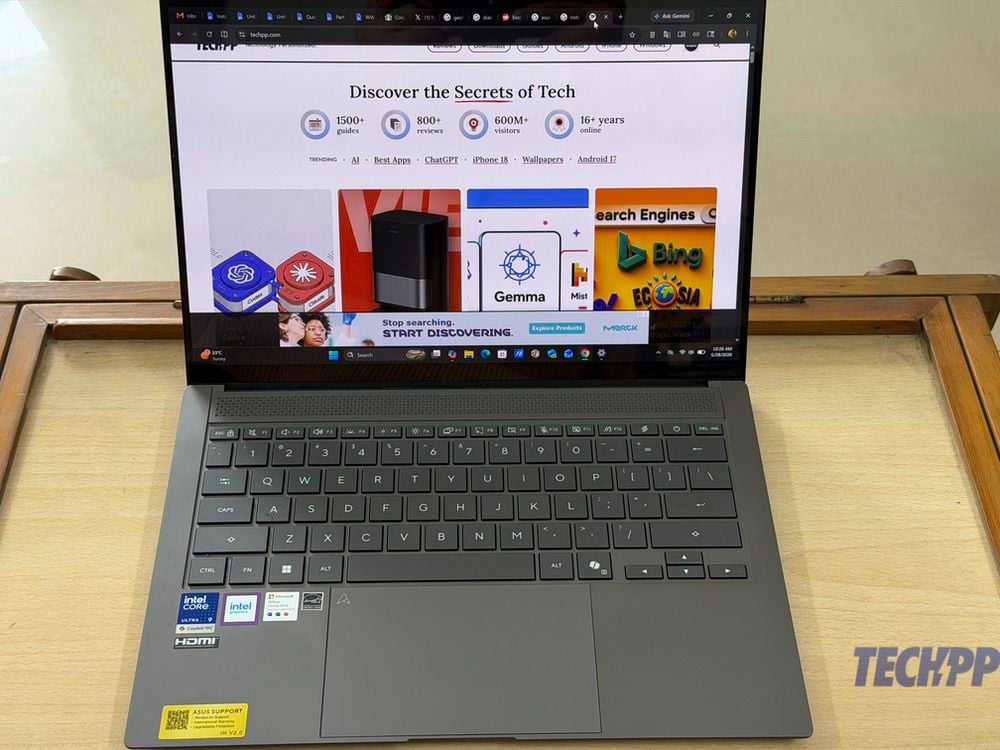
We have been fans of the keyboard on the Zenbooks, with the keys being well-spaced and yet large enough for a comfortable typing experience. The trackpad is excellent (which is not very common in Windows notebooks), and gestures and taps work absolutely smoothly, although clicks do not register as deeply as we would have liked (maybe it is just us). This is way too powerful a device for just writing, but as writers, we actually loved browsing, researching, and typing out our work on the S14. A prime reason for this also was the fact that it was so light and stayed very stable even when placed in our laps. While great for most heavy-duty tasks, the Zenbook S14 notebook is not really designed for gaming. It will handle the likes of Assassin’s Creed: Shadows, Elden Ring and Call of Duty with a few graphics tweaks. We were able to get a reasonable Assassin’s Creed: Shadows performance, but this is not a gaming notebook, and it can heat up a little when it gets into the gaming zone.
Battery life is where we felt a little underwhelmed on the Zenbook S14. Asus claims 27 hours of battery life, but that is under optimal test conditions. We found ourselves getting about 10-12 hours of battery life in the course of intensive work with lots of tabs being open, watching a few videos (and even a few FIFA World Cup 2026 matches), and working away on presentations and the like. Let’s put it this way – it will easily get through a day of hefty work. And when it gets drained, it can be recharged in about 90 minutes with that 68W charger.
Asus Zenbook S14 Review Verdict: Pricey, but a Perfect Portable for the Pros
The Asus Zenbook S14 was launched at Rs 1,79,990 in India, although our variant is significantly more expensive at Rs 2,49,990. At that price, it goes right up against the 14-inch MacBook Pro, which starts at Rs 2,39,900, although that one comes with 16 GB RAM as compared to the 32 GB on ours. At 1.2 kgs, the Zenbook S14 is also significantly lighter than the 14-inch MacBook Pro (which is about 1.55 kg), which makes it much easier to carry.
And if that price seems too high, the Intel Core Ultra 7 or Ultra 5 variants of the Zenbook S14, which are available at well under Rs 2,00,000, are also excellent options. We cannot see too much competition for it in terms of its blend of design and performance – there are heavier notebooks with better specs or ones that are as light but do not feel as classy or premium. And it is this blend of design, portability and productivity that makes the Asus Zenbook S14 the coolest notebook cat on the Windows block. It does not come cheap, but it is perhaps one of the best options for those who want to do heavy work on a light notebook, all while looking super cool.
- Sleek design
- Super light to carry
- Powerfully specced
- Excellent display
- Expensive
- Speakers are not the loudest
- No fingerprint scanner
- Touchscreen remained largely unused
| Looks & Appearance |
|
| Specs |
|
| General performance |
|
| Battery Life |
|
| Price |
|
|
SUMMARY
The Asus Zenbook S14 (2026) pairs a sleek, lightweight Ceraluminium design with powerful Intel Core Ultra performance, a gorgeous 3K 120Hz OLED display, and all-day productivity. While pricey and not built for serious gaming, it's one of the best premium Windows laptops for professionals who want power without the bulk. |
4.0
|

