

Quick Answer
AI study planners help students turn assignments, exams, and deadlines into smart, flexible schedules. These tools use AI to personalize plans, auto-adjust missed tasks, integrate calendars, and even add quizzes or revisions, making studying more efficient and stress-free.
A student’s life is full of ups and downs: some days are peak boredom, whereas others make you wonder if time’s moving faster than it should. Be it assignments, projects, classes, self-study sessions, and more, planning is the ultimate way to achieve high productivity. It’s essential to prepare a schedule according to your workload to get a bird’s-eye view of what needs to be done. The rest relies on meticulous execution without procrastinating. But making a study plan isn’t as easy as it sounds; it’s not child’s play to schedule every task optimally without compromising any aspect.

But fret not, AI can help you brilliantly in this regard. After all, as a student, you must use AI not just to learn and answer your queries, but also to help with other essential tasks, such as streamlining your workflow. Say hello to AI study planners, which can generate flawless study plans tailored to your preferences. Because AI understands human context perfectly well, all you need to input is your tasks, such as assignments, deadlines, upcoming exams, subjects, and more, and it can create a highly effective study plan in no time. AI study planners are no less than a superpower for a student, and this article outlines 8 of our favorites to give you an edge in your academics.
Table of Contents
How Do AI Study Planners Work?
If you’re wondering how it works, here’s a brief how-to. The AI model takes your input in the form of assignments, deadlines, project submissions, self-study sessions, time duration for each task, and other parameters, if any. Because it’s AI, it can understand your context and adjust the plans accordingly. For instance, if you need to revise some concepts before solving an assignment, AI can understand it and schedule a revision session before you solve the assignment. A study plan satisfying all preset parameters will be generated in no time.
Another benefit of having an AI model do this task for you is that it can understand other related parameters equally well and adjust the schedule accordingly. For instance, if you couldn’t complete a task today, AI models can automatically reschedule it to another day. Some even take it a step further by suggesting related tasks, such as scheduling a practice or quiz session after studying a topic. Most AI study planners integrate well with existing services, such as Google Calendar, Outlook Calendar, Google Classroom, Moodle, and more, for a seamless experience.
Best AI Study Planners for You
StudyNova
Like most students, if your goal, too, is to excel in an exam or a high-priority goal, such as an interview or presentation, StudyNova is a viable choice for you. You begin by entering your goal’s deadline, ideally an exam. Other input parameters include the number of hours you can devote per day, the subjects to be studied, their contents, and the estimated time you’ll need to complete the subject. You can add multiple subjects in a single study plan with varying modifications and instructions for each. Because it’s AI-powered, you can add special instructions, such as to focus on a specific topic a little more than others, scheduling practice sessions at regular intervals, and more.

There’s also an option to choose your study approach: problem-based, revision-based, theory-focused, or whether you require a deep understanding, among others. After all this, StudyNova generates a thorough study plan. We will complement StudyNova’s elaborate UI, which makes it effortless to keep track of multiple plans, especially through its calendar view. In our testing, the plans generated were largely accurate and followed our instructions, with a few exceptions, such as the AI model’s inability to account for rest days or Sundays.
To help you with your schedule, StudyNova includes a handy pomodoro timer and a progress tracker. However, there’s no option to edit an existing schedule or upload study materials for a topic, which is a minor shortcoming. The free plan limits you to creating up to 5 study plans, each comprising no more than 2 subjects and up to 8 days of study. The Pro plan costs $19.50 per month and increases the limit to 10 study plans, each comprising up to seven subjects and 30 days of study. It also includes advanced AI analytics and allows exporting of schedules.
Source – r/Productivitycafe
Dende
At its core, Dende is an AI tool that helps you with exam prep by generating questions, flashcards, and summaries from uploaded documents. However, it doubles up as a great AI study planner through its AI study guide maker feature. In general, Dende’s study planner is best suited for those seeking a comprehensive plan to follow regularly. You can still enter your exam details and deadlines, and the AI model will adapt your schedule accordingly, which is quite ideal for students.

Dende’s AI model requires you to upload your study documents, such as PDFs, textbooks, or presentations, which it uses to break into subtopics and plan your schedule accordingly. You must also enter how much time you can devote daily, with the ability to mark days off as rest days. Dende can prepare your schedule based entirely on the amount of course content, or you can also set a deadline or goal to finish studying before a specific date. We recommend the latter, as it allows you to track your progress and develop a sense of urgency.
What we love about Dende is its ability to adjust your study plan dynamically. For instance, your plan will be dynamically rearranged if you miss a session or start getting a topic wrong. Since Dende can analyze your uploaded documents, the study sessions will be based on quizzes, using which your progress and performance will be tracked and analyzed to improve your schedule. It can color-code topics based on your performance and schedule review sessions, prioritizing weaker topics. Dende’s only con is that its AI study guide maker feature is paid, so you’ll have to pay a monthly fee of €6.90 or a quarterly fee of €17.40, which also gives unlimited file uploads and access to all concepts, questions, and answers.
Planora
Next up, we have Planora – an AI study planner created by a Reddit user who goes by the name u/XPFlames. Planora is not just for scheduling; it’s an all-in-one tool that improves your productivity with its truckload of valuable features. Similar to Dende, Planora can generate practice exams and flashcards using its built-in AI model to help you evaluate and review your preparation. You don’t even need to upload study materials, as Planora can do so entirely through text prompts with the option to modify the difficulty level, format, quantity, and more.

As for its scheduling feature, Planora lets you create tasks as calendar events under their respective subjects, with the option to set their priority level, recurrence duration, and due date. A task could be anything from an assignment to a project or activity. Apart from the default exam countdown, you can also add custom countdowns or deadlines for things like project submission or handing in an assignment. Planora uses the Eisenhower Matrix, an effective way to prioritize and schedule tasks based on their value, which you can freely adjust if needed.
Despite the good-looking interface, we encountered a few inconsistencies and broken elements that ought to be there, given that it’s someone’s personal project. In addition, Planora includes a handy Pomodoro timer and lets you record your study logs, helping you track the progress of your studies and preparation. The best part about Planora is its zero-dollar price tag, which is pretty rare for a service like this. A sign-up is all you require to get started and access all the features Pandora has to offer.
Manfred
If you want a no-nonsense AI study planner without the overwhelming set of features others have to offer, Manfred is the perfect choice for you. It’s created by u/Stas1407 from Reddit, but instead of being a website like many others on this list, Manfred is a mobile app available on both Android and iOS. The beautifully designed app features an easy-to-navigate interface with a handful of options to choose from.

The only form of input in the app is adding a task, which can be anything from preparing for an exam to managing projects. Of course, you can set deadlines, specify the maximum and minimum session durations, and choose between task types (quick or exam). Manfred then creates a schedule and assigns the topics under the Tasks section of the app. Interestingly, it can also act as a habit tracker using its built-in feature. You can also track your progress and habits, which is a thoughtful addition.
Despite the nice interface, we felt the UI was not very responsive, which is a minor nitpick. What we love about Manfred is that it prioritizes rest as much as work, and does not schedule tasks on weekends unless necessary. Because it’s AI-powered, Manfred can easily adjust your schedule when something unplanned comes up, such as a trip or an emergency. It also prevents you from being over-ambitious and overcommitting by suggesting realistic deadlines. Manfred is entirely free to use, making it suitable for those new to the world of AI study planners.
Manfred is available on: Android | iOS
Scholarly
Although a multi-purpose website for all things students, Scholarly has a handy AI Study Schedule Generator, which is ideal if you would like to maintain your own calendar using a generated plan. In other words, because it’s tool-based, Scholarly AI Study Schedule Generator doesn’t include bells and whistles like a calendar view, to-do list, or progress tracker. All it generates is a detailed written plan, which perfectly aligns with your prompt and instructions.

We suspect the generation is handled by an AI LLM, possibly ChatGPT, in Scholarly’s backend. Albeit you still get a dedicated interface to enter your instructions and deadlines, making it more suitable than using ChatGPT or Perplexity AI directly for this purpose. The input parameters include the subjects you wish to study (it’s recommended to mention the topics and subtopics to generate an even detailed study plan), study hours per day, plan duration, exam or other important deadlines, study preferences, and your preferred approach, after which Scholarly generates a comprehensive plan that can be copied.
The generated plan relies on your prompt, so it’s essential to include even the most minor details to create a tailored schedule. In our experience, the plans are pretty detailed, offering a weekly breakdown of tasks and hourly schedules, with ample emphasis on breaks between tasks and on weekends, practice, quiz, and problem-solving sessions post-topic completion, and revision sessions before the subject’s exam knocks on your door. Scholarly’s AI Study Schedule Generator doesn’t charge a penny; in fact, we didn’t have to log in either, making it ideal for those looking to create a quick yet detailed plan.
Shovel
If you like to plan everything in advance, you can’t get anything better than Shovel. It may closely resemble a school time table, as Shovel recommends adding in not just your course details, such as subjects, courses, exam deadlines, and more, but also other things making up your daily routine, inlcuding meal, sleep, and Me times, the latter which is to ensure that you are devoting adequate time towards equally important aspects, like exercise, sports, extra-curriculars, sports, entertainment, and more. The interface and its simplicity also deserve a special mention.
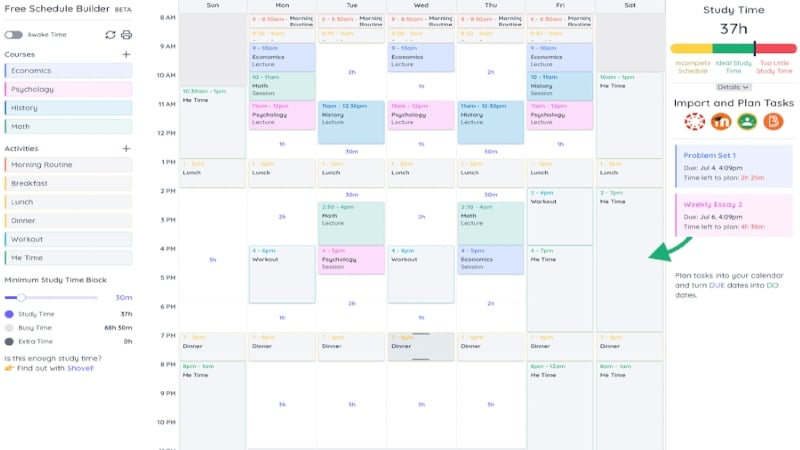
You begin by setting your awake hours, and Shovel’s AI model ensures nothing is scheduled beyond those hours or that interferes with your quintessential sleep hours. Once you have added your courses and daily activities, along with their usual durations, you can start planning your day by dragging and dropping them into the calendar. To adjust the duration of a task, you can resize it by dragging its top or bottom edge. You can also set repeat patterns for repeating tasks, such as your classes, meal times, gym sessions, and more. Dismally, Shovel’s AI cannot plan your day in its entirety, but it has a few unique tricks up its sleeve.
Firstly, Shovel can sync natively with academic tools you may already be using, such as Google Classroom, Moodle, Canvas, and Brightspace, and pull up assignments to add to your schedule right away. Secondly, Shovel can essentially predict your future through its signature analytical tool, The Cushion, which analyzes your tasks, deadlines, and available study time to determine whether you are running ahead, on, or behind time, which is nothing short of a superpower for tackling procrastination. Shovel isn’t free to use, but all of this can be availed for a modest fee of $9.79 per month or $35 per year, which also includes a 7-day free trial.
Quizard
Quizard is an all-in-one study companion that boasts an artistic interface and houses a handful of valuable tools, including a study planner. Quizard’s study planner isn’t its standout feature, but it’s well complemented by the other AI-powered tools, making it a compelling choice. Similar to Planora and Dende, Quizard can also generate quizzes and flashcards directly from uploaded documents or using AI. Quizard’s study planner can integrate the generated flashcards and quizzes into your study schedule for a seamless experience. Not just that, Quizard’s Study Buddy feature can help you match with a suitable study partner, which we find thoughtful.

As far as the study planner is concerned, it’s a fairly nice one, as it lets you create entirely different plans for your upcoming priorities, such as exams, projects, or major submissions. Each plan can be configured based on a deadline and the days of the week on which you wish to study. Within each plan, you can create study topics and set their size, difficulty level, and deadline. This is where you can also directly integrate the quizzes and flashcards generated by Quizard, alongside any other remarks. You can also create subtasks within a topic and add your own study material, which Quizard can further summarize to save time.
Quizard’s awe-inspiring interface makes it very easy to keep track of the study plan and progress. The study topics are proportioned appropriately to meet their deadlines, though there’s not a whole lot of AI involved, which is a missed opportunity, if you ask us. Quizard’s study planner is still a no-nonsense one, and given that it’s free for all users, you can certainly give it a shot. However, generating unlimited quizzes, flashcards, and note summaries is locked behind a paywall at €7.99 per month or €59.99 per year.
Harmony
A student can never be just a student from a broader perspective; many, if not most, students are involved in multiple side hustles or roles, whether as a budding entrepreneur, volunteer, freelancer, fitness freak, or even a parent. Carefully curated by Nathan Covey, who you might know from X (formerly Twitter), Harmony’s unique concept enables role-based planning, ensuring all your goals go hand in hand. Be it losing weight while scoring good grades, or finishing a course while launching an app of your own, Harmony can take care of them all.

Harmony lets you create a single comprehensive plan by combining all your roles’ goals and milestones, which you must set first and foremost. Instead of the cumbersome daily planning format, Harmony emphasizes a weekly planning approach, which is to be reviewed daily. Compared to other AI study planners, Harmony’s AI model can guide you in planning your week, suggest tasks to help you reach your milestones effectively, make necessary adjustments to your plan, and nudge you to get the right things done, making Harmony one of a kind. It can also sync your schedule with Google Calendar, which many prefer.
Harmony is iPhone-only for now, so you are limited on that front, but the app is very well-made and beautiful to look at. The app will also remind you to plan your upcoming week, in case you forget to do so. Harmony is well-reviewed and out-and-out an AI study planner in a true sense, but it doesn’t come for free: it costs $9.99 per month or $39.99 yearly. Fortunately, there’s a 14-day free trial to try out Harmony.
Ease Your Studies With These AI Study Planners
AI study planners make it very easy for students burdened with due dates, assignments, exams, projects, and whatnot to streamline and prepare a comprehensive plan of action. Thanks to AI, they can be as personalized as possible and restructured as per your progress. Among the ones available, we highly recommend Planora, Shovel, and Manfred for their elaborate approach. If you wish to focus equally on practice, we suggest giving Dende and Quizard a try, especially if you are a school student. Harmony’s role-based planning is similarly unique and commendable.

