

Budgeting is not just for businesses or financial experts; it is a tool that anyone, including ordinary people, can use to manage their finances better. Budgeting is necessary, especially in these times when digitalization is on the rise, and the increasing use of online payments means that much more money is being spent. A simple budgeting tool can help you control your spending, save money, and achieve certain financial goals.

At its core, budgeting is about knowing how much money you have coming in (income)and deciding how to spend or save it according to your needs and goals. There are many ways to record your income and expenditure. In the past, people used bookkeeping and other methods to record transactions and manage their spending.
Today, with the help of technology and the increasing use of smartphones, a simple budgeting app can help you track and control your spending. In this guide, you’ll learn about the best budgeting apps and the pros and cons of using them. Before that, here’s a quick guide to choosing the best budgeting app to help you make a better choice.
Table of Contents
How to Choose the Best Budgeting App
- Ease of Use: The app should have a user-friendly interface that’s easy to navigate and use. A simple and easy-to-use interface makes it easy for beginners who want to track their expenses.
- Expense Tracking: The app should record and categorize every purchase or expense. This way you can see where your money is going and recognize where you may be spending too much. You should be able to enter all sources of income and expenditure so that you have a better overview of your spending.
- Income Entry: Most apps offer manual and automatic data entry. Choose the app that suits your needs and comfort level. Both manual and automatic expense entry have their advantages in terms of security, accuracy, and more.
- Goal Setting: The app should allow you to set financial goals and alert you if you go over budget. Look for an app that allows you to create weekly and monthly budget plans.
- Bill Reminders: The app should notify you when bills are due to avoid late fees. Paying bills on time can save money and protect your credit score.
- Security: The app should have strong security measures such as encryption to protect your financial data. Financial data is sensitive, so the app should use high-security standards to protect your financial data. Few apps automatically read your bank statements. Make sure that the app does not share your data with advertising or other third-party services.
- Reports and Analytics: The app should provide summaries or charts of your spending, savings, and other financial trends. Many apps offer visual representations of your spending. It is easy to read and understand.
- Syncing Across Devices: The app should work on different devices, such as phones and tablets, and be updated in real-time. The ability to access your budget from any device ensures that you always have up-to-date information and also for people entering data across multiple devices.
- Customization: You should be able to customize the app’s settings to suit your personal needs and preferences. If you love customization, you should look for an app that offers customization options.
- Cost: Some apps are free, while others cost a one-time or monthly fee. It’s important that you choose an app that offers good value for money and fits within your budget.
10 Best Budgeting Apps
Money Manager Expense & Budget

Highlights:
- Expense Tracking: View and manage spending tendencies graphically.
- Income Entry: Manual. Easy and simple data entry system.
- Goal Setting: Plan and manage weekly, monthly, and annual budgets.
- Reports: Access weekly, monthly, and annual statistics.
- Price: Free with in-app purchases, subscription options available for enhanced features.
The Money Manager Expense & Budget app offers manual data entry to record expenses and income. Like bookkeeping, you can enter the expenses or income each time a new transaction takes place. The app keeps track of all your data and provides detailed graphical reports to help you better understand your spending. The app shows you budget and expenses for a quick comparison and lets you view weekly, monthly, and annual statistics.
By default, the app offers categories such as groceries and shopping, where you can enter your main and sub-categories. For better management, the app offers a calendar view. Users can select a specific date and make an entry. The app supports multiple accounts and allows you to manage them simultaneously.
Money Manager is free with ads. There is also a premium subscription that allows you to remove the ads, get an unlimited list of accounts, and get PC Manager support so you can use the app on your PC. The Money Manager app also offers backup and restore options via email, iTunes, Google Drive, and iCloud. The app is available for Android and iPhone and automatically syncs data across all devices if you have the same account.
While automatic data entry can be time-saving and convenient, manual data entry also has its advantages. When you record each transaction manually, you become more aware of your spending habits and can be more accurate than with automatic entry, where transactions can sometimes be categorized or overlooked altogether. It’s also more secure as it doesn’t have direct access to your financial data. If you’re looking for an app for manual data entry, Money Manager could be the best choice for you.
Download Money Manager Expense & Budget: Android | iPhone
MyMoney – Track Expense & Budget
Highlights
- Expense Tracking: Easily record and monitor all your expenses.
- Income Management: Keep track of every dollar you earn. Manual Entry
- Goal-Oriented Budgeting: Set and achieve your financial goals.
- Comprehensive Reports: Get detailed insights into your spending habits.
- Pricing: Free app with premium subscription.
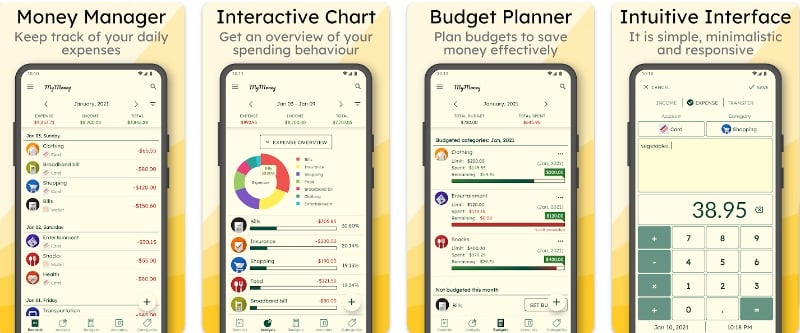
MyMoney – Track Expense & Budget is a budgeting app that uses a virtual envelope system. In case you’re not familiar with it, this method breaks down income into different categories such as food, beauty, car, clothing, and more when you set your budget. This method helps you set the budget for each category and track your spending. The app keeps track of the total budget for the different categories and tracks your spending. You can set different budgets for each category.
The app offers manual data entry, which again has advantages over automatic entry. You can record your transactions and select the category to track your spending. The app also allows you to change and set new income streams and spending categories. It also provides a detailed analysis of your spending and income. On the “Analysis” tab, you can view and filter your spending by week, day, month, or year and filter your spending by category.
The user-friendliness of the app could be better. Don’t get me wrong, it’s clean, but it has a unique and different user interface that I found very difficult to use. You can test it for yourself because most of the time, user interface and looks are personal preferences.
The app is free, but there is also a pro version that allows you to unlock additional icons, set different themes if you don’t like the current theme, passcode protection, annual reviews of data and much more. It’s best to remember that MyMoney Pro is a separate app. You can purchase it for a one-time payment of USD 2.99 (INR 219). It also offers a backup and restore option and helps you sync your data between your devices.
Download MyMoney – Track Expense & Budget: Android
Finart
Highlights
- Expense Tracking: Automatic tracking of expenses based on SMS alerts.
- Income Management: Supports both manual and automatic entry.
- Goal-Oriented Budgeting: Set, track, and achieve short-term and long-term financial goals.
- Comprehensive Reports: Detailed insights into spending habits and financial health.
- Pricing: The app is free to use and offers a premium subscription.
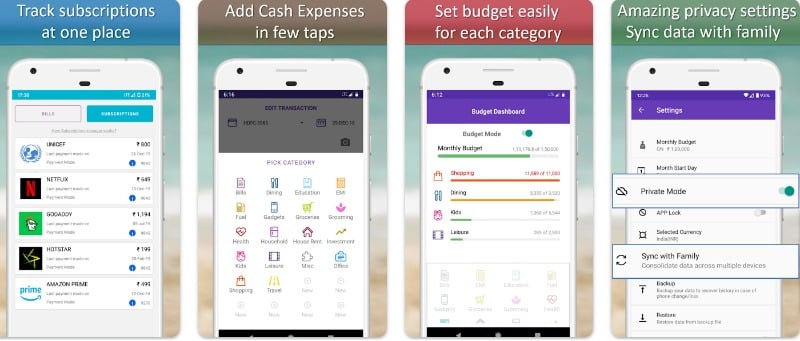
Finart is an automatic spending-tracking app for Android smartphones. The app automatically reads your expenses and tracks your spending. The app reads your expenses through messages and data entry, but the user experience still needs improvement. The app is free and automatically fetches your latest transactions via SMS and instantly shows you your financial spending. You can view your monthly expenses, recent transactions, cash balance, bills due, and much more.
The only problem I had with the app was using it. Somewhere, the app still feels immature. The user experience and interface should be improved. Don’t get me wrong, it’s still good, but compared to other apps, it falls apart. The reason I emphasize this is because the app is good in other areas, but the user interface lags behind. Hopefully, it will be improved in the future.
The best thing about the app is that it supports both automatic and manual data entry. In addition to automatic data entry via SMS, you can also enter the data manually, so we benefit from both manual and automatic data entry.
The app also allows you to set a monthly budget for different categories like bills, food, EMI, gadgets, and more. You can set multiple budgets like envelopes and manage all your budgets in a single place. The app is free to download. There is also an annual premium subscription that offers additional benefits like automatic learning, synchronization, ad-free experience, and more.
Download Finart: Android
Quickbooks
Highlights:
- Expense Tracking: You can track and categorize transactions from linked accounts.
- Income Entry: Automatic and Manual
- Budget Planning: The app provides a clear view of disposable income after accounting for bills, savings goals, and other expenses.
- Bill Management: Manually scan the receipts and organize daily expenses.
- Pricing: The premium version, “PocketGuard Plus, ” offers additional features for a more enhanced budgeting experience.
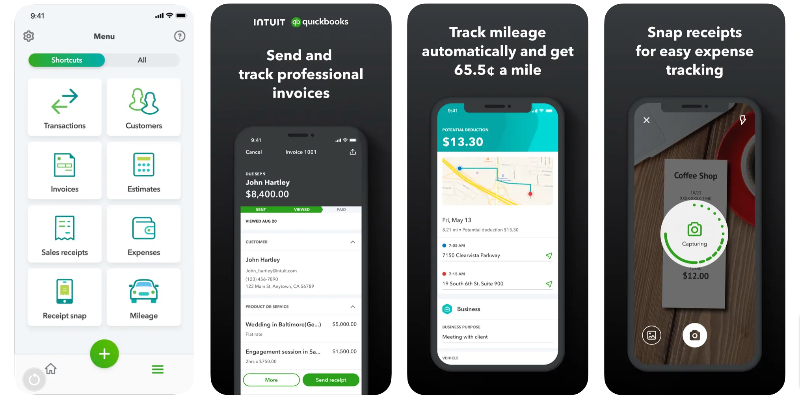
Quickbooks is an accounting app that allows you to track and forecast your finances. The app is primarily used for creating budgets and reports on different types of budgets, such as financial budgets, operating budgets, master budgets, and more. Individual users can set a budget in Quickbooks, get notified when the budget is exceeded, create forecasts for budgeting, access reports, and more. The app also suggests effective budgeting based on your trends.
Users can record expenses and income manually. You can also take photos of receipts and record expenses automatically. You can also download expenses and income by category and reconcile them with bank transactions. This product is currently only available in the USA.
The app is also used to create professional invoices and estimates. The app automatically captures wire transfers and processes credit cards directly in the app with mobile card readers. The app is also used to send notifications about overdue invoices.
The app is primarily designed as a budgeting app for companies. Individual users can create detailed budgets, compare them with figures, make informed financial decisions, and much more. The app is also available on the web. The web version offers additional reports, third-party integration, and much more. The Quickbooks app is free to use. It also offers different premium subscriptions based on your role in your organization. You can use it for free for your expenses.
Download Quickbooks accounting app: Android | iOS
Wallet: Budget & Money Manager

Highlights
- Expense Tracking: Automated expense tracking with the help of AI.
- Budget Planning: Set household budgets and manage them effectively. Supports both manual and automatic entry.
- Bill Management: Never miss a bill payment again with timely reminders.
- Subscription Oversight: Keep track of all your recurring payments.
- Pricing: available in both free and paid versions.
Wallet: Budget & Money Manager is a simple app for Android and iPhone that allows you to track your budget and spending. The app allows you to add individual accounts with a specific amount and track your spending. The app supports manual and automatic data entry (for premium subscribers only), where you can record the transactions of your income, expenses, and more. It also supports templates where you can create a new template and record the transaction.
The app supports multiple currencies. The app automatically recognizes the currency you are using. You can also change the currency in the app settings. You can set scheduled payments (recurring payments). The app automatically enters the data when the time is reached. This is especially useful if you are paying an EMI or need to pay the rent or water bill every month without having to enter the transaction manually every time.
You can also set a monthly, weekly, and one-time budget for different categories like groceries, shopping, vehicles, and more and set up a notification when you reach or exceed 75% of the budget. The app also provides detailed statistics about your spending. These include current account balance, spending, cash flow, outlook, credits, income and expense reports of the income you spend, and more.
The user interface is clear and easy to use. The free version of the app does not offer automatic data entry. You can upgrade to the premium version to get automatic data entry and other benefits like multiple accounts, smart automatic category sorting based on your transactions, family budget tracking, and more. The app offers lifetime, annual, and monthly subscriptions. The app is available for Android and iPhone and can be downloaded for free from the app stores.
Download Wallet: Budget & Money Manager app: Android | iPhone
Buddy: Budget & Save Money

Highlights
- Automated Tracking: Uses AI to track expenses from SMS alerts automatically.
- Income Entry: Manual.
- Unified Budgeting: Plan and synchronize household budgets seamlessly.
- Timely Alerts: Receive reminders for bills and never miss a payment.
- Dual Profiles: Manage both personal and business finances within the app.
- Subscription Management: Monitor, manage, and get insights on recurring payments.
Buddy: Budget & Save Money is another simple, expensive tracker app for the iPhone. The app offers an intuitive user experience to track your spending. You can record your transactions manually in the app. The app automatically analyzes your spending and provides you with detailed spending tables. You can also use the app to create budgets for income, expenses, and savings.
The best thing about the app is its intuitive user interface. It offers a clean, minimal, and good-looking interface. Thanks to the app design and smooth animations, it is one of the best-looking user interfaces of all personal budgeting apps. The app is free to download. It is only available for iPhone, and there is no information about the Android version. The app also offers a premium version with additional benefits such as setting up multiple budgets, a shared budget with family or partner, client categories, budget insights, debt accounts, custom color themes, and more.
Download Buddy: Budget & Save Money app: iPhone
PocketGuard: Money & Budgeting

Highlights
- Expense Tracking: PocketGuard automatically tracks and categorizes transactions from linked accounts.
- Income Entry: Automatic and Manual
- Budget Planning: The app provides a clear view of disposable income after accounting for bills, savings goals, and other expenses.
- Bill Management: All bills and subscriptions are identified automatically and included in the monthly budget.
- Pricing: The premium version, “PocketGuard Plus, ” offers additional features for a more enhanced budgeting experience.
Pocketguard is another simple and easy-to-use app to track expenses, pay bills, and set your budget. When you link your accounts, you give the app your online banking credentials. Once access is granted, PocketGuard can retrieve transaction information, funds, and other details from the bank and automatically enter the data into the app.
The app provides a historical overview of your transactions. You can sort your spending by weeks, months, and years. You can also view your spending by different categories. The app automatically organizes your transactions into different categories. You can also set your financial goals using your pocket. The app allows you to set monthly budgets and set each budget for different categories. You can also track and manage all your subscriptions in one place in the app.
The app also notifies you of upcoming bills so you can stay on top of your spending. If you use Excel or other spreadsheet software for your budgeting, you can export transactions directly to Microsoft Excel with the PocketGuard Plus membership. The app is free and available for both Android and iPhone. It is also available with a premium subscription. The paid version offers features such as exporting transactions, unlimited goals, and categories for budgeting. The price for PocketGuard Plus is $7.99 per month, $79.99 per year, or $99.99 for a lifetime membership.
Download Pocketguard: Android | iOS
Fold.Money
Highlights
- Expense Tracking: Access all your financial data in a single view.
- Income Entry: Automatic using the AA model
- Budget Planning: Plan and manage your finances in the app.
- Bill Management: Receive timely reminders for outstanding bills to ensure you never miss a payment.
- Subscription Oversight: Monitor and manage recurring payments seamlessly.
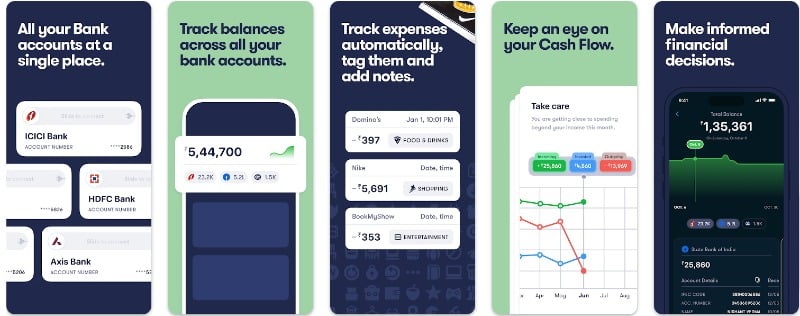
Fold.Money is a popular India-specific app for automatic expense monitoring. The app uses the Account Aggregator Model, similar to the Mint app (see below). With the AA model, Fold.Money can aggregate all your financial details, making it easier for you to manage your money.
Let’s say you don’t know the Account Aggregator Model. In this case, the Account Aggregator (AA) model is like a digital “middleman” that helps you gather all your financial data from different places in one place. It’s a tool that allows you to quickly collect the data from all your bank accounts, insurance policies, and investments and view it in a single place.
The app does not store your financial data. It only shows it to you by collecting it from various places at your request. Before the app can collect your financial data, you must allow it to do so.
As far as the app’s functions are concerned, it displays all your finances in the dashboard. You can easily keep track of your income and expenses and view your current account balance. The app automatically analyzes your monthly expenses and lets you decide which data should be displayed. The app lists all your transactions and automatically flags your incoming and outgoing transactions so that you have more control over where your money goes. You can easily manage your linked bank accounts and add new accounts if the app cannot automatically assign the category. You can also mark the category yourself.
The app is available for both Android and iPhone and is currently in the beta phase, for which you can be invited. You can download the app for free from the Google and Apple app stores and create an account. On the registration page, click on “I have not yet been invited” and wait for the invitation code. Within a few weeks, you will receive an email with the invitation code. You can use the invitation code to log in to the app. Once you have successfully created the account, connect your bank accounts. The app supports almost all major banks in India. It also lists our issues with the bank in real-time if the app has problems retrieving the data.
Download Fold.Money: Android | iPhone
Finma

Highlights:
- Expense Tracking: View and manage spending tendencies graphically.
- Income Entry: Automatic. Easy and simple data entry system.
- Goal Setting: Plan and manage weekly, monthly, and annual budgets.
- Reports: Access weekly, monthly, and annual statistics.
- Price: Free with in-app purchases, subscription options available for enhanced features.
Finma is an automatic expense tracker app for the iPhone. The app automatically collects transaction statements from all your bank and credit card accounts. It automatically creates transaction entries without you having to enter all the data manually. This is easier and more convenient than manual entry.
The app automatically fetches your statements via Gmail (currently, only Gmail is supported). You can link your Gmail account and authenticate yourself with the required permissions to read your financial data. Make sure that all transactions are also sent to your Gmail account so that the app does not miss any transactions. You can also unlink and add a new Gmail account in the app.
The app displays the summary of your expenses and income on the home screen. The app also offers interactive charts that give you detailed insights into your income and expenses. It also offers a cash flow widget that allows you to check your financial health by comparing income and investments over time. This is very helpful to know your current financial health.
The app also allows you to see all your transactions in one place and divide them into different spending categories. You can also customize these categories with text, icons, and colors. You can filter the categories by weeks, months, and more. The app also allows you to add rules for automatically categorizing transactions that support simple text matches and regex patterns. You can also edit and add them according to your needs and requirements. You can add multiple bank accounts in the app. The app also allows you to plan your budget and alerts you if the budget exceeds the amount you have set.
Overall, Finma is the best app for people who want to track and manage their expenses automatically. The app automatically fetches your statements from your email apps (as of October 3, 2023), only supports Gmail, and helps you manage your spending visually. The app is simple and easy to use and has a clear and interactive user interface. If you’re worried about privacy, according to the app, all transaction statements are processed locally on your device and never sent to the servers or shared without third-party apps.
The app is currently in beta. (Sign up for the beta program via this link and receive an invitation code). Currently, it is only available in India and supports some banks. You can fill out the form to sign up for the beta, get an invite code, and start using the app. So far, there is no option to enter the transactions manually. We asked Tanmay, the developer of the app. He said that he would add this soon and that there is no timeline for a stable launch of the app and an Android app.
Download Finma: iOS (Register for Beta)
Notion
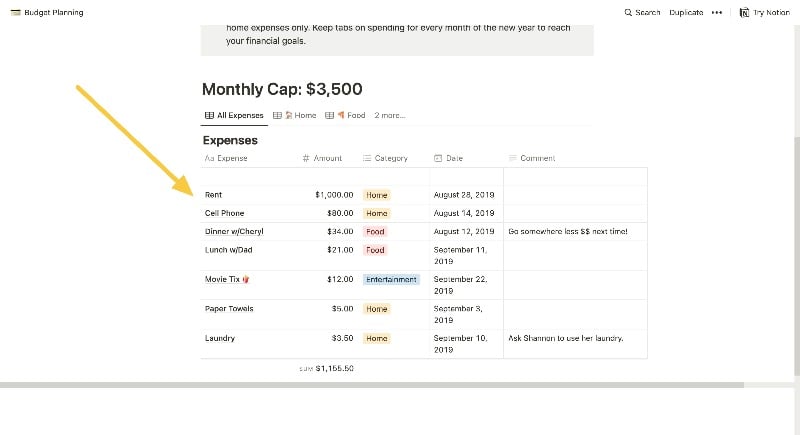
Notion, an all-in-one document management app, is also ideal for budget planning. You can use the app to create your own budget page or use existing budget templates to keep track of your expenses and income. The best thing about the Notion app is that it can be customized according to the user’s wishes and needs.
There are hundreds of free budget templates for Notion. You can add them to Notion and start creating your budget plan. The Notion app is free and available for all major platforms, including Android, iOS, macOS, Windows, and web. You can also collaborate with other people in real-time, which can be especially helpful if you’re creating a shared budget for your small business or family.
Download Notion app: Android | iPhone
Comparison of All the Personal Budgeting Apps Listed in This Post
Feature/Aspect | Money Manager | Finma | MyMoney | Fanart | Wallet | Buddy | Fold. Money | Mint | PocketGuard | Notion |
|---|---|---|---|---|---|---|---|---|---|---|
Expense Tracking | Yes | Yes | Yes | Yes | Yes | Yes | Yes | Yes | Yes | Customizable |
Budget Planning | Yes | Yes | Yes | Yes | Yes | Yes | Yes | Yes | Yes | Customizable |
Bill Management | Yes | Yes | Yes | Yes | Yes | Yes | Yes | Yes | Yes | Customizable |
Data Collection | Manual Entry | Gmail Login | Bank Login | SMS Reading, Manual Entry | Bank Login, Manual Entry | Manual Entry | Account Aggregator | Bank Login & Aggregation | Bank Login, Manual Entry | Manual Entry |
Subscription Oversight | No | Yes | Yes | No | Yes | Yes | Yes | Yes | Yes | Customizable |
Security | High | High | High | High | High | High | High | High | 256-bit SSL | Depends on User’s Settings |
Custom Categories | Yes | Yes | Yes | Yes | Yes | Yes | Yes | Yes | Yes | Customizable |
Financial Goals | Yes | Yes | Yes | Yes | Yes | Yes | Yes | Yes | Yes | Customizable |
Versatility | High | High | High | High | High | High | Moderate | High | High | Very High |
Free vs. Paid | Both | Both | Both | Both | Both | Both | Both | Both | Both | Both |
Track Your Spending With These Apps

Budgeting apps are often better than other methods because they make managing money easier and faster. With an app, you can track your spending automatically and see everything in one place. You don’t have to write everything down or keep receipts. The app can remind you when bills are due so you don’t forget. It can also show you charts and graphs to help you understand your spending habits and has many other benefits.
Plus, most budgeting apps are free to use. I hope you find the list helpful. We also like the Goodbudget and Rocket Money budgeting apps. If you have any other suggestions, feel free to mention them in the comments.
FAQs about Best Budgeting Apps
1. Are budgeting apps safe to use?
Budgeting apps use different security measures to protect users’ financial data. Some apps offer manual data entry, while others automatically retrieve financial data based on the user’s consent. Make sure you know the consent and check the app’s privacy policy and what security measures the app uses to protect users’ financial data.
2. What are other ways of budgeting other than apps?
While apps can be handy, there are also various traditional methods of budgeting that you can use to keep track of your expenses and income. The most common and popular methods are:
- Pen and Paper: The simplest method. Simply write down all sources of income and then deduct all expenses. You can do this daily, weekly or monthly. The only downside to this method is that it can be time-consuming, and there is a high chance of missing household paperwork.
- Envelopes: Allocate cash for different expenses in separate envelopes (e.g., groceries, entertainment, utilities). When the cash in one envelope is used up, your spending limit is reached, and you must wait for the next budget to allocate funds.
- Spreadsheets: Spreadsheets are the most popular and are still used. Use software like Microsoft Excel or Google Sheets to create a detailed budget (you can also use budget templates). Just apply the different formulas and manage your expenses.
- Ledger Books: These are physical books in which you can record income and expenses. They are especially useful for those who prefer a tangible record of their finances. They are mainly used in small businesses.
3. What are different methods of personal budgeting
There are dozens of personal budgeting methods. You can choose the method that suits you best.
- 50/30/20 Budget: Sort your expenses into three categories: “needs” (necessities), “wants,” and savings. 50% of your net income is allocated to needs, 30% to wants and 20% to savings. You can also change the number depending on your needs.
- Pay Yourself First Method (80/20 Budget): The 80/20 method is another popular budgeting method. It involves saving at least 20% of your net income first and then spending the remaining 80%. You can also split it into 70/30, 60/40, or 50/50, depending on your saving and spending goals.
- Envelope Method (Cash-Only Budgeting): This method requires using cash instead of cards. Income is allocated into categories (e.g., groceries), and cash for each category is allocated at the time of budgeting.

