

In Summary
- The Royal Kludge RK84 is an 80% mechanical keyboard with a body that might even be smaller than that of a traditional 75% mechanical keyboard. It offers some cool and very useful features. It also has multiple connectivity options and can be used with everything from Android and Windows to Mac and iOS.
- It comes with multiple switch options and in two colors, boasting a solid build quality and some nice keycaps.
- In this Royal Kludge RK84 review, we’ll tell you everything you need to know about this affordable mechanical keyboard, how good or bad it is and whether you should buy it.
The Royal Kludge RK84 really takes things up a notch. While the feature set of this mechanical keyboard is impressive, it scores the home run when you check its price tag. We have been using this keyboard for over 100 days and absolutely love it. This keyboard has many useful functions and great customization options. It’s a perfect combination of useful features and customization.

In this review, we’ve discussed everything about the Royal Kludge RK84 Mechanical Keyboard, from the quality of the switches to the versatility of the keyboard to whether or not you should buy it. So buckle up because we’re going to cover every aspect of the RK84.
Table of Contents
A Quick Unboxing of RK84: What Comes in the Box
Unlike most budget keyboards, which don’t come with much in the box, Royal Kludge didn’t skimp here and included a lot of accessories (which aren’t needed but are good to have). The box itself is made of cardboard, which is fine, and when you open it you’re greeted by the RK84 itself wrapped in a light plastic. When you take out the keyboard, you’ll find the user manual, and when you open the other side, Royal Kludge gives you a keycap and a switch puller.
There are also two magnetic feet for height adjustment and four additional switches as the keyboard is hot-swappable. A USB cable from type C to type A is also included. If you take a look at the keyboard, you’ll quickly notice that it also has a removable outer panel, which we think looks very cool as it makes the keyboard look like a custom mechanical keyboard.
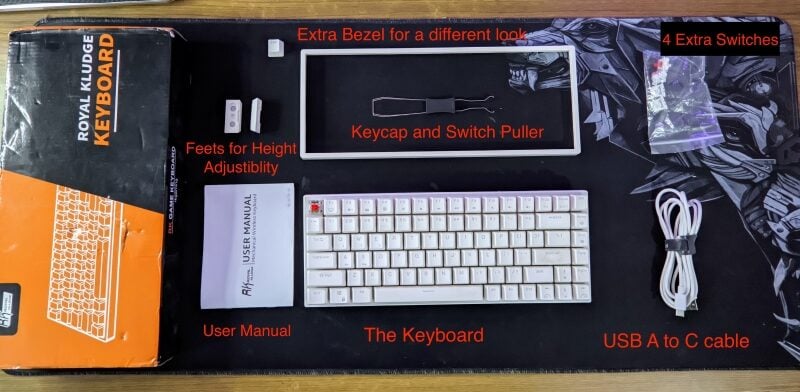
Even though the unboxing experience is definitely not fancy, which is actually a good thing since the keyboard is pretty cheap compared to keyboards from reputable brands that have similar features, it’s good that Royal Kludge saved some money here and gave us a nicer keyboard experience to type on than just the unboxing experience.
RK84 Initial Setup and Connectivity Options
Initially, to start typing with the keyboard, you need to connect it to your laptop or desktop. There are three ways you can connect this keyboard to your computer – use it as a wired keyboard using the cable in the box or wirelessly using built-in Bluetooth 5.0, or a Bluetooth receiver.
The RK 84 takes a very different approach to wireless connectivity. It can get a bit tricky for anyone who is not accustomed to reading the user manual. On the back of the keyboard, there are two switches and a receiver which is well-placed. To connect the keyboard in wireless mode, you need to toggle the switch from OFF to ON and then toggle the other switch to “B” if you want to connect through Bluetooth or “G” if you want to connect the keyboard through the provided USB dongle.
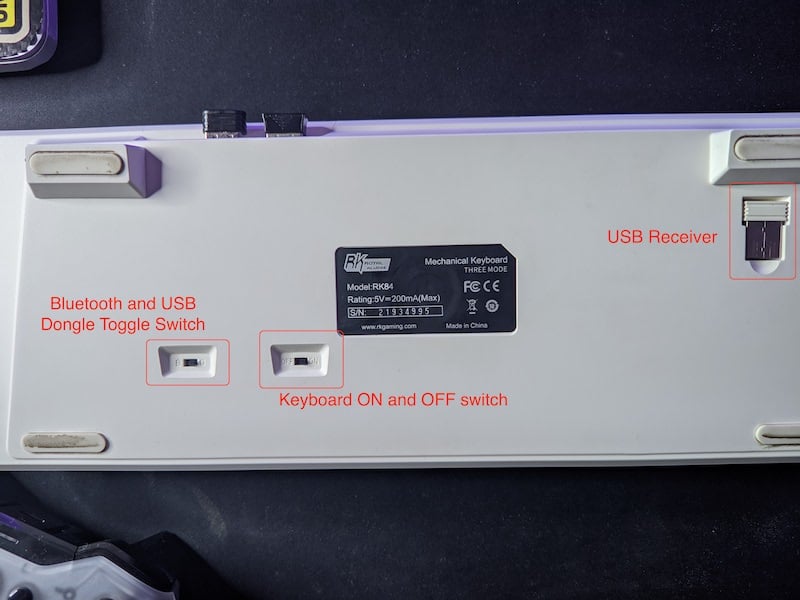
RK84 ships with Bluetooth 5.0, so you can easily pair it with a PC/ laptop, macOS, iOS, and Android. The pairing process is pretty simple and only takes a couple of seconds, at max. We used it with Bluetooth, and there is little to no latency when you are in the same room. You can also pair the keyboard with up to three devices via Bluetooth; switching between them is a breeze. The connection is instant; you can immediately start typing on any device when you switch.
To pair the RK 84 to any device with Bluetooth, long press the Fn key + any key from Q /W/ E. These keys are also marked as 1, 2, and 3, and you can toggle between devices by pressing the Fn key+ Q /W/ E. It associates these letters to different devices, just like every other keyboard.
Or you can use the RK84 with the included USB receiver, just toggle the back switch from B to G and insert the receiver on the machine of your choice. The connection is stable, and it does not interfere with other devices that also work with their respective receivers, although we have used it on the motherboard I/O instead of the front USB connectors on our PC. We also tried using it with our MacBook Pro, and the RK84 keyboard worked fine on Mac with all three connectivity options.

Switch Options and RK Red Performance
Four switch options are available for the RK84: RK Red, RK Blue, RK Brown, and RK Low Profile Red. We opted for the RK Red switches as they are Leniar and quiet compared to the blue switches on our last keyboard. The switches have already been oiled at the factory, and it appears that they are Gateron Red switches. Royal Kludge sells them as RK Red switches, which is fine, in our opinion.
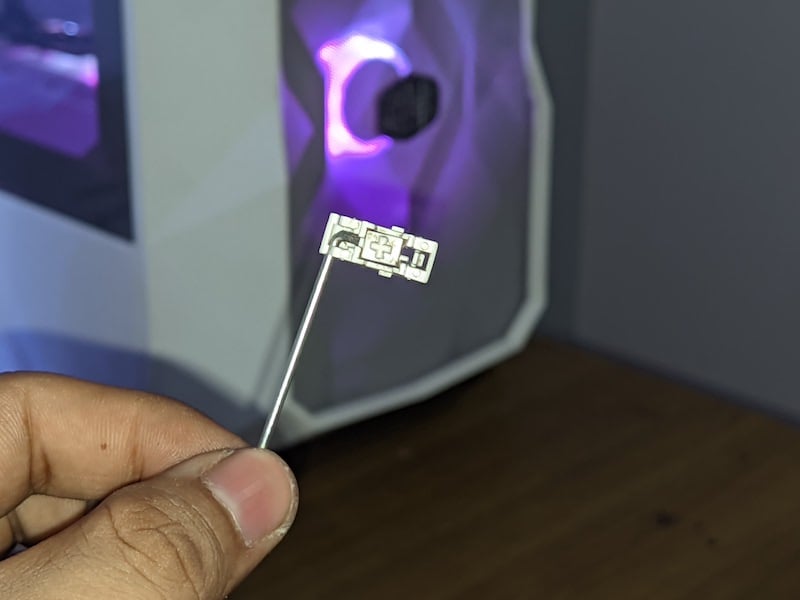
The best thing about the RK 84 is the hot-swappable PCB, which supports most switches from all manufacturers, such as Cherry and Ontemu. Unlike other low-cost mechanical keyboards, where the hot-swap capability of the PCB only allows you to swap switches from one manufacturer, the RK84 gives you plenty of options to swap switches on the fly.
The red switches that came with our RK 84 are 3-pin switches, but if you want to use 5-pin switches for better stability, you can also use them with your RK 84. However, as we didn’t have 5-pin switches, we couldn’t test them.
Let’s also talk about the RK Red switches, as they are the most important component of the RK84. The RK Red switches are Leniar switches and are comfortable to type on (more on the typing experience in a bit). The switch is factory-lubed and has an actuating force of 40 grams, which is the minimum in all four categories. We personally like that. Once you’ve switched to the RK84, other keyboards in the same or even higher price range don’t even come close in terms of what’s on offer. Both entry-level brands and established brands like Redragon, Razer, and Logitech don’t come with Gateron switches and either use Ontemu switches or their own solutions.

The switch is stable when typing and not as loud or tactile as the blue or brown options, but we think if you’re a gamer or someone who types a lot in an office environment, this could be the perfect switch for you. If you want to know more about the different types of switches and how they work, our blog on Ultimate Guide to Mechanical Keyboards will help.
Stabilizers
Just like the lubed switches, the RK84 also comes with factory pre-lubed stabilizers for all long keys such as Enter, Shift and Space bar. These stabilizers are another reason to choose the RK84 over any other keyboard in the same price range. Thanks to the stabilizers, there is no rattling in the keys, which results in faster typing. The stabilizers are also relatively easy to remove, and even after 100 days of use, you can still feel the lube in the keys.
Keycaps
The RK84 ships with Double Shot ABS plastic keycaps, and these keycaps might be the most underrated part of this mechanical keyboard. They feel very comfortable when typing and are very well made – not only in terms of build quality, but they are very thick compared to other keyboards. That’s why the RGB lighting on these keys is just perfect. One thing to remember is that the RK84 comes with one-piece keycaps. This means that when replacing your keycap set, you need to make sure that you get a keycap set with Alt, Ctrl, and Fn keys as single-unit keycaps.

These keycaps could also be the reason why this keyboard sounds so good, unlike most other keyboards in this price range. Unlike other keyboards, the lettering and font on these keycaps also look good. They don’t feel or look cheap, no matter the angle of lighting or typing.

On our variant of the RK84, however, some keycaps lost their color, e.g., the Enter key or keys 3 and 4. At first we thought it might be skin grease or dirt that had accumulated over the Enter key, but it turned out that only specific keys lose their color on our keyboard. It started around day 80. At least, that’s when we noticed it.

There are no problems when typing, and the key illumination also works perfectly. Let’s see how good the Royal Kldge RK84 is at typing: spoiler alert, it dominates here, too.
Build Quality and Typing Experience
When it comes to good mechanical keyboards, good build quality and a great typing feel are the two most important things to look out for. After all, a good build ensures that the keyboard feels good, looks good, and sounds good, and how good the keyboard is can be judged by the typing feel. Let’s take a look at what the RK84 has to offer here.
Build Quality of RK84
The RK84 is made entirely of plastic, but it doesn’t feel cheap. The plastic is hard and feels extremely solid. We have the white color of the RK84, and it looks cool whether the RGB is enabled or disabled. One thing that is not so great about the build quality of the RK84 is the fact that the white color attracts dirt and debris very quickly, and it is visible because of the white color.
The keyboard also has 2 height-adjustable feet that allow the keyboard to be tilted by 4 or 5 degrees. This is a great move by Royal Kludge, as the 8-degree angle is not ergonomic for everyone, and we think you should use the extra feet to achieve a better and more comfortable typing experience. The rubber under the feet and on the bottom half of the keyboard does a great job. The keyboard doesn’t move when you type very fast.

The keyboard weighs around 800 grams and is easy to carry around as it only has 10 keys. With 84 keys, it is very compact, and the length of the keyboard is similar to that of its smaller sibling, the RK71, which has 71 switches.
The Typing Experience
The RK84 comes with a compact 75% layout. It has 84 keys and a complete function bar. The response of the keys is solid as they are equipped with linear switches. It might take some time to get used to the quiet and linear profile of the keyboard. If, like us, you’re coming from a keyboard with blue switches, these switches are not clicky, and you may miss the touch and clicky sound that blue switches are known for, but once you get used to the red switches, there’s no going back to the blue ones. The overall typing experience feels very good, thanks to the heavier keycaps, lubed switches and stabilizers, and good build quality. It feels like a keyboard specifically designed to beat the competition. It feels like Royal Kludge has tweaked little things like extra feet for better ergonomics, an outer bezel for a better look, and much more.
We’ve tried all keyboards from 100% layout to 60% layout, and this compact 80% layout feels like a sweet spot for both typing and gaming. You have all the important keys in your arsenal, and shouldn’t take much time to comfortably switch to the RK84 and get back to your full typing speed. However, if you’re someone who needs special number keys like the 100% layout, it might be a little problematic. You will need some time if you are an accountant, for example, and are used to using full-size keyboards.
The new variants of the keyboard also come with EVA foam inside the case, which makes them sound like an expensive keyboard – you won’t get a sound experience like this on any keyboard in this price range. We have also prepared a sound test so that you can find out how good the keyboard sounds. To do this, we used the RK84 on a wooden table with a desk pad and used the included feet for a better typing experience, and our keyboard ships with Red RK switches.
Sound Test
The keyboard sounds good, our version is stock, and no mods were used for a better acoustic experience. The keyboard doesn’t sound very deep, and the space bar sounds hollow, but there is plenty of THOCK! on other keys.
RGB Customization and Software Experience
RGB is very subjective – some people love it, some don’t. The RK84, like many other keyboards in this price range, has RGB per key. It is equipped with north-facing LEDs and the RGB lighting is perfect as it doesn’t shine too much outwards, and all key labels are bright and clearly visible.
Honestly, the RGB implementation of the RK84 is so good that it looks like a very expensive keyboard when the RGB lighting is enabled, even in the white color and in a room with sufficient lighting, the RGB lighting is clearly visible. The RGB can be easily controlled via the keyboard itself, and there are several effects you can switch between. With the Fn key + Prtsc key, you can cycle through all effects, and with the Fn key + arrow keys, you can change the brightness and speed of the effect as with other mechanical keyboards.

The only thing we don’t like about the RGB of the RK84 is that there is no easy way to set the RGB color of the keyboard to pure white. You can set the keyboard to the color white, but Royal Kludge’s definition of white is something like light pink. The only way to set the color white is to adjust the RED slider in the color panel to create white. This is just a small nitpick we wanted to mention.

What makes the whole experience better than other keyboards in this price range is the software experience of the RK84. Let’s get straight to the point: it’s one of the best keyboard softwares out there, and it’s only available for Windows. The software is called RK Gaming and can be downloaded from the Royal Kludge website.
When you install the software for the first time, it recognizes the keyboard immediately, and you can set custom macros and custom lighting profiles and change the 21 built-in lighting effects in the software itself. You can also delete the saved keyboard data and reset the keyboard in the RK Gaming software itself.
Things like setting up custom profiles and macros can be a little tricky at first, but there are plenty of online tutorials to help you out. Although the software feels perfect, it’s not spot-on everywhere. Every time we try to update the software, we get stuck in the download bar for hours until we quit the software and download the update again.

Once the right side of the keyboard suddenly stopped working and we had to update the keyboard firmware via the software, then it worked again. However, this only happened once, and apart from this problem, there is nothing else to complain about.
Extras: Battery Life and Built-In USB Pass-Through
Some very useful tricks make the RK84 stand out compared to other options in this price range. These can be very handy. Let’s take a look at them:
Good Battery Life
The RK84 comes with a 3750MAh battery, which is not fully charged when the keyboard is first used. In terms of charging speed, the battery can be charged from 0% to 100% in 6 hours, which feels like an eternity when you charge it for the first time. The best way to charge the keyboard is to plug it into any USB port on your PC/laptop or Mac and then use it normally.
The good part is the battery life, which is very good considering all the features this keyboard offers. Royal Kludge claims a battery life of 200 hours, meaning this keyboard should work for weeks if you need to type continuously for 8 hours a day. In reality, however, this is not the case. The keyboard lasts about seven days if you use it with RGB all the time, and if you disable RGB, it lasts about 10 days, which is great battery life, in our opinion. We mostly use the keyboard with RGB on and with a USB cable and this is due to the other great feature that the Royal Kludge RK84 comes with a built-in 2-port USB pass-through.
Built-in 2-port USB Pass-Through
The RK84 has probably the coolest and most useful feature of all the mechanical keyboards we’ve used so far. It has a built-in 2-port USB hub, and we love it. Unlike other keyboards, the RK84 has 3 USB ports that allow it to be used as a USB hub built into the keyboard itself. It only works when the keyboard is connected via a USB-C cable (any USB-C cable will work fine), and you can connect your flash drives, card readers, and even hard drives to transfer small amounts of data. The biggest limitation with these two ports is that they only support a maximum of USB 2.0 speeds. That’s fine if you’re only transferring very small amounts of data, but at least you have the option.
We use them to connect USB receivers/dongles from other devices, such as our mouse and game controller. There is no latency and if you are tired of the dongle life with your Macbook or Windows, this keyboard could be a great help to connect other USB peripherals to your computer. Even if you have a PC and keep it at a distance because of the heat, it’s a good idea to buy a long USB-C cable and simply connect the USB receiver of your mouse and controller to the keyboard for a good gaming experience.

It’s such a useful feature that we want more keyboards to adopt it.
Royal Kludge RK84 Review Verdict
We saved the best part of RK84 for last. The Royal Kludge RK84 is priced at 70 dollars, making it an absolute bang for the buck in this price range. The RK84 is packed with interesting and useful features and comes with extras like height-adjustable feet and an outer bezel for a different look. It offers three connectivity options, from Bluetooth to a USB dongle/receiver, and connects to everything from Android to iOS, Windows, and macOS.

The typing experience is very good compared to other keyboards in the same or even higher price range. There are multiple switch options to choose from, and the build quality is very good, although there are a few minor flaws here and there, like the keycap color fading. The software experience is great, although restricted to Windows only. The battery lasts long enough to get through the working week, and the built-in USB pass-through adds convenience.
We really liked the RK84 and think it’s the perfect keyboard for anyone looking to go down the rabbit hole of mechanical keyboard modding and customization. And almost perfect for the general audience who wants a good typing experience.
Buy Royal Kludge RK84 (USA)
Buy Royal Kludge RK84 (India)
- Multiple switch options to choose from.
- Great Battery life.
- Robust build quality and great design.
- Solid typing and gaming experience because of factory-lubed switches and stabilizers.
- Multi-device connectivity over Bluetooth, 2.4 GHz dongle, and Wired mode.
- Great implementation for RGB and and decent software experience.
- Ships with useful features like height adjustability and USB pass-through.
- Could have a slightly better paint job over the keycaps.
- Could take some time to get used to for people who are used to 100% Keyboard layout.
- No software for macOS.
- Understanding how connectivity options work is a hassle for the first time.
- Not every custom keycap set works out of the box.
| Features |
|
| Typing and Gaming experience |
|
| Battery Life |
|
| Build |
|
| Pricing |
|
|
SUMMARY
In this Royal Kludge RK84 review, we'll tell you everything you need to know about this affordable mechanical keyboard, how good or bad it is and whether you should buy it. |
4.4
|

