

Quick Answer
The best way to experience printing on your Android smartphone is by using printing applications that offer features like editing and formatting the document along with support for most wireless printers and the option of Save as PDF. My favorite is Printer for Airprint for the ability to edit images and documents straight from the app before hitting the print button.
Printing is an essential part of our personal and professional life. It doesn’t matter how much digitization happens, print is still going to be used for most of the things that are important like legal documents, rent agreements, medical reports, etc. Printing from a computer is easy especially since most printers are supposed to be used with computers but nowadays, wireless printers are found everywhere that use technologies like WiFi and Bluetooth to print wirelessly from any device.

Android smartphones and tablets have the option to print documents on the go, it is just a simple 2-3-step process that lets you print your documents through any wireless printer around or even save documents as PDF files for easier access. We have curated a list of ten printing applications available on Android that let you print your documents effortlessly straight from your smartphone or tablet. Let’s get started.
Table of Contents
Best Printer Apps for Android
Sl No | App Name | Edit Document | Save as PDF | Key Features |
|---|---|---|---|---|
1 | Samsung Mobile Print | No | No | Easy to use, Wide range of support for printers |
2 | ePrint | Yes | Yes | Variable formats, Option for Scanning documents |
3 | PrinterShare | Yes | Yes | Can edit images |
4 | NokoPrint | No | Yes | Supports a wide array of printers from wifi, Bluetooth, and USB printers. |
5 | MobilePrinter | Yes | No | Wide range of options for documents to print. |
6 | Printer For Airprint | Yes | Yes | Options to edit documents and images. |
7 | Smart Print | No | No | It supports scanning documents and has templates |
8 | AirPrint | No | No | Has the ability to edit images. |
9 | PrintHand | No | Yes | Support for a wide range of connectivity options for printers. |
10 | Android Share Print | No | Yes | Integration in the entire Android OS. It can be used with any app for any media. |
Samsung Mobile Print
Samsung Mobile Print might be the easiest printer application to use that is available on Android devices through the Google Play Store. The UI is easy to understand hence it barely took us a minute to select our file, connect to the printer, and then print the file. All of this can be done in just 2-3 steps and does not require much knowledge about printers or printing. We tried to connect with a few wireless printers using the app and it works properly regardless of the brand of your printer.

You can use the application to print photos, documents, and web pages, and also directly capture images from the app to print on the go. You can also scan documents and use it to operate your Fax machine (if you still use that). The app is clean, works quickly, and provides a reliable printing solution for Android smartphone users. It does not support saving the file as a PDF unlike some of the other apps in this list but we kept Samsung Mobile Print on the top because of how reliable it is.
- Offers support for a wide range of printers regardless of the brand.
- Allows users to print files of multiple formats including scanning the document straight from the app.
- Simple and fast UI for quick printing tasks without any interruptions.
- Does not support saving the file as PDF.
- There is no customization option before printing the document.
ePrint Smart Printer
The good thing about the ePrint Smart Printer application is that it is beautifully designed and has tons of features. The animations are smooth, and the UI looks clean but it hits you with a subscription page as soon as you open the app. On top of that, you will be hit with an ad at every step making the printing process much slower in comparison to other applications.

You have features like scanning, web page printing, editing photos and pdf files before printing and even support for cloud services like Google Drive and OneDrive to directly fetch files straight from the cloud. It also has templates for different forms and documents along with things like birthday cards which makes it a very useful and the most feature-rich application on our list. Only if the ads were a bit less in the free tier then this would have been the perfect printer app for Android.
- Feature-rich app with editing options for documents and images.
- Supports a wide variety of printers and file formats.
- Has templates for important documents and cards
- There are tons of ads in every step and every part of the app.
- Prompts for a subscription too often.
PrinterShare Mobile Print
PrinterShare Mobile Print might be the most vintage printer application available on the Play Store. The UI is straight from the Android Eclair era and I like it. Looks clean yet funky and provides all the basic features that are required in a printer application. You can print photos, documents, and even web pages straight from the app. It also used to have the option to print your phone call records but that feature is not supported on Android anymore.
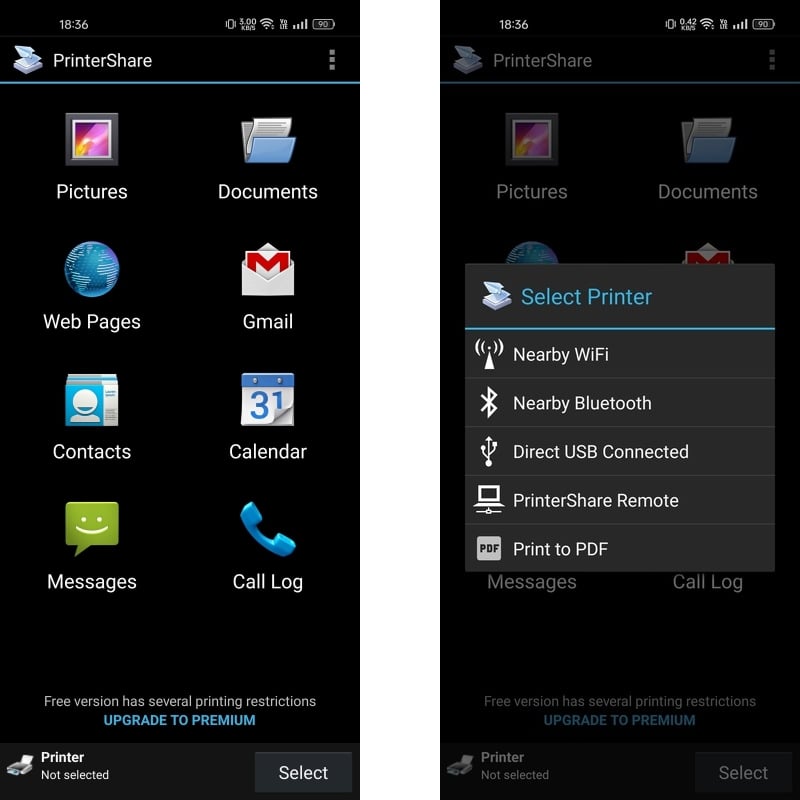
You can connect to WiFi, Bluetooth, and USB printers through the app and also save files as PDFs from the PrinterShare app. The app is fast and you can get a print in just 3-4 clicks. It does not have any ads but it does have a subscription available that gives you unlimited printing access from the app.
- Simple and easy-to-use vintage UI.
- Support for WiFi, Bluetooth, and USB printers. Save as PDF available.
- No ads
- UI is old.
- Limited editing options for files.
NokoPrint – Mobile Printing
The NokoPrint app has a straightforward and easy-to-read UI with just three options. You can print images, documents, and web pages through the app. We love that you can select to print a specific page before moving on to the print options. You can connect to WiFi, Bluetooth, and USB printers which makes it easier to find and print your documents wherever possible.

There are ads baked into the app but they are not intrusive and NokoPrint is fast enough to complete the print process within a few clicks. You also have the option to save the file as a PDF which is always convenient to keep a digital copy.
- Simple and easy-to-use UI.
- Has the option to connect with WiFi, Bluetooth, and USB printers.
- Can print a particular page from a multi-page document.
- Ads in the app.
- No way to edit the files before printing.
Mobile Printer: Simple Print
The most annoying thing about the Mobile Printer application is the fact that it has an annoying video ad after every tap. Although it supports a wide variety of printing options including photos, documents, and web pages, and even lets you scan the documents straight from the app, you don’t have any options to edit your documents.
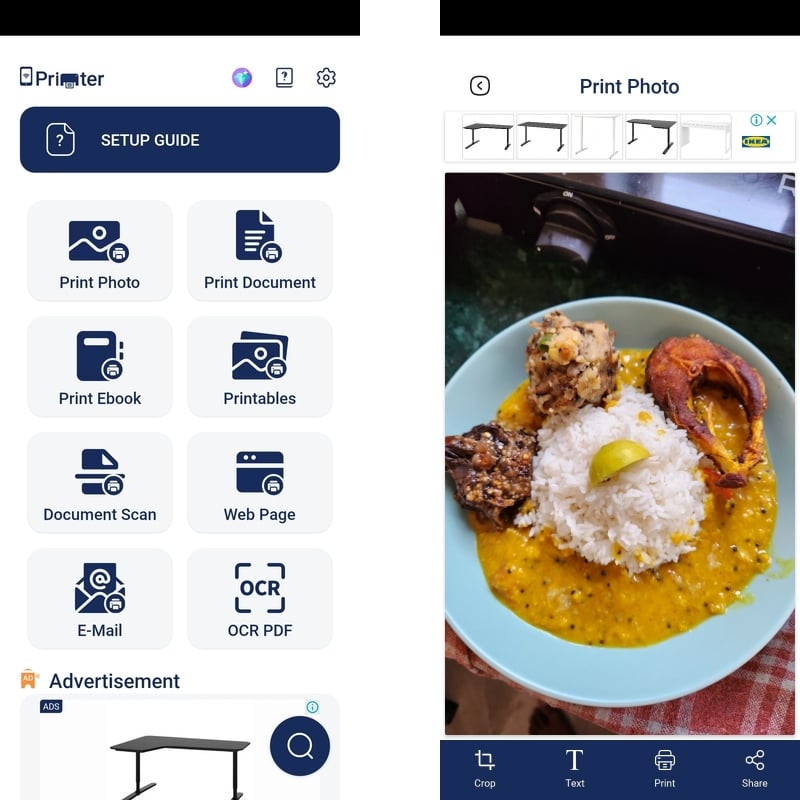
For photos, you can crop the image and add text to it which helps in emergencies. But the ads are so annoying that you would be frustrated by how slow the entire print process is. We appreciate the fact that it lets you save the files as PDFs if you want. Overall, the UI is very intrusive and makes it tough to use the app properly.
- Various file formats and printing options to choose from.
- Has the option to save the file as PDF.
- Ability to edit images before printing.
- Intrusive ad-filled UI.
- Very slow printing process.
Printer for AirPrint
Printer for Airprint is one of the most versatile applications on the list since it has everything you need to get a good print for your documents. We love that you can edit images and PDF documents on the app itself before getting the print. There is even an option to copy any text on your phone and directly paste it into the in-built canvas on the printer app and get a printout. You can scan documents, print entire web pages, or even your contact list if you would like to. Printer for Airprint is an all-in-one application for your printing needs. You have the option to print your documents as a PDF file.

The thing that we do not like is that the application has tons of ads and you need to purchase a subscription to remove the ads while also getting access to unlimited printing which is not available with the free version. The Printer for AirPrint application only supports WiFi printers. Overall, Printer for Airprint is our top contender for the best printer application on Android.
- Options to edit images and PDF files.
- Can print straight from the clipboard and also contact lists.
- Very fast UI and can print as a PDF file.
- Ads in the UI.
- A limited number of prints in the free version.
- Only supports WiFi printers.
Smart Print – Air Printer App
Smart Print is a feature-packed application but the free version is filled with ads at every step which is very annoying when you are trying to print something important. Other than that, it has features like document scanning, print as PDF, print web pages, etc. The UI is user-friendly and can be navigated easily but the ads make it a bit difficult. The best thing is that Smart Print has a ton of templates to help in making your printing process a bit easier.

Smart Print has support for a wide range of printers but only supports WiFi printers. You can print images, documents, and files from your cloud storage and also use the templates to get a hold of tons of pre-formatted documents.
- Support for a wide range of printers
- Supports images, documents, web pages, and even print as PDF.
- Easy to understand UI.
- Ads at every click and every step of the printing process.
- Very hefty subscription fees.
AirPrint – Mobile Printer
AirPrint is a simple printing application with a user-friendly UI and has the ability to edit images before printing. We like the fact that you can add your signature on images before taking a printout. It is compatible with WiFi printers from almost all the brands out there so it should not be a problem to connect to the nearest available printer. You can scan your documents as well to directly print them out or you can even print things from your smartphone’s clipboard. Adding the vast library of templates that AirPrint has, you can quickly whip up a birthday card or a form with just a few clicks.
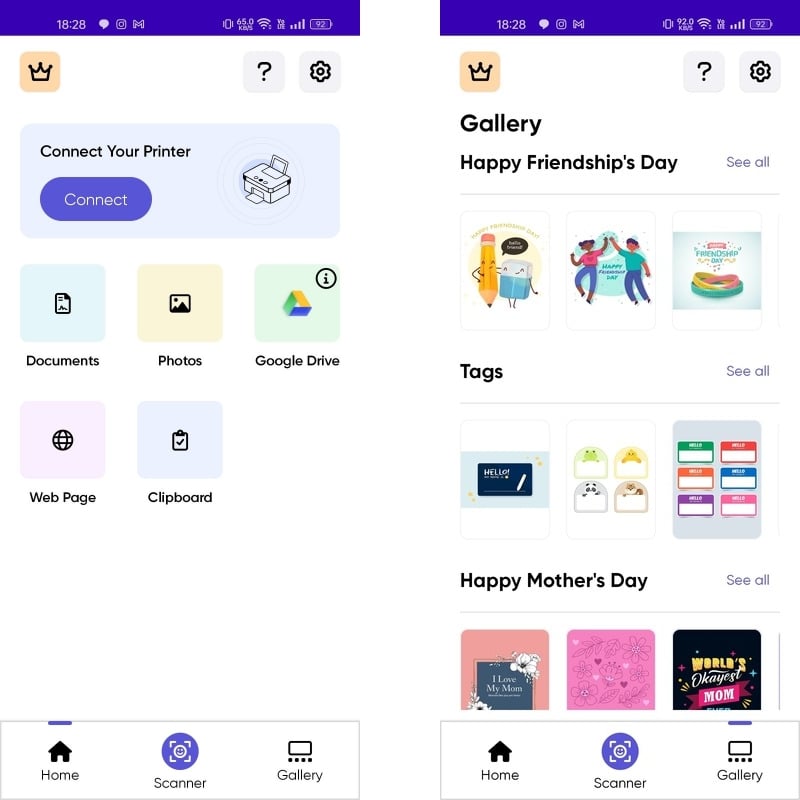
The only issue is that you do not get unlimited printing access with the free version and there is no option to Print as PDF. But other than that, AirPrint is an excellent application on your Android smartphone for all your printing needs.
- Ability to edit images and add signatures before printing.
- Huge library of templates and supports a variety of printers.
- No option to edit documents before printing.
- The free version does have unlimited printing access.
PrintHand Mobile Print
PrintHand might just be the only Android Printer Applications that support such a wide variety of connectivity options for printers. You can connect WiFi, WiFi Direct, Bluetooth, USB, and Windows Shared printers using the PrintHand application. There is even support for Print as PDF on the app and you can even sign into remote printers to print things across the world. The user interface gives vintage vibes but it is very easy to use and understand. You can literally print anything starting from images, documents, and even the clipboard on your phone.

Unfortunately, there is no option to edit documents before printing and you need a subscription to connect the app with everything except for Virtual Printers. This is a big downside of the app but if you are going to use the app on a daily basis then the subscription is not that expensive.
- Support for a wide range of connectivity options for printers.
- Can print any kind of document.
- Easy to use and has the option to Print as PDF.
- Doesn’t have the option to edit the documents.
- Needs a subscription to connect with most printers.
Download PrintHand Mobile Print
Android Share Print
In the end, we have our own Android Share Print which is baked into every Android smartphone and can be used from the share menu to connect with wireless printers and even print files as PDFs. You can access the printing option from the share menu of your Android smartphone and this also allows you to edit the documents before printing.

The only issue is that it’s hard to connect your smartphone directly to a printer without the help of a client application which makes it quite difficult to use the option.
- Built into the Android OS and available from the share menu.
- Can print files as PDFs.
- Tough to connect with printers without client applications.
Best Printer Applications for Android Smartphones

Printer applications can be either a client app for a specific printer brand or they can be universal like Printer for Airprint. All the printer applications mentioned in this article are free to use but some of them have a subscription to access additional features. The free features are good enough for most people who print on a daily basis but if you have the money then go ahead and get the subscription to your favorite printer application as it adds to the overall experience.
If you are planning to use any of the applications from this list then let us know in the comments below.

