

In Summary
- The ASUS SmartO MD200 is a productivity-focused wireless mouse that features dual connection modes, can pair up to 4 devices, and can switch seamlessly between the paired devices with the push of a button.
- The ergonomic design and the metal scroll wheel lead to a comfortable grip with solid build quality.
- It runs for 12 months with a single AA battery, which is commendable considering that it also has customizable controls through the Armoury Crate application.
- The SmartO MD200 mouse from ASUS beautifully pairs productivity and performance to be considered one of the best mice for the price.
The ASUS SmartO MD200 is a wireless mouse that has Bluetooth and 2.4GHz modes, making it a versatile choice for people with multiple devices. It runs on a single AA battery that can last up to 12 months of usage, which means that battery life is not going to be a concern. Lastly, the sensor it has makes it usable on all kinds of surfaces, may it be wood, marble, or glass. We have been testing the MD200 for over a week now, and this is our review after using it on multiple devices and surfaces. Let’s get started.

ASUS SmartO MD200: Design and Build
The MD200 has an ergonomic design with a thumb rest on one side, which helps with whatever grip you are using. The mouse is tailored to be used with the right hand as the side buttons and thumb rest are only present on one side. The contoured design of the mouse leads to a comfortable grip, which does not lead to fatigue. Whether you are working on complicated designs in Figma or just shooting some terrorists in Counter-Strike, the MD200 is not going to be a hindrance in terms of grip and comfort. There is an elastic carrying band at the front of the mouse, which can be used to hook the mouse around your finger or onto things with a carabiner. This is kind of unique but also unnecessary.
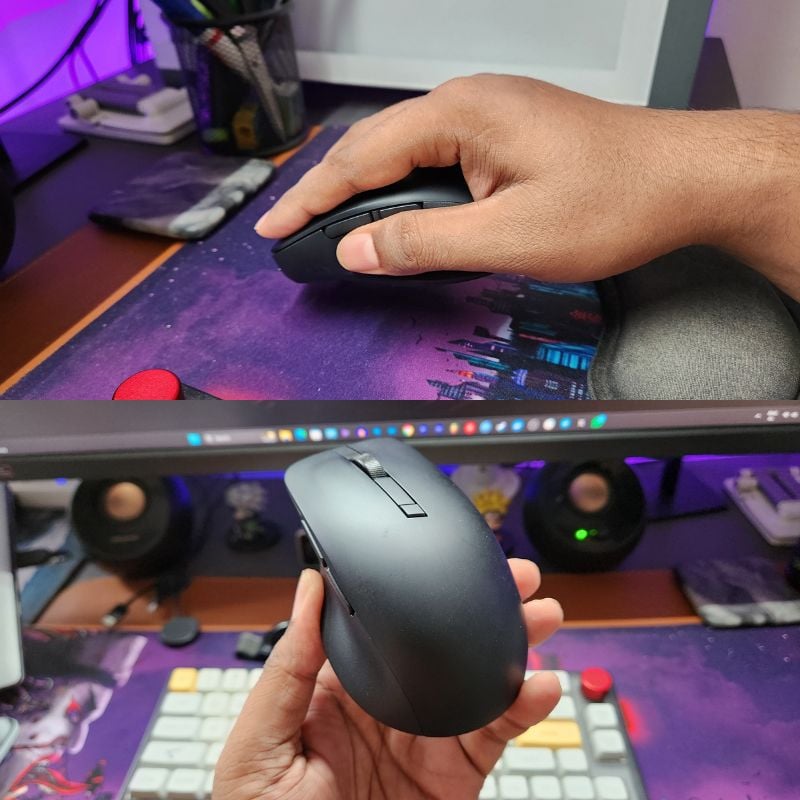
In terms of build quality, the mouse is mostly made out of polycarbonate, with just the scroll wheel being made of metal. The MD200 feels solid but is light enough at 85 grams to be flicked around easily without much effort. There are PTFE feet on the bottom, which lets you glide the mouse easily on any surface. We have used it on glass, marble, and wood surfaces, and the mouse tracks easily on all surfaces. Overall, the Asus SmartO MD200 is a well-built mouse with a comfortable design.
ASUS SmartO MD200: Connectivity and Features
The MD200 can be connected to a total of 4 devices. You can connect up to three devices using Bluetooth and one device with the 2.4GHz dongle. There is virtually no lag when using the dongle mode on the MD200. I even played a few games with it, and the response was almost instant. The Bluetooth mode can have a bit of delay depending on the type of device and Bluetooth version, but the connectivity is quick, and the connection is stable throughout. The switch on the bottom lets you switch between Bluetooth and dongle mode with a flick. The Bluetooth devices can be paired by using the button on the bottom.

Here is the list of all the controls:
- Mouse OFF – Switch in the middle.
- Mouse in dongle mode – Flick the switch to the top.
- Mouse in Bluetooth mode – Flick the switch to the bottom.
- Bluetooth pairing – Select the device number by pressing the button once (light indicates the current paired device), then press the button for 3 seconds to start pairing mode (light keeps blinking).
- Bluetooth device switching – Press the button once to switch between the three paired devices actively.

The MD200 is packed with features like an anti-bacterial coating on the body, which destroys up to 99% of bacteria on the surface. The metal scroll wheel is smooth and has clicks to ensure accurate scrolling. An infinite scroll wheel like the Logitech MX series would’ve been nice to have here, but that’s probably a patented tech. There is a DPI button below the scroll wheel, which can be used to switch between DPI levels up to 4200. It’s quite useful to switch DPI on the fly, mostly a gaming mouse feature, but it’s nice to have. There are six customizable buttons on the MD200, which can be configured using the ASUS Armoury Crate application.
ASUS SmartO MD200: Performance and Battery
The MD200 is a fast mouse that easily glides over any surface, providing a smooth experience without any hiccups in your workflow. I keep it between the 1000-1500 DPI range, which allows me to use the mouse freely across my 27-inch display. The left and right clicks are not entirely silent but do have a good response, which assures you that the clicks are being registered. The switches are rated to last for up to 10 million clicks, which honestly is like a year of clicking 24×7. The response of the switches is instant in dongle mode, but it takes just a millisecond more to register in Bluetooth mode. If you are planning to do some sensitive work like video editing or gaming, then it’s best to use dongle mode for the most optimal experience. The side buttons are easily reachable and responsive enough. The PTFE feet are an underrated feature that every mouse needs to have for better control and tracking.

Asus has not made clear which sensor is being used here, but it looks like they are using an invisible sensor, which is a good thing since the MD200 can easily track the cursor movements regardless of the surface and is very accurate. The lift-off distance is not much, but it is enough to get a few headshots with your flicks. The mouse is highly configurable, where the buttons, DPI, polling rate, etc., can be configured in the Armoury Crate application without much effort. The software is readily available on ASUS laptops and desktops, but it can be downloaded from the ASUS website onto any Windows computer.

In terms of battery life, you will get an AA battery bundled with the mouse, which should last around a year, depending on the usage. Our unit still has a 100 percent battery life, and it should remain so for some time. The mouse can go to sleep when not being used for a certain amount of time. I have set the time to be 3 minutes, but it can be configured in the Armoury Crate application as well. There is no option to use the mouse in wired mode, but you won’t need it since it will rarely run out of charge. You can even check the battery percentage in the application, but there is no indicator for it on the mouse. Overall, battery backup should not be an issue on the MD200.
ASUS SmartO MD200 Review Verdict

ASUS has done a great job with the SmartO MD200 mouse. The ergonomic and comfortable design, paired with fast and accurate tracking, make it a trustworthy choice for anyone planning to invest in a wireless mouse. Although it is a productivity-focused mouse with multiple connection modes and the quick switch feature, it is quite responsive even while playing games.
Paired with the super long battery life, the ASUS SmartO MD200 is one of the best mice that we have tested. We use the Logitech MX Master 3S in our day-to-day lives, but the MD200 is a lighter and much cheaper option with very good performance. If you are planning to get a wireless mouse and your budget is under Rs. 3000 or $40, consider getting the MD200. Otherwise, there are options like the Logitech G304 Wireless and Logitech MX Anywhere 3S for a similar price.
- Comfortable and ergonomic design
- Multiple DPI levels
- Works on any surface
- Multiple connection modes
- Long battery life
- Software support
- No wired mode
- Needs AA battery
- Only for right-handers
| Design & Build |
|
| Features & Connectivity |
|
| Battery |
|
| Ergonomics |
|
| Price |
|
|
SUMMARY
The ASUS SmartO MD200 is a comfortable and ergonomic mouse with multiple connectivity modes and software support. All of this makes it easier to use with multiple devices on many kinds of surfaces. For the price of $40 or Rs 2499, the MD200 is one of the best mice you can get. Logitech has competition. |
4.1
|

