

In Summary
This guide covers four top Windows 11 Start menu replacement apps: Start11, StartAllBack, Open Shell Menu, and Flow Launcher. These apps offer a range of customization options, from classic layouts to minimalistic designs, catering to different preferences and enhancing user experience. There is also a guide on how to use them.
Microsoft has introduced a lot of changes to the Windows 11 operating system. One of the prominent changes was its Start menu, which appears at the center by default. While you can change where it appears, many are not fans of what Microsoft has to offer in terms of the features for the Start menu in Windows 11. If you also didn’t like what Microsoft has done with the Start menu on Windows 11, it’s natural that you might want to try out the alternatives available.

Thankfully, there are multiple options available that can replace the Windows 11 Start menu and give you something better to work with. Some of the options are free, while for some, you need to pay. Third-party Start menu replacement apps give you even more customization options than Microsoft will ever will. In this guide, we have compiled a list of some of the best Windows 11 Start menu replacement apps. Let’s check them out.
Table of Contents
Best Windows 11 Start Menu Replacement apps
Sl. No. | App Name | Key Features | Pros | Cons | Pricing |
|---|---|---|---|---|---|
1 | Start11 | Multiple Start menu layouts (Windows 7, Modern Style, Windows 10, Windows 11), taskbar customization, backup/restore settings, color and transparency adjustments. | Extensive customization, taskbar tweaks, backup/restore options. | Price may be considered high. | Free version; Paid: $9.99 for a single license |
2 | StartAllBack | Three Windows 7-inspired styles, taskbar and File Explorer customization, custom Start menu button image. | Ideal for Windows 7 Start menu fans, taskbar and File Explorer customization. | Limited style options. | Paid: $4.99 for a single license |
3 | Open Shell Menu | Classic or Windows 7 style layouts, taskbar customization, shutdown button behavior tweaking. | Free, open-source, customizable taskbar. | Requires several setup steps. | Free |
4 | Flow Launcher | Search bar for apps, files, and web; community-built extensions; minimalistic approach without Start menu. | Minimalistic, efficient search-focused interface, extensive extension options. | Completely removes the Start menu, which may not suit everyone. | Free |
Start11 – Offers loads of Start menu customization options
Stardock’s Start11 is one of the best Windows 11 Start menu replacement apps that you can try out. Very few Windows customization software tools offer the level of customization Stardock has to offer, which is quite evident in the Start11 Windows 11 Start menu replacement app. For some, this may be the only tool that they were looking for on their PCs for the Start menu.

Start11 lets you choose among different Start menu layouts. There are different Windows Start menu styles, ranging from Windows 7, Modern Style, and Windows 10 style. You will also find a Windows 11 style that offers more customization options than what you get officially from Microsoft. It also offers you the option to use the full-screen Start menu.
Speaking of customizations, Start11 lets you choose and edit the apps list, add/remove shortcuts, adjust the color and appearance, set how the Start11 menu is triggered, and even lets you tweak the color and transparency of the Windows Taskbar. You can also adjust the size and choose it will appear on both the primary and secondary screens. One great feature is that it lets you rename, move, and delete folders straight from the Start menu. There is a free version available, and the subscription price starts at $9.99 for a single license.
Pros
- Lets you choose among different Windows Start menu styles
- Gives you granular controls to modify or delete folders or files from the Start menu
- Offers a free version
- Offers the option to tweak the Windows Taskbar
- Backup or restore your Start11 settings
Cons
- The price is a bit high
StartAllBack – A perfect app for the Windows 7 Start menu
If you are someone who loved the Start menu that Windows 7 offered, then you should check out the StartAllBack. There are three different Windows 7 styles to choose from, all of them having a touch of the Windows 7 Start menu. There is the default Windows 7 Start menu option that looks fantastic, and then there is a style that is much closer to Windows 10’s Start menu with sharp corners.

Finally, there is a classic Windows 7 Start menu look with an Aero Glass effect. The animation of the StartAllBack is one of the things that should be talked about because it looks amazing when opening and closing the Start menu. It also lets you tweak the menu’s style, appearance, and functionality. It is available for $4.99 for a single license.
You can change the icon size, show apps inside a folder, highlight newly installed apps, and set shortcuts on the right side as menus or as links. Similar to Start11, StartAllBack also lets you change the appearance of the taskbar. There is also an option to pick a custom image for the Start menu button and position the taskbar anywhere on the screen. It also lets you customize the File Explorer and choose between the Ribbon interface or command bar.
Pros
- Best for Windows 7 Start menu
- Offers Taskbar customization
- Offers File Explorer customization
- Lets you add a custom image as the Start menu button
Cons
- May be a bit limiting in terms of styles
Open Shell Menu – A free Windows 11 Start menu replacement
Open Shell Menu is a great open-source and free Windows 11 Start menu replacement app that you can use on your PC after tweaking a few settings. Once you have downloaded the app, you need to open the Start menu, select All Apps, select the folder for Open Shell, and click the shortcut for Open Shell Menu Settings.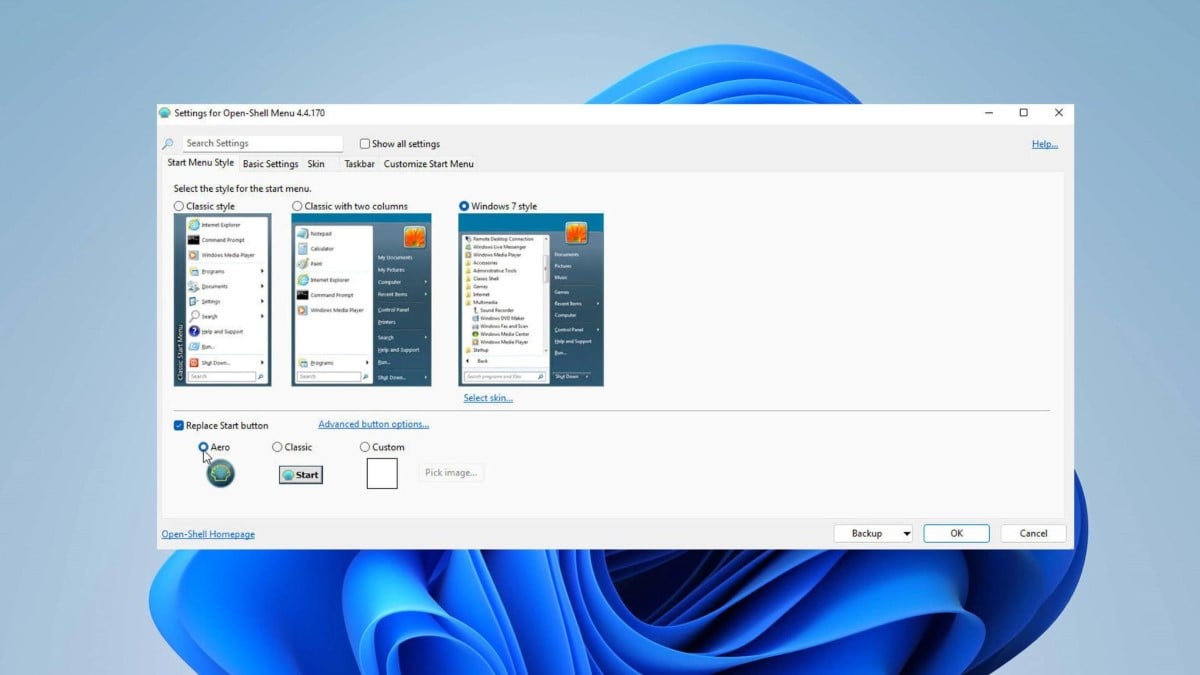
From here, you need to choose the Start menu layout: Classic style with one menu column, Classic with two columns, or Windows 7 style with two columns. Finally, you need to check the box for the Replace Start button and select one of the built-in images. You can tweak other settings, such as how to trigger the Open Shell Start Menu, show recent or frequently used programs, choose how the Shut Down button behaves, etc.
The app also lets you tweak the size, color, and opacity of the Taskbar, along with which apps you would like to see in the Start menu and if they should appear as links or as menus. It is worth it because the app is available for free.
Pros
- Available for free
- Let you tweak the Taskbar
- Choose how the shut-down button behaves
Cons
- Requires a few steps to go through before you can use it
Flow Launcher – Gets rid of the Start menu altogether
This app is the one that you can consider the Windows 11 Start menu replacement app, as it gets rid of the Start menu altogether. This offers you a whole new way to get things done. Flow Launcher lets you open any app on your PC just by searching for it in the search bar. But wait! There’s more to this app.
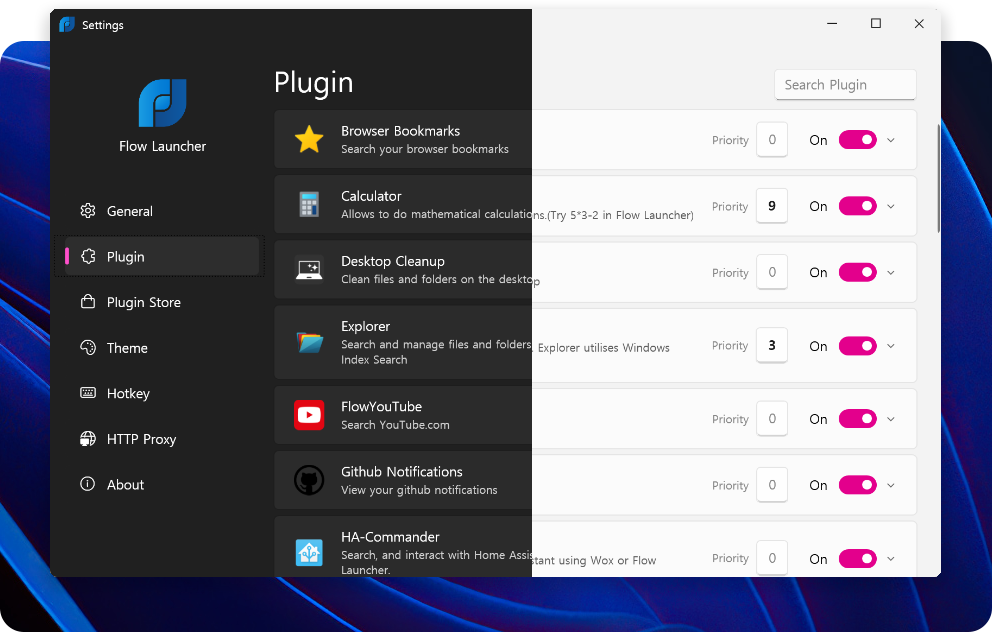
There are plenty of community-build extensions that you can use to your advantage besides just launching your apps. You can search the web, look for videos on YouTube directly, get weather information, run CMD, and much more. To trigger the Flow Launcher, the default shortcut key is Alt+Space.
You can also look for files directly in the launcher and even calculate numbers directly without needing to open the Calculator app. The app may not let you tweak the appearance of the Windows 11 Start menu, but it lets you change the appearance of the Flow Launcher. There are multiple styles to choose from, or better, you can create one from scratch.
Pros
- Lets you find anything using the search bar
- Gives your PC a minimal look
Cons
- Completely removes the Start menu, which may not be for everyone
How to use Windows 11 Start Menu replacement app
In this section, we will discuss how you can replace the Windows 11 Start menu by installing one of the apps listed above. For this guide, we will be using the StartAllBack application.
- Download StartAllBack from the official website.
- Open the EXE file and install the program.
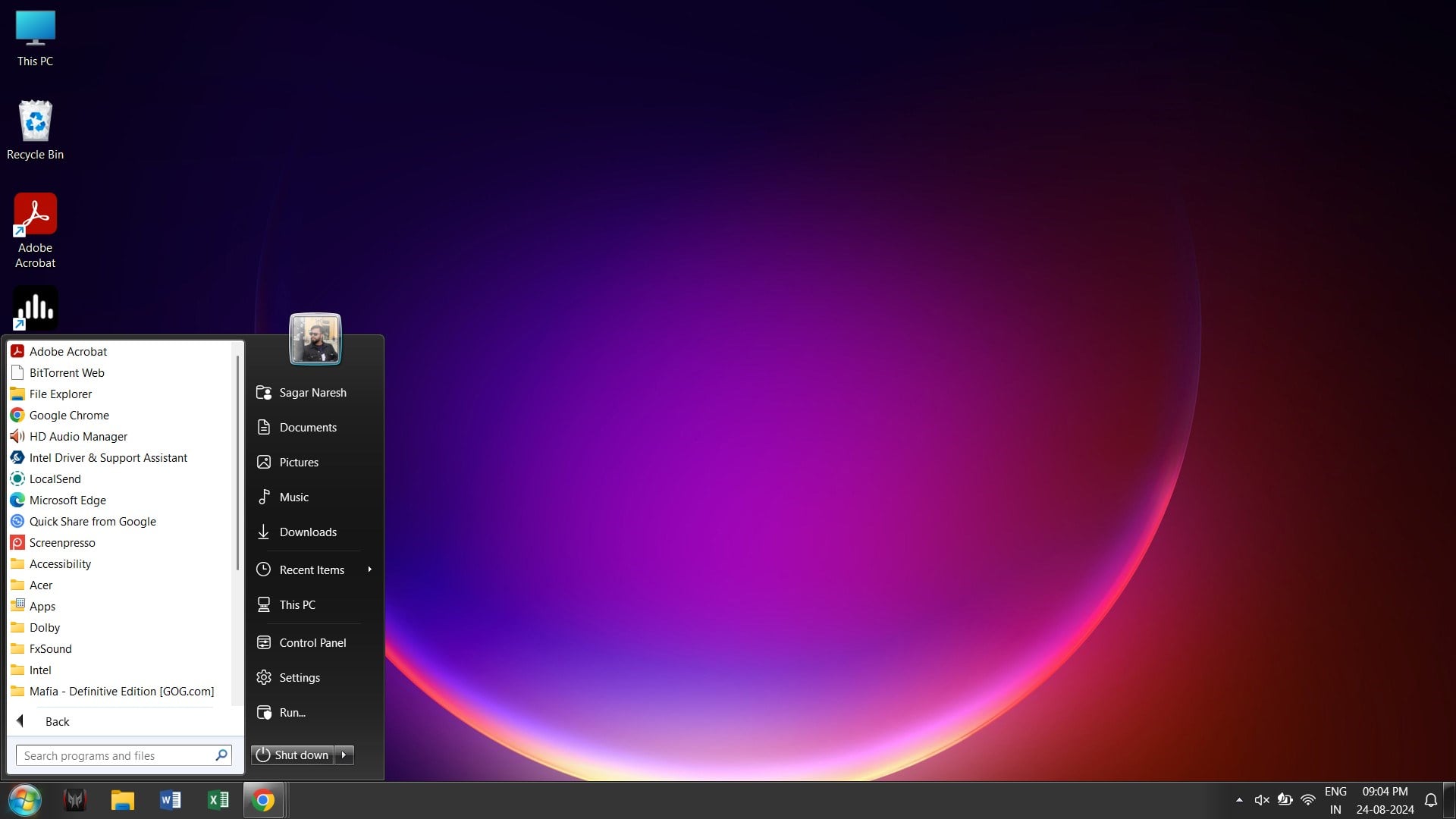
- The app will automatically launch. In the StartAllBack Configuration window the style you want to choose. In our case, we went with the Remastered 7 option.

- From the left pane, you will have the option to tweak the below settings:
- Start Menu
- Taskbar
- Tray icons
- Explorer
- Advanced
- Custom start menu coloring
- Custom taskbar coloring
- Tweak as per your preference and see your Windows 11 Start menu transform into a Windows 7 Start menu with a personal touch.
Modify the look of your Windows 11 home screen
There are more ways you can follow to customize the look of your home screen. For instance, you can check out our guide, which mentions how you can hide the hover cards for inactive apps on the taskbar in Windows 11. We also have a list of some of the best apps that can elevate your Windows PC experience. Let us know in the comments below which one of the above apps you used.

