

iPhone is the world’s best smart phone available today without any doubt. People carry their phones everywhere they go, and hence there is always a chance of them forgetting their iPhone somewhere or the iPhone getting stolen. Learn how to track, message, erase and recover your lost or stolen iPhone.
Table of Contents
Locate or Track iPhone

1. Track iPhone via Find My iPhone app
Apple has announced a new service called Find My iPhone that will allow iPhone owners to remotely locate their lost or stolen iPhones using the iPhone’s GPS. The service will be available as part of Apple’s MobileMe online subscription service.
Find My iPhone will pinpoint the iPhone’s current location using Google Maps and let owners send and display a message on the iPhone even if it’s locked, presumably to provide information on how to return the phone to the owner of the phone. The Find My iPhone feature can also force the iPhone to play a sound for 2 minutes, which is useful for not only getting the attention of the finder of iPhone but also locating it between couch cushions.
The Find My iPhone feature will require a subscription to Apple’s MobileMe service, which costs $99 a year (currently $65.99 on Amazon.com) after a free 2-month trial. Update: Find my iPhone Goes Free with iOS 4.2
Update 2: Find my iPhone is now part of iOS 5 via the iCloud.

2. Recover your Lost/Stolen iPhone with Navizon app
Navizon is a hybrid positioning system combining GPS, Wi-Fi, and Cellular triangulation techniques. It calculates the geographic location of a wireless device by analyzing the signals from nearby Wi-Fi access points and cellular towers and comparing it against a database of known data points. A new option called Locate-by-SMS allows you to locate your lost iPhone by just sending an SMS text message to it.
Download Navizon
3. iPhone anti-theft solution – iLocalis
iLocalis lets you track your iPhone device location and also remote control it! It is considered as the best theft-tracking and remote control utility for Apple iPhone.

iLocalis has the following uses-
- Never lose your iPhone: If it is missing, just log onto the iLocalis site, and you’ll know where it was located last.
- Retrieve a stolen iPhone: If your iPhone is stolen, you can log into the site and check out where it’s at. Extra features built into iLocalis allow you to send text messages or make calls on your iPhone when you don’t even have it with you. If your iPhone is stolen, log in and send yourself a text message. If the thief changes the sim card, you’ll have their phone number!
- Allow your family and friends to know where you are: iLocalis will send a message to your friends when you are nearby. You can also set it up to allow your friends to locate you. If your friend also has iLocalis, you can send messages to each other for free. No text messaging charges.
- iLocalis can also be used for a business that needs location services for their employees. Employees carrying iPhones with iLocalis can be tracked via the website easily.

Note: iLocalis needs a jailbroken iPhone with Cydia installed and supports all firmware versions on iPhone 3G and 3GS.
Related Read: How to Turn Off Location on iPhone
4. GPS Phone Tracker
GPS Phone Tracker is a location-based social app aimed to keep track of your friends and family members all the time. It maps the location of your phone, and everyone else’s pretty accurately on a virtual map. This can help you find lost or stolen phones when required. A must-have app, considering it’s free!

Alternatives include Footprints, Device Locator and GadgetTrak.
5. GPS tracking for iPhone with Mobile Spy 3.0
Mobile Spy version 3.0 spy software for Apple iPhone from Retina-X studios allows users to track GPS locations, SMS messages and calls of employees, teen or family mobile phones by logging into SSL secured online control panel from any computer or phone’s web browser.

Mobile Spy allows users to monitor their handsets in real-time and runs in the background behind all other applications. After the spy software is set up on the cellphone, it will silently record SMS messages, GPS locations, and call activities and then upload the data to your private Mobile Spy secure online account.
The Mobile Spy version 3.0 software is compatible with all iPhone models, Windows Mobile, or Symbian OS-based smartphones and is priced at $99.97 (1-year subscription).
6. Find and Recover your Stolen iPhone with iHound

This free security program alerts you when your iPhone is connected to another individual’s computer. It will also track down the location of where your device is being used.
When your missing iPhone is being plugged into a computer, you will:
1. Get an email saying that your tracked device is being located.
2. Get a detailed report on where it is being used by logging in to iHound’s website.
The second method can be very useful when the stolen iPhone is switched off and later gets connected to a computer for changing software or formatting the memory card.
Download iHound for iPhone or iPod Touch
7. MyFoundCast
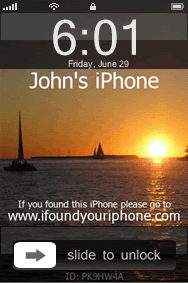
Oh yes, this is a bonus. MyFoundCast, a patent-pending technology, is the internet’s first lost and found service that allows you to create custom wallpaper and embed information into that wallpaper so when somebody finds your iPhone or iPod Touch they will know how to return it. All members are given a unique tracking ID and automatically registered in our lost and found database. You may register the serial number of any iPod or iPhone.
I am not sure if this really works. If someone is honest enough to return your iPhone, he/she will do some basic research on the owner of the iPhone and return it back. Isn’t it?
Other Options
8. GadgetTrak
9. FoneHome
10. Phone Trace

