
The following step-by-step tutorial will help you unlock your iPhone 3G and iPhone 3GS with the latest iPhone 3.1.2 firmware using ultrasn0w. This unlocking guide applies to iPhone 3G and 3GS only. Before you can follow these instructions you must have a jailbroken iPhone if you haven’t jailbreaked your iPhone 3G then follow our guide on How to Jailbreak iPhone 3G on OS 3.1.2 Pwnage Tool.

UltraSn0w is a small daemon that is launched on boot. It injects the payload at boot and also whenever there is a baseband reset. You won’t notice anything about it other than that your third-party sim now works. Once you have a Jailbreaked iPhone then you can use these easy steps to Unlock your iPhone.

Note: This unlocking guide will work for you only if your Modem Firmware (Baseband) version is 04.26.08. If you have upgraded directly to iPhone 3.1.2 stock firmware from iTunes then you are pretty much out of luck for now.

How to Unlock iPhone 3G 3GS 3.1.2 firmware with Ultrasn0w?

1. Download and install the latest version of iTunes if you haven’t already.

2. Follow the guide here to jailbreak your iPhone 3G or 3GS using PwnageTool on firmware 3.1.2.

3. Once you are done with the jailbreak, you can now unlock your iPhone running jailbroken firmware 3.1.2 by using ultrasn0w 0.9.

4. Press to launch Cydia Installer from your Springboard.

5. Press to select the Manage tab at the bottom of the screen and touch on Sources

cydia-unlock

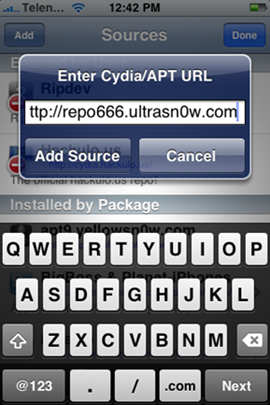
6. Touch on “Edit” and then on “Add”. You will be prompted to enter a url source as seen in the screenshot below. Type “http://repo666.ultrasn0w.com” and touch on “Add Source”.
unlock-iphone

7. Cydia will now automatically update your sources by following a series of automated steps.

8. After installation is completed. Search for “ultrasn0w” in Cydia and install this application. This app will automatically unlock your iPhone so that you can use it with any carrier.

ultrasn0w

9. Now press the Home button then power off and power on the iPhone. You do this by holding down the power button for 3 seconds then moving the power slider that appears to the right. Press the power button again to turn on the phone.

10. You should now be able to insert the SIM of your choice!

Update 1: I can see from the comments most of the people who are saying the tool didn’t work are having baseband 5.11.07. I had clearly mentioned in the article (under Note) that this will work only for users on baseband 04.26.08

Update 2: Good news! Blacksn0w to Unlock 05.11.07 Baseband on iPhone 3.1.2 Firmware

Update 3: Unlock iPhone 3.1.2 baseband 05.11.07 With BlackSn0w

Thanks RedmondPie!

Free subscription: Subscribe to RSS feed or get daily tips in your email
You must click confirmation link sent in email. If you don't see the email, check the spam folder

Around the Web:

Raju Raju is the owner and editor-in-chief of TechPP. A proud geek and an Internet freak, who is also a social networking enthusiast. You can follow him on Twitter @rajupp

View Comments so far | Have Your Say!

  1. I’m using iPhone 2G and used blackra1n to unlock 3.1.2. Now, after the unlock I can’t access GPRS/Edge on my phone. Is this related to the unlock and should I try with some other tool again ?

  2. gordon

    ok i have a 3g iphone that is jailbroke and unlocked using ultrasnow on 3.0 and 4.26 i want to restore my phone to the new firmware can i use blackra1n to jail break and unlock for t mobile

  3. ziggy

    i have a 3g iphone that is jailbroke and unlocked using ultrasnow on 3.1.2 and 05.11.07 and it work’s 100000000000% you need to unlock it with blacksnow

  4. 02.28.00

    for 02.28.00 “no service” carrier problem:
    - upgrade to custom 3.1.2
    - remove ultrasn0w if installed and reboot
    - THEN install Fuzzyband from cydia
    - run Fuzzyband to update baseband to 04.26.08
    - install ultrasn0w
    - reboot
    - enjoy!

  5. carla

    hello, have already updated to have installed blackra1n and when i selected the packages : cydia, rock, snow, error message displayed : error downloading snow, could not download.Domain=NSURLErrorDomain Code=>-1001 Userinfo=0x199b80 “timed out”, pls. help, what shall I do

  6. Harish

    in on a iphone 3gs 3.1.2 , firm ware 05.11.07, bootloader 6.04. followed tutorial to the letter and got Snow off blackrain with cydia. however when i put in sim card from other carrier it just comes up with “different sim detected please connect to itunes” however i have signal “i recived a text at this point” . but i cant use anything on the phone unless i put in my rogers sim again. anyone got any ideas. thanks for your time.

  7. thomaar

    No matter how many ways or times I try to Jailbreak/Unlock my brand new Iphone 3GS, I get the msg “Different SIM detected: Please connect to ITunes” when I put my TMobile SIM in. Here’s the steps:

    1. I used blackrain per the instructions without ITunes running. I hit make it rain. Everything looks good like its down loading.
    2. I enable my wireless on the phone and launch the blackrain icon on my phone. I install both Cydia and snow. Everything appears to install ok
    3. I swap my ATT sim with my TMobile sim and get the above error msg. I can make and receive calls with the TMobile sim in. The weird thing is when I receive a call, it is as if my contacts are loaded because the persons name appears that is calling me. It also recognizes that it is a TMobile sim by the Tmobile at the top left hand corner of the phone.
    4. The extra things I have done to try to make it work.
    a. Restore the iphone using ITunes then started the process all over again.
    b. Repeated the process with 3G enabled and disabled
    c. Tried to install Blackrain with either the Sim cards (Tmobile or At&T) and with none
    d. After install of snow & cydia with At&t sim, removed Sim, did reboot then installed Tmobile sim

    Here are the particulars on my phone: Version 3.1.2 (7D11); s/n 32946 (1st 5 #s); model MC123LL; firmwre: 05.11.07

    I am running from a Windows 7 machine. I also tried with Windows XP

  8. SHibu

    HI, i got 3g 8gig iphone with baseband 5.11 with version as 3.1.2 and i run blackra1n and follwed the step it worked fine and go the the rain-drop icon in my iphone. Then i tried to open the blackra1n application from iphone with Wi-Fi ON but was not able to install the “Cydia” or “Rock” or “Snow” as it was showing “Internet error occured”. Because of this i uninsatll the blackra1n from my iphone device and tried running it again but it only reboot the the iphone and i was not able see the icon. Now i am stuck please let me know how should i go ahead from here…thanks….

  9. Thanks for this. IT worked fine on my Iphone 3G 3.0. I hope everybody had the good result from it.!

  10. khanan

    thanks man a lot
    i was feeling i had lost it all
    thanks man once again
    really i owe you man
    thnks

  11. Hi, I am really new at this and I was told that once i jailbreak the iphone 3gs (with the 3.1.2), there r a few things i cant do.. such as i cant turn off my phone anymore and no direct updates from itune (this one i fully understood)

    But, about the ‘cant switch off the iphone’ is it true? and I was informed that if it is switch off, it will go into ‘sim lock’ and I need to send it back to a iphone dealer.

    Can someone shed a light on this for me pls?

    Thanks.

  12. Aaron

    I got the no service after installing custom firmware and I have the 4.26 baseband. I had to go into Cydia and install the repo666 listed under sources even though it showed it was installed. Phone rebooted and it worked perfect.

  13. Bernard

    I need help unlocking my iPhone 2G and the baseband in it is 04.05.04_G
    I’m trying to unlock it, but I only get to jailbreak it. Can someone tell me how to unlock it even thought I don’t have at&t service no more, I cancel them long ago.

  14. ahririaiauag

    is there an ULTRASN0W for baseband 5.11.07?

  15. I updated 3.1.3 firmware in my I Phone 3G accidentally & jail broken with redsn0w. But i tired to unlock it using ultrasn0w. but when i add repo666.ultrasn0w.com in cydia, after searching it shows that repo is not found. this could be because you are trying to add a legacy installer respository (these are not supported). please contact the author of cydia with any question

    why is this. please help me

    thanks
    Ajay

  16. Laughter

    Hi, I’m new to this Iphone thing. I had a 2G, like it very much until I tried to put music into it. I accidently the new version of itune. The phone doesn’t working anymore, it’s asking for the original sim which I don’t have one. Can anyone help? Thank you in advance.

  17. HI Everybody I have a unlocked, jailbroken iphone 3g with bootloader 06.04 and baseband of 04.26.08 using T-mobile carrier. My question is can I upgrade to 3.1 with out any problem? Please help.

  18. Annie

    Hi,
    on my iphone it says ‘Searching..’ and it hasnt gotten a network for a long time now.. have i done somthing wrong..? pleaasee help !

  19. 3.12 unloked :)))

    add source in cydia blackra1n.com after download , install blacksn0w , it worked for me : 3.1.2 modem firmware 5.11.07

  20. Is it possible to unlock iphone 2G 3.1.3 without wireless network or cydia or ultrasnow

  21. aCtiSyS

    If you guys can’t it right for your carrier service do follow below tricks:-

    AFTER BLACKSN0W
    1. switch OFF WIFI
    2. switch ON 3G
    3. switch ON DATA ROAMING
    4. set PLANE MODE ON
    5. eject your SIM card
    6. put back de SIM TRAY
    7. lock screen for 1 minute
    8. eject SIM tray and inside your SIM card
    9. set PLANE MODE OFF
    10. once you get your signal, set 3G and Data Roaming OFF
    11. try make a call.
    12. Done :)

  22. Trupti

    Hey plz help me out I hav 3g iPhone few days ago updated my phone to 3.1.3
    nw d prob is I m nt able to unlock my phone as baseband
    is 5.12 n boot loader is 5.09 I tried wid fuzzyband bt it’s of no use plz help me out
    when wil d unlock wil b released
    I jst can’t wait fr a month

  23. Carla

    hi, have jaibroken & unlocked iphone 3g 3.1.2 but wifi signal cutting out at first then disappeared, tried to restore it then jailbreak again, wifi connection did not comeback and so is the unlock, question, how can i jailbreak & unlock without wifi, pls. help im really desperate

  24. Hi Raju,
    Is it possible to unlock baseband 05.12.07 on Iphone 3G

  25. hello can anyone tell me how can i unlock myiphone 3g of version 3.1.2 and modem firmware 5.12.01

  26. sanil sen

    hi everybody , I just unlocked 3.1.2 with the baseband

  27. sanil sen

    hi everybody , I just unlocked 3.1.2 with baseband 05.12.01 . thanx for all your help

  28. Prabakar

    Hi Mr.sanil sen, I am waiting for my iPhone 3G 3.1.2 baseband 05.12.01 for long time. Its already jailbroken using BlackRa1n, I tried to unlock using blacksn0w, ultrasn0w etc. But no luck. My iPhone doesn’t be unlocked till now. Waiting for long time…Please update me how did you unlocked it?

    Thanks.

  29. Hi, I’ve already jailbreak my iphone 4 but now i have to unlock and Cydia is disappear.I tried to do jailbreak again but the message is

    Welp.
    Version too new. You need to downgrade to 4-0.1/3.2.1.or earlier (wich may be impossible explanation) before you can use this site.
    more info

    I tried to jailbreak again with jailnìbreakme 2.0 star but I can see only an indications about what is and what can do jailbreak.
    have you any solution for me? I hope you understand, I’m italian and my english is terrible.
    thanks a lot for every suggestion.
    mara

  30. apay01

    i use ultrasnow and its work after 1 month my the signal is become unfunctional and i decided to reinstall the ultrasnow but still not working, i uninstall the repo666.ultrasnow,com and install it again i cannot install anymore prompt says bad url… what will i do so i can unlock my iphone again..please help me out…thank u

Trackbacks/Pingbacks

blog comments powered by Disqus
Copyright 2010 Technically Personal! 
Blog Design Studio