

AMD has unveiled its latest version of FidelityFX Super Resolution called FSR 3. According to AMD, it is a major improvement over the previous version FSR 1 AND FSR 2. It introduces the new Native AA (Native Anti Aliasing) upscaling technology and image generation using improved AMD Fluid Motion Frames (AFMF). Combined with AMD’s new latency reduction technology Radeon Anti Lag+, FSR 3 is overall a big improvement over FSR 2.

According to AMD, the combination of Native AA for maximum fidelity, frame generation with an improved version of Fluid Motion Frames, and Anti Lag+ for ultra-low latency will help gamers achieve more than double or triple the frame rate in supported games. According to AMD, FSR3 will help improve the gaming experience not only in 1080p games, but also in high-resolution 4k games, while boosting frame rates when CPU becomes a bottleneck.
If all this interests you and you want to know more about FSR 3 in detail, you’ve come to the right place. In this article, we’ll cover how FSR 3 works, what features it offers, what games you can use FSR 3 in, when it will be available, and much more.
Table of Contents
How FSR 3 works
FSR 3 is not a completely new technology, but an improvement over FSR 2, and we might add that it is a massive improvement over that. It uses Frame Generation, which allows completely new frames to be generated in games and combined with existing frames to provide a smoother gaming experience, made possible by the combination of two technologies: Frame Interpolation and Optical Flow, enhanced by AMD’s Fluid Motion Frame technology.
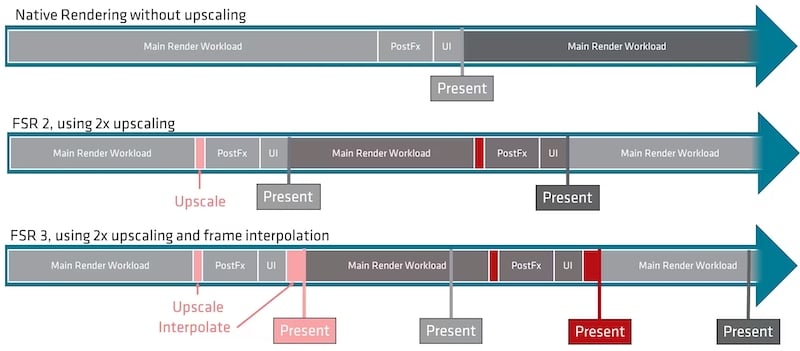
Frame generation in FSR 3 works by taking a frame/image from the game and passing it to the Optical Flow workload to improve the performance and quality of the image. Then the frame is passed through the new frame generation workload, and both workloads run asynchronously to improve game performance by reducing the impact on the game’s render pipeline.
AMD also uses a spare swapchain implementation that handles both the optical flow workload and the frame generation workload and determines the pace of the frames, i.e., when the user sees a real frame and when they see a generated frame. FSR 3 works best when the post-upscaling frame rate is around 60 fps. Then it can generate frames at 120 fps or even higher.
New Feature that FSR 3 offers
It’s no wonder that FSR 3 is a big improvement over FSR 2, but that’s because AMD was able to pack a lot more into it this time around than it did into FSR 2. This extra power is achieved primarily through three things: Native AA (Native Anti-Aliasing), New Frame Generation, and Anti Lag+. In combination, they can double the frame rate even at 4k or maximum ray tracing settings in supported games.
Frame Generation

AMD has introduced a new Frame Generation technology with FSR 3. According to AMD, Frame Generation can double the performance of FPS in supported titles, even at the most graphically intense settings, even at high resolutions like 4k, and even at maximum ray tracing presets. The best part about frame generation is that AMD says it doesn’t require special hardware like AI accelerators to use frame generation. According to AMD, frame generation can be used via software because, simply put, it analyzes past frames to determine the motion vectors and then inserts the generated frame before the future frame.

Even though this all sounds very interesting, we should not forget that according to AMD, the image generation works best when at least 60fps is reached before the image generation kicks in. This way, FSR 3 delivers the best results and can reach a performance of 2x to 3.3x.
Native Anti Aliasing
Native AA stands for Native Anti Aliasing and is a new quality mode in FSR 3. The main point of Native Anti Aliasing is that you can use FSR 3 without upscaling, but with the high-quality anti-aliasing and sharpening provided by FSR. Simply put, any title that supports FSR 3 and does not have a good implementation of TAA can use Native AA for a better and sharper image.

But Native AA also has a small drawback for performance: the image quality is improved, but the frame rate may suffer a small dip. According to AMD, Native AA can bring a significant performance boost in combination with Frame Generation. It can be assumed that Native AA and Frame Generation offer the best of both worlds if AMD’s claims are true.
Anti Lag+
With FidelityFX Super Resolution 3, AMD has also integrated its latest latency reduction technology for ultra-low latency gaming. AMD’s introduction of Anti Lag+ ensures very low latency in supported titles, but Anti Lag+ also suffers from the same problem as Frame Generation, which AMD recommends when at least 60 fps is achieved to get the best results.
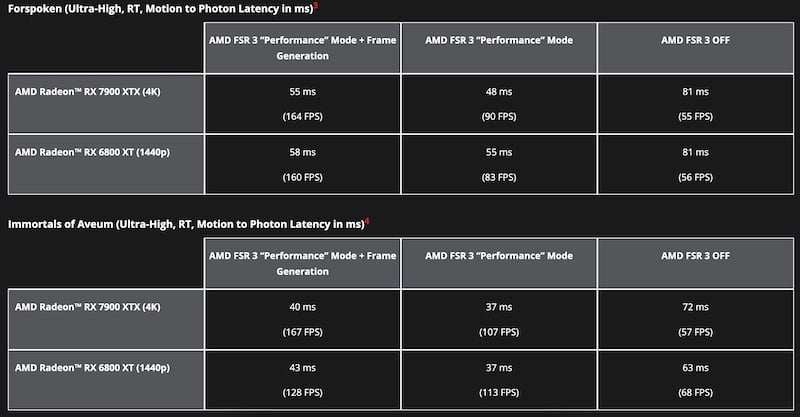
It is important to know that AMD’s Anti Lag+ only works with AMD’s 7000 series GPUs. With older AMD 6000 series cards and the previous generation, users can only use the Anti Lag technology with FSR 3, not Anti Lag+. Although it’s not a big deal, I think AMD could offer Anti Lag+ for older GPUs as well. Let us know what you think.
Can your GPU run FSR 3?
Well, the short answer to that question is yes! But the statement isn’t entirely true, because FSR 3’s upscaling technology is available to anyone with an RX 590 or GTX 1000 series card or higher. According to AMD, this was done because FSR 3’s Frame Generation capabilities depend on the GPU’s raw power, and older hardware may not have as much raw power and Frame Generation may not improve frame rates when used on hardware of that generation.

But when it comes to Frame Generation with FSR 3, it does not require machine learning hardware, which is why it is supported on a broad range of GPUs. Frame Generation can be used with any kind of upscaling, but it only works on GPUs from the RX 5700XT and above and the RTX 2000 series or above, which means cards from the 5000 series like the RX 5600 and 5500 can only benefit from FSR 3 upscaling. On the other hand, all cards from the 6000 series can use Frame Generation, which is a big advantage for GPUs like the RX 6500 and RX 6600.

FSR 3 supported Titles makes a debut
According to AMD, the number of games supporting FSR 2 has grown rapidly since its introduction. Today, there are over 300 titles that support FSR 2. FSR 3, on the other hand, was already announced with the RX 7000 GPU series in November 2022. It has been a long time since then, but now the wait is finally over. There are a total of 10 titles that will support FSR 3, 2 of which were originally announced and are finally making their debut today, September 30, 2023.

These titles are Forspoken and Immortals of AVEUM,, which you can play starting today. This makes them the first games to officially support AMD’s FidelityFX Super Resolution 3. AMD has also released the list of upcoming FSR 3 titles, which includes some popular titles like CyberPunk 2077, AVATAR Frontiers of Pandora, ForestPunk 2, Warhammer SPACE MARINE 2 and more.
AMD is also working with 15 game developers and publishers such as Sega, Ubisoft, and Unreal Engine, and is committed to supporting AMD FSR 3, according to AMD.
FAQs about AMD’s FSR 3
1. Will FSR 3 work on any GPU?
Even though FSR 3 will run on virtually any GPU, the results will not be as good. For this reason, AMD has given the minimum recommended requirements for the base configuration, but doesn’t prevent you from enabling/testing it on older hardware. If you use FSR 3 on older hardware, you may not get any performance increase.
2. Will FSR 3 work on iGPUs (Integrated GPUs)?
FSR 3 will work on virtually any GPU, but you have to keep in mind that for best performance we have to use AMD’s recommended GPU list. It doesn’t mention anywhere if FSR 3 will also work on iGPUs, but we do know that it was designed specifically for RDNA 3 GPUs, so any CPU with RDNA 3-based integrated graphics should work fine with FSR 3. However, we don’t know anything about performance benchmarks on iGPUs yet.
3. Is FSR 3 better than DLSS 3?
This is not an easy question to answer because we know that both are upscaling technologies, one based on hardware accelerators and the other on pure software, AMD has done a fantastic job for gaming by making the technology available for almost all Nvidia and AMD GPUs. This makes it a win-win situation for all gamers, whether you have an Nvidia GPU or a AMD GPU, you can take advantage of FSR 3 and improve your gaming experience.
4. Will FSR 3 be available for Gaming consoles?
Yes, FidelityFX Super Resolution 3 will be available for Xbox Series X and Xbox Series S. However, we do not know when the first title for Xbox Series X and XBOX Series S with FidelityFX Super Resolution 3 will be released.
5. Can FidelityFX Super Resolution 3 help us deal with performance loss of CPU bottleneck?
FidelityFX Super Resolution 3 won’t help you overcome the CPU bottleneck in gaming, but it will improve your FPS in games when enabled on the listed GPUs.
6. Which will be the first game to support FSR 3?
There are 2 games that use FidelityFX Super Resolution 3 that you can safely enjoy right now: Forspoken and Immortals of AVEUM. They are the latest titles to support FSR 3.

