

Building a PC with a low budget doesn’t mean poor performance. Cheap components are always getting better, but when budgeting, the PC doesn’t skimp on important things like extra fans, CPU coolers, and even good-quality RAM and storage for those things. These are important components that can make the difference between success and failure. In this blog, we will discuss one such component: the CPU cooler.

While many budget CPUs work well with the cooler that comes with them, if you upgrade your PC later on, these coolers will become a bottleneck sooner than you think. That’s why it’s important to buy a high-quality CPU cooler. Even if you are using a cheap CPU, a good air cooler will benefit your CPU more than you think.
In this blog, we will introduce you to the best budget CPU coolers that will allow you to cool even some of the best chipsets on the market without sacrificing thermal and acoustic performance. All of these budget coolers are under or around USD 50 so that they won’t break your wallet either. We’ve got something for everyone, whether you’re a budget-baller or a mini-ITX enthusiast.
Now, let’s take a look at our first budget CPU air cooler.
Table of Contents
6 Best Budget CPU Coolers to Buy
ID-COOLING SE-214-XT ARGB CPU Cooler
We start our list with probably the cheapest option on our list. We have the ID-Cooling SE 214-XT ARGB. This budget CPU air cooler shows what $18 can do when invested properly. It is a cheap CPU air cooler with 4 heat pipes and a solid heatsink that can cool any 65-watt CPU. It also comes with a pre-installed ARGB fan that is also PWM-controlled.

Unlike other budget coolers, it is easy to install and comes with brackets for Intel’s latest Socket 1700 and AMD’s Socket AM5, but it also supports earlier LGA 1200 and 1150 series as well as AM4 sockets. The noise performance of this cooler is also excellent for the price. The fan can be regulated from 500 to 1500 RPM, and the ID-Cooling promises an airflow of 68 CFM, which is insane for the price of 18 USD. It is a much better solution for any 65-watt CPU than any pre-installed box cooler from AMD and Intel.
It will allow most 65-watt CPUs to reach their full turbo clock speed without bottlenecking. The ID-Cooling SE-214-XT ARGB is highly recommended because it offers so much. However, we only recommend it to those using a locked CPU instead of an unlocked CPU. This affordable CPU air cooler is available in 2 colors.
Buy ID-COOLING SE-214-XT ARGB CPU Cooler.
ID-COOLING FROZN A410 Black
Now, let’s take a look at something that can also cool some unlocked CPUs without breaking the bank. The ID-Cooling Frozen A410 Black, this unobtrusive, budget CPU cooler, is your best bet for around $30. Before we get started, let’s get a few things straight: This cooler comes with 4 heat pipes and a non-RGB PWM fan, is available in black, and costs between $25 and $30.

This makes it a great option for anyone using an unlocked mid-range CPU like the i5 12600k, Ryzen 5 5600x or even Ryzen 5 7600x. Although this budget CPU air cooler can also cool a 5700x and a 13600k when running at their default settings. This budget CPU cooler comes with black 120mm FBD fans equipped with rubber grommets, which helps keep the noise level under 30dB, which is pretty good for a cooler that costs under $30.
It is a single-tower air cooler with a height of 120 mm. The included FBD fan can deliver about 72 CFM of flow, which is amazing for a single-tower fan, especially in this price range. Since the fan is PWM-controlled, it operates at a fan speed of 500 to 2000 RPM. The package includes all the necessary parts to install the fan.
This affordable CPU air cooler can be installed on both LGA 1700 and AM5 sockets but also supports the earlier Intel 1200 and 1150 series as well as AM4 sockets.
Buy ID-Cooling Frozen A410 Black.
DeepCool GAMMAXX AG500 ARGB
The DeepCool GAMMAX AG500 is one of the most popular budget coolers on our list. For that reason alone, it is by far the best-performing budget cooler CPU on our list that can be had for under $35 USD. Let’s take a look at what this budget CPU cooler has to offer.

The DeepCool GAMMAX AG500 ARGB is a single tower air cooler that comes with a 120mm fan ( ARGB PWM) and is available in two colors (black and white). It features 5 heat pipes that enable it to cool some extremely powerful CPUs such as the i5 13600k, the Ryzen 5 7600x, and even the non-K variants of the i7 and a non-X variant of the Ryzen 7. It can reach a maximum TDP of 240 watts at any time and under any kind of load, whether you’re editing, gaming, or streaming on your Windows PC.
The ARGB PWM-controlled fan can reach up to 1850 RPM while delivering a maximum airflow of about 67 CFM. The fan should work well in any ATX or M ATX build. The best thing about this budget CPU cooler is that it only costs about $35 USD, making it one of the best CPU air coolers for the money. This budget CPU cooler is able to handle all budget and mid-range models CPUs and also some high-end models.
However, we recommend you buy it only if you are using an unclocked mid-range processor CPU like Core i5 or Ryzen 5 to get the best performance. And just like the other air coolers on our list, it is also compatible with Intel’s LGA 1700, 1200, 1150(Series) and AMD’s AM4 and AM5 sockets.
Buy DeepCool GAMMAX AG500 ARGB (Black)
Thermalright Peerless Assassin 120 SE ARGB
The Thermalright Peerless Assassin 120 SE is probably the best-performing budget air cooler CPU under $40. There are a few reasons for this: It comes with a dual tower design, 6 pure copper heat pipes, and 2 PWM-controlled ARGB fans that can go up to 1500 RPM. The fans can generate an airflow of about 66 CFM while being the quietest CPU cooler you can imagine. This budget CPU air cooler only produces about 25 dB of noise, making it the quietest CPU cooler on our list so far.

The Thermalright Peerless Assassin 120 SE is probably the best air cooler for unlocked CPUs like Ryzen 7 and Intel i7, but it also works great with the i5s and Ryzen 5s of this world. But one thing you should keep in mind is that this cooler is huge, so you need to check the height of your RAM first before you can install it. Otherwise, you might run into problems. Also, this cooler is not suitable for mini ITX PC builds.
This affordable CPU dual tower air cooler comes with all the materials for installation on Intel’s LGA 1700, 1200, 1150(series) and AMD’s AM4 and AM5 sockets. Installation is very simple, but remember not to install the cooler until you have all the cables plugged into your motherboard. Otherwise, it would be a nightmare to install it first and then try to connect all the cables.
Buy Thermalright Peerless Assassin 120 SE.
DeepCool GAMMAXX AG620 BK ARGB
The Deepcool GAMMAX AG 620 BK ARGB is by far the most impressive budget CPU cooler on our list. With a price tag of around $50-$55, it can easily kick some budget AIO coolers out of the park.
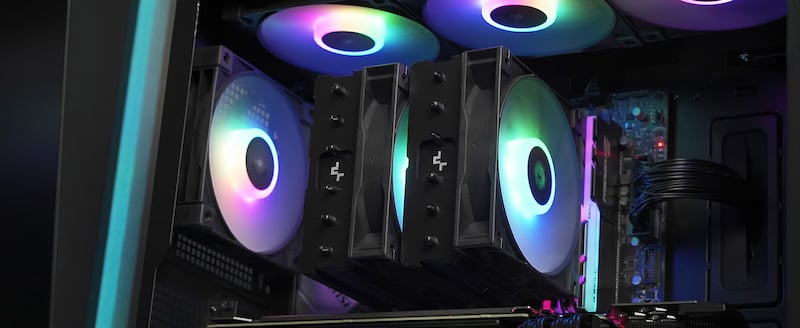
It features a dual-tower heatsink and 2 PWM-controlled ARGB fans that operate at a maximum power of 1850 RPM and produce about 67 CFM of airflow. It has plenty of RAM clearance, and the fans can be easily adjusted. While the thermal performance of this fan is impressive, the noise is okay for a dual-heat sync design but not the best: it can reach up to 35 dB at full speed.
This budget CPU air cooler is meant for high-performance unlocked chipsets like Core i7 13700k and Ryzen 7 5800x and 7800x. With this budget dual tower air cooler, these processors can easily reach their maximum turbo frequency, and you can also overclock them if you want to. And that’s a big deal for an air cooler that costs around $50 USD.
However, it does have a height of around 160mm, and we don’t recommend you install this cooler in a mini-ITX build. Otherwise, it is a solid option for any M-ATX or ATX build. You can check it out for yourself at the link below.
Buy Deepcool GAMMAX AG 620 BK ARGB.
ID-COOLING IS-55 ARGB CPU Cooler
Let’s take a look at a budget CPU air cooler that is perfect for all mini-ITX enthusiasts: ID-Cooling IS-55 ARGB. This is probably the best budget CPU cooler for all mini ITX PC builds. It is an ultra-low profile CPU cooler with an overall height of about 56 mm and a 120 mm slim and low profile PWM controlled ARGB fan that can reach up to 2000 rpm while being quiet up to 36 db, which is to be expected for a budget CPU air cooler made for Mini-ITX PCs.

This Budget CPU air cooler shines when it comes to performance, and it can easily manage CPUs like Core i5, Ryzen5, and even their unlocked variants in their stock settings. We would not recommend not overclocking them as it can handle them at their stock settings.
One thing to keep in mind before buying this cheap air cooler is that if you have a high-end motherboard with a lot of heatsinks around the I/O, then you’ll need to use RAM sticks that are only 33mm tall. If that’s not the case, you can simply rotate the CPU cooler to use any RAM of any height.
Like the other air coolers in this list, this CPU cooler comes with 5 heat pipes and all the installation materials needed for Intel and AMD sockets. It is compatible with LGA 1700, LGA 1200, LGA 1150(series), AM4 and AM5 sockets. It is available in 3 variants: in white with an ARGB fan, in black with an ARGB fan, and in black without an ARGB fan.
Buy ID-Cooling IS-55 ARGB CPU cooler
These budget CPU coolers offer great value for money and are available in different form factors for different builds. They can help you boost the performance of your new or existing PC build if you are coming from the included cooler or another cooler that is not working properly for you. We also recommend you use a high-quality thermal compound to get the maximum cooling performance. Let us know which cheap CPU cooler you chose for your PC build.
FAQs about Budget CPU Coolers
1. What is a good and cheap CPU cooler?
A good and cheap CPU cooler is one that doesn’t exceed your budget and can do the job of cooling your CPU. Nowadays, there are many great budget CPU coolers that are able to cool all budgets, most of them in the mid-range and also some high-end CPUs. You can pick a cheap CPU cooler from the list that fits your needs and get the best value for your money.
2. Are CPU air coolers worth the money?
Yes, they are worth it. There are plenty of capable air coolers out there that can rival some mid-range AIOs, and more importantly, there are plenty of people at PCMR who want to stick with a CPU air cooler instead of going for an AIO because of the sheer reliability of air coolers. Especially with budget builds, we always recommend choosing a high-quality cooler, as you can’t always get all the right motherboard connectors on budget motherboards, which can quickly become a problem!
3. Does cooling your CPU affect FPS?
Yes, the cooling of your CPU has a positive effect on your FPS. When your CPU is properly cooled, it can reach its boost clock rates more easily and last longer. That’s why it’s important that you invest in a good CPU cooler. You can choose any cooler from the blog above to have a great experience. It doesn’t matter what kind of work you are doing on the CPU, whether you are gaming, streaming, or editing; just get a suitable cooler for your CPU, and you will have a great experience.
4. Is water cooling better than air cooling?
The answer is not as simple as you think. While water cooling is better for your components because they can maintain their peak performance longer than air cooling, there are obvious drawbacks: Water cooling is more expensive than air cooling, and inexpensive or mid-range components don’t necessarily need water cooling to perform at their best, and there’s a risk of destroying your hardware if something goes wrong.
5. How much a good CPU cooler should cost?
A good CPU cooler can cost anywhere from one to several hundred dollars. The cost of a CPU cooler depends directly on what kind of CPU you are using. For example, if you’re using an i3 12100F, you won’t need to spend a dime on an air cooler, as the inbox cooler will suffice. An i7 13700, on the other hand, needs a good CPU cooler, even if it comes with it, as it is much more powerful and hotter than the i3 CPU.
You should first be clear if your CPU needs a new cooler at all or if your current cooler is sufficient. If you are building a PC, you should consider if you have an extra budget for a CPU cooler and then make a decision.

