

Quick Answer
The best clipboard management apps for iPhone include Paste, Clipboard++, SnipNotes, Anybuffer, Clipbetter, and others that offer features like history tracking, cross-device sync, keyboard integration, and smart organization, making copy-paste far more efficient than the default iOS clipboard.
I recently switched from Android to iPhone and there’s one feature I really miss – clipboard management. On my Android phone, I used to use the Google keyboard, which had a clipboard management feature. This allowed me to access previously copied text and images and simply copy and paste them wherever I needed them.

After switching to the iPhone, I immediately installed the Google Keyboard in hopes of getting that feature back, but I was disappointed to find that it is not supported on iOS. After some research, I found that there are some great third-party apps that allow you to manage clipboard content on the iPhone. In this guide, I’ll introduce you to ten of the best clipboard management tools on iPhone.
Table of Contents
How to choose the best clipboard management apps for iPhone
- Paste: Overall Best Pick, Supports multiple content types, Syncs content across all other Apple devices, and offers the best user interface.
- Clipboard++: Simple and easy-to-use clipboard management app for iPhone
- SnipNotes Notebook & Clipboard: A Notebook and clipboard organizer app for iOS
- Any buffer: Simple and easy-to-use clipboard manager with wide supported content types.
- Clipbetter: Simple Clipboard management tool.
- Clipboard by Tariq Almazyad: Simple clipboard manager tool with PIP mode and keyboard access feature
- PastePal Clipboard Manager: Powerful and best alternative to Paste Clipboard Manager.
1. Paste

Paste is the first choice for many users, especially those who use Mac and iOS devices. The app offers cross-platform support and allows you to synchronize clipboard content between iPhone, iPad and Mac via iCloud. Paste supports various content types and search functions, organizes the copied content efficiently, offers a simple user interface and is available in a free and a paid version.
Paste supports different content types for copying and organizing from the clipboard. It supports text, images and files. It automatically synchronizes clipboard content across all Apple devices, especially within the Apple ecosystem. For example, the content copied from Mac is automatically synchronized with iPhone. You can paste the text copied from your Mac to your iPhone. The experience is so seamless that it matches Apple’s level of seamless connectivity.
You can easily organize and access the contents of the clipboard in Paste. You can categorize the copied content into folders, tags or categories. Paste also has a search function. You can search the clipboard history to easily find previously copied items. You can easily access the contents of the clipboard using the iOS keyboard and Siri buttons, and it can be easily integrated into other apps such as day widgets and more. You can quickly copy and paste the content where you want it. You can also perform batch actions, such as copying multiple items at once. It also offers various customization options, such as the ability to include and exclude types of content.
The user interface is one of the biggest highlights of the app. It matches the other Apple elements and is simple and easy to use for both beginners and advanced users. The app offers a free version with ads that can be removed with a $0.99 in-app purchase. There is also a subscription model for advanced features at $1.99 per month or $14.99 per year. Users also have the option to get Paste for iOS for free with an upgrade on iPad if they have a Setapp subscription that also includes the macOS version of Paste.
Highlights:
Feature Description | Paste App Features |
|---|---|
Content Types Supported | Supports text, images, and files. |
Syncing Capabilities | Syncs across Mac, iPhone, and iPad through iCloud. |
Search Functionality | Provides a search functionality to find anything copied on any device. |
Organizational Tools: | Allows quick access to frequently needed items and has custom rules to specify what to keep and what to exclude. |
Ease of Access: | Provides easy access through Siri Shortcuts and an iOS keyboard for typing. |
Batch Operations | Allows pasting multiple items in the order chosen by the user. |
Customizable Actions: | Offers custom rules to choose actions based on the type of content. |
Security and Privacy: | Data never leaves your device or your private iCloud, which ensures privacy. |
User Interface: | The app is designed to blend into the user’s workflow unobtrusively. |
Price: | Priced at $29.99/year for personal use, with options for family and team subscriptions as well |
2. Clipboard++

Clipboard++ is a simple and easy-to-use clipboard management app for the iPhone. It supports different content types. It offers a simple and easy-to-use interface and a drag-and-drop function to organize the contents of your clipboard. The Clipboard++ app automatically recognizes the phone number and email address in the copied content and automatically assigns functions when you tap on the clipboard content.
The app keeps track of all copied content in the clipboard on your iPhone. It only supports text content, such as phone numbers, email addresses, links and other text-based items, such as text copied from websites or apps. It doesn’t support native synchronization, but offers the ability to copyand paste text between different devices using Apple Continuity features. Most of the time, however, this doesn’t work as expected.
You can find all copied content on the home screen of the app. There is no way to mark the content in the app or group it into folders. You can drag and drop the content. The content copied to the clipboard is automatically added to the app. You can only access and copy the content from the app. There is no support for keyboard integration or integration with third-party apps. This can be time-consuming, especially if you want to quickly paste the content into apps like WhatsApp. One feature I really like is that it automatically recognizes the text and adds features to it. For example, it automatically remembers the phone and email address and automatically assigns tasks to it.
The user interface is simple and clear. It’s not visually appealing, but it can be the best choice if you want a minimalist and straightforward look for a regular user. The app is free to use and there is no pro version. You can download the app from the App Store.
Highlights:
Feature Description | Clipboard++ App Features |
|---|---|
Content Types Supported | Text, email templates, email addresses |
Syncing Capabilities | Supports sync through Apple continuity |
Search Functionality | Yes |
Organizational Tools | No |
Ease of Access | Direct calling and opening links with a long press |
Batch Operations | Yes |
Customizable Actions | Editing and saving of items |
Security and Privacy | Secure |
User Interface | Clean and minimal |
Price | Free to use |
3. SnipNotes Notebook & Clipboard

SnipNotes is a notebook and clipboard organizer app for iOS. It can be described as a versatile clipboard alternative to the Notes app on iOS. The app allows you to save content such as text, images and notes to the clipboard. You can view and manage all your content in the app. The app also supports cross-platform features and the ability to synchronize notes across different Apple devices such as iPhones, Macs, iPads and more.
The app does not automatically save the contents of the clipboard. You have to manually launch the app and paste the clipboard content into the app. This can be an extra step for people who want to keep the content and manage it automatically. However, it can also have advantages, such as more control over what to paste, the ability to change the contents of the clipboard and much more. In addition to text notes, you can also quickly take and import photos from the gallery and files, add voice notes and much more.
You can access saved content from the app’s home screen. The app also features a notification center widget that allows you to easily access notes and clipboard content. It also supports configurable actions to organize the contents of the clipboard. The app also supports synchronization with all Apple devices and much more.
Snipnotes is also available on the Apple Watch and allows you to create and view new notes with voice control and more. The app also offers premium subscriptions that provide advanced features such as iCloud syncs, nested categories, note reminders, theme support, and the ability to lock saved content with a passcode and face. You can download the app for free from the App Store.
Highlights:
Feature Description | SnipNotes App Features |
|---|---|
Content Types Supported | Text, images |
Syncing Capabilities | Yes, via iCloud |
Search Functionality | Yes |
Organizational Tools | Nested categories, inbox, archive |
Ease of Access | Menu bar app, today widget, offline access on all devices, including Apple Watch |
Batch Operations | Select multiple notes for moving, exporting, or deleting |
Customizable Actions | Yes, based on the content type |
Security and Privacy | Synchronization to private iCloud account, no data collection |
User Interface | Customizable formatting options, color schemes, dark mode |
Price | No subscriptions or ads offer in-app purchases |
4. AnyBuffer
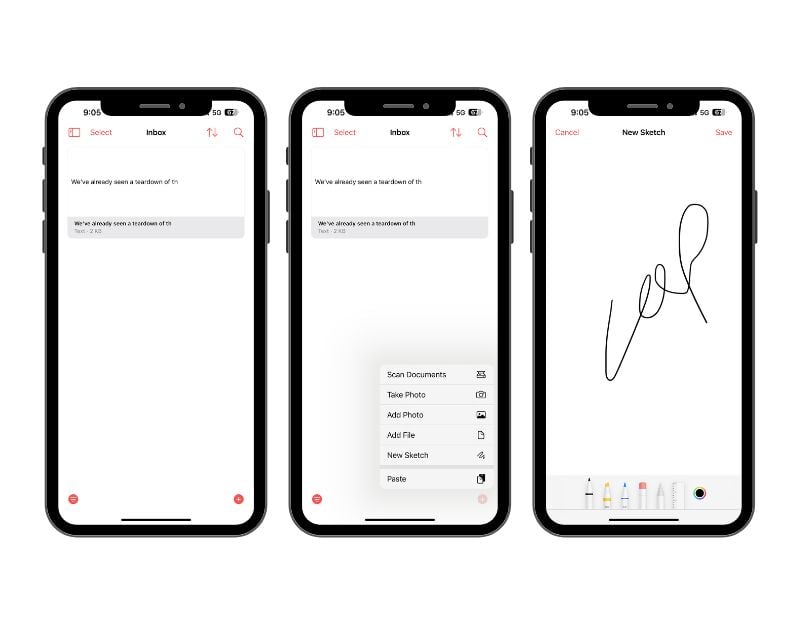
AnyBuffer is another popular app that allows you to store and manage all the contents of your clipboard in one place. Similar to SnipNotes, the app allows you to paste the contents of the clipboard and manage them in a single place. With the app, you can keep clipboard contents, quickly take photos, import and save images from the galley, links, notes and more.
You need to save the content manually in the app. The app supports text-based content such as notes, links and more. You can also use the app to quickly snap photos and import them from the gallery. You can also save documents and create links to documents to share them with others and much more. The app allows you to paste clipboard content directly into the app. You can find all content on the home screen.
You can organize the content in folders, add tags and customize it with different colors and fonts. The app automatically synchronizes the data across all Apple devices via iCloud. There is also a search function that allows you to quickly find the nites you have created in the app.
The app offers a clear and concise user interface. Recently, the user interface was redesigned so that it now matches the iOS design esthetic even better. AnyBuffer also supports Siri shortcuts and the multi-window environment on the iPad. The app is available for free and there are also premium versions that give the app additional benefits. You can download them from the App Store.
Highlights:
Feature Description | Any buffer App Features |
|---|---|
Content Types Supported | Text, images, videos, documents, links |
Syncing Capabilities | Yes, via iCloud |
Search Functionality | Yes |
Organizational Tools | Shelves, Smart Shelves |
Ease of Access | Share Extensions, Widgets, Shortcuts |
Batch Operations | Yes |
Customizable Actions | Yes |
Security and Privacy | No third-party integrations, data stored on the device |
User Interface | Contextual menus, Spotlight search |
Price | Free, with optional one-time in-app purchase to unlock premium features |
5. Copy better

Copy Better is a simple clipboard content management app. The app keeps all the things you need to copy and paste in one place. The clipboard content is easily accessible and efficiently organized with different tags, folders and more. The clipboard automatically copies the most recently copied text to the clipboard and pastes it into the app. Copy Better supports formatted text and images for copying and pasting.
The app is only available for iPhones and does not have native clipboard synchronization options. However, it can work with Apple Continuity features to paste clipboard content copied from other Apple devices such as Mac and iPad into the app. You can organize the text into different folders and add tags to individual readers. You can also name individual copied content from the clipboard, which can be helpful when accessing the data. You can manually enter the last copied text into the app or ask the app to automatically log the previously copied content when the app is opened, which is very helpful. You can add lists to favorites and then directly ask to remember the text.
You can access the contents of your clipboard from the app. Although the app says you can access the content from the keyboard, I couldn’t find it on my device. You can open the app manually and copy the text. You can also access the content via the voice assistant Siri by giving the command “Get me the last copied text”.
The app is free to use. You can easily manage the content in the app. The user interface is simple. At first glance, the app looked very similar to the Notes app on the iPhone, with identical text and colors. It is available for free in the App Store.
Highlights:
Feature Description | Copy Better App Features |
|---|---|
Content Types Supported | Text, formatted text, images |
Syncing Capabilities | No |
Search Functionality | Yes |
Organizational Tools | Folders |
Ease of Access | Favorites and Folders widgets, Copy Better Keyboard, Siri shortcuts, Share extension |
Batch Operations | Yes |
Customizable Actions | Edit clips, create new clips |
Security and Privacy | Secure |
User Interface | Simple and easy to use |
Price | Free |
6. Clipboard by Tariq Almazyad

Clipboard is simple and another one of the best clipboard management tools for iOS. The app automatically saves the contents of the clipboard and lets you access it quickly, both in the app and from the keyboard. You can copy the text and paste it into other apps. It also has PIP mode (picture-in-picture mode). The app is free to use.
At the time of writing this article, the app only supports text content. The text you have copied from other apps and websites is automatically saved in the clipboard app. You can add the copied content to favorites, edit the text and add additional content to the reader. There is no option to create folders and add tags to the content. You can also add the text manually and save it in the app.
You can access the contents of the clipboard both in the app and via the keyboard. Similar to the paste app, you will see a globe icon in the bottom right corner of the keyboard after installing the app and setting it up for the first time. If you tap on it, you can switch between the keyboard. To access the content of the keyboard, you can tap on the globe icon to switch between apps. From here you can see all the clipboard contents in the app. You can click on “Copy” or tap on the text to paste it into another app.
The app also has a history tab that allows you to view previously copied text on your iPhone. The app does not support the native sync feature, but works with Apple’s continuity feature. You can rearrange the content and customize how the content is displayed.
It is free to use. It is the best app after Paste, but many users have reported issues with the app. Some users pointed out that they couldn’t find the clipboard content after a certain time, and a few others pointed out that the app couldn’t copy and display the area, which also happened to me sometimes.
Apart from these problems, everything about the app is excellent. It is also simple and easy to use. It can be confusing for some people at first, but after setting up the app for the first time, it is quite simple. The app is free to download from the Apple App Store. The contents of the clipboard are secure and are not shared with third parties. You can also delete the content at any time if you want.
Highlights:
Feature Description | Clipboard App Features |
|---|---|
Content Types Supported | Text |
Syncing Capabilities | Yes, via iCloud (based on user review) |
Search Functionality | Search all types of Notes |
Organizational Tools | Supports Add to fav options |
Ease of Access | Access content from the app and Keyboard |
Batch Operations | Copy multiple texts |
Customizable Actions | No |
Security and Privacy | Data not collected |
User Interface | Simple and easy to use |
Price | Free |
7. PastePal – Clipboard Manager

PastePal is the best alternative to Paste. It allows you to save copied items to collections, widgets, keyboard extensions, share and action extensions, Siri shortcuts and more. The contents of the clipboard are easily accessible from the keyboard, widgets and Siri shortcuts. The only problem with the app is that you have to manually enable the settings to get the most out of it.
PastePal supports all content types, including text, images, videos and documents. You can manually save the content to the app or enable auto-copy content to automatically copy the content to the clipboard and save it to the app. By default, the app offers various collections for saving text and other types of content. These include text, color, links, images, picture, trash and more. You can also add your collection manually. There is no option to add text to the folders and tags. In the free version of the app, you cannot edit the copied contents of the text storage.
The copied content can be accessed via the app and also via the keyboard. Surprisingly, automatic copying of text and access to content via the keyboard are activated by default. You have to edit and activate these functions manually after installing the app. Similar to pasting, you can tap the keyboard switch icon (the globe icon is located in the bottom left corner of the keyboard) to access clipboard content. Pastepal also supports widgets. You can add the devices to the home screen and access the contents of the clipboard.
The app is free to use. There is also a premium version that offers cloud synchronization, unlimited copy and paste, and a few other benefits. PastePal is available for Mac, iPhone and iPad and can synchronize data with these platforms in real time via iCloud. You can download the app from the App Store.
To enable keyboard access and automatic copying, open the app on your device and go to the settings. You can click on the gear icon in the top right corner of the screen. Under the Extension tab, find the keyboard and tap it. Scroll down and click on the “Go to settings” icon Tap on the “Keyboard” option, activate “Paste” and click on “Allow full access”. Now open the keyboard and click on the globe icon, click on the Settings tab and activate the Monitor to clipboard option.

Highlights:
Feature Description | PastePal App Features |
|---|---|
Content Types Supported | Text, images, videos, documents |
Syncing Capabilities | Yes, via iCloud |
Search Functionality | Yes |
Organizational Tools | Collections |
Ease of Access | Widget, keyboard extension, Share and Action extension, Siri shortcut |
Batch Operations | Yes |
Customizable Actions | Yes, but limited. You can add text to the collections. |
Security and Privacy | Secure and data is not shared with third parties. |
User Interface | Light and dark mode, side window for quick access |
Price | Free, Offers In-App Purchases |
Other Notable Mentions
Clipboard – Paste Keyboard: The Clipboard – Paste Keyboard app allows you to manage the contents of your clipboard on your iPhone, iPad and Mac. It ensures that everything you copy on one device is also accessible on your other devices via iCloud. The app also supports copying images and files in this app. The app is free and can be downloaded from the Apple App Store.
Clipboard Keyboard Manager: The Clipboard Keyboard Manager app for iOS, also known as Paste Manager Pro, is designed to efficiently manage your clipboard, keep a history of it and provide quick access to your notes. It also allows you to paste content into any app using a custom keyboard. It also has a copy and paste feature on the iPhone that provides a direct option to paste text into the app and more. The app is free and can be downloaded from the App Store.
How to choose the best clipboard app
- Content Types Supported: Choose an app that supports a wide range of content, such as text, images, links and files.
- Syncing Capabilities: The ability to synchronize copied content across multiple devices, especially within the Apple ecosystem.
- Search Functionality: The search function allows you to find the copied content quickly. Look for an app that supports a search function to search clipboard history for previously copied items.
- Organizational Tools: When you copy content, it’s important that you organize it properly. Over time, the amount of content can become overwhelming and confusing. It’s helpful to use features in your app that allow you to organize copied content into folders, tags or categories. This allows you to quickly access the content you need.
- Ease of Access: Pay attention to how easily and quickly you can access clipboard content and use the clipboard manager, including its integration with other apps and systems (e.g. Siri, Today widget).
- Customizable Actions: Customization options allow for easy clipboard content management and a personalized look with a variety of themes and fonts.
- Security and Privacy: Security is the most important factor you should consider. We tend to copy emails, passwords and other sensitive content. Make sure the app has various security measures in place to protect sensitive data and user privacy, especially when it comes to personal or sensitive copied content.
- Price: Most clipboard managers are free, but some offer premium subscriptions. Check the cost of the app, including in-app purchases and subscriptions.
Get Clipboard Content
With the Clipboard Content Manager, you can easily track and access the contents of your clipboard. With the help of these apps, you can easily manage the contents of the clipboard on your iPhone. If you don’t want to install these apps, you can also use the Apple Notes app to manage your content. Just like the clipboard management app, you can paste the content into Apple Notes and access it easily. We hope this is helpful for you. If you have a suggestion, you can share it with us in the comments. Also, on Windows, you have even more powerful options. Check out our roundup of the best clipboard managers for Windows if you work across both platforms.
FAQs on Best Clipboard Manager Apps for iPhone
1. Are these clipboard manager apps easy to use and set up on my iPhone?
Yes, most of the apps listed in this article are easy to set up and use. However, when setting up a clipboard app that requires a keyboard to access the content, it might get a little tricky. You need to launch the app, add an additional keyboard and allow full access to the keyboard to view the clipboard content. Most apps provide built-in instructions on how to set this up. You can simply follow these steps and set it up. If you have any difficulties, you can leave a comment below and we will help you.
2. Can I integrate these clipboard manager apps with other applications on my iPhone?
Yes, you can integrate these clipboard manager apps with other applications on your iPhone. You can easily access the contents of the clipboard via the app or via the keyboard. Some apps also offer a PIP mode that allows you to quickly access clipboard content by displaying a small overview window on top of other apps.
3. Do these clipboard manager apps offer cross-platform synchronization?
No, only a few apps in this list offer native, cross-platform synchronization support. However, you can benefit from the Apple Continuity feature, which allows you to copy and paste text into these apps automatically, regardless of native support.
4. Do these apps support images and other non-text clipboard items?
Yes, apps like Paste and Any Buffer support images and other non-text clipboard items. Some apps also support taking pictures with the camera, adding documents, adding drawings and much more.
5. Can I organize my clipboard items into categories or folders with these apps?
Yes, you can organize your clipboard items into categories, tag them and store the contents in folders.

