Gone are the days when you had to read an entire PDF to find the information you needed. Thanks to AI, you can now summarize PDFs in seconds, get the information you need, and quickly retrieve it for revision.
There are plenty of AI-powered PDF summarization tools on the market that allow you to summarize PDFs and more. HiPDF, for example, uses AI to summarize the PDF and offers an interactive conversational experience. You can chat with the PDF using AI, quickly summarize PDFs, access various PDF annotation tools, convert PDFs, crop specific parts of the PDF, and much more.
In this guide, we will explore all the features of HiPDF and look at how HiPDF can be your AI companion to save all your PDFs, organize them in one place, gain valuable insights, and much more.
Table of Contents
Top 5 Features of HiPDF for Efficient PDF Management
Keep All Your PDFs Together with HiPDF
There’s a lot to say about HiPDF, but what makes HiPDF unique is the ability to organize your PDFs in a single place. Having all your PDFs in one place makes it easier to find and access them whenever you need them.

The tool stores all your PDFs in the document cloud. You can access them at any time and make the changes you want. All changes to the PDFs are automatically updated and linked to your account. This means you can easily access all PDFs, view them, and manage them in one place.
For example, if you are summarizing or editing a PDF, you can quickly access the tool and view your PDF summary immediately without losing the information. All of these features are very useful for people looking for a complete PDF management tool. The free version of HiPDF offers 1 GB of free cloud storage. You can upgrade it to 10 GB for free.
Chat with Your PDFs for Quick Summaries

AI is transforming the way we work online. It saves time and streamlines many aspects of our daily lives. With AI-powered PDF summarization, you can quickly read through long PDFs, summarize them, and gain valuable insights.
You can upload the PDF and summarize it instantly and ask the bot to explain or rewrite certain parts of the PDF. You can continue conversations with PDFs. The chat interface makes the experience even more interesting and offers a two-way messaging experience. You can ask the bot for specific information and compare it with other data.
For example, I asked the AI to summarize a PDF and tell me the population growth in the US from 2016 to 2030 and break it down for each year. The bot provided a detailed and comprehensive summary. It could take a lot of time to compare the data and perform calculations if you do it manually.
The PDF summary tool is powered by ChatGPT, which is usually very accurate but occasionally off. You can easily fix this by going into more detail to get the results you want.
You can also translate the chat into different languages. The tool supports over ten languages, including Chinese, French and German. It can summarize information from the PDF file and translate it into different languages so you can continue the conversation in your preferred language – all in real-time.
You can export the conversation, add a summary to the PDF by editing it, and much more. The tool also allows you to access the original links for reference. It can also recognize the AI-generated content.
The AI functions are quite limited in the free version. The premium version offers 50,000 monthly tokens, which should be sufficient for most people. There is a special AI plan that costs $9.99 and offers up to 2,000,000 tokens. If you plan to work extensively with AI, you should consider this plan.
Edit and Customize Your PDFs

With the PDF editing tool, you can easily make changes to the PDF file by adding and changing content. You can use PDF annotations to highlight specific text in the PDF file and refer to it when needed. You can also replace text in the PDF file by searching for a specific text and replacing it with the desired text.
You can insert text into the PDF file and customize it with different fonts, text sizes, colors, and much more. You can add images, shapes, and even your digital signature, which can be very helpful when signing documents online.
In addition to these editing and annotation features, the tool also offers the ability to merge two PDFs into one, compress the PDF to reduce its size, split the PDF into multiple files by page range, extract images from the PDF, rearrange PDF pages and delete specific pages, and much more.
All these functions are excellent for making professional changes to the PDF file. However, these functions are split between different tools, which makes it difficult for anyone who wants to make different edits to the PDF file at the same time.
For example, the Edit, Crop, and Replace functions are split into three tools. You can’t do them all at the same time. You have to edit the text, save the PDF, re-upload the PDF, crop, download the PDF, re-upload the PDF, and then replace the text, which can be a lot of work. Grouping similar tools together can help you and save you time.
Most tools can be used for free. There are no restrictions on their use. Some features in the specific tools, such as OCR support when converting PDFs to documents, are limited to premium users.
Secure Your PDFs with passwords

HiPDF also has various PDF protection functions. You can protect your PDFs by adding a password, signing the PDF with an electronic signature, and sharing it online with a private link.
There is also the Redact PDF tool, which you can use to remove sensitive content from the PDF file. You can manually select the sensitive content in the PDF file and hide it with a markup. It would be better if the tool automatically recognized the sensitive content and redacted it for you.
In addition to these functions, the tool also has a password removal tool that allows you to remove the password from password-protected files. To remove the protection, you must enter the correct password.
Convert Your PDFs into Various Formats
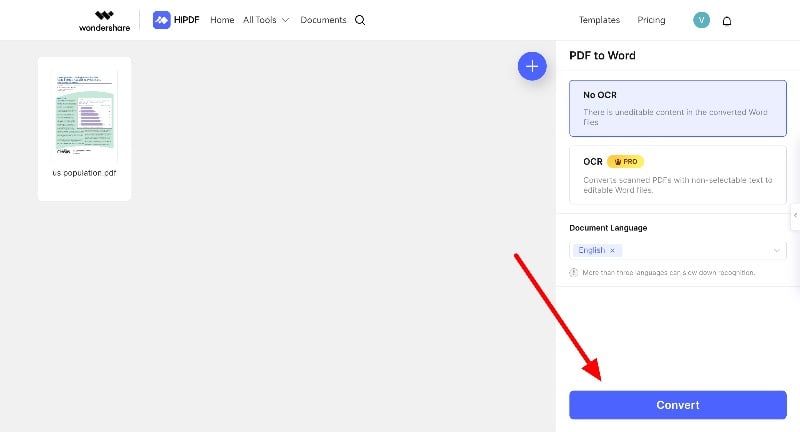
You can convert PDFs to different file formats or different files to PDFs. HiPDF supports tools that can convert Word to PDF, PPT to PDF, Excel to PDF, JPG to PDF, and more.
You can also convert PDF to Word, PDF to PPT, PPT to Excel, and vice versa. All these tools can be found in the PDF Tools section. In addition to these tools, HiPDF has various image editing tools that you can use to convert and compress images into different formats.
HiPDF Pricing: Find the Right Plan for You
The free version allows you to upload files with a maximum size of 20 MB, supports up to 100 pages, and offers up to 5000 tokens and access to most free tools. With the premium version, you can increase the token limit from 5000 to 50000, increase the file upload size, and access various premium features of the tool. You can find more details on pricing below.
| Feature | Free version | Premium – Monthly Plan ($5.99/mo) | Premium – Yearly Plan ($3.33/mo) | Exclusive Monthly Plan for AI Tool ($9.90/mo) |
| Access to all PDF and Image Tools | Limited | Yes | Yes | Yes |
| Batch Processing Limit | 5 Files | No Limit | No Limit | No limit |
| Maximum File Size | 20 MB | 100 MB | 100 MB | 100 MB |
| Maximum Pages Per File | 100 Pages | 2000 Pages | 2000 Pages | 150 Pages |
| Access to OCR | No | Yes | Yes | – |
| Ad-Free Interface | No | Yes | Yes | – |
| Secure and Privacy Protection | Yes | Yes | Yes | – |
| 24/7 Support Service | Yes | Yes | Yes | – |
| Money-Back Guarantee | – | Yes | Yes | – |
| Free Lifetime Updates & Keycode | – | Yes | Yes | – |
| Chat with PDF Tokens | – | 50,000/month | 50,000/month | 2,000,000 tokens |
| AI Detector Characters/Month | – | 100,000 | 100,000 | – |
| PDF Pages for AI Tool | – | Up to 2000 pages | Up to 2000 pages | Up to 150 pages |
| Summary | Good for basic tasks | Best for people looking for a complete PDF management tool | It is ideal for people who use AI chat and AI summarise. | |
A complete PDF management tool
HiPDF is a complete PDF management tool. You can save all your PDFs in one place, summarize them, protect them, and convert them to different file formats. It’s ideal for anyone who works with PDFs and is looking for a comprehensive PDF management tool. With the AI features, you can create summaries, chat, and quickly retrieve the information you need from the PDF file. The AI features are limited in the free version, but you can upgrade to the AI plan to get all the AI benefits and increase the limit.