

Personal relationship management apps help you improve your relationships with other people. They help you keep track of everything by storing all your contacts, whether friends, family, or work colleagues, in one place. They allow you to note important details about people, such as birthdays or work details, and send reminders of important dates, such as a friend’s birthday. Some apps also show how long it’s been since you have contacted the person.

If you’re struggling with your relationships and forgetting important events and dates, we’re all like that. In this guide, you’ll learn the 10 best personal relationship management apps to help you remember important details and dates of your friends and family, stay in touch, keep all your connections in one place, and more.
Table of Contents
Best Personal Relationship Management Apps
- Clay: Best for both personal and professional relationship management with an intuitive user interface.
- CatchUp: Simple and easy-to-use personal relationship management app with the last catchup feature.
- Covve: User-friendly with options to add extra info about contacts and a helpful dashboard.
- Section: Advanced management app for both personal and professional relationships.
- Queue: This simple app prompts you to take notes after each Catchup.
- Moments: Ideal for enhancing personal relationships with tasks and courses.
- Dex: Advanced app for managing both personal and professional relationships.
- Cloze: Best Personal CRM app for professional relationship management. Aggregates emails, calls, and social media messages from contacts and more.
- Fabriq: Gamified interface to make relationship management engaging.
- Evernote: While primarily a note-taking app, its features can be utilized to track relationships.
Clay

Highlights
- Easy Organization: Automatically updates and organizes contacts from your email, social media, and more.
- Stay Connected: Reminders for birthdays and reconnecting, along with updates on job or location changes of contacts.
- Flexible Pricing: A free version for personal use and paid plans with more features and team collaboration options, catering to different user needs.
Clay is the best app for personal and professional relationship management. The app helps you connect and manage people on different platforms like LinkedIn, Twitter, email, and others. It has a dedicated dashboard that lets you manage all your relationships from a single place.
The app organizes contacts, provides relevant information, and allows you to make notes and set reminders, which is essential for effective relationship management. It also offers unique features such as natural language search and updating messages about contacts, which are not common but useful. The app integrates with other platforms to provide a more comprehensive contact database.
Clay is available as a mobile, web, and desktop app. Clay supports Microsoft Outlook/Office 365, Google Calendar, Gmail/Google Mail, and Twitter. You can also add other services via Zapier integrations. The app automatically pulls information from the web and the source you connected to and displays it on your dashboard. The Clay app is free to use. In the free version, you can set up and track 1,000 contacts.
The app also offers a premium subscription. There are different pricing models: the Pro subscription for $10/month offers unlimited contacts and additional support. The Team plan for $40/seat/month allows three team members and more customization. The Enterprise plan offers more collaboration with unlimited team members, a dedicated manager, and secure login features. You can download the app for free from the App Store. The app is only available for Apple devices.
Download Clay: iOS
Catchup

Highlights
- Simple Reminders: So you don’t forget to connect with friends and family, you can set how often you want to connect.
- Easy Check-Ins: Tap to check in every time you talk or meet with someone so you can easily track your interactions.
- Free to Start: Try it out for free with up to two contacts. If you like it, you can upgrade for unlimited contacts and additional features like notifications and widgets.
Catchup is a simple relationship management app. The app helps you remember to meet up with friends and family by recording your last interaction and frequency of contact. The app lets you stay in touch with important people by setting reminders to connect with them. You can check in with a tap when you’re talking or meeting, keeping track of your interactions.
The user interface is simple. In the free version, you can allow the app to access your contacts and track your integration with two contacts. You can upgrade to the premium version and track unlimited contacts. You can also set the frequency of check-ins and reminders, and the app will remind you when it’s time to check in.
You can choose from every day, every week, every month, every two weeks, and more. The app also reminds you when the contract’s birth date is coming up. There’s no way to add details like birthdays or important notes in the app, but they can be imported from other sources, such as the Contacts app on your iPhone.
Catchup is available on the iPhone. It’s free to start with up to two contacts, so you can try it out at no cost. If you like the app, you can upgrade it for more contacts and features like notifications and widgets, making it a handy tool for managing your social contacts.
Download the Catchup app: iOS
Covve

Highlights
- Easy Organization: Helps keep your contacts in order and builds stronger relationships.
- Digital Cards: Quickly share digital business cards with new people you meet.
- Stay Informed: Sends reminders and updates about your contacts so you’re always ready to connect.
The Covve app makes managing contacts easy and effective. The app is similar to Catchup but offers advanced analytics and supports adding details like birthdays, notes, and more to your contacts. The app has a dashboard on the home screen that lets you know which people you’ve been in contact with frequently, how often you interact with others, and more.
It helps you organize your network, quickly exchange digital business cards, and keep track of your interactions with reminders and notes. It also gives you up-to-date information about your contacts’ jobs and hobbies, which can be very useful before you approach them.
The app also includes a weekly schedule to remind you of your networking progress and even offers a smart assistant to help you manage your emails. Besides, you’ll be able to showcase your brand with personalized digital cards, making it easier to network in person or online if you want to improve your professional relationships.
The user interface is simple and easy to use. The home screen is a bit cluttered, in my opinion, but once you’ve used it for a while, it’s fine. You can add relationships with other people and see your recent interactions with them, which works well.
There’s also a built-in AI that helps you compose messages. You can send messages to any contact; you can select the context, and the app automatically creates a message. You can copy the messages and share them manually to your messaging apps or click the options to share messages atomically from specific apps.
Overall, Covve is the best option if you want more options than Catchup. It offers a dashboard to track your interactions with people, the ability to compose messages with AI in the app, and more. The app is free, and you can download it from the App Store.
Download Covve app: Android | iOS
Nection: Personal Contacts CRM

Highlights
- One-Click Communication: Nection allows you to communicate on the channel preferred by the other person with just one click.
- Personalized Messaging: You can send tailored messages to a group, making your communications more personal.
- Insights for Conversations: The app provides useful insights like weather forecasts and recent news about the individual to help initiate meaningful conversations.
The Nection app helps you store all your contacts from places like Facebook and LinkedIn in one place. You can track every interaction you have with each contact in the app. You can find details like birthdays, websites and platforms where you met them, reminders, and more.
The app also has advanced messaging features. You can add people to your favorite messaging channels with just one click. You can send personalized messages to a group, set reminders for messages, and more. The app also shows the weather they are in, which sometimes helps you start a conversation.
The user experience is intuitive and easy to use. You see all interactions with people in a dashboard on the home screen. You can import contacts from different platforms. The app supports all popular platforms such as Facebook, Linkedin, Instagram, Gmail, and Contacts. You can use the AI assistant feature to improve people’s responses. You can compose personalized messages.
The Nection app is a paid app that you can download from the App Store. You can also try the app for free with the trial version. To use the free trial, you need to provide your payment details. Overall, the Nection app is designed to make contact management and relationship management easier and more effective, especially for business networks.
Download Nection: Personal Contacts CRM: iOS
Queue Personal CRM
Highlights
- Integration: Seamlessly pulls in contacts from Google and iPhone, making starting easy.
- Catchup Reminders: Automatically reminds you when to catch up with someone.
- Post-Interaction Notes: Helps remember important details by prompting you to take notes after each Catchup.
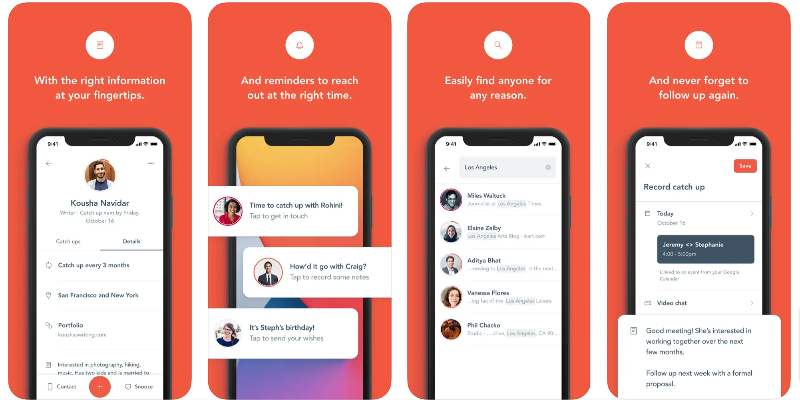
The Queue app is a simple personal CRM app that is only available for iOS users. The app lets you add contacts from Google Calendar, Gmail, and iPhone contacts and manage interactions with contacts in a single place.
You can set a reminder for your next interaction, track when you last caught up with a particular interaction, and add interaction notes after you’ve finished interacting with specific people.
The app, as mentioned at the beginning, is simple and easy to use. You’ll find all of your contacts on the home screen, and you can view the last interaction you had with that contact. Tapping on a contact will give you full information about them and the last interaction with them, special notes you added to the contract, and more.
The app lets you set reminders for how often you should interact with the contact. You can also set how often you want to be reminded to interact with a particular contact.
Queue Personal CRM is paid and offers a free trial. Overall, Queue is the best app for people looking for a simple and easy-to-use personal CRM app for managing limited content. The app lets you set interaction frequency, set reminders for the next interaction, import contacts from the Gmail and Apple Contacts apps, and more.
Download Queue app: iOS
Moments
Highlights
- Personalized Reminders: Moments help you remember important dates and plan events, reducing stress.
- Learning Resources: Provides articles and courses to improve networking and relationship-building skills.
- AI-Powered Messaging: Crafts personalized messages for each contact, making interactions more meaningful.
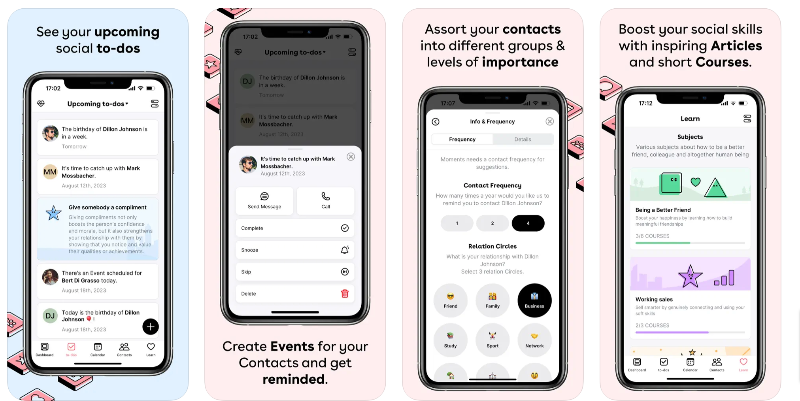
The Moments app is the easiest and best app to improve relationships, make new friends, and more. The app reminds you of important dates, helps categorize contacts, and even syncs with HubSpot for easy management. You can schedule events, buy gifts, or send messages with reminders to stay on top of things.
The app gives you a single feed to see your contacts’ social updates. There are also resources to help you learn how to network better and build relationships. There’s also a cool feature that lets you write a personal message to each contact, making it easier to stay in touch in a meaningful way.
The Moments app is not only a management app, but it also helps you build and maintain personal relationships with people. The app has a dedicated tasks section where you can find tasks to help you connect with new friends, interact with old friends you haven’t met in a while, practice gratitude, and more.
There are also special lessons on personal relationship management to improve your relationships with other people.
The app is simple and easy to use. The user interface is another highlight of the app. I liked the design of the app. The app is free to use. You can create an account in the app and use it for free. There is also a premium subscription that offers additional benefits, such as managing an unlimited number of contacts, the ability to maintain relationships with additional add-ons, and more.
Download Moments app: iOS
Dex – Rolodex and Personal CRM

Highlights
- Memory Aid: Helps remember key contact details, making interactions more personal.
- One-Place Organization: Keeps all contact notes and tags in one place for easy access.
- Multi-Platform Integration: Syncs with LinkedIn and works across various platforms like Facebook and Gmail, simplifying contact management.
The Dex app helps you stay connected with people by sending you reminders to meet up with them. It helps you remember important details about your acquaintances, such as the names of family members or when you last met. You can organize your contacts into groups and see all the notes you’ve made about people in one place.
The app can sync with various platforms that are connected to the app, like LinkedIn, Gmail, and more, to update contact information. It also works with other platforms like Facebook and Gmail, so you can easily manage your contacts without having to log into multiple sites.
It guides you through setting up and managing contacts. You can also easily import contacts from other platforms like email, smartphone, LinkedIn, or other CRM systems to populate your Dex account.
The app’s user interface is simple and easy to use. Dex is designed primarily as a personal CRM, not a corporate CRM. The app is more suited for individuals who want to maintain their personal and professional relationships in an organized and efficient manner. Dex is only available for iOS so far. You can download the app for free from the App Store.
Download Dex app: iOS
Cloze Relationship Management
Highlights
- Unified Information: Cloze organizes emails, calls, and social media messages from your contacts in one place, making it easier to manage relationships.
- Automated Reminders: It reminds you to follow up with key contacts, ensuring you don’t miss important engagements.
- User-Friendly Interface: The app is easy to use and presents your workload in a friendly manner, which is great for long hours of use.
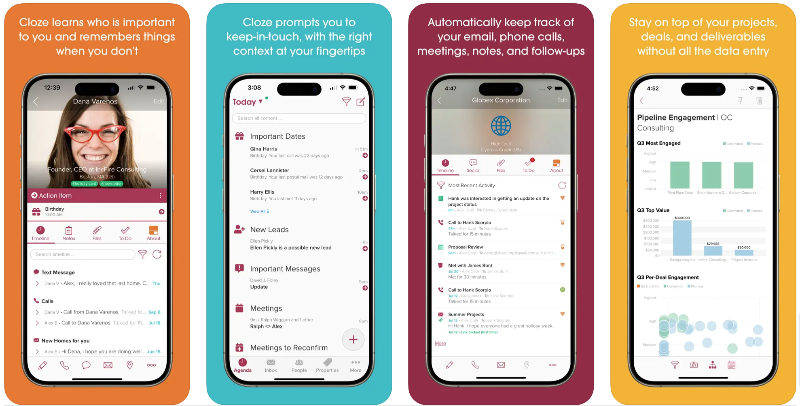
The Cloze app helps you keep track of your professional relationships. The app gathers information from other apps to create an overview of every person and company you interact with and displays all contact information, emails, phone calls, meetings, and messages in one place. It automatically reads email content and schedules meetings for you.
Like other apps, this one reminds you when it’s time to contact important contacts and remember important connections in your life. It also has intelligent AI features that understand action items from emails and automatically update your agenda and contacts. The app also offers professional email management tools, project tracking, and a unified view for team communication.
Cloze also sends automatic reminders for meetings or follow-up calls with clients. The app enables better team collaboration by keeping everyone updated on the latest interactions with contacts.
The app is user-friendly and easily customizable. The app collects and organizes tweets, emails, Facebook posts, and other messages from your contacts and organizes them by relevance.
The app is free and comes with a premium plan that offers additional benefits like managing more contacts and more. The app is also available for Android, the web, and as a standalone desktop app. This is the best option for anyone who wants to manage their professional relationships.
Download the Cloze app: Android | iOS
Fabriq: Stay in Touch

Highlights
- Stay Connected: Fabriq reminds you to keep in touch with important people, helping maintain strong relationships.
- Track Interactions: See how often you connect with others, helping improve your social habits over time.
- Help: Provides suggestions for starting conversations, making interactions easier and more meaningful
Fabriq is another simple app for personal relationship management. It helps you keep track of important relationships by reminding you to connect with them. You can add notes to things you don’t want to forget and set reminders for special events. It shows you how well you connect with people over time. The app also gives you ideas on how to start a conversation.
The best part about the app is its intuitive interface. The app offers a unique interface that I like. It’s a game that helps you improve relationships; in other words, it forces you to cultivate personal relationships with people. The app is paid and only available for iOS users. It costs $4.99 per month or $39.99 per year. The app also offers a free trial if you want to test the app before you invest.
Download Fabriq: Stay in Touch: iOS
Evernote
Highlights
- Flexibility: Unlike other PRM apps, Evernote lets you organize information your way, making it adaptable to your needs.
- Cross-Platform Access: Access your notes on any device, anytime, ensuring your relationship details are always at hand.
- Rich Media Notes: Not just text, save web pages, images, or voice memos, providing a richer context for each relationship.
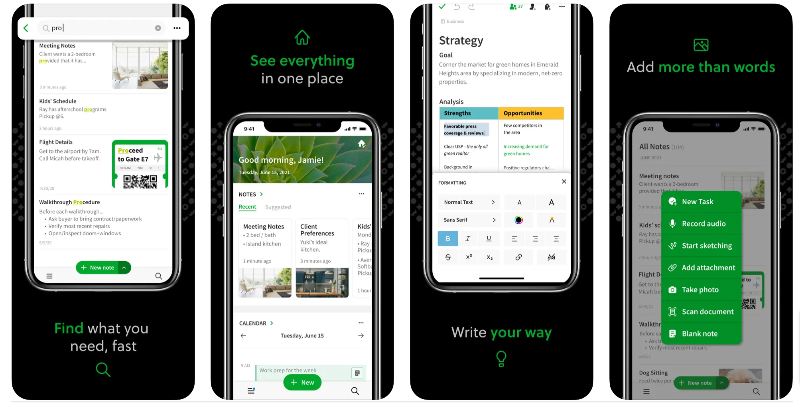
You can also use note-taking apps as personal relationship management apps. After spending hours researching the best note-taking apps, we’ve chosen Evernote as the best app for personal relationship management. Although it’s primarily a note-taking app, it can also be used as a personal relationship manager. You can create notes for each contact, jot down important details, set reminders for follow-up appointments, and even share those notes with others.
As with personal relationship management apps, you can create a separate note for each person you meet. In each note, you can jot down important things like what you talked about, what they like, and when you should talk to them next. You can also set reminders so you don’t forget to contact the person. Plus, you can access your notes from any device, so you always have your information with you.
Unlike dedicated PRM apps, Evernote doesn’t automatically record your interactions or pull in contact information. You have to enter all the details like names, phone numbers, and the time of the last conversation. This can take more time and effort. Evernote is a good, flexible tool, but if you’re looking for something that does the tracking of your relationships for you, a dedicated PRM app might be a better choice.
Plus, Evernote has other helpful features. You can store web pages, photos, and voice memos in it. This can be useful if you want to remember what someone’s house looks like or save a nice article to talk about at your next meeting. Also, there’s a good search feature that lets you quickly find a note about someone, even if you forget their name.
Compared to other PRM apps, Evernote is very flexible. You’re not bound to a specific format, and you can organize your information the way it makes sense. But as I said, you have to set everything up manually.
Download Evernote: Android | iOS
How To Choose the Best Personal Relationship Management App
- Identify Your Needs: Figure out what kind of relationships you want to manage. (Personal, professional, or both). Features may vary depending on the type of app used to manage personal relationships.
- Ease of Use: The app should have a user-friendly interface. It should be easy to enter and retrieve information.
- Integration Capabilities: Make sure the app can integrate with other platforms you use, such as email, calendar, or social media.
- Contact information: It’s good to have as much information about your contact as possible. Look for an app that can add important information about your contacts, like email, phone number, birthday details, and more.
- Reminders: Reminders are important and at the heart of apps for managing personal relationships. Look for apps that send important reminders such as birthdays, special events, etc.
- Automated or manual entry: Automatic data entry saves time and effort; at the same time, manual data entry offers flexibility and more accuracy. Look for an app that works based on preference.
- Team collaboration: Consider collaboration when choosing a professional relationship management app. It will help you organize your team and collaborate easily.
- Pricing: Most of the personal and professional relationship management apps in our test are paid. Only a few apps offer a free version with limited support. Choose the app that fits your budget and needs.
Full Comparison: A Close Look at the Top 10 Apps for Better Relationships
Features | Clay | CatchUp | Covve | Nection | Queue | Moments | Dex | Close | Fabriq | Evernote |
|---|---|---|---|---|---|---|---|---|---|---|
Contact Management | Yes | Yes | Yes | Yes | Yes | Yes | Yes | Yes | Yes | Yes (Manual) |
Reminders | Yes | Yes | Yes | Yes | Yes | Yes | Yes | Yes | Yes | Yes |
Interaction Tracking | Yes | Yes | Yes | Yes | Yes | Yes | Yes | Yes | Yes | No |
Cross-Platform Access | Yes | Yes | Yes | Yes | Yes | Yes | Yes | Yes | Yes | Yes |
Notes & Details Storage | Yes | No | Yes | Yes | Yes | Yes | Yes | Yes | Yes | Yes (Manual) |
Automated Data Entry | Yes | No | No | No | No | No | No | Yes | No | No |
Social Media Integration | Yes | No | Yes | No | No | No | No | Yes | No | No |
User-Friendly Interface | Yes | Yes | Yes | Yes | Yes | Yes | Yes | Yes | Yes | Yes |
Subscription Pricing | Yes | No | Yes | No | No | No | No | Yes | Yes | Yes |
Team Collaboration Features | No | No | Yes | No | No | No | No | Yes | No | Yes |
Platform Availability | iOS | iOS | Android/iOS | iOS | iOS | iOS | iOS | Android/iOS | iOS | Android/iOS |
Price | Subscription | Free | Subscription | Free | Free | Free | Free | Subscription | Subscription | Freemium |
Conclusion
This is the list of the best apps for personal relationship management. In summary, Clay and Dex offer advanced relationship management for personal and professional connections. CatchUp, Queue, and Moments are simpler and focused on personal relationships. Covve and Cloze offer unique features such as additional contact information and communication organization. Nection and Fabriq offer unique approaches with advanced management and gamification. Evernote, while not a PRM app, can be used to track relationships through notes.
FAQs about Best Personal Relationship Management Apps
1. What is a Relationship Management App?
A relationship management app records all of your personal and professional interactions with others. This includes when you last spoke to them on the phone or sent them a text message. It also remembers their birthdays and reminds them of important dates. These apps also help keep track of personal relationships with people. This can be the last meeting you had with them. Some apps offer simple and easy-to-use interfaces, while others offer a dedicated dashboard that lets you track every interaction you have with people. These apps aggregate and display data from different platforms you use to connect with people.
Relationship management apps are mainly categorized into personal management and personal CRM apps. Personal management apps help you track individual interactions, while personal CRM (customer relationship management) helps you track professional connections you’ve had with people.
2. Are there any free Relationship Management Apps?
Most of the apps in this guide offer a free version with limited tracking. You can use these apps for free.
3. How secure are Relationship Management Apps?
Most apps protect the data used in the app. To make them even more secure, you should manage the app’s permissions, check what data these apps have access to, and control them if you want more privacy. You can also read the app’s privacy policy to learn more about how your data is used.

