

Quick Answer
Some of the main signs you should look out for if you suspect your phone has been hacked are unusual battery drain, excessive data usage, presence of unknown apps that you don’t remember installing, feeling that the phone is much slower and heats up more frequently.
Our lives are inextricably linked to the digital devices we use. As everything in our lives has become digital, our phones pose a serious threat to our privacy. Imagine someone silently intruding into our home, lurking unnoticed in a corner and carefully observing our lives in our personal space. Hacking a phone is similar. It gives away not only our personal data, but also financial information. The deepest secrets we hide from others can become known just by hacking our phones.

We receive many emails every day and many links that we click on. They look so credible that we click on the links and install apps. Sometimes as a part of our routine, we click on malicious links that give us unauthorized access to our phones with credible brand names. Let’s take a look at what signs we should look out for to know if our phone has been hacked and how we can protect our digital devices and privacy.
Table of Contents
How to Know if My Phone is Hacked
The following are the signs of a hacked phone. Not all signs may apply, but most of them can help you recognize a possible hack.
Unusual Battery Drain

When a phone is hacked, the battery will drain faster than normal because the processes are running in the background. If you notice unusual signs of low battery over several days, you need to look for other signs to determine whether the phone has been hacked or not.
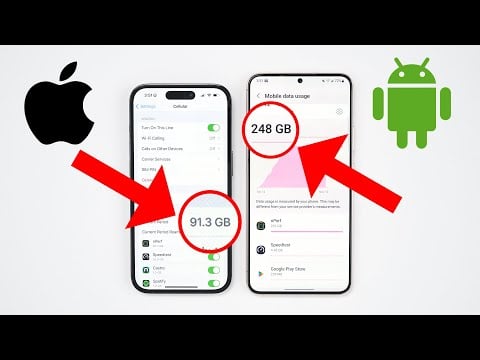
Excessive Data Usage
Fortunately, our mobile phones have a feature that allows us to view data usage, both mobile and WiFi. If we look at the details, we can even see the data usage of each app. We can even find out how much data an app is using in the background and foreground. If we keep a close eye on the numbers, we can find out whether the phone has been hacked or not.
To find the data usage details on your Android phone:
- Open the Settings app.
- Tap on Connections > Data usage

- In the Data usage details, you will find SIM-wise data usage, as well as on WiFi. Tap on the Mobile data usage tab under SIM 1 and SIM 2 to find application-wise use of the data. Similarly, under Wi-Fi, tap on Wi-Fi data usage to know more details about the usage. Tap on each application to know the amount of data used by the app in the background and in the foreground.
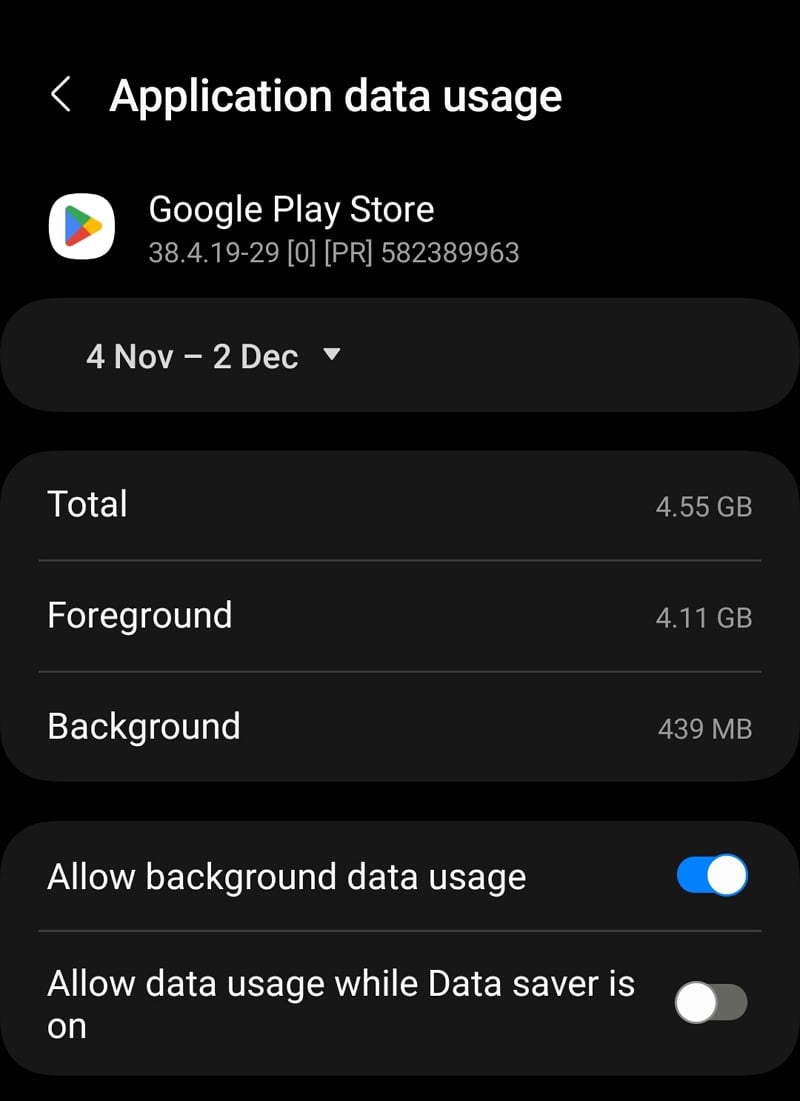
- Tally the numbers and find out if your data there is an unaccounted usage of the data to find out if your phone is hacked or not.
Unfamiliar Apps
It is human nature that we only focus on the important things. We only focus on the apps we use every day and ignore all the other apps installed on our phones, including the bloatware. Even if we see something new, we might dismiss it as a bloatware app. Look at the names and icons of all the apps installed on your phone on the Apps tab in the Settings app.
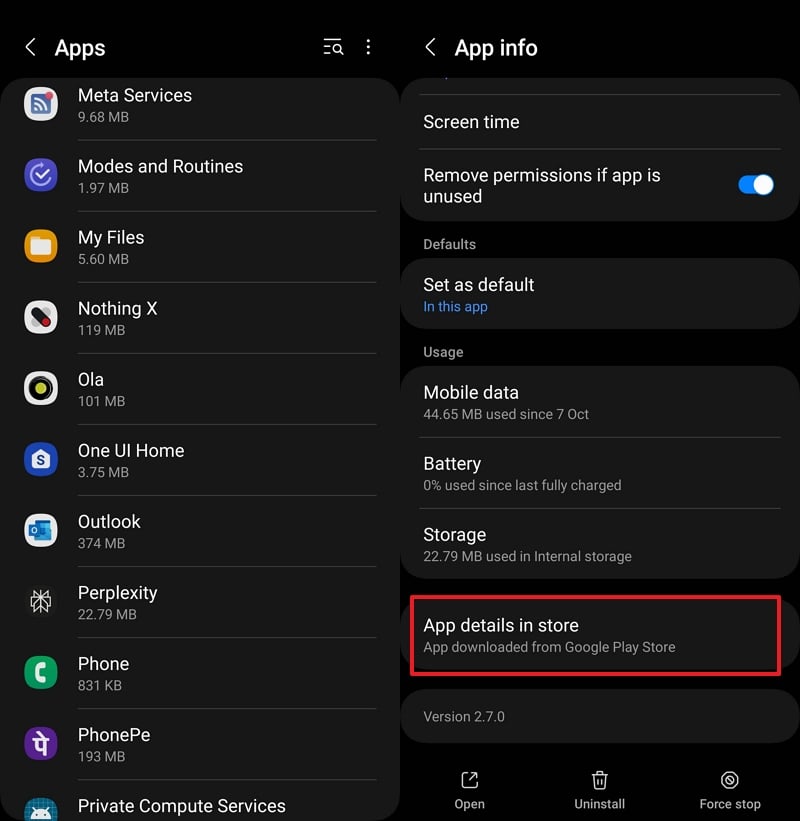
In the list you will find all apps as well as the processes. Tap on the app you don’t recognize to find out more about it. If the details are not enough for you, scroll down on the App info page and select App details in the store. This will open the page of the app in question in the Google Play Store or Apple App Store. If you don’t think the app is useful or trustworthy, you can uninstall it.
Slow Performance and Overheating
If you find that your phone is slow to perform even the most basic tasks like entering a number to make a call, chances are there’s something to look for. If your phone is too old or has run out of storage, it can’t be considered a phone hack. If you have a relatively new phone with a good amount of memory, restart the phone and see if anything changes. If the phone is still too slow, you need to be careful and look for other signs of a hack.
It’s normal for the phone to heat up sometimes but if you notice that it keeps heating up, you should be careful. Take your phone to the appropriate service center and have it checked for overheating. The many processes running in the background due to hacking can stress the phone and cause it to overheat.
Strange Behaviour
If the apps open strangely by themselves and run in the background, you see unrecognized calls, text messages or emails, your phone may have been hacked. If a phishing attempt is underway, you’ll see all the strange things that happen on a hacked phone.
Interruptions During Calls
If you hear strange noises, observe dropped calls or interruptions during calls even though you and the other person have a strong network, there is reason to doubt. If the hacker is listening to your calls, recording them or forwarding them, you may be witnessing the disturbances.
Unexpected Ads or Pop-ups
The bloatware that comes pre-installed on our phones (especially Android phones) can show us ads on their widgets or in the notification panel. If you recognize strange ads or unexpected pop-ups that you don’t normally see, you should be careful before clicking on them. The malicious programs installed on your device can generate such pop-ups or ads.
Unexplained Transactions
Check your bank account transactions if you have any doubts about whether your phone has been compromised. If you find unexplained transactions on the bank statement, you should call the bank and find out more about the transaction. If the transaction doesn’t match your lifestyle, your phone may have been hacked and your bank accounts compromised.
What to Do if My Phone Is Hacked
If you suspect that your phone has been hacked, you must take the following measures immediately.
Turn off Mobile Data and Wi-Fi
As soon as you realize that your phone has been hacked, turn off mobile data and Wi-Fi. As the internet is the medium between your phone and the hacker, this will cut off communication with the hacker and protect you from further damage.
Change Passwords
Use your laptop or another device that is not at risk of security breaches and change the passwords of all your online accounts and bank accounts. It may not be possible to change some passwords because your phone is offline. Simply change the passwords to all accounts where this is possible. Set a stronger password that contains letters, numbers and special characters and is difficult to guess and crack. Also, enable two-factor authentication for all your accounts to make them even more secure.
Install Anti-Virus App
There are some of the best antivirus apps you can install and use on your phone. Install an antivirus app and scan your phone for malware or malicious programs or processes. The antivirus app will take care of the threats and neutralize them.
Inform Your Family and Friends
If your phone is hacked, everyone you interact with regularly and everyone in your contacts are at risk of being hacked too. You need to inform your family and friends about the hack and warn them not to click on phishing links, install apps, etc. Ask them to ignore suspicious emails, texts, calls or requests for a few days.
Factory Reset Your Phone

The only credible way to recover your phone after getting hacked is to reset it to factory settings. This means that all data on the phone will be lost, except for the data that is synchronized with your cloud accounts. To reset your phone to factory settings:
- Open the Settings app.
- Go to General management.
- Tap on Reset or simply search Reset in the Settings app.
- Select Factory data reset.
- Tap on Reset to proceed.
After the reset, you will see a lot of bloatware. Uninstall the apps that have an uninstall option if you don’t use them. Install the apps you use regularly from the Google Play Store or App Store and be careful when clicking on links or installing apps. Do not allow the apps to access contacts, gallery or files.
Threats Associated With a Hacked Phone
The threats that come with a hacked phone are enormous. Some of them are:
- Identity Theft: We all store and share most of our lives on our smartphones. A phone can be used to know a person inside and out. From our IDs and bank details to our personal choices, everything is stored on the phone. Contacts, emails and social media accounts are a bonus for hackers. It’s very possible that a hacked phone can lead to financial loss and credit score damage because our credentials are misused.
- Financial Loss: We stay connected to our bank accounts through banking apps, emails, etc. It is not difficult to use a hacked phone to gather information and access our bank accounts. Keylogging is also possible if there is no way of knowing your banking credentials.
- Invasion of Privacy: A hacked phone also means a hacked camera, microphone and other sensors. The perpetrator can turn on the camera and microphone and invade the user’s privacy. The possibility of taking videos and photos and recording conversations is huge. This exposes sensitive and intimate moments, which can lead to exploitation that causes emotional distress.
- Unauthorized Access to Accounts: We are always logged into social media accounts, email accounts and other online accounts on our phones. We log in once and then use them forever. A hacked phone is an easy gateway to such accounts, compromising not only your privacy but also that of the people who interact with you. It can be used to manipulate, spread false information, create rifts, etc.
- Stealing of Data: Thanks to freely available data, our mailboxes are flooded with promotional material. Our phones contain sensitive data and the pictures of our family and friends. It can be used against you and lead to blackmail, or the data can be sold on the dark web. The threat of ‘easy loan’ apps in India, for example, use the same tactics to blackmail victims into paying abnormally high amounts for the meager loans they give out. They use the contact details and pictures or videos from the victim’s phone, morph them crudely and send them to the contacts. This has led to many suicides in recent years.
- Ransomware Attacks: Scams that encrypt our data and demand a ransom to decrypt it are on the rise. It is possible that the hacker encrypts the data on your device and continues to demand a ransom without fully decrypting the data.
- Disruption of Communications: Since a hacked phone has access to everything, it can intercept and disrupt calls, messages, emails and other forms of communication, manipulating the person. This can lead to misunderstandings, strained relationships, etc.
- Surveillance: Hackers can use the phone’s location feature along with a camera and microphone to track and eavesdrop on communications in real time. This can jeopardize the victim’s safety and lead to stalking or other criminal activities.
How to Protect My Phone From Hacks

Never Click on Links
Never click on the links you receive in e-mails, text messages and other forms. They are the main sources of phishing scams that occur. The more attractive an ad or link looks, the more cautious you need to be. The links come with incredible offers that you can’t resist. You need to resist the temptation, scrutinize everything carefully and then decide whether to click on the link or not.
Don’t Install Apps From Third-Party Sources
For Android we have the Google Play Store and for iPhone the App Store to install apps. Every app we use every day is available there. If an app is not available there, it is either not allowed to be installed due to its code or policy, or it is considered a threat. Third-party sources for installing apps increase the risk of your phone being hacked.
Use a VPN
Public networks pose a major threat to the security of devices and online accounts. Public networks are not reliable as they are not secure enough to protect your device from hackers. If you have no other choice, use a premium VPN like ExpressVPN while connected to a public network.
Install Updates Regularly
There are monthly security updates for our phones and regular updates for the apps we use. Each update brings a security update and new features. Don’t ignore the updates and install them when you are notified of them. Remember to only install app updates via the Google Play Store or the App Store.
Stay Informed
Stay informed about everything that happens on your phone. Although everyone, better not know what affects our everyday lives. Hackers are finding new ways to get to us. We need to stay up to date and know what’s happening. You can follow TechPP.com to stay informed.
Signs of a Hacked Phone
A hacked phone shows many signs that we can use to recognize the hack and protect ourselves from the dangers that come with the hack. Unusual signs and unrecognizable patterns should not be dismissed. If you discover something new on your phone, you should know more about it to protect yourself.
FAQs on How to Know if My Phone Is Hacked
What are the 2 possible signs that you have been hacked?
Two possible signs that your phone has been hacked are unexplained data usage and unusual battery drain. Both occur due to the background processes of the hack.
What is the solution if your phone is hacked?
If you suspect your phone has been hacked, uninstall the apps you don't trust, change the passwords of your accounts on another device, install an antivirus app and finally reset the phone to factory settings to remove any doubt about the hack.
How do I know if my phone is linked to another device?
A phone can be connected to another device via an app, Wi-Fi or Bluetooth. Check if there is an app installed on your phone to connect your device to another device, view the connected devices in Bluetooth and turn off the casting feature if it is enabled.
Can you remove hackers from your phone?
Yes, you can remove hackers from your phone by scanning your device with a trusted antivirus app. Use multiple antivirus apps if one doesn't show any threats. If you still suspect that you have been hacked, reset your phone to factory settings and then install an antivirus app.

