

The Tor browser is a popular tool used by many people around the world to surf the internet anonymously and securely. It is mostly used by journalists, activists, and privacy-conscious people. Although the Tor Browser offers complete privacy, the speed at which websites load can be frustrating. With the Tor Browser, everything loads painfully slowly.

If you’re looking for ways to improve Tor Browser speed, this guide is for you. There are a few working methods you can use to speed up Tor Browser. In this guide, we’ll show you some effective tips on how to optimize the Tor Browser so that it loads web pages faster than usual.
Table of Contents
Why Is Tor Browser Slow?
There are several reasons why the Tor Browser is slow. Some of the main reasons are:
- Routing through the Tor network: When you visit a website using the Tor Browser, the traffic is routed through a network of volunteer-run servers around the world. The routing makes your internet connection slow as it is routed through multiple connections around the world. If you access a website whose server is far away, it will load even slower.
- Encryption: The Tor Browser is known for its encryption, which protects user privacy. The Tor browser’s encryption ensures that you remain anonymous. Since encryption is an important process for the Tor Browser to function, it slows down the connection.
- Limited bandwidth: The Tor Browser relies on the bandwidth provided by volunteer-run servers around the world. The limited bandwidth available on the servers makes it difficult to serve the huge user base around the world. This slows down the entire network.
- Browser configuration: Sometimes, the settings you make in the Tor browser can slow it down. The extensions you install for the browser can also slow it down. If the browser is outdated, this can also affect performance.
Let’s take a look at how we can speed up the Tor Browser to make it run faster.
8 Ways to Speed Up Tor Browser
Update Tor Browser
One of the most important ways to get faster with the Tor Browser is to have the latest version of the browser. Make sure you have the latest version installed on your device. The latest version includes fixes and upgrades for Tor Browser bugs and features. You need to update it regularly to optimize its performance.
Optimize Your Device
The firewall or antivirus program on your device may interact with Tor Browser traffic. This will slow down your browser. You need to exclude the Tor Browser from their scans and blocking. You can do this in your device’s firewall/antivirus settings.
Use a Wired Internet Connection
If you are connected to Wi-Fi, there is a good chance that the latency of your connection is high. Connect your device via a wired connection to reduce latency and fasten your Tor browser.
Switching from a wireless to a wired connection may cause some inconvenience at first. But it’s worth a try if you want to speed up your Tor browser and surf the web safely.
Use Bridges
Tor bridges provide a way to connect to the Tor network when the Tor network is blocked or censored by your country’s government. They are not publicly listed, making identifying and blocking them easier.
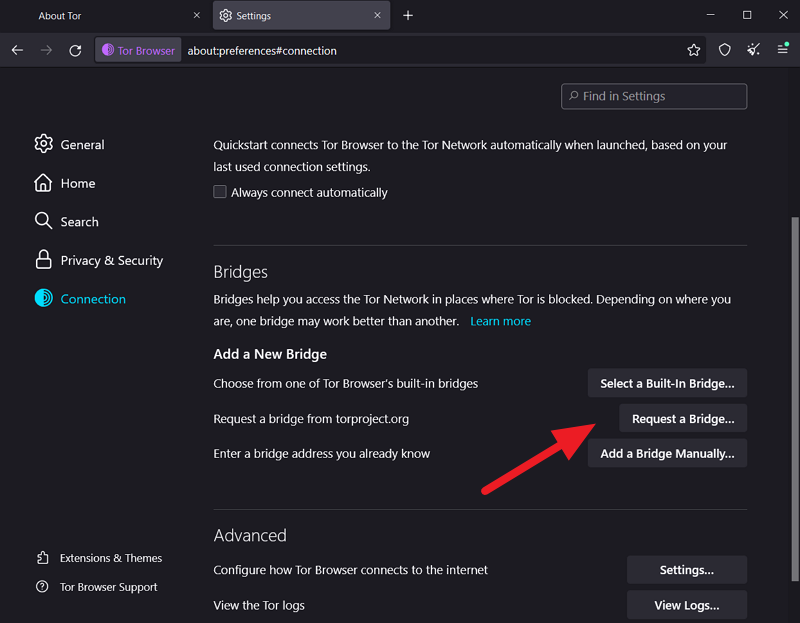
The bridges not only help you connect to the Tor network, but they can also increase browser speed. To use a Tor bridge, click on the hamburger menu in the toolbar and select Settings.
Then, click on the Connection tab. On the Connection tab, you will see the Bridges section. Click on Request a Bridge beside Request a Bridge from torproject.org.
A request bridge pop-up opens. You must solve a CAPTCHA to request a bridge from the Tor project. Enter the characters to solve the CAPTCHA and click Submit.

Once you have requested the bridge, the Tor project will provide a bridge address and a port number. You can see the available bridges in the Bridges section.
Create a New Tor Circuit
When you visit a website with the Tor Browser, the traffic is routed through a series of encrypted connections. This is called a Tor circuit. Each volunteer-operated server in the Tor network is called a relay. Each connection you make through the Tor Browser involves multiple relays forming a circuit together.
Creating a new Tor circuit can be an effective way to speed up the Tor Browser. You need to do this every time you notice a slow speed when browsing a website.
To create a new Tor circuit, open a web page in the Tor Browser, click on the hamburger menu in the toolbar, and select “New Tor circuit for this site“.

The website is automatically updated and reloaded with the new circuit.
Use New Identity
The Tor Browser has a new Identity button in the toolbar. When you click it, scraping the old identity for your connection creates a new identity. This works by closing your browser and restarting it to connect to the Tor network.
If you notice the slow speed of the Tor browser, simply click on the “New Identity” button in the toolbar.

A pop-up window will open to reset your identity. Click on Restart Tor Browser to create a new identity.
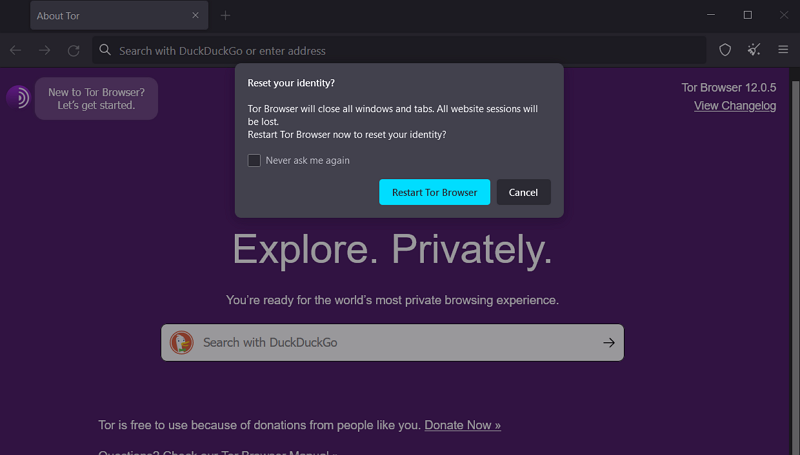
The Tor Browser will reopen and connect to the Tor network.
Try Tor on Brave Browser
The Brave browser is equipped with the Tor function integrated into it. You can use it without installing the Tor Browser separately. It works just like the Tor Browser to keep you anonymous and protect your privacy.
To use Tor in the Brave browser, click the hamburger button in the toolbar and select New private window with Tor.

A new private window is automatically opened, and a connection to the Tor network is established.
Replace the Old Torrc File With the New One
The Torrc file is nothing other than the configuration file of the Tor browser. It contains everything that has to do with the configuration of the browser, including the ports and relays to be used.
GitHub contains many Torrc files that are regularly updated to improve performance. Download one from GitHub and paste it in the following location.
Open the Tor Browser folder, go to Browser and then to Data and paste it there.
This is a risky method because incorrect configuration can compromise your privacy and destroy your anonymity on the Tor network.
Make Tor Browser Run Faster
The Tor browser is used for privacy and anonymity. Websites load too slowly on it. Fortunately, the methods above can help you make Tor Browser run faster and load websites faster than usual.
FAQs on How to Speed Up Tor Browser
1. What is the maximum speed of the Tor Browser?
The maximum speed of the Tor Browser depends on various factors. We can’t say that it works up to a certain speed because it includes several relays from volunteer-run servers. They are all located in different parts of the world and have limited bandwidth available.
2. What is faster than Tor?
There are various tools that offer faster surfing speeds than Tor. Some of these are Virtual Private Networks (VPN), the Invisible Internet Project (I2P) network, and proxies. Keep in mind that the privacy and anonymity guaranteed by the Tor network may not be available with other tools.
3. Why is Tor Browser so laggy?
The Tor Browser was developed to protect your privacy on the Internet. To ensure this, your traffic is routed through multiple servers around the world with limited bandwidth, as they are operated by volunteers. All traffic is encrypted to make it even more secure. These processes are what make the Tor Browser so sluggish.
4. Is Tor or VPN better?
If you prefer speeds, a VPN is better because you can have both your privacy and speeds. If you only care about your privacy, the Tor browser is the right choice for you. VPN providers claim not to log any data, but whistleblowers say otherwise. As long as you don’t use the Tor browser or a VPN for illegal purposes, both are better and safer.

