AI is taking the world by storm, and it is now part of everything we create. It can generate text, audio, images, and even videos. Creating videos with AI can save you a lot of time and effort. Instead of spending hours or even days filming and editing, you can finish your video with just a few clicks. And you don’t need fancy equipment like big cameras or a studio to produce a video. You can create professional-looking videos directly from your laptop or computer with simple text instructions.

There are many tools to create AI-generated videos. Vidnoz AI is a tool for creating AI-generated videos. It offers a large selection of AI videos. It has a simple video editor and the ability to add elements such as avatars, backgrounds, and music. There is also a video editor that allows you to add text, change the language, and adjust the speed. In this guide, we’ll look at all the features of Vidnoz AI and find out how AI technology simplifies video creation and much more.
Table of Contents
Top Features of the Vidnoz AI Video Generator
AI Video Generator
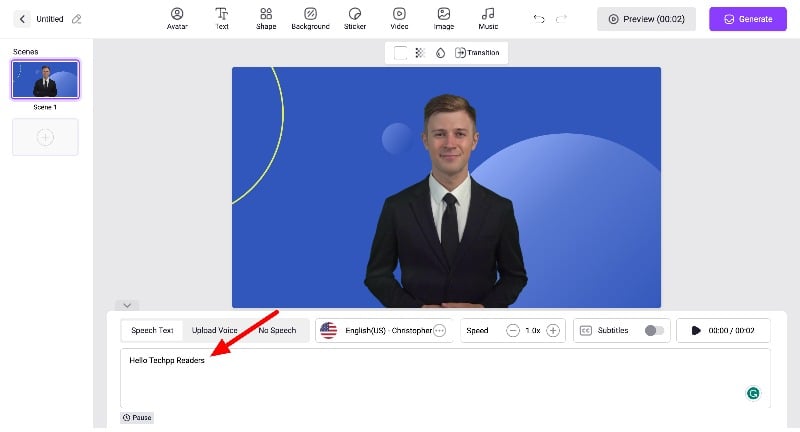
Vidnoz AI enables the creation of AI videos with advanced video creator tools. You can choose from over 300 templates or create the video from scratch. The tool allows you to create both portrait and landscape videos. You can enter your video script, and the tool will automatically convert the text into a video. It has its own video editor where you can add a script, set the language of text and audio, adjust the speed, and generate high-quality videos.
In addition to these functions, you can also use the tool to customize various elements in your video. You can customize the avatar, voice, background, text, and music to suit your needs. The editor offers the option of previewing the video before exporting it. Vidnoz AI also converts PowerPoint presentations into videos. You can import your PPT, and the tool will then convert it into a video. The tool allows you to export videos in 720 and 1080 mp4 format.
Create Custom Avatars
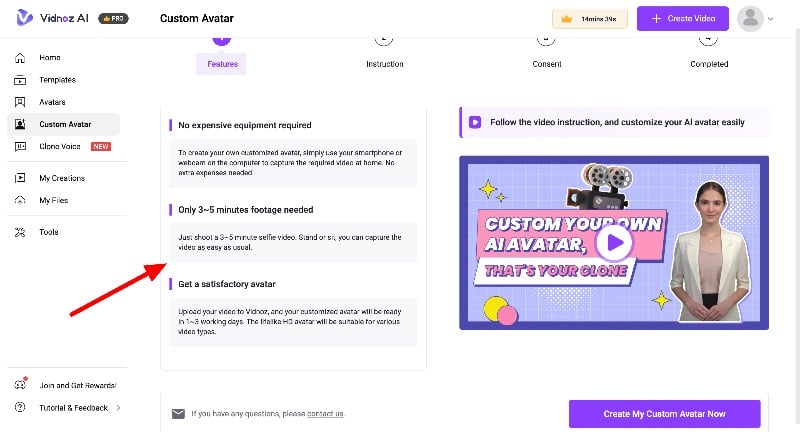
Video avatars can be helpful when creating explainer videos for tutorials. Adding an avatar can improve the user experience. Vidnoz offers more than 300 avatars to choose from, and the tool also allows you to create your own AI avatars. You can create your avatar from scratch and use it in your videos. Creating custom AI avatars can help you personalize your content. Instead of using a generic avatar, you can create your own avatar and add it to your videos. The avatar creation process is designed to be as simple and user-friendly as possible. The tool provides a step-by-step guide with tips on lighting, background, video capture type, and more to create perfect avatars.
Creating a custom avatar is easy and doesn’t require expensive equipment. You can record a short video of yourself that is well-lit and has a clear background and then upload it to Vidnoz AI. The tool creates your avatar. You can add the avatar to your videos and create an AI version of yourself.
Clone Your Voice
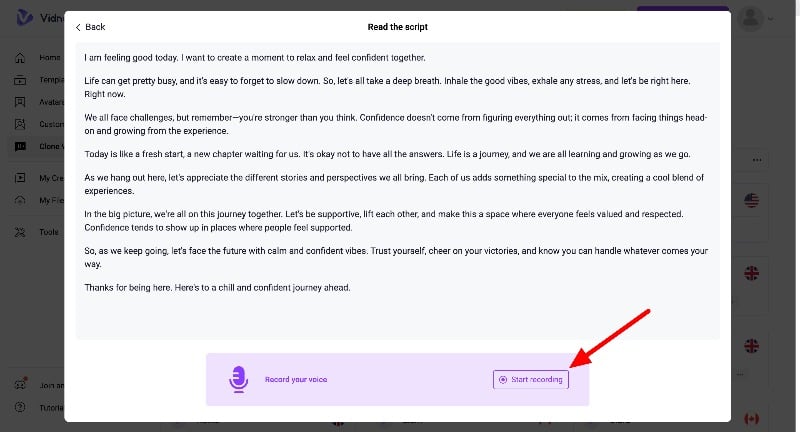
You can also create your voice clone with Vidnoz AI. Creating your own clone voice can help make your videos more original and authentic. The tool allows you to create and add voice clones to your videos. With the ability to create your own avatars and add your own voice, you can include yourself without being yourself.
The voice clone feature is currently in beta as of writing this article. And you have to pay $99 upfront to create a voice clone. You can create your voice clone in simple steps. You can record the voice in real-time or upload the voice recordings and create a voice clone. The tools recommend that your voice clips should be between 1-3 minutes long for better results. Name your voice. You have to pay to clone your voice. There is no way to preview the cloned voice before paying, which is something the tools should definitely change. Overall, adding your voice to the videos can have benefits.
User-Friendly Video Editor Interface

Vidnoz AI offers a simple and easy-to-use interface for the video editor. This simple interface allows anyone to create high-quality video content without needing a technical background or training in video production. It simplifies the video creation process and automates complex tasks such as synchronizing the avatar’s lip movements with text, avatar moments, and more. Anyone with no video editing experience can generate high-quality videos.
Resourceful Tools

Vidnoz AI also offers other useful tools to enhance your videos. These tools can help you produce high-quality videos. For example, you can use the Vidnoz Flex to record your screen online and share it with a click. This tool is perfect for creating tutorials or presentations. With the AI Headshot Generator, you can create custom, AI-generated headshots, and with the AI Cartoon Generator, you can add a playful or artistic aspect to your content by turning images into cartoon-like graphics. Vidnoz AI also offers other creative tools, such as the AI Vocal Remover and the AI Background Remover, to expand the possibilities for content creation. You don’t have to pay extra for these tools. They are available free of charge and you can also use them in the free version.
Vidnoz AI Pricing Details

Vidnoz AI is a paid tool and comes with different plans. There is a free version and three paid standard plans. With the free plan, you can create 1-minute videos with more than 300+ AI avatars, 17 plus voices, and a resolution of 720p. With the Starter plan, you can create up to 15 15-minute videos with a maximum duration of 5 minutes per month and more. You can also have the flexibility to increase the limit without changing the plan. The tool also offers a Business Plan and an Enterprise Plan. You can choose the plans according to your needs.
FAQs on Vidnoz AI
1. Can I use Vidnoz AI to create videos in different languages?
Yes, Vidnoz AI supports multiple languages. You can enter your script in the language you want, and the tool will generate a video with text and speech in that language. And thanks to the AI, you can easily switch between different languages.
2. Is it possible to customize avatars in Vidnoz AI?
Yes, Vidnoz AI allows you to create custom AI avatars. You can either choose from the library of over 300 realistic avatars or create your own avatar by uploading a short video of yourself. This feature is ideal for personalizing your videos.
3. How does the AI Text-to-speech feature work in Vidnoz?
The AI text-to-speech feature converts your written script into spoken words. It uses AI to generate audio. The tool also allows you to clone your voice and add it to the videos.
4. Can I export high-resolution videos from Vidnoz AI?
Yes, Vidnoz AI supports exporting videos in high resolutions, including 720p and 1080p in MP4 format. With the free version, you can only export videos in 720p, while with the Starter plan, you can export videos in 1080p format.
5. Is Vidnoz AI suitable for beginners without video editing experience?
Yes, the best thing about Vidnoz is the ability to create AI videos in a simple format. Its user-friendly interface makes it easy to use even without prior technical knowledge or experience in video editing. The tool also simplifies complex tasks such as synchronizing avatar movements and lip movements with the script and more.