

According to various renowned data institutes, India is the fastest-growing economy in the world, bypassing the sinking economies of China, Japan, and the UK. With its growing stature across the globe, India’s technology has also gone international. India’s UPI, which stands for Unified Payments Interface, pioneered the digital payments ecosystem in the country and is now adopted by multiple countries worldwide. To be specific, seven countries, including France, the UAE, Mauritius, Sri Lanka, Bhutan, Nepal, and Singapore, now offer Indians around the world to make use of the UPI system to send or receive money in foreign currency directly from their Indian bank accounts.

Since UPI has gone international and is available in seven countries, it is now more convenient for Indian travelers visiting any of these countries to simply use any of the supported UPI apps to make payments. They now don’t need to rely on their Forex or credit cards for shopping for international expenses. In this guide, we will show you how you can enable UPI international on BHIM, PhonePe, GooglePay, and Paytm. Let’s dive into it.
Table of Contents
What is the UPI international system?
There are some major players in the UPI payments scene, such as Google Pay, PhonePe, Paytm, and BHIM, which Indians use to perform their UPI payments. For payments internationally, UPI International has joined hands with NPCI (National Payments Corporation of India) and other partner countries to facilitate real-time currency exchange using UPI. It works 24×7, just like the domestic UPI system in supported countries, avoiding the hassle of carrying notes from that particular country.

Similar to how it works in India, the UPI international system has a transaction limit set for INR 2 lakhs. This amount instantly gets converted to the local currency in whichever country you are using. Do note that there isn’t any transaction fee involved when using the UPI International in any of the supported countries.
However, you will be charged forex charges from your respective banks as a conversion fee. The forex charges vary from bank to bank, and you need to check in with your bank or get in touch with customer support at your bank to know the forex charges for using UPI International. Charges aside, Indian tourists can now visit France, buy tickets for the Eiffel Tower using UPI, and feel proud.
NPCI International Payments Limited (NIPL), a wholly-owned subsidiary of the National Payments Corporation of India (NPCI), has also signed an agreement with 10 Southeast Asian countries, including Malaysia, Thailand, the Philippines, Vietnam, Singapore, Cambodia, South Korea, Japan, Taiwan, and Hong Kong, to enable a QR-based UPI payments system.
How to enable UPI international in UPI apps?
As mentioned, you can conduct international transactions via the UPI systems using the popular UPI apps such as PhonePe, BHIM, Google Pay, and Paytm. However, the feature isn’t enabled by default on any of these UPI apps, and you need to enable the UPI international feature to transact internationally. Let’s go through the steps to enable international UPI on each of these UPI apps one by one.
Google Pay
Google Pay supports UPI international payments. The first step to enabling the feature is to make sure that you have the latest version of Google Pay or GPay installed on your phone. After that, follow the below steps:
- Launch the Google Pay app on your phone.
- Tap on your profile picture at the top-right.

- Tap on Bank account.
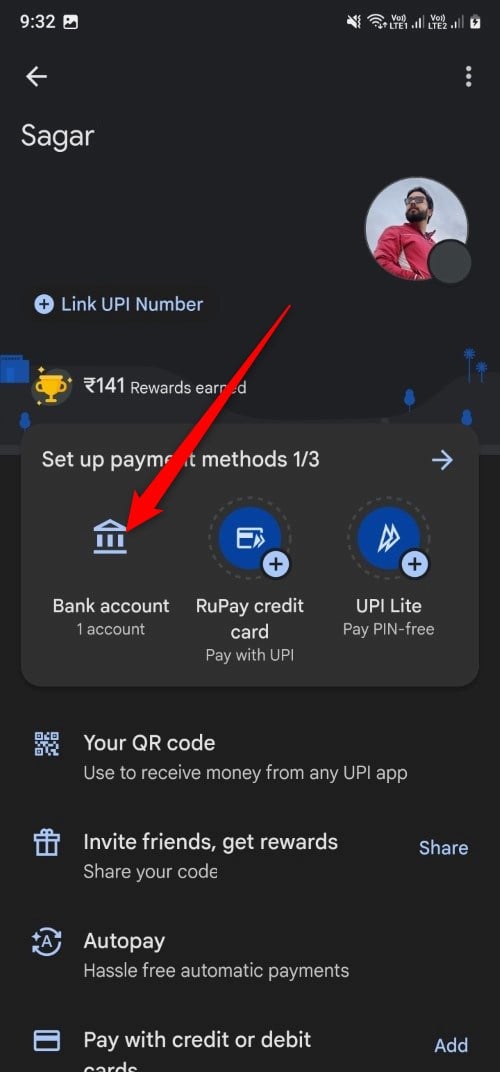
- Select the bank account on which you would like to transact internationally using Google Pay UPI.
- Choose the Manage international payments option.
- Turn on the Pay with UPI International toggle and enter your 6-digit UPI PIN to enable UPI International.

The above steps will turn on UPI International on your Google Pay account for 90 days. After that, you need to turn on UPI International again. All transactions will be conducted with the bank account that you have selected.
PhonePe
PhonePe, which was previously owned by Flipkart, has Walmart as its parent organization. It is an Indian multinational digital payments system that supports UPI International. Here are the steps that you need to follow to turn the feature on:
- Launch the latest version of the PhonePe app on your phone.
- Tap on your profile picture in the top-left corner.
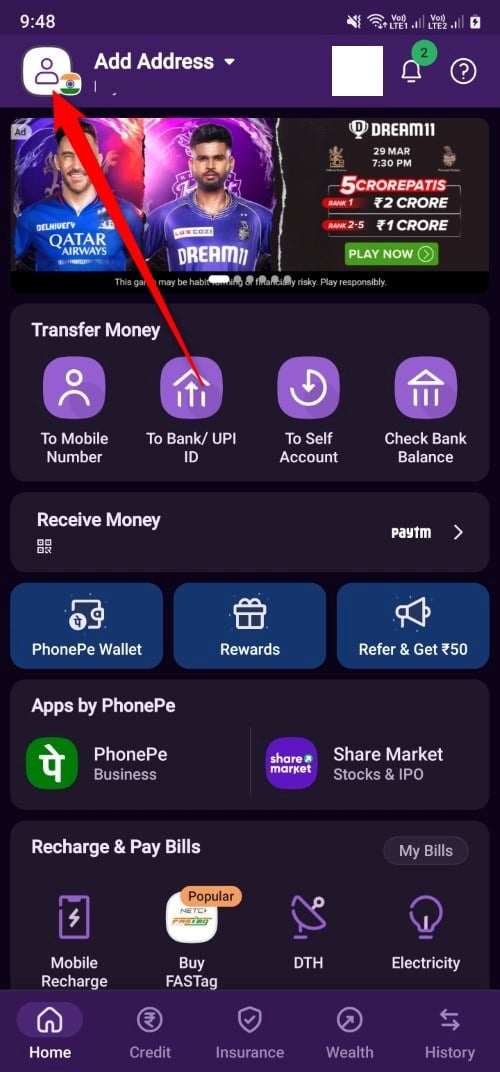
- Scroll down and select UPI International.

- Next to your active bank account, tap on Activate. Enter the PIN to enable the UPI International feature.
Notably, the UPI International feature will be enabled in your PhonePe account for 90 days, after which it will be disabled automatically.
Paytm
Paytm is going through an ongoing battle with the RBI, which has banned Paytm Payments Bank from accepting new deposits as of March 15 because of non-compliance and other regulatory issues. While the company is advocating its battle, its UPI users can still use the UPI international feature on the app. Follow the below steps to enable the feature:
- Open the latest version of the Paytm app on your phone.
- Tap on your profile photo at the top-left corner.
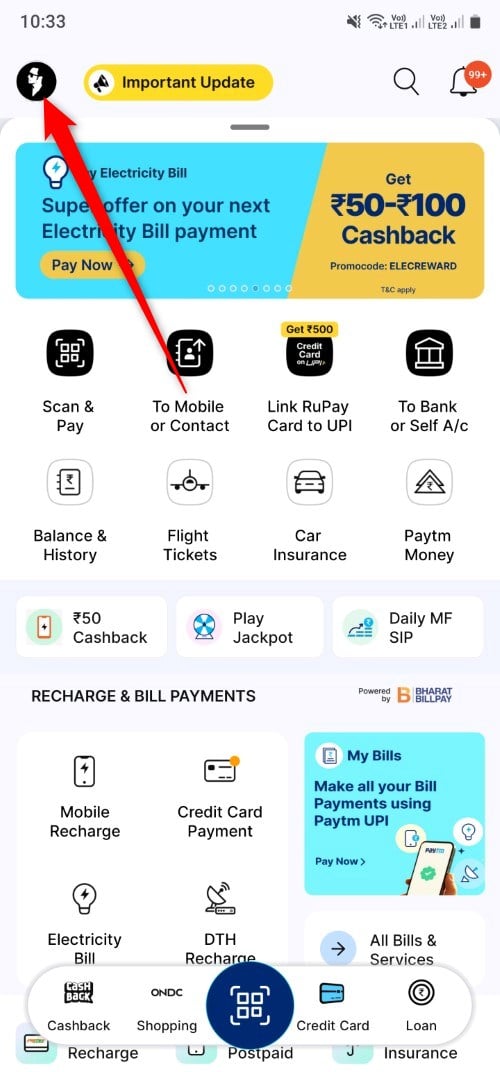
- Scroll down and select UPI & Payments Settings.

- Scroll down and tap on UPI International.
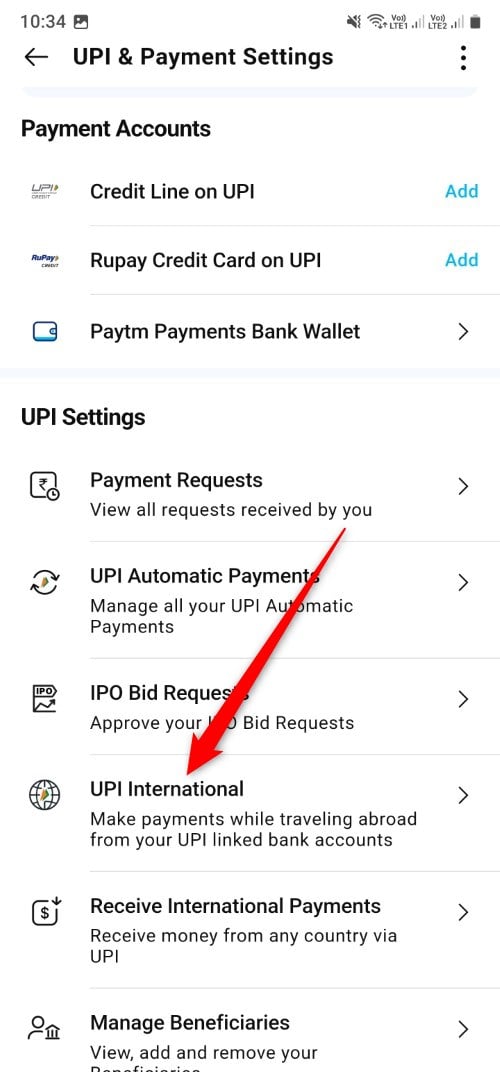
- Select your bank account and tap Activate next to it. Enter your UPI pin to turn on UPI International on your select bank account.
The ongoing RBI sanctions on Paytm prevent any user from using the Paytm Banks account as their primary bank account for UPI transactions. You need to ensure that you have an external bank account added to Paytm to use UPI International.
BHIM
You can also activate UPI International on the BHIM UPI app by following the below steps.
- Launch the BHIM app on your phone.
- Tap on your profile picture at the top-left corner.

- Under the My Linked Bank Accounts section, tap on your primary bank account on which you would like to enable UPI International.
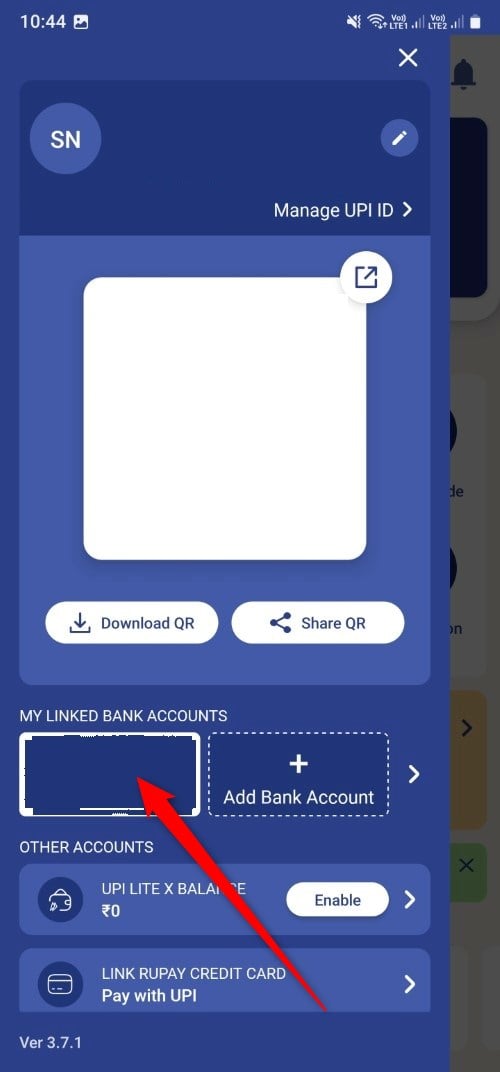
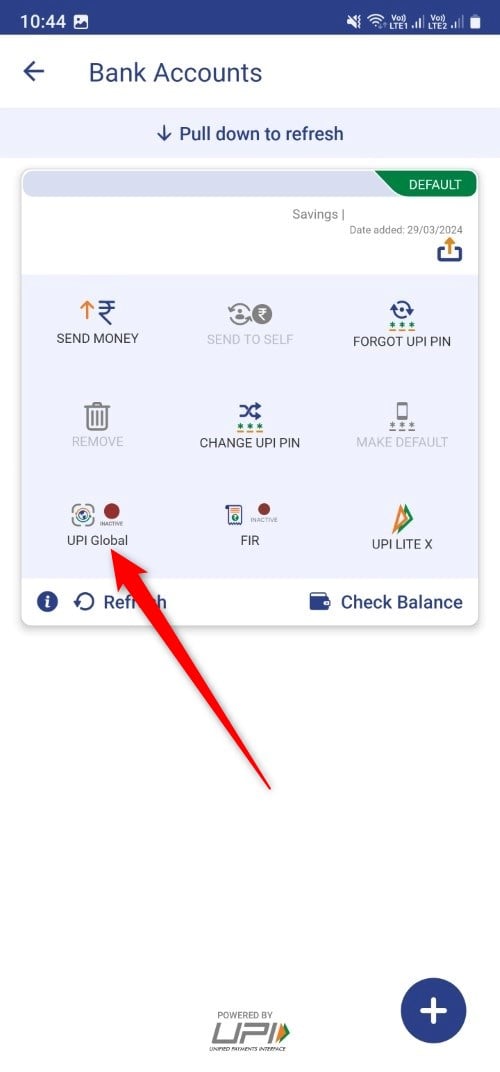
- You will be shown multiple options for your bank account. Here you need to tap on UPI Global.
- You will be asked to select the time frame until UPI International is enabled on the BHIM app. It cannot exceed the 90-day limit.
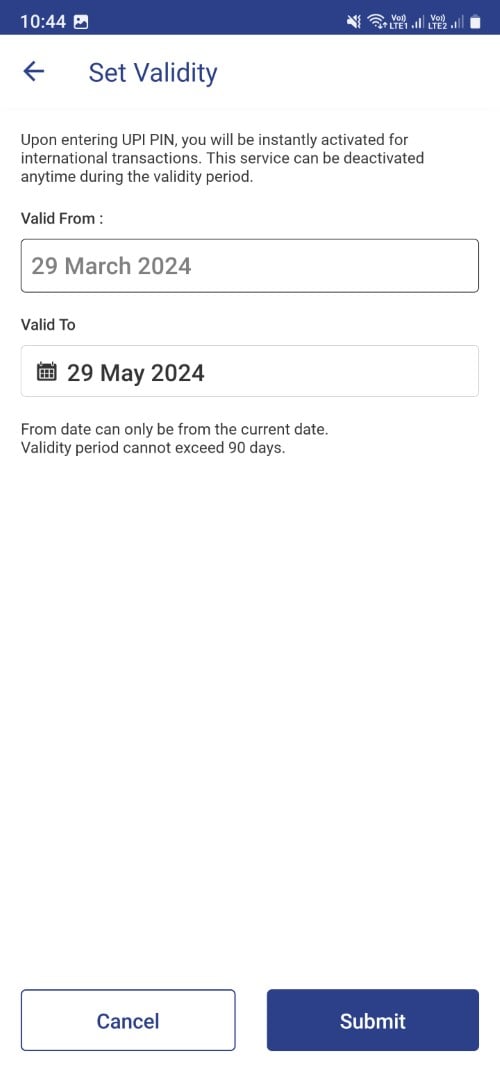
- Click Submit and enter your UPI pin to proceed.
Once the process is complete, the UPI Global icon for your bank account will turn green.
Can I receive money internationally using UPI?
Yes. Apart from sending money using the UPI International feature, you can also receive money using the same UPI. The only thing that you need to keep in mind is that this is currently supported in the specific seven countries mentioned above. To receive international payments, all you need to do is share your UPI ID or the VPA (Virtual Payments Address) with the sender and ask them to send money to your UPI ID.
Your VPA or UPI ID will appear as xxxxxx@okhdfc. It is just an example, as the VPA or UPI ID varies differently for different banks. There are no charges involved when receiving international money transfers. However, you may want to check in with your bank, as some banks may levy a convenience fee for every transaction.
FAQs about UPI International
1. Which banks currently support UPI International?
All Indian banks, including SBI, Kotak Mahindra, ICICI, HDFC, etc., support the UPI International feature. Smaller banks or cooperative banks do not support this feature. So, always check with your bank regarding support for UPI International before going ahead to enable it.
2. Can UPI be used internationally?
Yes, you can use UPI internationally by enabling the UPI International feature in the UPI apps listed above. Do note that the feature is currently supported by seven countries, and the Indian government is working with other partner nations to expand its reach.
3. Does the USA use UPI?
UPI, or the Unified Payments Interface, is exclusive to India, while FedNow is a payment system used exclusively in the USA.

