

In Summary
It’s normal to be confused between different types of RGB devices. In this article, we have mentioned the problems that one can face while lighting their PC with RGB, how can one overcome them, and more importantly, what is the right way to do RGB on a gaming PC. Also, what utilities should one use to control RGB? And what sort of stuff could slow down your PC?
After deciding it was time to switch from a laptop to a desktop PC to improve my creative workflow, I started researching and found that building a gaming PC was my best option. A few months later, I started ordering parts for the desktop. After picking out the major components, it’s time to make a decision. Should I invest some of my hard-earned money into a balanced build that prioritizes both aesthetics and performance, or should I just pick the best-performing parts and call it a day? Well, I went for the first option.

For aesthetic reasons, I ordered a case with pre-installed RGB fans. I ordered an all-in-one cooler with RGB fans and even got RGB RAM. Finally, all the parts arrived, and poof! The PC works great and looks even better. There’s just one small problem: I didn’t want colorful and glowing disco lights in my system. So, after a clean Windows installation and driver updates, I decided to personalize it. After all, all RGB components can be controlled via the software. That’s what motivated me to look into RGB components and the various brands that equip PCs with RGB components and invest in the process.
RGB components are nothing new; we’ve been seeing them for almost a decade now. The only problem is that even after so many years of developing RGB components, developing specialized software to control them, and refining the whole process, we are still a long way from getting a good result. In this blog, I will address all the problems I have personally faced with RGB components while also outlining all the solutions and steps you can follow to save time and money if you have already invested in the rabbit hole of RGB glorification or are thinking about going in that direction. This is the ultimate guide to understanding RGB in gaming PCs.
Table of Contents
Problems that you could face with RGB components
There are 3 main problems with most RGB components on the market, and it’s important to solve all three, especially because these problems can cause you to waste either your time, your money, or, in some cases, even your energy. Let’s find out what they are.
Controlling Individual RGB components could be a Nightmare
When I was planning to build a PC, I never thought this could be such a big problem. Most RGB components, from fans and CPU coolers to RGB RAM and even RGB SSDs, can be controlled with your motherboard’s RGB utility/software.
In most cases, these programs simply recognize all RGB components and let you control them individually. At least, that’s how it should be. But unfortunately, in some cases, this is not the case. When I was planning my PC, the motherboard specifications, such as VRM sections, RAM type, socket type, and PCIe capabilities, were at the top of my list. This is because most RGB components can work with the most popular motherboard manufacturers. But after building the PC, this statement is not entirely true.

The problem is that most motherboard manufacturers and even the brands that make these RGB components don’t work together or even work separately to improve the RGB software for a better experience. This is what becomes a nightmare for the end user. For me, the RGB software that came with my motherboard didn’t even work properly on Windows. So, in the beginning, I had to rely on multiple software programs to control RGB for my case fans and different utilities to control RGB for my RAM kit. In short, in the beginning, it was a problem for me to control the individual RGB components.
Understanding the types of RGB correctly
When researching different RGB products on the market, you will come across three types of RGB standards: RGB, Auto RGB, and Addressable RGB. Understanding these is crucial if you want to experience the full flavor of RGB sweetness.
RGB Lights/Components: LED strips or RGB fans with RGB lighting are equipped with a 4-pin connector that works with 12V. The most important thing about these devices is that they deliver the same signal to all LEDs. This means that each LED of the device must have the same color. You cannot change the color of the individual LEDs. These devices are also the cheapest and are not really preferred by people because they cannot be customized.
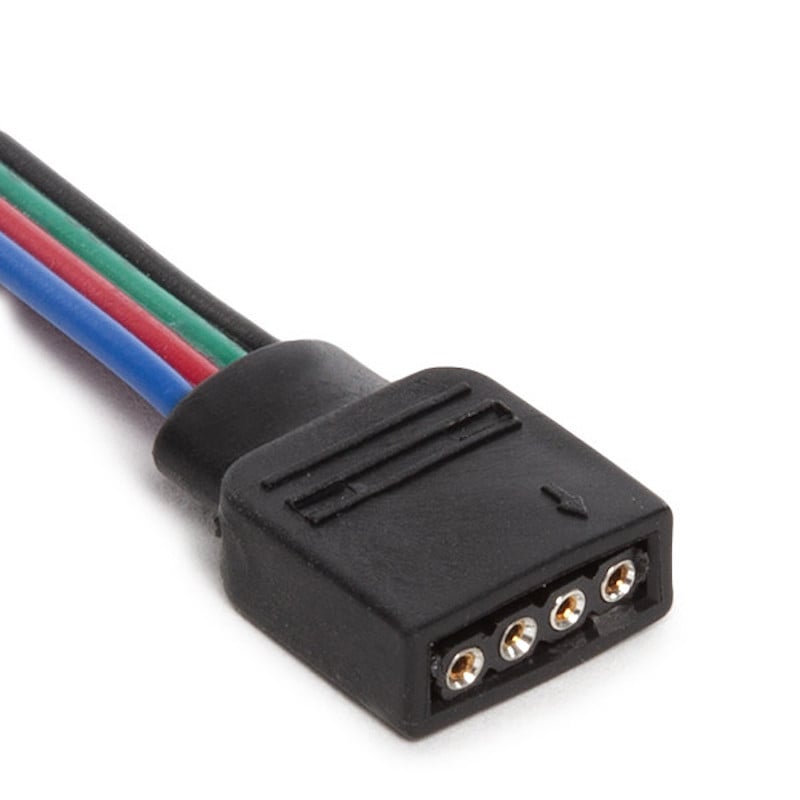
Auto RGB Lights/Components: LED strips or RGB fans with auto RGB lighting are also equipped with 4-pin connectors and function similarly to the RGB components. These types of components are usually the cheapest, as they lack the most important feature: “The controllability of RGB.” This type of component cannot be controlled by software or hardware. They change color automatically, hence the name Auto RGB.
Addressable RGB lights and components: Addressable RGB strips and fans are the most commonly used RGB components. They use 3-pin plugs instead of 4-pin connectors and also work with 5 volts. They allow for precise color matching with RGB, as you can control all RGB lights individually. Most mid-range and high-end RGB products for PC master racing come with these RGB components.
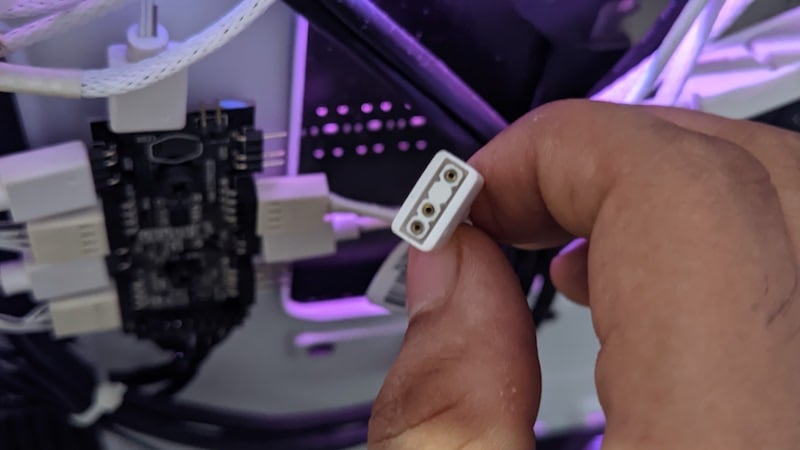
After reading all this, you will have understood the difference between RGB, Auto RGB and Addressable RGB. It is important that you understand the difference between all RGB components so that you can protect yourself from bad marketing techniques. Some brands that produce low and mid-priced components only use ARGB for addressable and auto RGB components. It’s important that you do your research before investing money in any of these components.
All RGB devices take a bit of extra power
While it’s not a huge problem, it’s important to know that all RGB fans, RGB RAM, AIOs with displays, and multiple RGB components consume extra power compared to non-RGB components. Sometimes, people use cheap hardware to save money on daisy chain fans or RGB strips. It can always happen that a single hub is not enough to power all RGB devices. It’s always a good idea to make sure you buy high-quality RGB hubs or even split cables, especially if you’re buying high-quality fans or RGB light strips.
Now that you understand the various complications with RGB products let’s take a look at the different options and steps you can take to ensure a bright user experience with RGB products.
Try to stick with an ecosystem of products
It is an expensive idea to stick with a single ecosystem of products, but it is also the most convenient idea to do so. By ecosystem of products, I mean stick with at least one brand and get all the major RGB components like fans, RGB strips and AIOs. Many brands like Corsair ICue and NZXT make all the major RGB components like fans, AIO, and even RGB strips. These brands ensure that all products communicate with each other and work great when you choose them.

Manufacturers like Corsair, Icue and even Lianli stick to solutions that don’t require too many cables, and most importantly, these products can be controlled with a single piece of software, like Icue and NZXT Cam. Consumers also get macro and microcontrollers that allow them to customize RGB to their liking, and it all just works.
These RGB components can also be controlled with third-party software such as Open RGB and Signal RGB. The only problem is that these premium hardware devices also have a high price tag. They may give you better lighting and even quiet operation when it comes to fans, but the high cost is only worth it if you want the best solution for your PC; otherwise, many mid-range and sometimes even budget options work just fine.
Use good software to control RGB devices
Most motherboard software programs that control RGB devices are garbage and don’t really work well. I suggest you try Open RGB or even Signal RGB. These are open-source programs that won’t slow down your PC. The most important thing is that you can control the RGB lighting of all components: RGB fans, AIO, CPU cooler LED strips, keyboard, RAM, and even the lighting on the back of your gaming monitor and mouse. They are easy to use and work on any PC.

These are user-friendly and come with features such as customizable in-game lighting, advanced lighting control via the console panel, and free daily effects. You can also create a library of your favorite lighting effects that you can use at any time. One of these (Open RGB) is very lightweight and only offers certain features, Signal RGB on the other hand is very feature rich and could be a treat for RGB users who struggle to get good lighting every day of the week.
I recommend you try them both. You can also use software of your choice; just keep in mind that not all software will work with the appropriate hardware. Simply put, a lack of hardware can also cause the software to not work properly. Mid-range AIOs may not work with the specific program that the manufacturer recommends. Just because it lacks things like USB ports, it’s a mid-range or budget product.
Try to get hardware that is compatible with different vendors
Every time you buy an RGB product, such as RGB RAM or even an RGB SSD or GPU with an RGB logo or fan, you should check the product description on the manufacturer’s website. Most new-generation hardware products can be controlled with various software programs, but sometimes, the product manufacturers explicitly mention all the utilities that can be used to control the hardware.
This happens most often with memory sticks and SSDs. If you’ve picked something up and can’t control it, remember that any device that has a 3-pin or 4-pin RGB connector can be controlled with any software. If not, you can use apps like Signal RGB or Open RGB to control them instead of your motherboard’s software.
Splitter Cables and RGB Hubs are your best friends
I’ve seen people personally obsess over a motherboard just because it has multiple 3/4 pin ARGB connectors. If you’re considering a motherboard, how many RGB headers does it have? That should be the last scenario you think of. You can usually use a high-quality hub or even a cheap splitter cable to connect RGB devices. Most RGB devices use 3-pin cables, and this is something of a universal standard. Instead of wasting your money on a motherboard that has 5 ARGB headers, you should always consider a motherboard with a good VRM section, a maximum number of PCIe lane support, and much more.

Many cases from brands such as Cooler Master, MSI, and even NZXT come with a high-quality hub to control RGB devices and fan functions. You can also opt for these cases if you don’t want to spend extra money. More importantly, the fans of several brands such as Deepcool, MSI and Corsair come with their own solutions for controlling RGB products.
There is nothing like one solution that fits all
RGB should be tasteful. Instead of buying everything in RGB, take some time to see what suits your aesthetic and what goes down well. Not everyone has the same taste, and it’s better to find out what suits you best. Instead of spending money to buy as many RGB accessories as possible, do your research first by watching YouTube videos and using sites like Pinterest and Reddit to gather ideas and find your own aesthetic. This way, you won’t spend too much money on products but will make a good decision on what to buy and what not to buy. You can always use the PC Part Picker for product and price comparisons.
RGB on Gaming PCs: Choose your components wisely
People should always choose their components wisely. There should be a balance between performance and aesthetics. Instead of opting for more expensive RGB components, one can also buy moderately priced components that offer both RGB and performance. In fact, I would suggest that if you’re on a tight budget, you’re better off forgoing RGB components and opting for something that considers performance first and aesthetics second. The best example of this is budget CPU coolers. They may not have flashy RGB colors, but they will keep your hardware properly cooled.
If you want RGB components for a better-looking system, make sure you have room for more components later. You can build your PC with the bare essentials now and add RGB fans and LED strips later for a better look.

