

You’ve finally built a gaming PC and can finally play the latest titles you’ve always wanted to play. But the gaming experience still sucks because you’re stuck with your old monitor, or because after building a PC on a budget you’re confused that gaming monitors are too expensive. And you won’t find anything good under your budget. In 2023, the opposite is true: we live in a time where good gaming monitors are getting cheaper and cheaper and cheap gaming monitors are getting better and better.

To prove us right, we’ve compiled a list of the top 5 budget gaming monitors (100 USD to 200 USD) that offer a great gaming experience and provide all the essentials of a gaming monitor without putting too much strain on your wallet. If you’re interested in buying a budget gaming monitor, make sure you stick it out to the end because after this blog, you’ll be getting one for yourself.
Table of Contents
Things to Remember Before Getting a Budget Gaming Monitor
It doesn’t matter whether you buy a budget or an expensive gaming monitor, the things we mention in this part of the blog apply to all gaming monitors. You also need to keep in mind that there is a difference between “must have” and “nice to have”. These monitors are called budget gaming monitors because they don’t offer everything a mid-range or expensive monitor might offer. But what they do offer at this price are solid gaming monitors that are indispensable.
These monitors have their bases covered. All monitors offer at least a 144 Hertz or 165 Hertz refresh rate and a response time of 5 ms or less. All monitors have a standard resolution of 1080p and offer a screen size of 24 inches. We would not recommend choosing more than 24 inches in this price segment. Especially with a resolution of 1080p. All monitors have an IPS panel with a standard brightness of 250 nits or 300 nits. All monitors support both HDMI and Display Port, so they can be connected to everything from gaming laptops to PCs. These are the standard specifications that all monitors in this list have.
IPS (In-Plane Switching) panels are technically slower than TN (Twisted Nematic) panels, but using TN panels comes with a lot of unacceptable trade-offs – unless you’re an FPS nerd and play extremely competitive games, a budget gaming monitor isn’t worth it.
While these are the essential specs that every monitor in this list has, there are also some “nice to have” features such as an adjustable stand, an overdrive mode for even faster response times and higher peak brightness, which are all nice to have but are not present on all budget gaming monitors in this list as they are not necessary for a better gaming experience.
So let’s take a look at the best budget gaming monitors.
Best Budget Gaming Monitors You Can Buy
KOORUI 24″ Gaming Monitor
Let’s start with the cheapest option in our list: The Koorui 24″ attempts to redefine what $115 can do for budget gaming monitors. With its fast 165Hz refresh rate and 5ms response time, the Koorui 24″ delivers a solid gaming experience and features a 24-inch 1080p IPS panel with an sRGB coverage of 95% and a DCI P3 of approximately 85%. In short, the panel used in this monitor is very powerful and performs well. It also has a peak brightness of around 250 nits, which is to be expected from a monitor in this price range.

In terms of connectivity, it has 2 HDMI 1.4 ports, a DisplayPort 1.2 port and a headphone jack. As an additional function, the monitor offers an overdrive mode, which reduces the response time to approx. 3 ms. Although this is still not the response time of 1 ms that the manufacturer claims, it is still incredible for this price.
If you’re on a budget and want a good gaming experience, we recommend this monitor. If you want to try it out for yourself.
Pixio PX248 PRO
Let’s increase the budget to around 150 USD. The next monitor on our list of the budget gaming monitors is the Pixio PX248 Pro, which you can also consider the elder sibling of the Koorui 24″. Both monitors have the same specs (could be the same panel) with a slightly different color tuning. This means that all the good features of the Koorui 24″ are also transferred to this monitor.

The Pixio PX 248 Pro has a fast refresh rate of 165 Hz and a standard response time of 5 ms. The 24-inch IPS panel has an sRGB value of approx. 95% and a DCI P3 value of approx. 87%, which is almost the same value as the Koorui 24″. In terms of connectivity, it has two HDMI ports that support HDMI 2.0 and a Display Port 1.2 port with a headphone jack identical to that of the Koorui 24″. It even offers a GtG (Grey-to-Grey) of about 3 ms when the monitor is in overdrive mode, which also lowers the brightness.
So if everything is similar to the Koorui 24, why not just buy the Koorui 24 for 115 USD?
Well, there are two things that make the Pixio PX248 Pro shine. One is the peak brightness, which at 320nits is better than the 250 nits of the Koorui 24″. And two, it comes with a really good monitor stand compared to the stand that comes with the Koorui 24″. The Pixio PX248 Pro comes with a tiltable and height-adjustable stand, which is always better than the crap Koorui comes with. So if you want a better stand and higher peak brightness, you should consider the Pixio PX248 Pro.
MSI G241
The MSI G241 is a fully dimmed, stealthy-looking budget gaming monitor with all the bells and whistles you’d expect from a gaming monitor in this price range. It has a fast 144Hz IPS panel and an advertised response time of 1ms, as with all monitors in this price range, but as we’ve seen with the last two budget gaming monitors, it should be practically 3 to 4ms, which is still great at this budget.

And yes, as a budget gaming monitor it costs $170, which is $20 more than the last option, but that’s what you’re paying for the value MSI brings to the table as a whole. The monitor also offers a DCI P3 score of 84% and an sRGB score of 85%.
When it comes to connectivity and additional features, the monitor has 2 HDMI 1.4 ports, 1 Display Port 1.2 and a headphone jack. It also supports AMD freesync, which you can use with other AMD technologies like FSR 3 for a better gaming experience. The included MSI stand only supports tilt adjustment, which is a shame as the Pixio monitor is cheaper and comes with a better stand.
But one thing where this monitor stands out is the contrast ratio. It has a better contrast ratio than the other two monitors on the list because the use of Digital Vibrance in games provides an even better experience.
Acer Nitro VG240Y
A fan favorite, the Acer Nitro VG240Y is a $185 165Hz gaming monitor that offers some of the best response times in our list of budget gaming monitors and is the absolute best so far in terms of color, contrast, brightness, and response time. Let’s take a look at what it offers, it’s a 24″ 1080p 165Hz gaming monitor with a refresh rate of 165Hz and a response time of around 1ms, although the company claims a response time of around 0.5ms, it’s actually around 1ms, but you have to keep in mind that response time is a double-edged sword for this budget gaming monitor.

While the Acer Nitro VG240Y has the best response time in the whole list, it also has overdrive settings, and we don’t recommend setting it to extreme overdrive as you’ll feel a lot of ghosting. Just set it to the normal overdrive setting and you’re good to go.
This monitor has a peak brightness of 350 nits, which is the best so far, and a true sRGB coverage of 99%, but the DCI P3 coverage takes a hit and drops to around 80%. The monitor also comes with a height-adjustable stand and is the only monitor on the list that supports both Microsoft and Sony’s new consoles, as both the PS5 and Xbox Series X/S require HDMI 2.0 and the Acer Nitro VG240Y comes with 2 HDMI 2.0 ports and a Display Port 1.2.
The Acer Nitro VG240Y is a good choice and worth considering.
ASUS ROG Strix 24.5″
Let’s take a look at the last contender on our list of best budget gaming monitors, the Asus ROG Strix 24.5″. It is the only monitor that surpasses both the size and refresh rate of all the gaming monitors on our list without exceeding the 200 USD price limit. The Asus ROG Strix 24.5″ is a 24.5-inch gaming monitor with a refresh rate of 180 Hz. This monitor offers the best build quality of any gaming monitor and a height-adjustable stand as well.
It is probably the best gaming monitor for all hardcore FPS gamers out there who want to play competitively without breaking the bank. The monitor offers a response time of approx. 1 ms and a peak brightness of approx. 400 nits, which is the maximum in this price range.
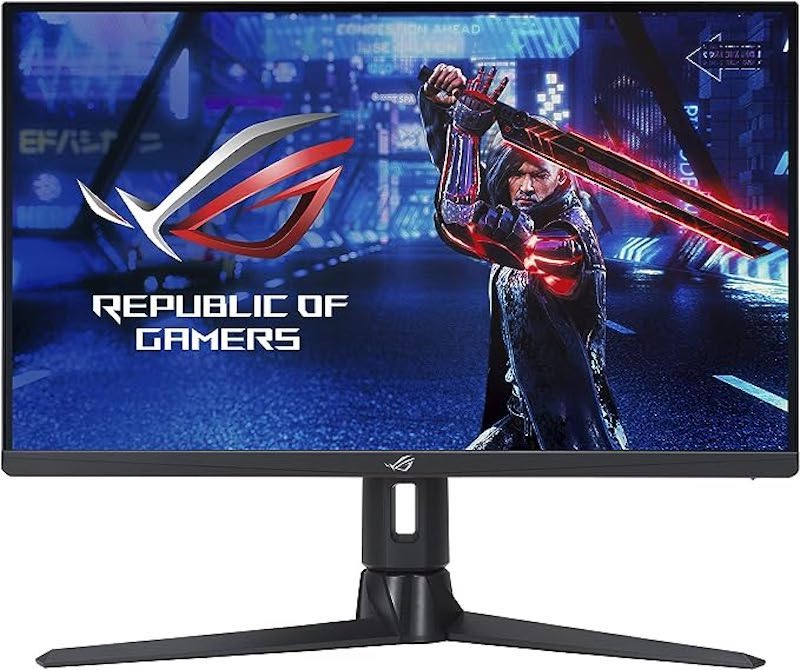
The display is 1080p and offers an sRGB value of around 95% and a DCI P3 value of 88%, which isn’t the best, but it’s not bad either. It is the only monitor with a maximum refresh rate of 180 Hz, although this needs to be overclocked, and has features such as ELMB (Extreme Low Motion Blur), which reduces response time by inserting black frames in between other frames and multiple overdrive settings.
It also has a built-in blue light filter, which other monitors don’t offer. If you want to protect your eyes with blue light filters, you can take a look at our article on different blue light filters for PCs that you should use to protect your eyes from blue light exposure.
This cheap gaming monitor is also compatible with the PS5 and Xbox Series S/X as it is equipped with 2 HDMI 2.0 ports and a DisplayPort 1.2 for a high refresh rate when gaming on consoles. Overall, the Asus ROG Strix 24.5″ is a solid option for you if you’re looking for a budget gaming monitor with a wide range of gaming features and solid build quality. Or, if you’re just an FPS nerd who wants to play games at the maximum framerate possible, then check it out.
Choosing the Best Budget Gaming Monitor
These are some of the best budget gaming monitors that are under 200 USD. They offer great performance and even force you to reconsider the price-performance ratio of mid-range and flagship monitors. Sure, expensive monitors offer a lot more features like an even higher refresh rate panel or an OLED panel with even faster response times and even better build quality, but when it comes to budget gaming monitors, they offer you everything you need to enjoy your gaming experience and nothing else. Let us know which is your favorite gaming monitor in this list of budget gaming monitors and which one you chose for yourself.
FAQs about Best Budget Gaming Monitors
1. What is a good budget gaming monitor?
A budget gaming monitor is a monitor that fulfills all the basics of a normal monitor, such as a high-quality display and then add things like a high refresh rate of 144 Hz or 165 Hz and a good response time of at least 5 ms. All of these features fall under a budget monitor, but the definition of budget can be different for everyone. However, we believe that anything under 200 USD can be considered a budget monitor, which is why we have presented the best budget gaming monitors under $200.
2. Is 165 Hz better than 144 Hz?
On paper, 165 Hz is better than 144 Hz for any kind of gaming. But when it comes to budget gaming monitors, it’s clear that a high-quality panel with a low response time makes a bigger difference in gaming. For example, a 165Hz monitor with a response time of 5ms versus a 144Hz monitor with a response time of 1ms. The 144Hz monitor will perform better when gaming.
3. Are 75 Hz monitors good for gaming?
No, a 75Hz monitor for gaming is the same as a car with a V8 engine in traffic: you simply can’t use the full power of the car/monitor. It’s better to choose a monitor with a refresh rate of 120 Hz or 144 Hz, especially if you can get something like the 24-inch monitor from Koorui which comes with a great panel and a high refresh rate of 144 Hz for less than 120 USD.
4. Can we use any of these budget gaming monitors with the new gen consoles like PS5 and Xbox Series S/X?
The answer is not as simple as you might think: all the budget gaming monitors mentioned in this blog can be used with the new consoles, but you can’t play high refresh rate games and are limited to 60 Hz, because of the five top monitors, three use an HDMI 1.4 port, while you need an HDMI 2.0 port to play games with a high refresh rate of 120 Hz.
If you want to play on consoles with a high refresh rate, you should look at the latter two monitors. The Acer Nitro VG240Y and the Asus ROG Strix 24.5″ are perfect for the PS 5 and the Xbox Series X and Series S. Both monitors have an HDMI 2.0 port.
5. What are the best budget gaming monitors at 120Hz?
120 Hz is not as common a refresh rate as you might think, so there are no 120 Hz monitors on the list. Also, you should consider a 144 Hz monitor instead of a 120 Hz monitor because of the higher refresh rate. But if you can find a monitor with a good IPS panel and 120 Hz refresh rate that has a response time of less than 5 ms and costs less than 115 euros, you should go for it because you won’t notice much difference.

