

Quick Answer
The Snapdragon X Elite is the top-end variant, available in three variants, while the Snapdragon X Plus has one. If you need the best performance for gaming, video editing, and AI tasks, go for the Snapdragon X1E-84-100 or Snapdragon X Elite (X1E-80-100). If you want a balanced option for multitasking and professional work, choose the Snapdragon X1E-78-100. For general use and cost-effectiveness, the Snapdragon X1P-64-100 is a good pick. There is an X1E-00-1DE variant primarily designed for developers for advanced development tasks.
Windows on Arm is finally happening, and it’s promising. Apple’s transition to ARM with their silicon processors has proven to be the next big thing for personal computers, offering incredible performance and great battery life. While Microsoft has tried moving to ARM, it didn’t go well. With the help of the latest Snapdragon X series processors from Qualcomm, Microsoft has started transitioning into ARM processors, with plenty of announcements from the OEMs and better support for native apps for Windows.
The new X series from Qualcomm comes in two variants: the X-Elite top-of-the-line processor and the X-Plus entry-level processor. With several laptops featuring the new X series already available in the market, you might feel uncertain about which one to choose for your next laptop. Don’t worry; in this guide, I will explain everything you should know about the new Qualcomm X series, including the differences between the X Elite and X Plus processors, understand the naming conventions, and provide more details about each variant. Finally, you can decide which one to pick for your next laptop.
Table of Contents
Common Terms Used in Processors and What They Mean
Before that, here are the most common terms used in processors and what they mean to you. Don’t worry about the technical terms; I will make it easy for you to understand.
Technical Term | What does it mean | How it is helpful? |
|---|---|---|
Cores | The CPU is the central part of the processor, and the cores are individual processing units within it. | More cores can handle more tasks simultaneously. |
Total Cache | The amount of high-speed storage area for frequently used data. There are several levels of cache, generally referred to as L1, L2, and L3. | Helps the device to run faster and also saves power, and extends battery life. More cache can give better performance, but there is a limitation. |
Max Multithread Frequency | The maximum speed the CPU can achieve when its cores are working simultaneously. | Improves the device's performance. Also consumes more power and generates more heat. |
Dual Core Boost | Increase the clock speed of two cores simultaneously beyond their base frequency under certain conditions. | Boost performance for more intensive tasks. Helpful while gaming, general multitasking, and more. |
GPU (Graphics Processing Unit) | Manages graphics and visual data. | Enhances gaming, video editing, and graphic design. |
TFLOPs (Tera Floating Point Operations per Second) | It is the measurement of computer performance during complex tasks. Modern GPU performance is compared to TFLOps ratings. | Higher TFLOPs mean better graphics performance. |
NPU (Neural Processing Unit) | NPUs are specified processing units designed to run AI and machine learning tasks more efficiently than CPUs or GPUs. | Used for all AI tasks. |
NPU TOPS (Trillions of Operations per Second) | Used to measure NPU's computing power. | Higher TOPS means faster AI processing. |
Memory Type | Type of RAM used in the processor. Ex: LPDDR5x, the latest high-speed memory standard currently. | Memory type determines the speed and efficiency of data transfers. |
Transfer Rate | The speed at which data is transferred in the memory. | Higher transfer rates mean faster performance. |
Battery Efficiency | Efficiency in power usage is more relevant to mobile but also for energy-saving desktops. | Lower power consumption, saving on energy bills. |
Thermal Management | How the processor handles heat while running. | Better thermal management keeps the device cool and offers higher performance. |
Understanding the Snapdragon X Series Naming Scheme
Like any processor, Qualcomm has a naming scheme for its X series. We have had Intel’s naming conventions for a long time, and now, understanding Snapdragon’s naming can be beneficial as many laptops will use X processors in the future. The X series naming has its brand name, generation, Tier, SKU, and variant.
For instance, in the Snapdragon X Elite (X1E-84-100), the first name, Snapdragon X, indicates the company’s brand. Next, the number refers to the generation. A higher number represents a newer generation. Currently, these processors are in their first generation, indicated by the number “1.”
Next, The letters “E” or “P” refer to the type within this series. Here, “E” refers to “Elite,” which is the top-tier model of the Snapdragon X series, and “P” refers to “Plus,” which is slightly lower in performance compared to the Elite processors.
Next, The number refers to the “SKU” (Stock Keeping Unit) tied to a specific model. A higher SKU number generally means better performance and more features. The last part of the name is the configuration details of the processor, which can include variations in performance, efficiency, and other features based on the processor.
For example, in the Snapdragon X1E-84-100:
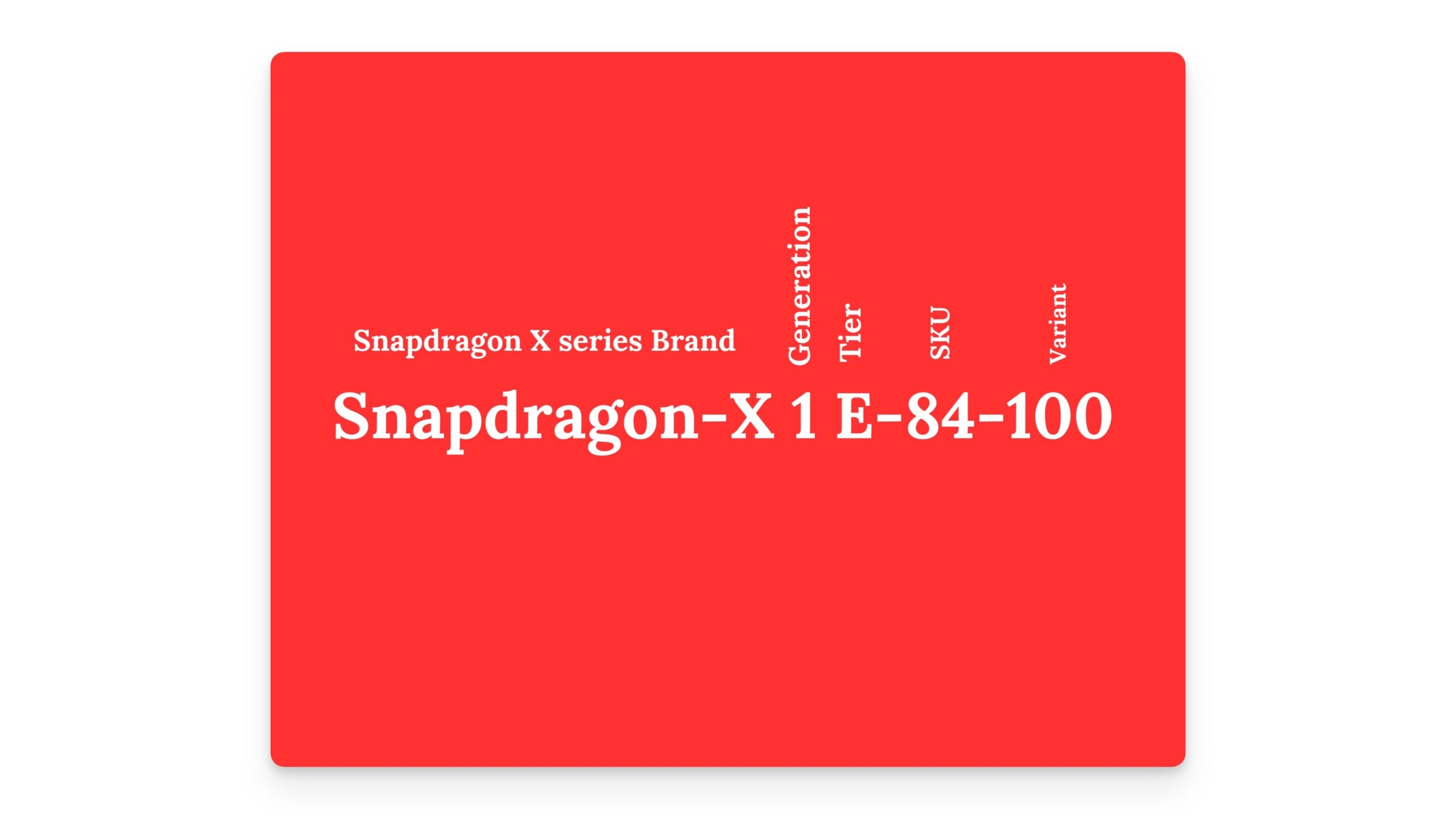
- “Snapdragon X” indicates the high-performance desktop series.
- “1” refers to the first generation.
- “E” refers to the Elite model.
- “84” refers to the specific model number.
- “100” refers to the particular variant or configuration within this model.
Snapdragon X Elite vs X Plus: The Differences and Which One Do You Pick
Snapdragon has introduced the X series with four variants under the Elite (E) series and one under the Performance (P) series. Here’s a detailed look at each processor:
Snapdragon X Elite (X1E-84-100)
The Snapdragon X Elite (X1E-84-100) is the top-of-the-line processor in the Elite series. It comes with 12 Orion CPU cores, base clocked at 3.8 GHz, and can go up to 4.2 GHz for demanding tasks. It has a 42MB cache size and a score of 3.8 TFLOPS, which makes it ideal for gaming and graphic-intensive applications. It features a dedicated NPU with 45 TOPS for AI tasks. This top-tier chip uses LPDDR5X memory and supports Wi-Fi 7 connectivity.
Snapdragon X Elite (X1E-80-100)
Next is the Snapdragon X1E-80-100, the second most powerful chip in the Elite series. It supports the same GPU as the X84, with a lower base CPU speed of 3.4 GHz. Like the X84, it offers high boost speeds for two cores, which can go up to 4.0 GHz during intensive tasks. The GPU performance is also strong, with 3.8 TFLOPS, and the NPU provides up to 45 TOPS.
Snapdragon X Elite (X1E-78-100)
The Snapdragon X1E-78-100 is the third most powerful processor in the Elite series. It shares many features with the higher models, including a 42MB cache and base clock speeds of 3.4 GHz. However, it does not support the high boost speeds for two cores. The GPU performance is up to 3.8 TFLOPS, with the NPU delivering up to 45 TOPS.
Snapdragon X Elite (X1E-00-1DE)
Finally, the latest addition to the Snapdragon X Elite series, made for developers, is the X1E-00-1DE. It features 12 CPU cores with a faster base clock speed of 3.8 GHz compared to 3.4 GHz on the X1E-8100. It also supports boost speeds for up to two cores, reaching 4.2 GHz. The GPU power is 4.6 TFLOPS, higher than the base models, with the NPU providing the same 45 TOPS. This process is primarily designed for developed optimized advanced development tasks.
Snapdragon X Plus (X1P-64-100)
The Snapdragon X1P-64-100 variant in the Plus series has significant changes compared to the Elite models. It comes with ten cores compared to 12 in the Elite series. The CPU clock speed is 3.4 GHz and supports a 42MB cache. There is no support for high boost speeds, and the GPU performance is up to 3.0 TFLOPS, with the NPU delivering up to 45 TOPS. It also supports LPDDR5X memory and Wi-Fi 7 connectivity.
Comparison of X-Elite and X-Plus Variants
Processor | Number of Cores | Total cache | Speed for All Tasks | Boost Speed for Two Cores | Graphics Power | AI Power | Memory Speed |
|---|---|---|---|---|---|---|---|
Snapdragon X Elite (X1E-00-1DE) | 12 | 42 MB | Fastest (3.8 GHz) | Highest Boost (4.3 GHz) | Best (4.6 TFLOPs) | High (45 TOPS) | Very Fast (8448 MT/s) |
Snapdragon X Elite (X1E-84-100) | 12 | 42 MB | Fastest (3.8 GHz) | High Boost (4.2 GHz) | Best (4.6 TFLOPs) | High (45 TOPS) | Very Fast (8448 MT/s) |
Snapdragon X Elite (X1E-80-100) | 12 | 42 MB | Fast (3.4 GHz) | High Boost (4.0 GHz) | Good (3.8 TFLOPs) | High (45 TOPS) | Very Fast (8448 MT/s) |
Snapdragon X Elite (X1E-78-100) | 12 | 42 MB | Fast (3.4 GHz) | No Boost | Good (3.8 TFLOPs) | High (45 TOPS) | Very Fast (8448 MT/s) |
Snapdragon X Plus (X1P-64-100) | 10 | 42 MB | Fast (3.4 GHz) | No Boost | Good (3.8 TFLOPs) | High (45 TOPS) | Very Fast (8448 MT/s) |
Snapdragon X Elite vs X Plus: Performance Benchmark Scores
Benchmark | Snapdragon X Elite (X1E-84-100) | Snapdragon X Plus (X1P-64-100) |
|---|---|---|
Geekbench 6 Single-Core | 2880 | 2349 |
Geekbench 6 Multi-Core | 15211 | 12981 |
Cinebench R23 Single-Core | 1783 | 1474 |
Cinebench R23 Multi-Core | 14672 | 11735 |
PassMark Single-Core | 3966 | 3255 |
PassMark Multi-Core | 23576 | 22626 |
3DMark Wildlife Extreme | 44.81 fps | 39.19 fps |
Aztec Ruins (GFXBench 1080p) | 357 fps | 295 fps |
Benchmark Sources: Geekbench, CPU Monkey, GFX Bench
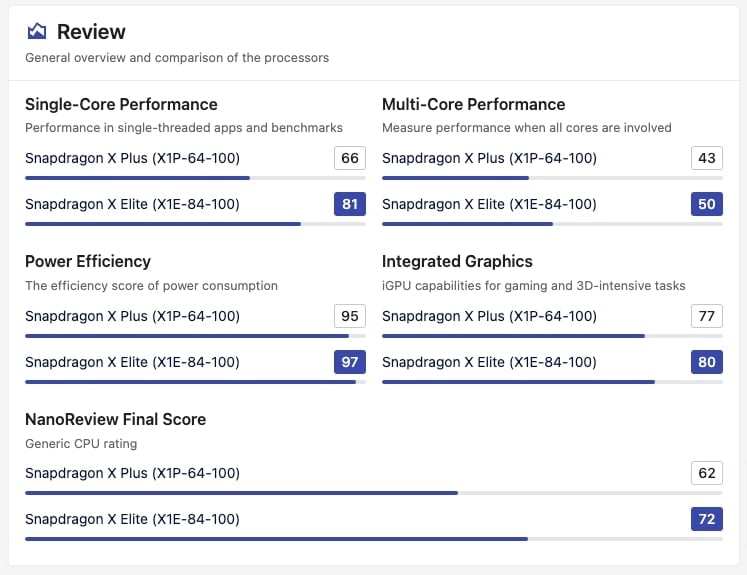
Based on the benchmarks and performance architecture, it is evident that the X Elite processors are the most powerful, top-of-the-line variant. At the same time, the X Plus is a slightly lower-tier processor with slower speeds. Obviously, if you want better performance, the Snapdragon X Elite is the best option. However, if you are considering the X Plus, which also comes at a lower price than the X Elite, here are some things you should know, including its limitations in daily life.
Performance-wise, the Snapdragon X Plus processors have a lower base and boost clock speeds than the X Elite processors. This means they offer slightly less performance, particularly in CPU-intensive tasks. Also, the X Plus model has fewer cores than the X Elite models, which might impact multitasking and graphical performance. While the NPU capabilities are generally similar across models, the overall AI performance may be slightly lower.
Snapdragon X Elite vs X Plus Battery Life Test
The new Snapdragon X Elite’s battery life is impressive compared to Apple’s M series processors. In a battery test by YouTuber Alex Ziskind, the Snapdragon X Plus on the Microsoft Surface 7 lasted a long time, and several other X Elite-powered laptops also performed well. While the test was conducted under specific conditions, it can last even longer in real-world usage. Here are the results for your reference.
Laptop Model | Battery Life -Tested user certain conditions (Hours) |
|---|---|
Surface Laptop 7 with X+ Chip | 8.0 |
MacBook Air M3 | 7.5 |
MacBook Air M2 | 7.3 |
Dell X Elite | 7.2 |
Asus VivoBook S15 | 7.0 |
Surface Laptop 7 with X Elite Chip | 6.8 |
Samsung Book 4 Edge (X Elite) | 6.7 |
MacBook Pro M2 Max | 6.5 |
Intel Core i7 (Various Models) | 6.0 |

Which One Do You Pick? Elite or the Plus?
The Snapdragon X Elite is the top-end variant, available in three SKUs. The most powerful variant, X1E-84-100, can clock up to 4.2 GHz, the second variant, X1E-80-100, clocks up to 3.8 GHz, and the third, X1E-78-100 variant, offers slightly less performance without a speed boost.
The X Plus variant (X1P-64-100) is a budget-friendly option with lower-performance cores. All Snapdragon models have the same NPU, meaning they have similar AI capabilities, but performance can vary. If you choose an X Elite, you get better performance, while the X Plus offers slightly lower performance and more battery life than the X Elite.
However, it is important to note that individual laptop specifications and optimizations also contribute to the performance of these processors. The actual performance may vary depending on the laptop you are choosing. Consider parameters like processor variant, RAM, Storage type, and battery capacity for better performance and battery life. I hope this guide helps you pick the right processor variant. If you have any questions, let me know in the comments below.

