

Quick Answer
To create a GIF using Meta AI on WhatsApp, ensure your app is updated. Open a chat, tap the Attach icon, and select “Imagine.” Enter your prompt, then press “Animate” to turn the generated image into a GIF. Once ready, tap Send to share it. Remember to follow Meta AI’s guidelines for prompt content.
Meta introduced Meta AI to WhatsApp very recently. Over the months, Meta is adding new features to Meta AI on WhatsApp. While you can use it to find useful information, you can also use Meta AI to generate images and GIFs. Yes, you heard it right. Using Meta AI on WhatsApp, you can create shareable GIFs. Since there are no limitations on how many GIFs or animated media you can create using Meta AI, you get endless chances to create the best GIF for reacting to certain messages.

We already have a guide that explains in detail how you can use Meta AI on WhatsApp and Instagram. Now, in this guide, we will show you how you can create GIFs using Meta AI on WhatsApp. Let’s jump right into it.
Table of Contents
How to create GIFs using Meta AI on WhatsApp?
Make sure that you are running the latest version of WhatsApp. With that out of the way, follow the steps below to generate a GIF on WhatsApp:
- Launch WhatsApp.
- Select a chat.
- Tap the Attach icon, beside the Pay icon.
- Tap the Imagine button.

- It will open a Meta AI window. Type your prompt for the GIF that you wish to create. For example, we used the prompt “a panda eating bamboo.”

- The best part about Meta AI is that as soon as you start typing, it starts generating an image in real time. When you are satisfied with your prompt and image, tap on the right arrow button.
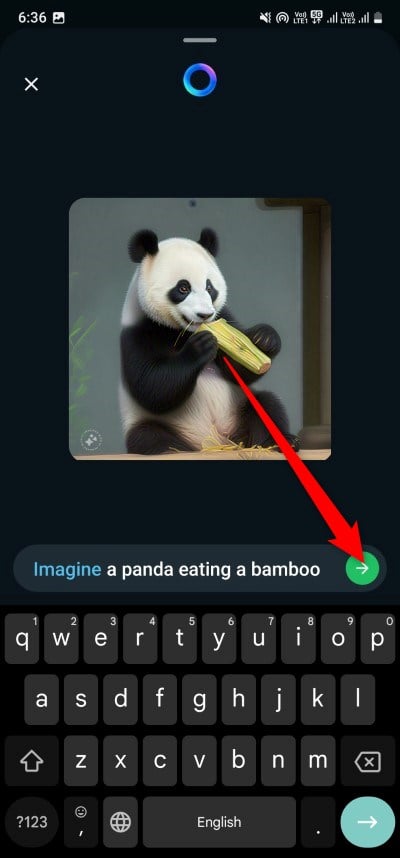
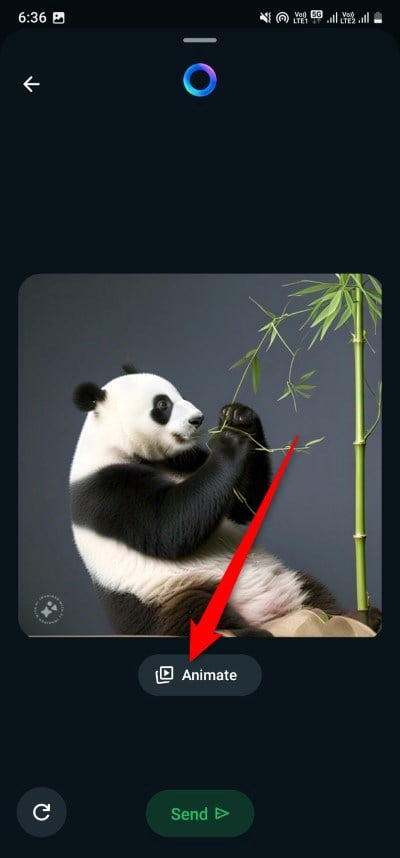
- Press the Animate button at the bottom of the image. This will turn your image into a GIF.
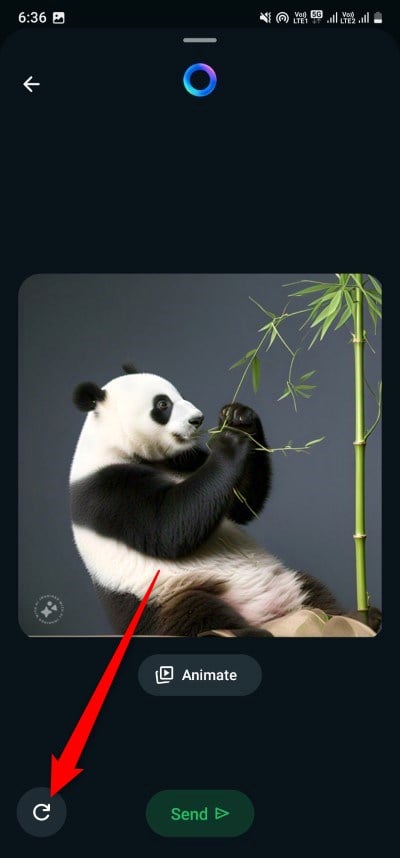
- There is also a Retry button beside the Animate button if you wish to start again.
- The process of GIF creation may take a few seconds, and once the process is complete, certain elements of the image will move in a continuous loop.
- Now, you can tap on the Send button to share it with your contacts.
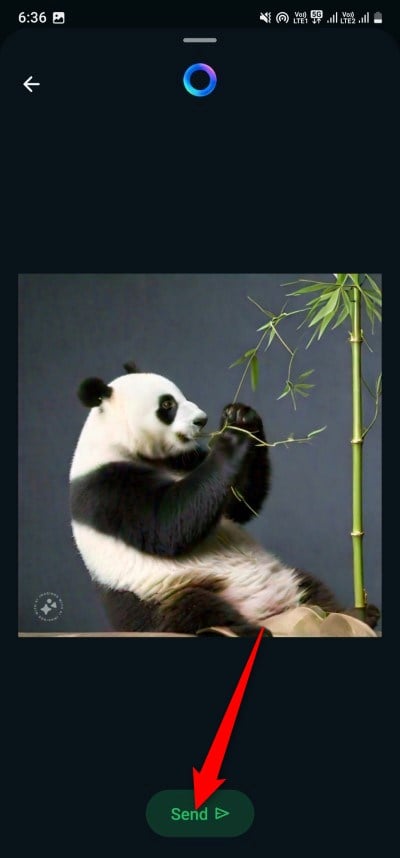
The GIF that you have created will be sent to the contact in HD format. If you wish to send an image instead of a GIF, then you should not press the Animate button after typing the prompt.
Meta AI restrictions for GIF creation
You won’t be able to generate anything using the Meta AI on WhatsApp. There are certain restrictions and guidelines that you need to follow in your prompts for GIF creation. Here are some of them:
- Stick to the guidelines: Certain prompts and words are restricted in the back end. Words such as porn, or anything related to 18+ content must be avoided. This is there to ensure the generation of reasonable and appropriate media.
- Don’t bring politics: You should avoid using prompts that involve politics or anything political. Meta AI won’t generate an image containing any political text.
- Keep cuss words out of the way: You should use foul language or cuss words when generating images or GIFs using Meta AI on WhatsApp. This is because the AI will not generate anything.
FAQs about creating GIFs on WhatsApp using Meta AI
Are there any restrictions on the number of GIFs I can create using Meta AI?
In our testing, we created multiple GIFs and found no limitations in the number of animated content you can create. In fact, there is no such mention of any limitation in the number of GIFs you can create using Meta AI on WhatsApp.
Why is my WhatsApp not showing Meta AI?
In case, you can't see Meta AI on WhatsApp, you need to make sure that you have the latest version of the messaging app installed on your phone. Moreover, Meta AI is available on both the Android and iOS versions of WhatsApp.
In what languages can I create an image on Meta AI?
Currently, Meta AI supports only English, Spanish, Portuguese, French, and Hindi. Meaning, you can generate images using Meta AI on WhatsApp in these languages. Moreover, you should also note that the feature may be available in limited countries.

