

Quick Answer
Apple’s latest iPhone 16 series introduces a new camera control button. This button lets you quickly launch the camera, take photos, record videos, and adjust settings using capacitive touch controls. Later this year, it will also support Apple’s Visual Intelligence, similar to Google Lens, and third-party app integration for more functionality.
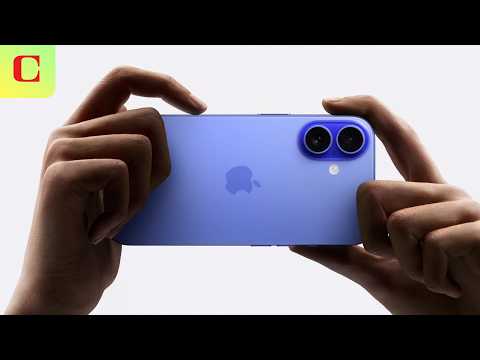
Apple announced the latest iPhone 16 series with improved performance, a better camera, On-device Apple Intelligence, and minor design upgrades. The base models now feature a vertical camera setup and a new action button, borrowed from previous Pro models and available in five new saturated colors. The Pro models look similar to the previous versions. However, the four new models now feature a dedicated Camera Control button that lets you quickly launch the camera, take photos, and much more.

You can use the camera control button to quickly launch the camera, capture or record video, access camera control with gestures, and more. In the future, the camera control button will also support Apple visual intelligence, similar to Google Lens, lock focus and exposure settings while using the camera, and more.
Here is everything you should know about Apple’s new camera control button because it is not just the shutter button; there is more to it.
Table of Contents
What Is the New Camera Control Button?
The Camera Control button is a new feature in the iPhone 16 series. It is a physical button that is both tactile and supports capacitive touch. It is different from the action button already on the iPhone.
With a single hard press, you can launch the camera app, after which it acts as a shutter or video record button. When you light press and hold the camera button, it brings up camera controls. You can slide and change values based on your needs; double tap to bring even more handy features. It also supports haptic feedback for every action.
Apple is adding a dedicated touch-sensitive camera button to the iPhone 16 series, which takes photos, records video, and more pic.twitter.com/OXWvgL2kyM
— TechCrunch (@TechCrunch) September 9, 2024
Intelligence, Customizability Coming Later This Year
With the new capacitive touch and quick camera settings, the camera control button is already very useful, and Apple plans to add more functionality to the button in the Future. Later this year, a two-stage shutter feature will be added, allowing you to lock focus and exposure with a light press and then capture the photo or video.
Apple also plans to introduce visual intelligence, which uses cameras to provide detailed information about objects and places. Like Google Lens, you can identify objects and places by directly pointing at the camera. It also supports adding calendar events by pointing the camera at flyers or posters. You can also scan objects, identify items, or get more details. This feature will use Apple’s data and on-device AI to provide detailed information.
Apple just announced its new Visual Intelligence for iPhone 16.
It looks insane 🤯 pic.twitter.com/JijqilD84S
— Alvaro Cintas (@dr_cintas) September 9, 2024
Apple is also known for expanding hardware capabilities through third-party app integration. Later this year, third-party developers can use the camera control button for in-app functionality to launch quick camera launches, use custom camera shortcuts, and more. The first official app to support this feature is the Kane Professional video recording app, which lets you set focus points, adjust white balance, control zoom, and more using the camera control button.
With the upgraded camera system on both standard and pro models, the camera control button can be handy for photo enthusiasts or people who want to capture images quickly. We have seen similar features on Android, especially on Sony devices, but Apple has enhanced it with a capacitive touch that brings interactive advanced camera controls. Additionally, the button supports third-party app integration, allowing developers to create custom camera shortcuts. It also features Apple Visual Intelligence, which will be similar to Google Lens in the future.
The standard 16 and 16 plus have an improved 48 MP fusion camera with 2x optical zoom and the new and improved 12 MP. ultra-wide angle, which also supports macro photography. You can directly capture Spatial photos and video capture from the camera, and you can use the camera control for tactile control of zoom, exposure, and depth of field.
The Pro series also comes with an improved camera system with a 48MP fusion camera that supports 4K 120 fps video recording in Dolby Vision and an improved 48MP Ultra Wide camera that supports macro photography and, finally, 5x optical zoom that supports smooth traction using the camera control slide gestures.
FAQ’s on the new camera control button
Will the Camera Control button’s Visual Intelligence feature be available on all iPhone 16 models or the Pro versions?
The new camera control button is available in all iPhone models without limitations, including the base iPhone 16 and iPhone 16 Plus.
Can I customize the Camera Control Button for other actions besides the camera?
Currently, the camera button is only available to launch the camera quickly. Support for third-party and Apple visual intelligence is coming later this year.
Does the Camera Control Button work with selfie mode?
Yes, the camera control button on iPhone 16 also works in selfie mode.
Does the Camera Control Button work for video recording and photos?
After launching the camera, you can press the button to take a picture and hold it to shoot the video.

