

In Summary
- OnePlus 13 starts at Rs 69,999/- ($899), competing with Apple and Samsung in the premium segment, and the 13R caters to users who need an affordable option.
- This product lineup also introduces ambiguity for the user whether to stick with the OnePlus 13R or spend the extra money to get the OnePlus 13 flagship smartphone.
- Choose the OnePlus 13 if you prioritize premium features, superior camera performance, and wireless charging; choose the OnePlus 13R if you want a more budget-friendly option with solid performance and compact design.
OnePlus announced flagship smartphones for 2025, the OnePlus 13 and 13R. I have been using them for more than three weeks. We have a detailed, comprehensive review of OnePlus 13 (4.5/5). If you like both devices and are undecided on which one to get, this guide will answer your questions.
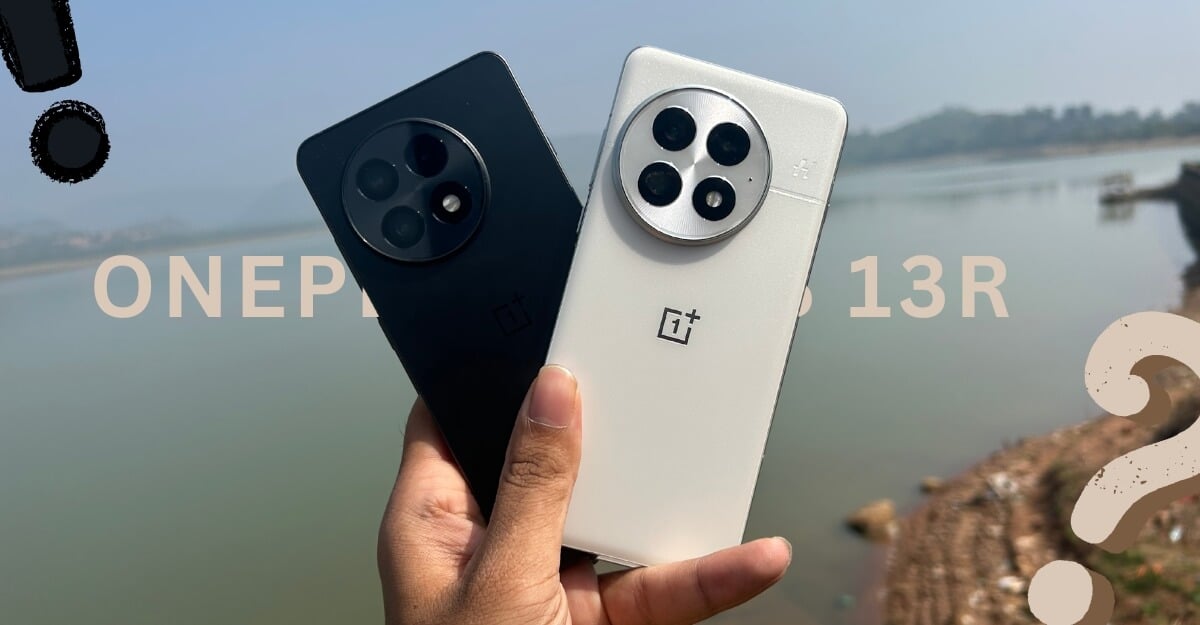
The base variant of Oneplus 13 now comes with 12GB RAM + 256GB Storage, which starts at Rs 69,999/- ($899), and 16GB RAM + 512GB storage at Rs 76,999/- ($999), and the top-end variant, 24GB RAM + 1TB storage is priced at Rs 84,999/-. The affordable OnePlus 13R comes in two variants: 12GB RAM + 256GB storage, which starts at Rs 42,999/- ($599), and 16GB RAM + 512GB storage, which starts at Rs 49,999/-.
I have been testing both devices and finding the differences to help you decide. I have compared every aspect of these smartphones, and in the end, I have personalized which one you should pick based on your preference. No spoilers this time. Grab your popcorn and enjoy.
Table of Contents
OnePlus 13 vs 13R Design: Premium vs Minimal Looks
Feature | OnePlus 13 | OnePlus 13R |
|---|---|---|
Dimensions | 162.9 x 76.5 x 8.5 mm | 161.7 x 75.8 x 8.0 mm |
Weight | 210 g | 206 g |
Build Materials | Glass front, Glass/Vegan Leather back, Aluminum frame | Glass front & back, Aluminum frame |
Ingress Protection | IP68/IP69 (better dust & water resistance) | IP65 (lower water resistance) |
Back Design | Slightly curved back & sides | Flat back & sides |
Color Options | Black Eclipse, Arctic Dawn, Midnight Ocean | Astral Trail, Nebula Noir |
I have the Arctic Dawn variant of the OnePlus 13; it comes in a white matte ceramic texture that looks very premium and holds well in my two weeks of usage. I have used the smartphone without a case. There are no noticeable screens or scratches on the rear. However, the smartphone is slippery when holding without the case. While it doesn’t attract fingerprints, If you have sweaty hands, it can easily slip out of your hand.
It is protected with strong Gorilla Glass Victus 2 protection on the front, which can withstand drops up to 2m. I haven’t dropped this smartphone, but it is always better to be careful. It also comes with a TPU case in the box, which you can apply for a better grip, but it does cover this aesthetic, beautiful smartphone look. I even tried to scratch the back panel with some objects, and it doesn’t scratch easily. If you prefer to use the phone without a case and don’t have sweaty hands, and prefer premium looks, I highly recommend going for the Artic Dawn variant.
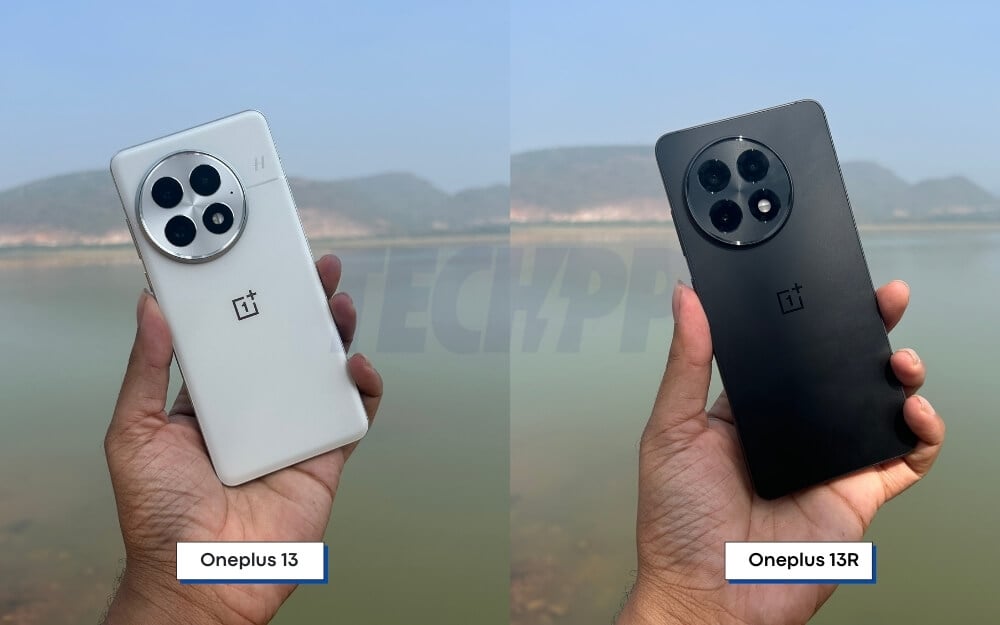
There is also a leather variant, Midnight Ocean, if you want a better grip and texture finish. It comes in blue and looks great in real life.
On the other hand, the OnePlus 13R looks minimal. It doesn’t look cheaper either; however, it is so minimal. I have the black color variant (Nebula Noir). It’s all matte black and flat, and it attracts fingerprints, but it also holds well in my two weeks of use without the case due to the flat sides. It is stiff to hold in the hand. It doesn’t slip easily like the OnePlus 13; however, if you accidentally drop it, it might break easily since Gorilla Glass 7i, a lower-end version of Gorilla Glass, powers it. It’s not a flagship-level protection that was found on flagship smartphones.
The OnePlus 13 is better protected by IP68 and 69, which can withstand continuous immersion in water beyond 1 meter for up to 30 minutes. Also, the Aqua Touch feature is very handy. If you have sweaty or wet hands, the water droplets don’t interfere with the display. This feature is also available on the OnePlus 13R. However, it is IP65-rated meaning. It can’t sustain any splashes, and you can’t directly use it under the rain or shower. You should be extra careful while using the OnePlus 13R smartphone.
Overall, if I had to choose one, I would choose the OnePlus 13 because I like a curved display. It looks more premium, and the new color variant, especially white, looks very premium. On the other hand, the OnePlus 13R also offers a better option if you want a boxy design and flat edges, especially if you are a gamer; the OnePlus 13R is more comfortable to hold for longer hours.
| Real-World Scenario | Winner |
| Comfort while holding for long periods | OnePlus 13 |
| One-handed usability | OnePlus 13R |
| Grip and handling | OnePlus 13R |
| Pocket-friendly size | OnePlus 13R |
| Water & dust resistance | OnePlus 13 |
| Durability against drops/scratches | OnePlus 13 |
| Premium look & feel | OnePlus 13 |
| Stability on flat surfaces | OnePlus 13R |
| Minimalist design preference | OnePlus 13R |
| More colour options | OnePlus 13 |
OnePlus 13 vs 13R Display: Bright, Vibrant and Similar
Feature | OnePlus 13 | OnePlus 13R |
|---|---|---|
Display Size | 6.82 inches | 6.78 inches |
Resolution | 3168 x 1440 pixels (510 ppi) | 2780 x 1264 pixels (450 ppi) |
Display Type | LTPO AMOLED | LTPO AMOLED |
Refresh Rate | 1-120 Hz adaptive refresh rate | 1-120 Hz adaptive refresh rate |
Peak Brightness | 4,500 nits | 4,500 nits |
HDR Support | HDR10+, Dolby Vision | HDR10+, Dolby Vision |
Touch Sampling Rate | Likely 360 Hz or higher | Likely 360 Hz or higher |
Aspect Ratio | 20:9 | 20:9 |
Screen Protection | Ceramic Guard | Gorilla Glass 7i |
Always-On Display | Yes | Yes |
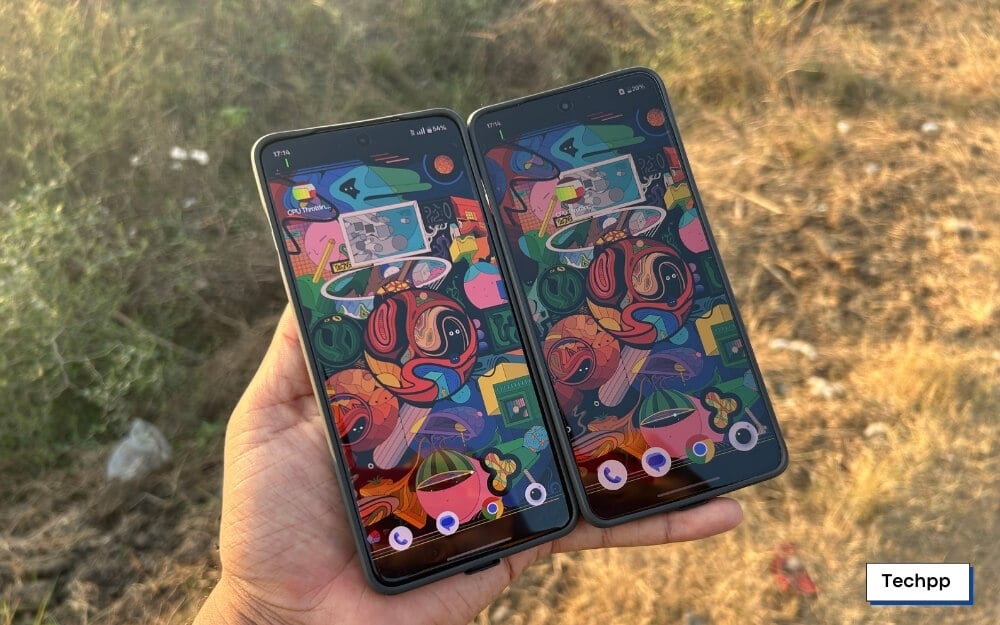
You won’t find any difference between the OnePlus 13 and 13R display quality for regular use. Both smartphones have very similar display specifications. However, the OnePlus 13 comes with a curved screen with a 6.82-inch display, and the OnePlus 13R comes with a 6.78-inch flat display, which has a better advantage for gaming and watching media.

I like curved displays, so OnePlus appeals to me in terms of looks. Apart from the design differences, there is no major difference between them regarding display quality when used regularly. The OnePlus 13 has a resolution of 3168 x 1440 pixels (510 ppi), while the 13R has 2780 x 1264 pixels. The OnePlus 13 is slightly sharper.
OnePlus 13 supports Pro display color mode, which uses D65 color templates that bring slightly warmer colors, which doesn’t make any difference. On both smartphones, you can adjust the screen color temperature display and set colors to vivid if you want more punchy colors.
| Real-World Scenario | Winner |
| Watching Netflix, YouTube, Movies | OnePlus 13 (Slightly sharper) |
| Gaming (fast response, smooth visuals) | Tie |
| Using the phone in bright sunlight | Tie |
| Reading eBooks, articles, PDFs | Tie |
| Using social media aps (Instagram, TikTok, X) | Tie |
| Editing photos & videos (color accuracy) | Tie |
| Always-On Display (notifications, clock) | Tie |
| Scratch resistance & durability | OnePlus 13 |
| Using Dark Mode at night | Tie |
| Customizing display settings | Oneplus 13 has a slight edge |
| Multitasking (Split-screen apps) | Tie |
| Fast UI navigation & smooth transitions | Tie |
| Screen response for fast typing & gaming | Tie |
Performance: 8 Elite vs 8 Gen 3
Feature | OnePlus 13 | OnePlus 13R |
|---|---|---|
Processor | Qualcomm Snapdragon 8 Elite | Qualcomm Snapdragon 8 Gen 3 |
RAM Options | 12 GB, 16 GB, 24 GB | 12 GB, 16GB |
RAM Type | LPDDR5X | LPDDR5X |
Storage Options | 256 GB, 512 GB | 256, 512 GB |
Storage Type | UFS 4.0 | UFS 4.0 |
Cooling System | Advanced vapor chamber cooling | Standard cooling |
OnePlus 13 is powered by Snapdragon 8 Elite, which is Snapdragon 8 Gen 4, and the OnePlus 13R is powered by last year’s flagship processor, Snapdragon 8 Gen 3. You won’t find much of a difference between these two processors. If you are a regular gaming user and want better raw performance, the Snapdragon 8 Elite is better in terms of CPU, GPU, and raw gaming performance.
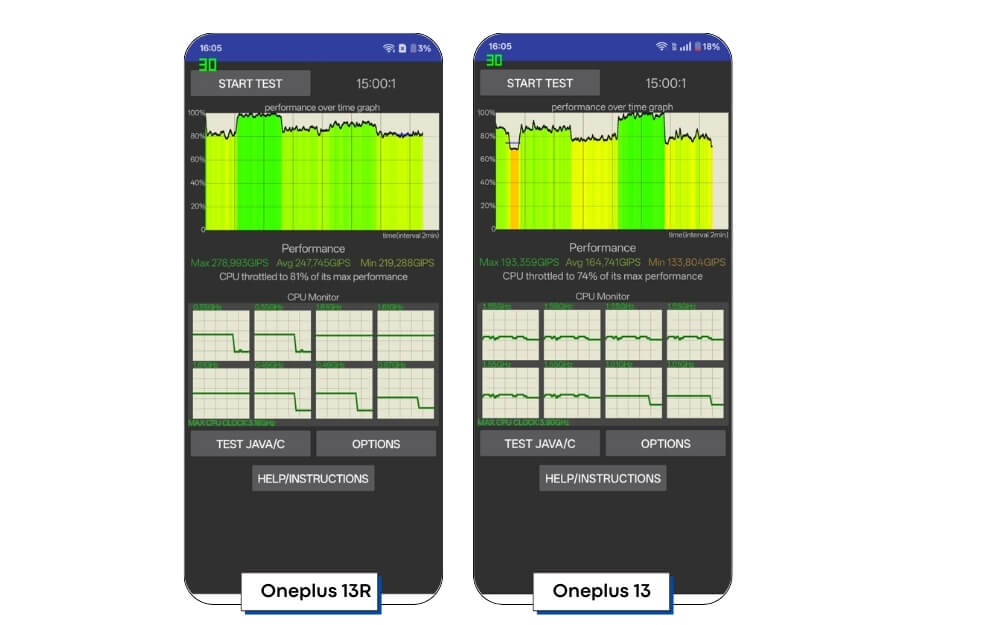
I have also conducted a fair test evaluating the benchmark of these processors. In every other scenario, of course, the Snapdragon 8 Elite beats the Snapdragon 8 Gen 3 in numbers, but we have also found that the Snapdragon 8 Elite throttles more than the Snapdragon 8 Gen 3 in the CPU stress test. OnePlus 13 stopped the stress test by reaching a higher temperature, and the Snapdragon 8 Gen 3 held it well for more than 40 minutes.

However, in the real-time use of both smartphones, by playing games and recording videos, they both get a little warm. However, you don’t find a significant heating issue on either device.
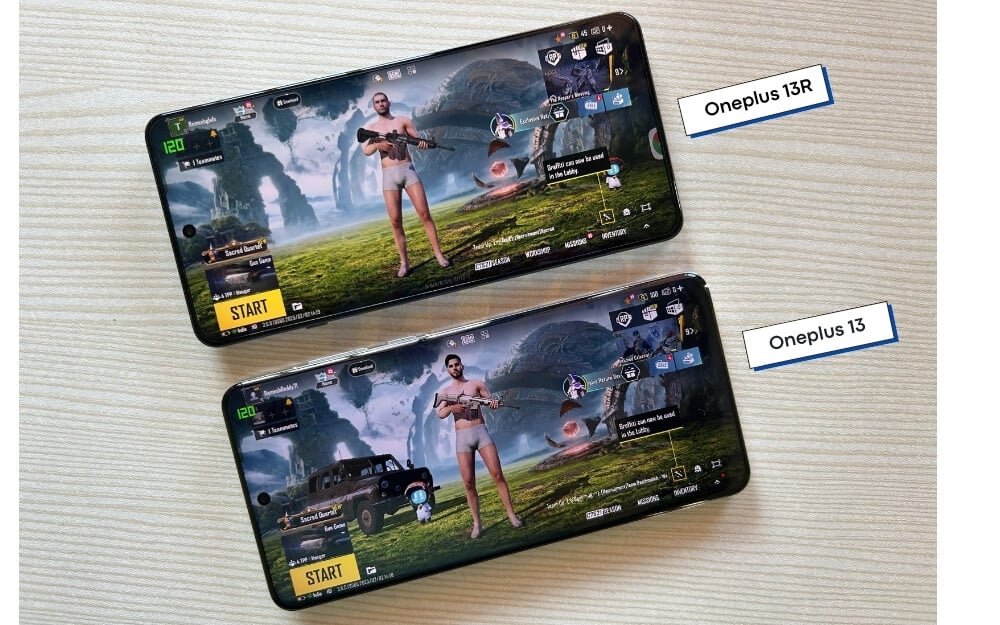
In terms of gaming, I have tried opening the BGMI, which is popular for its high gaming capabilities, and here, too, you won’t find much of a difference between these processors if you are a regular user. I am not a hard-core gamer, but judging by the performance of a standard gamer on these smartphones, I don’t find any difference between them while playing games.
Snapdragon 8 Elite on the Oneplus 13 does have some packs because it’s a newer processor and better benchmark scores, but as a real user, honestly, you don’t; you are not missing anything out in terms of gaming if you buy the Oneplus 13 R instead of the Oneplus 13.
As per the numbers, the OnePlus 13 and 13 support Ultra HD and extreme graphic settings in the BGMI. I haven’t noticed any frame drops or heating issues while playing this game. I mostly enjoyed playing the game on the OnePlus 13R because it’s more comfortable to hold and because of its flat size. Also, the flat display makes it easy to interact with the screen and hold it steadily for longer gaming hours.
However, with the OnePlus 13, you can put the case for a better grip. While gaming, I also noticed that the volume and the power button on the OnePlus 13 are slightly smaller than those on the OnePlus 13R. Because of its flat size, it makes a difference when using it, especially if you want to increase or decrease volumes frequently.
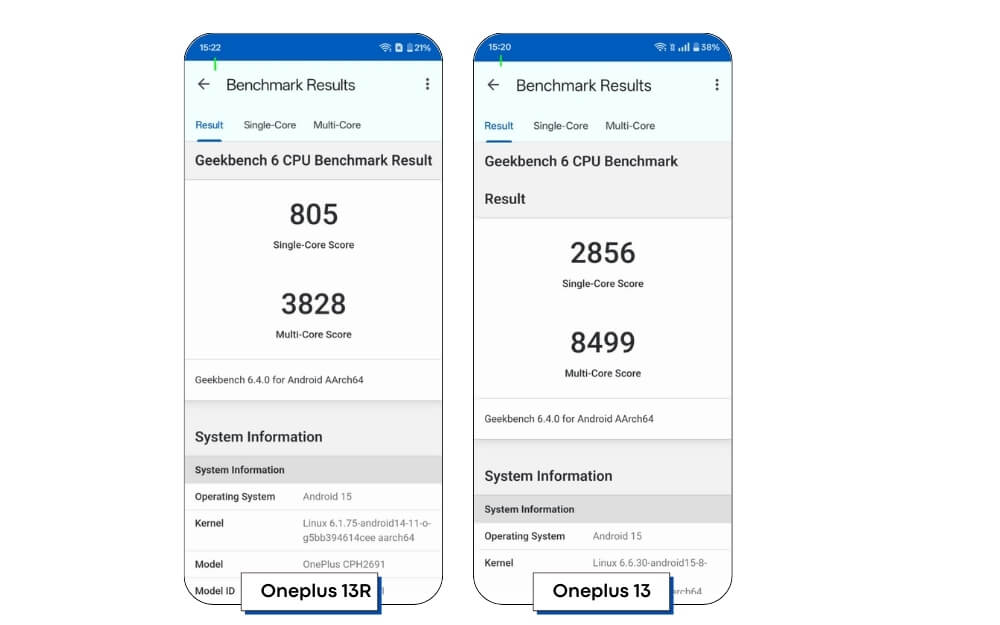
If you want the benchmark scores, we tested every benchmark with OnePlus 13 and OnePlus 13R. In all the tests, it is evident that the OnePlus 13 with Snapdragon 8 Elite has better numbers. However, you won’t find any significant difference in real-life usage, whether browsing, switching between apps, or gaming.
Overall, in the performance department, both the OnePlus 13 and the 13R perform well. If you are primarily considering the smartphone for performance, this smartphone performs well in real-world usage.

Battery Life: Better Charging Speeds on the OnePlus 13
Feature | OnePlus 13 | OnePlus 13R |
|---|---|---|
Battery Capacity | 6,000 mAh | 6,000 mAh |
Wired Charging | 100W | 80W |
Time take to reach (0 to 100%) | 45 Min (With rapid charging) | Nearly 1 hour (With rapid charging) |
Wireless Charging | Yes (50W) | No |
Reverse Charging | Yes (10W) | No |
The OnePlus 13 and 13R features a massive 6000 mAh battery but differ in the charging input speeds. OnePlus 13 supports a max of up to 100W and wireless charging up to 50W. At the same time, the OnePlus 13R is slightly lower, supporting up to 80W maximum speed, and has no wireless charging support. OnePlus 13 also supports reverse wireless charging, which can charge your accessories at a max of 10W and help charge your earbuds with wireless charging support.
Battery life isn’t a concern on Oneplus 13 Seris and most upcoming smartphones in 2025, thanks to silicon-carbon battery. The battery sizes are massive, with a minimum sporting 6000 mAh battery. We found it on the Realme 14 Pro Plus series, and both the OnePlus 13 and 13R (OnPlus 13R doesn’t use the silicon-carbon battery) come with the same 6000 mAh battery.
The battery life is very similar on both of these devices. The only difference you must notice is the optimization and the charging speeds. Again, for regular use, the OnePlus 13 and 13R last a full day, with the OnePlus 13R having a slight edge because of last year’s processor, which is well-optimized, which also translates to slightly better battery life. However, there aren’t any significant differences.

In my testing, on average for a regular user, which includes watching videos, playing games, and browsing web articles, just replicating regular use, the OnePlus 13R has lasted about 8 hours of screen-on time. The OnePlus 13 lasted me about 8-9 hours and 10 minutes of screen-on time on average. Remember, both smartphones are set to a higher refresh rate QuadHD display. If you lower the resolution, you can get better battery life.
The only difference you will notice between them is the charging speed. With 100W fast charging support on the OnePlus 13, you can charge the massive battery in under 45 minutes. In the same test, it took about an hour to charge the OnePlus 13R, which is a downgrade compared to the OnePlus 12R. The charging speeds are better with the newer models. Also, the OnePlus 13R doesn’t use the latest silicon carbon battery and uses single-cell battery technology, thus limiting the charging speeds.
If you use wireless charging, you might not get the benefit of enjoying wireless charging since the OnePlus 13R doesn’t support it. However, with the OnePlus 13, you get 50W charging. It also supports reverse wireless charging, which can be handy if you want to charge your battery or accessories while on the go.
Overall, the battery life is similar on both smartphones, with the OnePlus 13 having slightly better screen-on time and charging rates than the OnePlus 13R. If battery life and charging speeds are your highest priority, you should go for the OnePlus 13.
| Real-World Scenario | Winner |
| All-day battery life (normal use) | OnePlus 13 |
| Heavy usage (gaming, streaming) | OnePlus 13 |
| Fastest charging time | OnePlus 13 |
| Wireless charging convenience | OnePlus 13 |
| Best long-term battery health | Tie |
Software: Oxygen OS Gets an Upgrade
The OnePlus 13 and the 13R come with Android 15 and OxygenOS 15 out of the box. Fundamentally, they run on OxygenOS 15 out of the box, meaning you get the same experience on both devices. The animations are fluid. The overall system experience interacting with every UI aspect is faster and smoother. OxygenOS 15 also comes with many improvements.
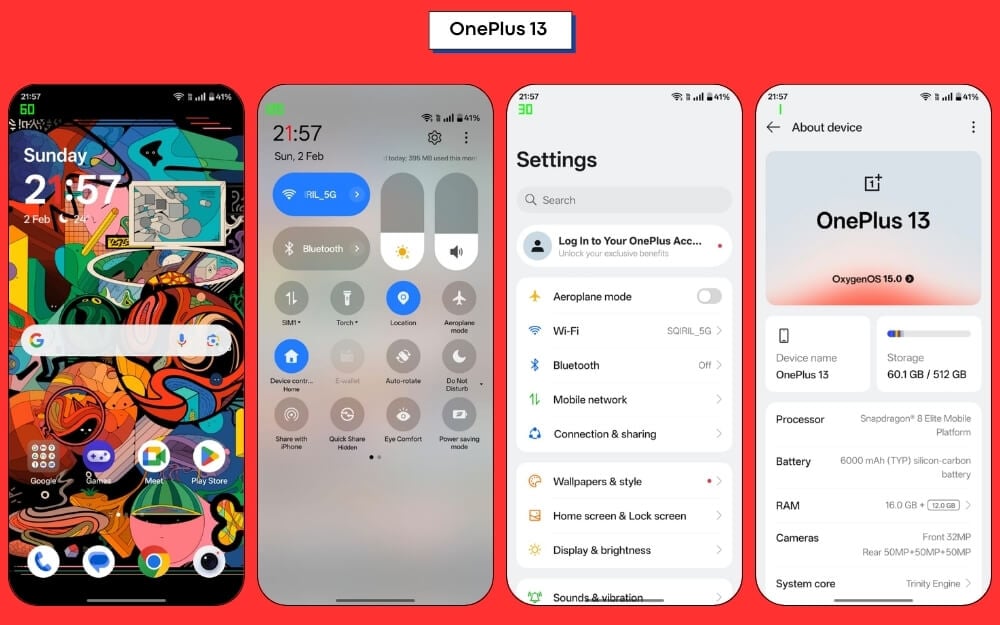
We have a detailed guide covering all the details of the OnePlus Oxygen OS 15, and you get everything mentioned in that article on smartphones. UI animations are especially enhanced when used on 120Hz displays. There is also a visual change to the icons, and there is a new control and notification shade where you can split the notifications and controls based on your preference.

Feature | OnePlus 13 | OnePlus 13R |
|---|---|---|
Operating System | OxygenOS 15 (Android 15) | OxygenOS 15 (Android 15) |
Software Updates | 4 years of Android updates, 6 years of security patches | 4 years of Android updates, 6 years of security patches |
Unique Features | Hasselblad camera integration, Display Settings | Standard OxygenOS features |
For multitasking, there is also support for the Open Canvas feature on both smartphones, where you can use three apps at a time by splitting the screen and using an open window. Since both smartphones are powered by a flagship processor, which allows you to switch and use apps, you won’t find any stutters or lags while using them. In addition, OnePlus OxygenOS 15 also brings some useful AI switches to the Photos and Notes app. Now, you can improve picture quality using AI details, remove unwanted elements from images using AI, and a new AI blur to fix blurry images and a high-reflection eraser if your photos have reflections and blurry lens flare.
However, despite the powerful processors and AI support on this processor, all these features use the cloud to perform AI actions, which is a concern since these photos need to be transferred to the cloud, processed, and then returned to your device. Also, to my surprise, AI features in the Notes app require an internet connection to function. However, it is handy to rewrite your text instead of switching to external apps like ChatGPT.
The only major difference you will find in the software settings is because of the hardware features. Since OnePlus uses the DC 65 color format with extra display settings, there are also new camera settings for Hasselblad for better photography. Apart from this, you get the same experience on both devices, including 4 years of support for software upgrades. Both OnePlus 13 and 13R come with OnePlus and Google preloaded apps. Facebook and Netflix are also pre-installed, but you can uninstall them
| Scenario | Winner |
| User Interface Smoothness | Tie |
| Customization Options | Tie |
| Camera Software Features | OnePlus 13 |
| AI-Based Enhancements | OnePlus 13 |
| Long-Term Software Support | Tie |
Cameras: The Differentiating Factor
Feature | OnePlus 13 | OnePlus 13R |
|---|---|---|
Main Camera | 50MP (Sony LYT-808), f/1.6, OIS | 50MP (Sony LYT-700), f/1.8, OIS |
Telephoto Camera | 50MP, 3x optical zoom, OIS | 50MP, 2x optical zoom, OIS |
Ultrawide Camera | 50MP, f/2.0, 120° FOV | 8MP, f/2.2, 112° FOV |
Front Camera | 32MP, f/2.4 | 16MP, f/2.4 |
Rear Video Recording | 8K@30fps, 4K@60fps | 4K@60fps, 1080p@60fps |
Front Video Recording | 4K@60fps, 1080p@60fps | 1080p@30fps, 720p@30fps |
Extra Features | Hasselblad tuning, Ultra Res Zoom (120X) | Standard OnePlus features |
OnePlus 13 and the OnePlus 13R have distinct camera systems, resulting in different camera performance. According to specifications, the OnePlus 13 has a 50-megapixel main camera, which uses the Sony Sony LYT-808 with optical image stabilization. On the other hand, the OnePlus 13R uses a 50-megapixel camera, but instead, it uses the Sony LYT700 with support for optical image stabilization. Additionally, both cameras offer a telephoto camera.
OnePlus 13 has a 50Mp telephoto camera that offers 3X optical zoom, and the OnePlus 13R offers 2X optical zoom. There is also a big difference in the ultrawide camera on both smartphones. The OnePlus 13 comes with a 50-megapixel ultrawide camera, while the OnePlus 13R uses a lower-resolution 8-megapixel wide-angle lens. On the front, the OnePlus 13 comes with a 32-megapixel camera, while the OnePlus 13R comes with a 16-megapixel camera.

In all the camera comparison tests, including daylight, low light, zoom, and ultrawide angle, one thing I have noticed is that the OnePlus 13 significantly performs better in terms of sharpness and clarity and also has a slightly warmer and more vibrant tone compared to the OnePlus 13R. On the other hand, the OnePlus 13R also performs well, but not better than the OnePlus 13.
Keep in mind that the OnePlus 13R cameras are not bad either. This is not a bad camera, but it falls short compared to the OnePlus 13. The standalone pictures on the OnePlus 13R have a cooler tone and many sharp details, and they look good for social media posts. However, the video clarity is a step down.
The main camera on both of these smartphones performs very well in detail. They have plenty of details. However, thanks to the Hasselblad partnership, the OnePlus 13 shines better in producing more accurate and close-to-real-life colors. The color tuning is very accurate and is evident in the pictures of both smartphones. OnePlus 13R produces good photos in detail. However, images have a cooler tone and vibrant colors, which some people might prefer because they look pleasing to the eyes, unlike the OnePlus 13 colors. After all, most times, natural colors look pale. If you want to, you can adjust the OnePlus 13 camera settings to add vibrant colors.
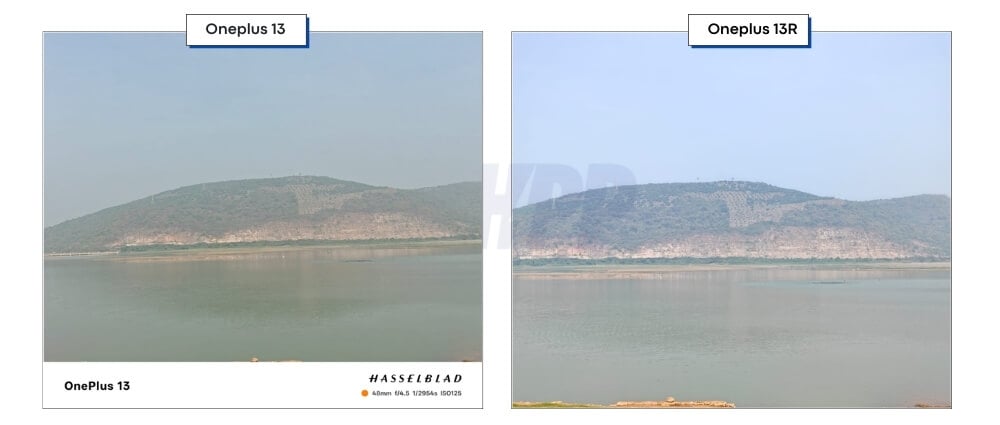


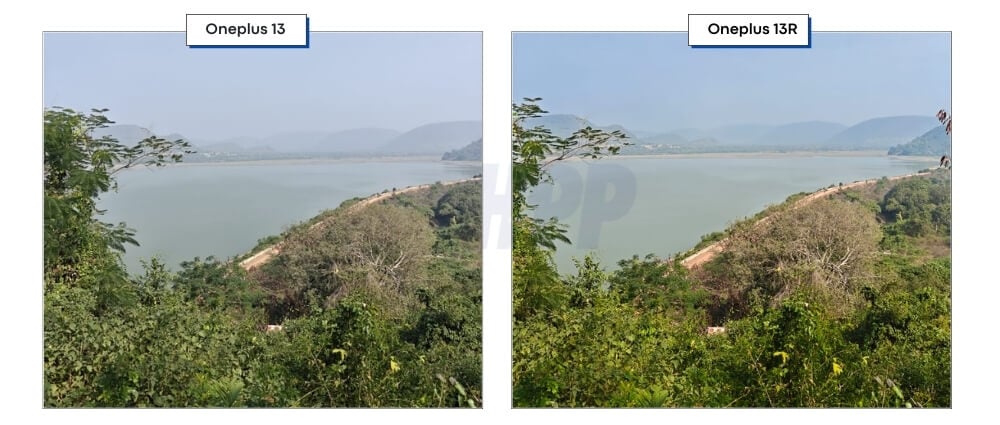
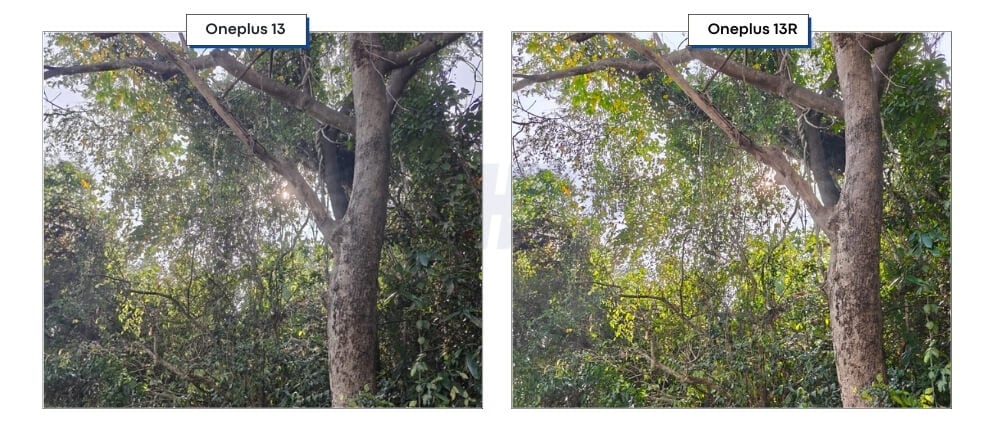
Another difference you will find is in terms of dynamic range. OnePlus 13 handles dynamic range well without overexposing or underexposing the images. OnePlus 13R also does a fairly good job. However, it suffers when the camera is pointed directly at lighting conditions, thus resulting in high exposure shots, which often miss out on the details.
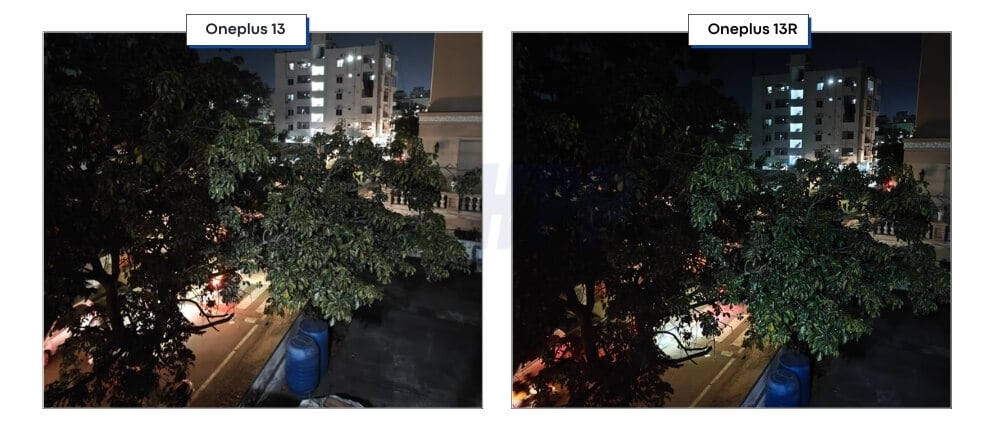
Surprisingly, the OnePlus 13R handles dynamic range better in low light than the OnePlus 13. The colors are again saturated, while the OnePlus 13 maintains a natural color tendency in low light.
In terms of telephoto, the OnePlus 13 is a clear winner here. It supports up to 3X optical zoom and up to 100X digital zoom. It has more natural colors and better details than the OnePlus 13R, which produces fairly well.
The ultra-wide-angle lens on the OnePlus 13 is a clear winner, producing sharper details and better colors than the 8MP ultra-wide-angle lens camera on the OnePlus 13R.
OnePlus 13s 32MP front camera performs better than the 16MP front camera on the 13R. The colors are more accurate from the front camera, resulting in better images, while the 13R continues to capture good details. Still, they are softer when compared to the higher-resolution camera on the OnePlus 13.
There is also a big difference in video recording. The OnePlus 13 supports up to 8K at 30 frames per second and 4K at 60 frames per second video recording capability, while the OnePlus 13R supports 4K up to 60 frames per second and 1080p up to 60 frames per second. It also varies on the front camera.
The OnePlus 13 can record up to 4K at 60 frames per second and full HD 1080p at 60 frames per second, while on the other hand, the OnePlus 13R only supports 1080p at 30 frames per second and 720p at 30 frames per second. With the Hasselblad collaboration, OnePlus has better filters and fine-tuned settings for better image quality and vibrant colors. The OnePlus 13R produces saturated colors, making the overall picture quality vibrant.
In terms of video quality, the OnePlus 13 does a really good job of maintaining real-to-life colors, resulting in better videos overall. OnePlus 13R also does well, but the main camera struggles in the video, with not-so-good dynamic range and saturated colors. Both smartphones support video stabilization, so stability isn’t an issue either.
In terms of video quality from the ultra-wide-angle camera, the OnePlus 13 completely dominates with better colors, sharper details, and the best dynamic range. With a smaller 8-megapixel camera, the OnePlus 13R struggles with details, fails to maintain accurate colors, and completely misses out on the dynamic range.
In 2X video recording, both smartphones perform well. However, the OnePlus 13 maintains slightly better details and produces close-to-natural-life colors. OnePlus 13R continues with a cooler tone, vibrant colors, and struggles in dynamic range. The advantage of the OnePlus 13 is its 3X zoom, while the OnePlus 13R only supports zoom up to 2X optical zoom and adds a digital zoom for 3X. As you can see from the video below, the OnePlus 13 is a clear winner.
Thanks to the bigger 32-megapixel front camera on the OnePlus 13, it captures better sharp details. OnePlus 13R may capture a better shot, but it over-sharpens the face. OnePlus 13R again creates the best dynamic range and close-to-natural life colors.
Overall, the OnePlus 13 is a clear winner in the camera department. It produces the best dynamic range, natural-to-close colors, and better sharp details. All your extra money goes to the camera quality of the OnePlus 13. If you want better cameras and video recording and have the budget, the OnePlus 13 is a better choice. However, the OnePlus 13R also does a commendable job. As a standalone device, it doesn’t impress as much in detail and sharpness but gives slightly cooler tones. It also includes an ultra-wide-angle and 2X telephoto lens, which is great for this segment.
Finally, if you are looking for cameras, the OnePlus 13 is the way to go. If you want performance and fairly good cameras, but not better than the OnePlus 13, then the OnePlus 13R might also be a good choice.
| Real-World Scenario | Winner |
| Daylight photography | OnePlus 13 |
| Low-light & night shots | OnePlus 13 |
| Zoom photography | OnePlus 13 |
| Ultrawide shots | OnePlus 13 |
| Selfies | OnePlus 13 |
| Front camera video recording | OnePlus 13 |
| Rear video recording quality | OnePlus 13 |
Sound: Loud, but No Dolby Atmos Support This Time
Feature | OnePlus 13 | OnePlus 13R |
|---|---|---|
Speakers | Stereo speakers | Stereo speakers |
3.5mm Headphone Jack | No | No |
Audio Enhancements | No Dolby Atmos | No Dolby Atmos |
The OnePlus 13 and 13R have loud dual stereo speakers with good separation. However, the OnePlus 13 has slightly better bass out of the audio. Unfortunately, OnePlus has now removed Dolby Atmos support on the OnePlus 13. Now, both smartphones don’t support Dolby Atmos in general usage unless you notice specific sounds on the bass.
In regular use, The sound quality is almost similar, whether you are watching media, listening to music, watching movies, connecting AirPods, or listening to the sound quality. Both of these smartphones sound very similar. However, if you compare smartphones side by side, the OnePlus 13 sounds better and has better quality at higher volumes. At the same time, the OnePlus 13R is loud yet lacks audio fidelity at higher volumes.
| Real-World Scenario | Winner |
| Listening to music | Tie |
| Watching movies and videos | Tie |
| Gaming audio experience | Tie |
| Using wired headphones | Tie (both require USB-C or adapter) |
OnePlus 13 vs OnePlus 13R: Final Verdict
Category | OnePlus 13 (Points) | OnePlus 13R (Points) | Best Choice |
|---|---|---|---|
Display & Audio | 5/5 (6.82 inches QHD+ Quad Curved, 3168x1440p, ProXDR, Display) | 4/5 (6.78 inches FHD+, 2780x1264) | OnePlus 13 |
Design & Build | 5/5 (IP68, ultrasonic fingerprint, Alert Slider) | 4/5 (IP65, glass back, optical fingerprint, Alert Slider) | OnePlus 13 |
Camera | 5/5 (50MP main, 50MP ultrawide, 50MP telephoto 3x optical zoom, Hasselblad tuning) | 4/5 (50MP main, 8MP ultrawide, 50MP telephoto 2x zoom) | OnePlus 13 |
Performance | 5/5 (Snapdragon 8 Elite, up to 24GB RAM, UFS 4.0) | 4/5 (Snapdragon 8 Gen 3, up to 16GB RAM, UFS 4.0) | OnePlus 13 |
Gaming | 5/5 (Snapdragon 8 Elite, LPDDR5X RAM, better cooling) | 4.5/5 (Snapdragon 8 Gen 3, LPDDR5X RAM) | OnePlus 13 |
Battery & Charging | 5/5 (6000mAh, 100W wired, 50W wireless) | 4/5 (6000mAh, 80W wired, no wireless charging) | OnePlus 13 |
Software & Updates | 4.5/5 (OxygenOS 15, 4 years of updates) | 4.5/5 (Same software and update policy) | Tie |
Price & Value | 4/5 | 5/5 (More affordable, excellent specs for price) | OnePlus 13R |
Total Points | 38.5/40 | 34/40 | OnePlus 13 |
Both the OnePlus 13 and 13R excel at their price. OnePlus 13 is still the flagship killer, an almost perfect smartphone for someone looking for a true smartphone with high specs. At the same time, the OnePlus 13R remains a great choice for someone looking for a real flagship killer at an affordable cost.
Comparing these two, choose the OnePlus 13 if you want better cameras, a premium design, and faster wireless charging support. Choose the OnePlus 13R if you want a budget-friendly option with similar performance, a more compact and flat design, and decent cameras.

