

Quick Answer
You can’t officially connect Galaxy Watch 4 or newer (running Wear OS 3+) to an iPhone, as Samsung and Google dropped iOS support. Basic time sync via Bluetooth is possible, but features like notifications, replies, and health sync won’t work. Third-party apps like Merge offer limited support—but with paid subscriptions and major drawbacks.
I bought a Samsung Galaxy Watch 4 for a really good deal in India; I have used it for over three months for tracking step count and heart rate monitoring, quickly view my notifications on my watch, and reply directly without needing to pull my phone out every time.
Over time, the convenience of having a smartwatch has become a necessity. Despite having poor battery life on my Samsung Galaxy Watch 4, I have successfully used it for over three months and am over-reliant on this watch. I even swapped bands and watch faces to match the style.
However, I also own a MacBook, and for a better ecosystem, I had switched to an iPhone, assuming my Galaxy watch would work with the iPhone; smartwatches running on WearOS 3 or later by Google are not compatible with the iPhones.
Unlike Android, where you can pair a watch and get instant notifications, track health data, and so on, you can only connect your iPhone using Bluetooth for basic time sync.
Fortunately, there is still a possibility of connecting Galaxy Watches running on WearOS 3 or later versions to the iPhone using third-party methods. However, using the app requires a monthly or yearly subscription, which can slowly add up to a huge cost shortly.
So, if you want to buy a Galaxy Watch, own an iPhone, and pair your Galaxy Watch with your iPhone, I highly don’t recommend this since the new Galaxy Watch 4 or later devices running on the WearOS 3 or later are incompatible with the iPhone.
However, if you already own earlier Tizen-based Galaxy Watches (Watch 3, Active 2, or older), you can still pair them with the iPhones via the Samsung Galaxy Watch app on iOS app.
If you already own a Galaxy Watch 4 or later Galaxy Wacthes and recently shifted to the iPhone, here is everything you need to know about it.
Table of Contents
Samsung Galaxy Watch4 or Later Series Are Not Officially Compatible With iPhones
With the Samsung Galaxy Watch 4 series, Samsung has switched to Wear OS from its Tizen OS. Unlike Tizen, Wear OS uses Google Mobile Services and Wear OS companion framework, which the iOS app natively doesn’t support.
Samsung and WearOS watches before Wear OS 3 are officially compatible with iPhones. Both Samsung and Google had dedicated apps on iOS that allowed Galaxy users to pair with the iPhone and use it without any issues. However, it still had limitations like not supporting message replies, no calling using an iPhone, app installation having to be done from the watch, and slower performance.
However, with Wear OS 3, which was co-developed by Google and Samsung, both Samsung and Google dropped support for iOS compatibility. This means smartwatches running on Wear OS 3 or later are incompatible with iOS.
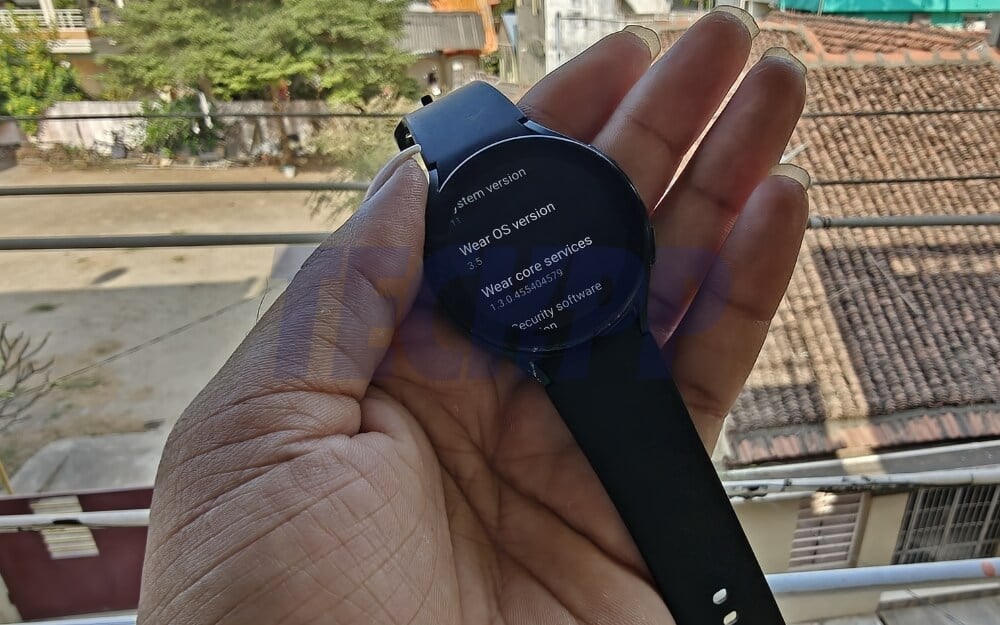
To check the WearOS version on your Watch, go to Settings and then About. Tap on the Software info and look for the WearOS information.
Using the Merge Premium App, You Can Still Pair Your Galaxy Watch 4 or Later Watches With Your iPhone
If you already own a Galaxy Watch and recently switched to an iPhone, you can use the third-party Merge app to connect with your iPhone. However, it requires a monthly or yearly subscription, which costs $3.99/month for the basic plan or $5.99/month for a pro to use the app.
In the long run, it can add significant costs; let’s say you have subscribed to the Merge basic plan for 3.99 dollars per month, and assuming you want to use it for two years, that’s 24 x $3.99, which equals close to 95 dollars, which you can get a refurbished Apple Watch. Not just that, even if you want to use the existing Galaxy Watch to save money and avoid buying an Apple Watch, the Merge app has some other limitations that can be a deal breaker for someone. You can check the Merge app pricing below to see which plan suits you best.
Plan | Monthly Price (₹) | Annual Price (₹) | Effective Monthly (₹) | Monthly Price ($) | Annual Price ($) | Effective Monthly ($) | Features |
|---|---|---|---|---|---|---|---|
Pro | ₹299 | ₹2,999 | ₹249.91 | ~$3.59 | ~$35.99 | ~$3.00 | Phone Calls, Notifications, Notification Control, Health & Workouts, Contacts Sync, Playback Control, Find My |
Basic | ₹199 | ₹1,999 | ₹166.58 | ~$2.39 | ~$23.99 | ~$2.00 | Phone Calls, Notifications, Notification Control, Find My |
Since using the Merge app is not an official solution, it has to rely on third-party apps to offer this service, meaning that it should constantly run in the background to offer the best and real-time services, which can impact the battery life of your iPhone and already existing poor battery life on your Galaxy Watch.
In my experience, using the Merge just for the setup has impacted a significant amount of the battery life, which over time can lead to usage of more battery life on top of already weak battery life on the Wear OS smartwatch.
Next, while the Merge allows you to sync the watch health data directly to the Apple Health app, many users have reported inconsistencies in data sync, and also data is missing on the Health app, which can be a concern for people, especially for health-conscious users who want to track their fitness data using the watch. Plus, also there are so many compatibility and stability issues.
Connecting the Merge app and the iPhone took me nearly an hour. Plus, you do not get some Apple-exclusive features like Siri on the Apple Watch, and the Samsung Pay won’t work on your iPhone since it requires a Samsung Watch to pair with the iPhone and use.
Unfortunately, there is no free third-party alternative to the Merge to rely on and get all those features for free now.
However, if you own an LTE version of the Galaxy Watch, you can still use the app as a standalone device without needing to connect to your iPhone. You can receive calls and messages directly on your watch and quickly reply since there is a separate phone number. You can keep all the data and track health data directly on your smartphone watch if you wish to do so.
How To Connect Your Galaxy Watch to the Merge to Your iPhone
If you have already set up the Galaxy Watch and set it up for your Android, you can directly install the Merge app on your watch and the Merge app on your iPhone and start the steps below. If you are setting up the Galaxy Watch for the first time with your smartphone, you follow the steps below.
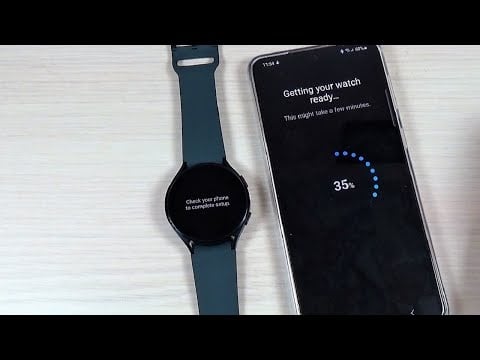
Install the Samsung Galaxy Wearable Watch app on your Android, open the app, and click on Connect to a new device. You will receive a notification on Android to confirm the code and click on the pair. Now you can use your Android smartphone to set up your watch, follow the on-screen instructions, connect with your Google account and create a Samsung account, and that’s it. After the setup, you will successfully connect your Galaxy Watch to your Android smartphone. Before connecting it to the iPhone, you can change a few settings and set a custom watch face.
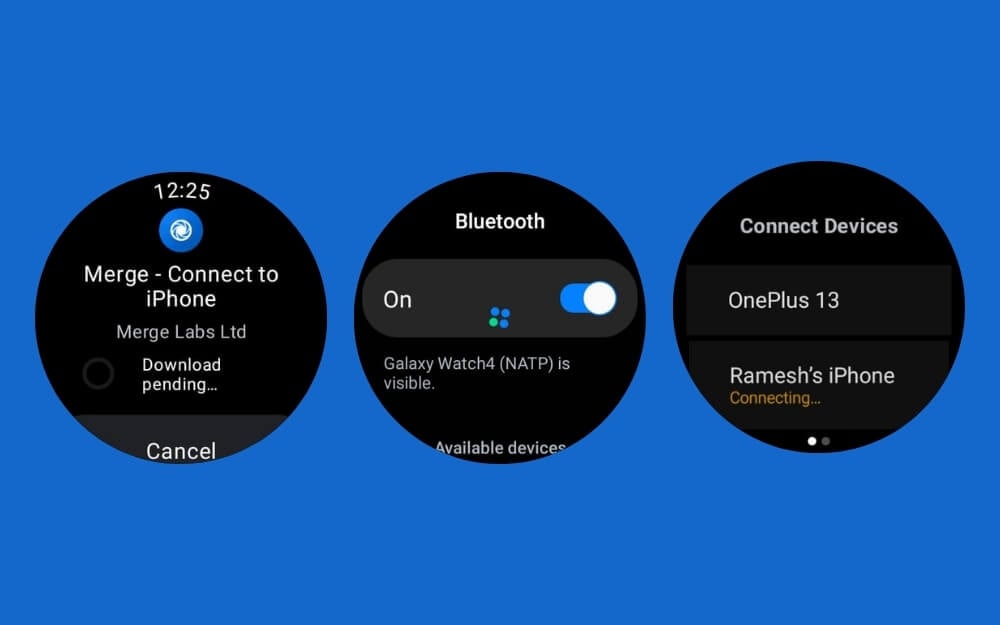
Once you are there, your watch will be up and running and completely set up. Next, open the watch and install the Merge app from the Play Store. On your iPhone, install the Merge app from the app store.
Open the Merge app on your Samsung Galaxy watch and follow the on-screen instructions. You want to connect your iPhone to the Galaxy watch. Give the necessary permissions for the merged app to use Bluetooth; now on your iPhone, go to settings>Bluetooth settings and turn on the button, and you will see a new Samsung Galaxy device, tap on it and pair your watch to the iPhone.

After successfully connecting, open the Merge app on your iPhone, subscribe to the premium plan, and start using the app.
What Works and What Doesn’t
If you already own a Galaxy Watch or want to pair one with an iPhone, here is the summary of what works and what doesn’t. If you are using Galaxy Watch 4 or later running on WearOS, you can still connect your watch to your iPhone using a basic Bluetooth tool to sync your time and get basic call and message notifications, or if you are using a LTE version, you can still use your Watch as a standalone watch without depending on your iPhone. If you want better compatibility, you can use the third-party Merge app, which requires a subscription and gives you better support for notification and Bluetooth calling, health data sync, and all. Here is a simple table summarising all these use cases.
Using WearOS 3 or Later Version of the Samsung Galaxy Watch
Using this method, you can connect your watch to your iPhone using a standard Bluetooth connection without requiring a subscription. It is very limited, and I have noticed sync issues with the basic time sync.
| What Works | What Doesn’t Work |
| Time sync | Notifications (calls, texts, apps) |
| Manual call via Bluetooth speaker | Health data sync |
| Alarm & timer functions | Message replies |
| Local fitness tracking (on watch) | App installs/updates from iPhone |
Using WearOS 3 or later Galaxy devices with a Merge subscription
If you use the latest Galaxy Watch and want full compatibility, you can subscribe to the Merge app, but it costs nearly $3.99 monthly. For over a year, it can add up to significant costs.
| What Works (via Merge app) | What Doesn’t Work |
| Notifications from iPhone (WhatsApp, etc.) | Message replies |
| Answer/make calls via watch (Bluetooth) | iMessage / FaceTime |
| Health data sync to Apple Health | Samsung Pay / Apple Pay |
| Music control on iPhone | App management from iPhone |
| Find phone/watch feature | Full access to watch-only features (some need Android) |
Using the WearOS Watch (LTE Version) Without Connecting It to Your iPhone
Using an LTE version, you can use your Galaxy Watch as a standalone app without connecting it to your iPhone. If you have an eSIM for your Apple Watch, you can use it as a standalone device.
| What Works | What Doesn’t Work |
| Make/receive calls using eSIM | Sync with iPhone (calls, texts, iMessage) |
| Use apps independently (Google Maps and more) | Share your iPhone number or the iMessage access |
| Track workouts, health on the go | Notifications from iPhone |
| Stream music via LTE/Wi-Fi | Sync health data to iPhone automatically |
| Download apps from the Play Store | Integration with iPhone apps (Mail, Calendar, etc.) |
If You Are Using Wear OS 2 or Older Devices
If you use a Galaxy Watch that runs on WearOS 2 or before, it is compatible with the iPhone. However, it still has limitations regarding message display, iMessage support, and more. Here is what works and what doesn’t work for Galaxy Watches running on WearOS 2 or before or Tizen OSes.
| What Works | What Doesn’t Work |
| Time sync with iPhone | Message replies from the watch |
| Receive notifications (read-only) | iMessage / FaceTime support |
| Health & fitness tracking on watch | Calling via watch (Bluetooth or native) |
| App install on watch usinf Play Store (Wi-Fi) | Full app sync/control from iPhone |
| Watch face customization (using the Wear OS app) | Apple Pay / Samsung Pay |
| Google Assistant (limited) | Deep integration with Apple Health |
| Basic music control | Third-party app syncing (very limited) |
So, that is it. I hope you got a very clear idea about Galaxy Watch’s limitations with the iPhone. If you already own a Galaxy Watch, you can still use it and pair it with your iPhone for basic time sync, or if you are looking to get one, I would highly recommend alternative options like Garmin, Fitbit, and other smartwatches that are fully compatible with the iPhone. You can also get the affordable Apple Watch SE, a lower-end version of the Apple Watches if you want an affordable option. Hopefully, this will change as the EU forces Apple to open its iOS for third-party compatibility; at least, users in the UE will have the option to use third-party smartwatches with the iPhone.
FAQs About Using Samsung Galaxy Watch With iPhone
1. Can I reply to WhatsApp or SMS messages from the Galaxy Watch when connected to an iPhone?
You can receive a notification. However, you cannot reply to WhatsApp or SMS notifications because it is not supported on your iPhone.
2. Can I install apps like Spotify or Google Maps on the watch without Android?
You can install third-party apps like Spotify and Google Maps on your Galaxy Watch without an Android smartphone. All WearOS Galaxy Watches support the Play Store. You can connect it to the Wi-Fi, or if you use an LTE version, you can directly visit the Play Store and download the apps.
3. Does the Galaxy Watch track sleep and show results without an iPhone?
Yes, you can view the data on the watch itself without connecting to your iPhone.
4. Can I pair my Galaxy Watch with both Android and iPhone at the same time?
Galaxy Watch can only pair with one smartphone at a time; it can be your Android with full or iPhone with limited compatibility.
5. Is it worth paying monthly for Merge, or should I buy an Apple Watch instead?
If you can afford it, I highly recommend getting an Apple Watch because it works best for the iPhone it is meant to be. If you already have a Galaxy Watch, you can still use it for basic time sync and wait for the Merge alternative. I would not recommend paying 3.99 dollars monthly in the long run; it can add significant costs.
6. If I switch back to Android later, will all my Galaxy Watch data remain?
If you are using an iPhone and the Merge app, you cannot get the data back since the Merge app only syncs your data to the Apple Health app, not the Samsung account. If you use an Android smartphone with a Samsung account, all your data will be backed up and stored in your Samsung account, which you can retrieve at any time.

