

Quick Answer
To hide your likes and comments from Instagram’s Friends Tab, update the app, go to your profile > menu > “Who can see your content” > “Activity in the Friends group,” and select “No one.” This will stop your activity from appearing in the curated feed your mutual friends see.
Did Instagram reveal all your reserved Instagram activity to your mutual friends? Yes, it looks like it, and you are in serious trouble if you are worried about your privacy. I have been writing guides for more than six years, but I have never written as scary an intro as this. This is definitely one of those posts that needs your attention.
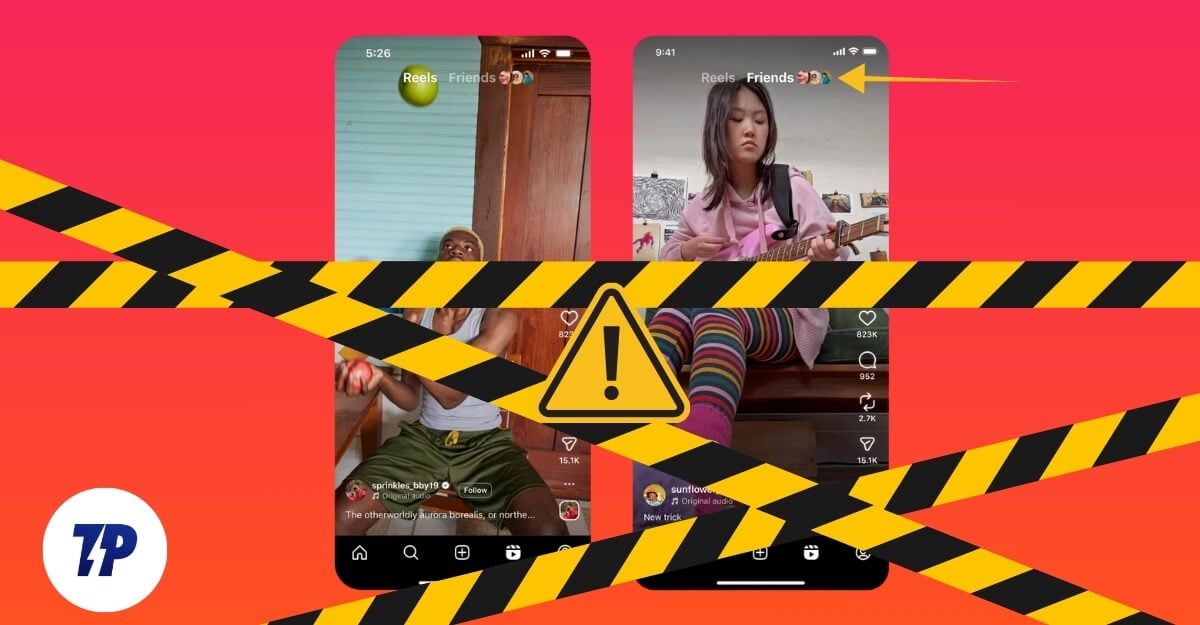
Instagram recently announced Friends Tab, a new tab feed inside the Reels section of Instagram where you can see all your mutual friends’ Reels activity, including the Reels your friends have liked, commented on, and the Reels they have reposted or created.
While it keeps you engaged and connected with your friends, it can have a serious privacy flaw if you don’t want your interests to be surfaced for everyone. I discovered the new Friends tab on Instagram recently, and found many hidden interests of my friends that I never knew about. While this data is already visible to your mutual friends, because the Friends Tab curates all of it into a single list and shows it actively, I am finding some hidden interests of my friends lately on Instagram.
So if you are someone who doesn’t want others to see what you have liked and commented on, and your personal interests on your Instagram, you can also hide them.
Before that, here is everything that you should know about how this feature works:
- The Friends Tab only shows the Reels interacted with by your mutual followers. This feed includes the Reels your mutual friends have liked, commented on, reposted, and created. It mostly curates the list from the people that you have interacted with the most, and also sometimes people you might not have known, but mutual friends.
- Instagram says sometimes it can also surface content from Blends shared by you and your friend in your Instagram messages. Here is a detailed guide to know everything about the Instagram Blends.
- Fortunately, Instagram allows you to hide your activity, including your likes and comments, from showing up in the Friends Feed to others.
- When you hide your activity in the Instagram friends feed, all your likes, comments, and reposts will be hidden from your friends, and those reels will not show up on your mutual friends’ activity tab.
Table of Contents
How to turn off your likes and comment activity in the Instagram Friends Tab
First, update your Instagram to the latest version. If you are using iOS, visit this App Store link, and if you are using Android, visit the Google Play Store link and update your app to the latest version.
Android
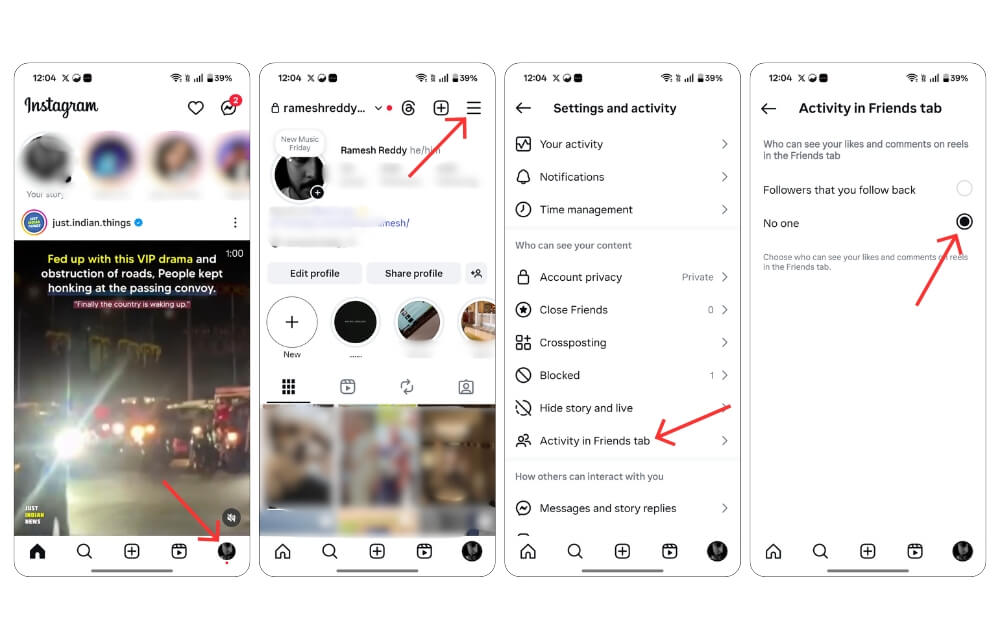
- Open the Instagram app.
- Tap on your profile picture at the bottom of your screen and tap on your menu in the top right corner of the screen.
- Now, scroll down to the Who can see your content section and tap on the Activity in the Friends group.
- Now select No one to prevent your likes and comments, and all other posts to your friends.
iOS
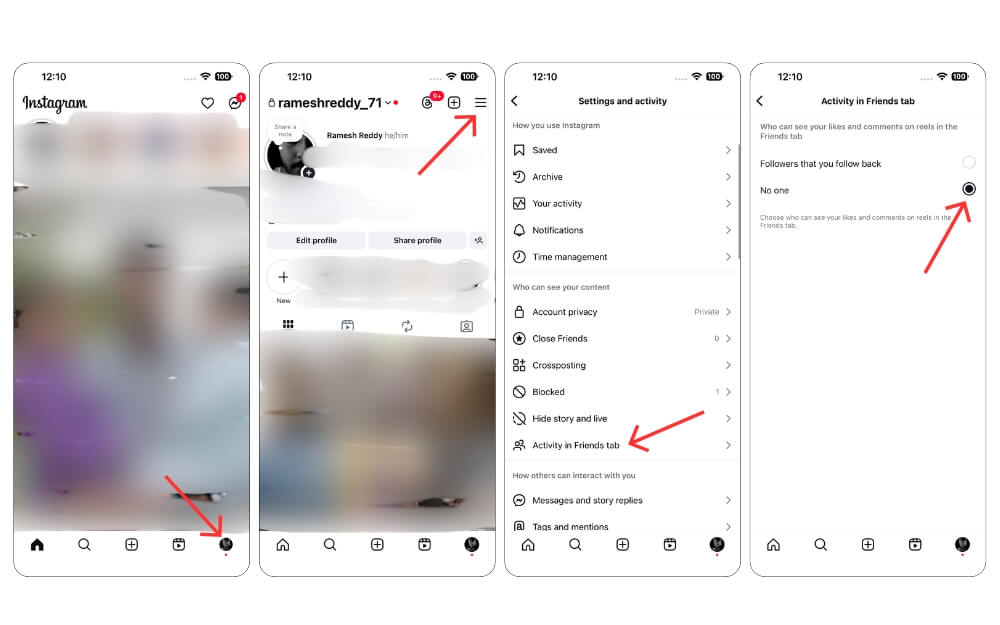
- Open the Instagram app.
- Now tap on your profile picture at the bottom of your screen and tap on your menu in the top right corner of the screen.
- Now, scroll down to the Who can see your content section and tap on the Activity in the Friends group.
- Now select No one to prevent your likes and comments, and all other posts from being visible in your Instagram Friends Rail.
Related: How to Hide Active Status on Instagram [Guide]
So this is how you can hide your activity using the Instagram Friends Tab. This is a serious concern as all your likes, comments, and reposts on public are automatically visible to your mutual friends in a curated list.
While this activity is already public since Instagram keeps all of it in a single place, your friends might discover your personal interests directly from their Instagram feed. I hope you find this guide helpful.
More Instagram Privacy Guides
- How to Hide an Instagram Account and Stop People From Finding You
- How to Hide Active Status on Instagram [Guide]
- How to Disable Instagram Read Receipts: One Simple Step
FAQs on Instagram Friends Tab
1. Can I selectively hide activity from only certain friends but allow others to see it?
Currently, hiding activity from specific friends is not available on Instagram. Either you can select all your followers to view your activity, or select no one.
2. How does Instagram decide which friends appear most often in your Friends tab?
In my experience, Instagram mostly shows activity from the friends you interact with the most, and it might change based on your session.
3. Are these settings account-wide or specific to Reels only?
Currently, the Friends tab only shows the Reels your friends have interacted with.
4. What’s the difference between the Friends Tab and the Reposts Tab?
The Repost tab contains the posts you have manually reposted, including regular and Reels. On the other hand, the Friends tab in the Instagram Reels feed shows you a curated Instagram Reels feed that your mutual friends have liked, commented, reposted, or created.

