

Quick Answer
If you love the portability of a laptop but miss the comfort of a desktop’s multi-screen setup, laptop screen extenders are the perfect fix. These plug-and-play add-ons clip to your laptop, instantly expanding your workspace for multitasking, trading, or creative work. Our 2025 buying guide lists the best options and what to look for before choosing one.
If you list the shortcomings of a laptop compared to a PC setup, the most obvious would be the lack of screen estate. While notebooks have portability as one of their strong points, you just can’t overlook the benefits of a larger viewing area. If you are someone who would love to experience the benefits of both without compromising either, say hello to the best thing you will come across for this — laptop screen extenders.

Setting up a laptop screen extender is as easy as it gets, since most, if not all, are designed to attach securely to an existing laptop, eliminating the need to find a dedicated spot to place them. What follows is a simple plug-and-play mechanism for the built-in USB cable — voilà! You now have a fully-fledged multi-monitor setup in no time and with the bare minimum effort.
Albeit not as mainstream, laptop screen extenders are a must-have accessory for many PC aficionados, productivity masters, or anyone who cannot discount a multi-monitor setup for portability. This buying guide lists our recommendations for the best laptop screen extenders and what you should consider before choosing one for your laptop. That said, let’s get started!
Table of Contents
What is a Laptop Screen Extender
As the name speaks for itself, a laptop screen extender enables you to extend your laptop’s screen estate. The mechanism involves a space-saving folding architecture that clips onto your laptop’s frame. Depending on the number of screens you choose, the additional displays hang on either side of your laptop’s screen, providing an immersive, continuous multi-monitor experience.
In case you are wondering what powers the screens, it’s your laptop and its battery pack, connected via USB Type-C, HDMI, or DisplayPort, depending on your laptop’s I/O ports. The setup often includes a kickstand at the back for additional support and to reduce strain on the laptop’s top lid, which is usually more fragile than the body. As futuristic as it may look, the whole thing can be folded back to a size only a shade or two larger than your existing laptop.
Speaking of the advantages of using a laptop screen extender, it’s undoubtedly the increased productivity and multitasking capabilities you can achieve. Plus, it’s the only way to enjoy working on a multi-monitor setup on the go, a priceless benefit for countless traders, teachers, developers, working professionals, and literally anyone who needs to keep track of multiple things simultaneously.
You will, however, compromise a bit on portability, which isn’t a major demerit, since most laptop screen extenders fold to save space. Furthermore, you will surely notice a noticeable downgrade in screen quality, as screen extenders can hardly match the quality of your laptop’s existing screen. Once the screens are set up, you will need to place the laptop in a stable position to work, as the setup’s mobility is limited, and you don’t want to damage it.
How to Choose the Right Laptop Screen Extender

Before we get to our list of best laptop screen extenders, here are a few things to keep in mind to prevent buying the wrong screen extender for your laptop:
Screen Quality
First and foremost, since it’s screens we are talking about, it’s crucial to ensure you are getting a good one. Most laptop screen extenders support full HD (FHD) resolution, which is what most laptops do. However, if your laptop’s screen is higher resolution, consider getting one with a resolution close to your laptop’s. If you are a little more particular about things, do match your laptop’s screen’s aspect ratio with that of the extended screen, as it may feel weird using two screens side-by-side with different aspect ratios.
Truth be told, laptop screen extenders don’t usually offer impressive brightness levels. However, you should still aim for the highest possible brightness values. Plus, if you prefer glossy screens, you will have a hard time finding one since most laptop screen extenders offer anti-glare screens that cut off reflections. If you are into those, you can also opt for a touch-screen laptop screen extender. We recommend getting one that supports high refresh rates if your budget allows.
Laptop Compatibility
While it shouldn’t be an issue in most cases, you should still ensure the one you are buying fits your laptop well. Most laptop screen extenders opt for a clip-on mechanism to latch onto your laptop’s lid. Now, that’s fine for most laptops, including MacBooks, but not if you own one of those dual-screen behemoths or gigantic 17″ gaming laptops. Although most do, ensure your laptop’s hinge is strong enough to support the additional components involved in this case.
Since laptop screen extenders for MacBooks are widely available, you can also opt for one specific to your laptop’s screen size. Compatibility also includes the ports on your computer, which in turn decides the port you will use to power the displays, be it USB Type-C, DisplayPort, or HDMI. Pick the one compatible with your laptop’s dimensions and existing I/O ports.
Build Quality
Despite not being a significant factor, since it’s usually well taken care of, ensure the one you are getting is well-built. You will mostly see an all-plastic construction with decent structural stability throughout. The built-in kickstand should be sturdy enough to withstand a particular load. Plus, it shouldn’t be too heavy, or your laptop’s hinge, top lid, or worse, the display, may get damaged easily.
Additional Features
Laptop screen extenders may include additional features, such as built-in fans to dissipate heat, speakers, touch-screen input, stylus support, and whatnot. While it depends on whether you need the functionality, your existing laptop will most certainly be a mile better in things like speaker quality and thermal management. In other words, don’t put those features at the top of your priority list; instead, prioritize getting one that offers excellent panel quality.
7 Best Laptop Screen Extenders for Your Laptop
With that out of the way, let’s take a look at some of our favorite laptop screen extenders for your laptop, spanning across a broad price bracket.
Model | Screen Size & Resolution | Key Features | Compatibility & Ports | Best For / Key Takeaway |
|---|---|---|---|---|
Forka Laptop Screen Extender | Dual 14" FHD (1920×1080), IPS, 300 nits, 72% NTSC | Aluminum base plate with rods, landscape/portrait modes, built-in speakers | HDMI / USB-C, fits up to 17.7” laptops | Ideal for users worried about hinge strain; sturdy desktop-like setup |
Cevaton Laptop Screen Extender | Dual 14" FHD (1920×1080), 80% NTSC, 300 nits | Clip-on + kickstand, built-in speakers, carry case | HDMI / USB-C, 13–17" laptops | Great midrange pick for general productivity and travel |
Kefeya Laptop Screen Extender | Single 14" QHD (2160×1440), 16:10, 100% sRGB, 300 nits | Lightweight, portrait support, kickstand, carry bag | HDMI / USB-C, supports Mac, Win, Android, Switch | Best value for multitaskers needing color-accurate display on the go |
Teamgee Laptop Screen Extender | Dual 14" FHD (1920×1080), 72% NTSC, 300 nits | Clip-on + kickstand, 180° rotation, built-in speakers, travel case | HDMI / USB-C, 13–17" laptops | Reliable all-rounder for remote work and travel setups |
Uperfect Laptop Screen Extender | Dual 14" QHD (2240×1400), 16:10, 100% sRGB, 400 nits | 360°/210° rotation, thin bezels, premium build | HDMI / USB-C | Premium choice for creators and power users seeking high-res screens |
Magicraven Laptop Screen Extender | Single 14" FHD (1920×1080), 16:10, 100% sRGB, 300 nits | Clip-on with kickstand, 3-year warranty | HDMI / USB-C, 14–16.5" laptops | Budget-friendly pick for basic dual-screen productivity |
Flytocca Laptop Screen Extender | Dual 16" FHD (1920×1200), 16:10, 300 nits | Large panels, includes stand & MacBook dongle | HDMI / USB-C + included dongle | Best for users needing large triple-screen workspace portability |
Forka Laptop Screen Extender
Pros:
- Clever latching mechanism, which is quite stable and doesn’t put any stress on the laptop’s hinges
- Screens are of good quality and offer high brightness levels
- The screens can be used in landscape, portrait, or standalone modes
Cons:
- A little pricey at $219.99
- MacBook users require an external media extension hub
The Forka laptop screen extender converts your existing laptop into a triple-monitor setup in no time. Instead of the usual mechanism of attaching to a laptop’s lid, the Forka laptop screen extender features a dedicated, extendable anti-skid aluminum base plate with a kickstand for enhanced stability and ergonomics, which is clever because it does not put any stress on the laptop’s hinges. There are two rods on either side of the base plate where the screens get attached, and they can be kept in both portrait and landscape orientations. The box also includes a dedicated stand, essentially granting you the power of a standalone portable monitor.
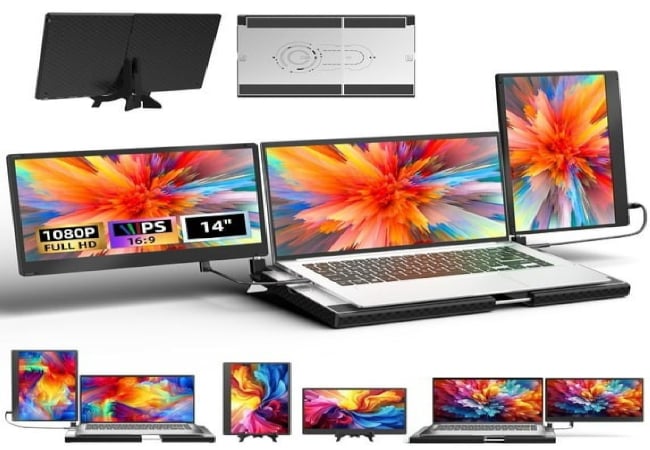
The 14-inch screens themselves are high-quality, featuring IPS LCD panels with 300 nits of brightness, a 178-degree viewing angle, a 60Hz refresh rate, a 72% NTSC color gamut, and a 1,920 x 1,080p (Full HD) resolution. The screens feature a dual-speaker setup and offer an ideal 16:9 aspect ratio, ensuring compatibility with most laptops. Speaking of compatibility, the base plate can extend up to 17.72 inches, and the screens can be powered via the HDMI or USB Type-C ports. If you plan to use it with a MacBook (M1 or later), however, you may need to use an external media extension hub.
Forka stands out with its aluminum base plate and rod mechanism instead of a pure clip. That design eliminates hinge stress and makes the unit feel more like a portable desktop. The screens have good viewing angles, and the ability to go portrait or landscape on each arm adds flexibility for coding, chat windows, or reference materials.
Because it sits on its own base rather than relying on the laptop hinge, Forka is safer for long sessions on laptops with fragile lids. However, it requires more desk surface and packs up larger than clip-only models.
Key Takeaway: Choose Forka if hinge strain worries you, and you can spare a little extra footprint for a stable triple monitor experience.
The Forka Laptop Screen Extender is available on Walmart for $219.99.
Cevaton Laptop Screen Extender
Pros:
- Sturdy setup with an added kickstand
- 80% NTSC color gamut and 300 nits brightness
- Supports both landscape and portrait modes
Cons:
- Incompatible with the latest MacBooks
- Some reviews suggest stability issues with specific laptop models
The Cevaton Laptop Screen Extender is among the better screen extenders for your laptop. It uses the traditional clip-on mechanism to latch onto your laptop’s lid, but Cevaton also sells a model with a base support, similar to the Forka Laptop Screen Extender. The setup is compatible with laptop screens ranging from 13 to 17 inches. The screens only support the landscape orientation if you wish to use both of them together in the form of a triple-monitor setup, but you can also switch to portrait mode, where one screen acts as the base, essentially creating a dual-monitor setup. There’s a sturdy kickstand for added support and built-in speakers.
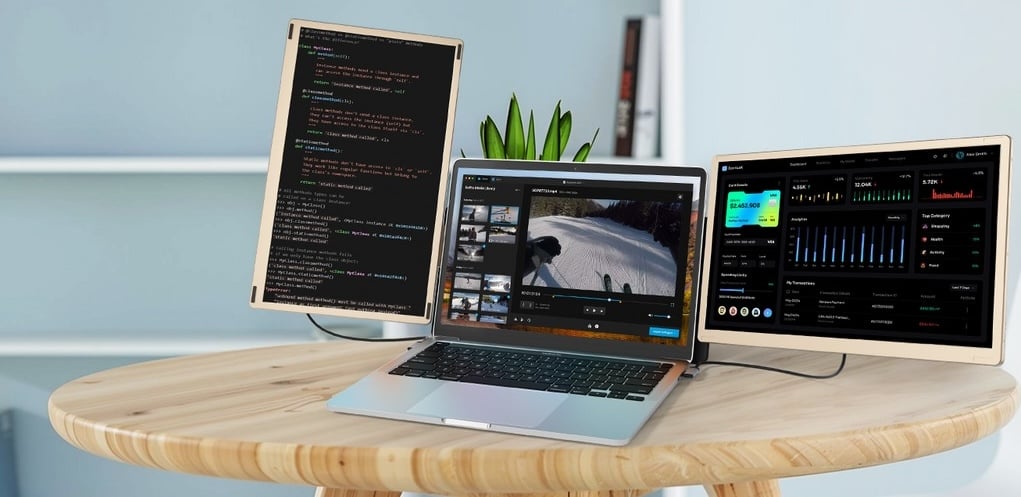
The Cevaton Laptop Screen Extender features dual 14-inch displays offering a 1,920 x 1,080p (Full HD) resolution, an 80% NTSC color gamut, a 1,000:1 contrast ratio, a 16:9 aspect ratio, and 300 nits of peak brightness, making them primarily suitable for indoor use. The screens can be connected using HDMI or USB Type-C ports, making them quite versatile. The in-box contents include all the necessary cables and a nice carry case. Unfortunately, the Cevaton Laptop Screen Extender misses out on compatibility with the latest MacBooks powered by Apple Silicon (M1 or later), which is a bummer.
Cevaton uses the familiar clip-on mechanism but feels sturdier than many budget clip models. The combo of built-in kickstand and included case makes it easy to flip between mobile and desk use. I feel it’s ideal for sales reps or consultants who need dual screens during presentations or client meetings. Quick plug, present, and pack away is the typical workflow.
Key takeaway: Solid midrange pick for general productivity with dependable build for road use.
The Cevaton Laptop Screen Extender is available for $179.54 on Amazon.
Kefeya Laptop Screen Extender
Pros:
- QHD resolution instead of the usual FHD
- 16:10 aspect ratio and 100% sRGB coverage
- Compatible with the latest MacBooks
Cons:
- There can be fitting issues with some laptops
If a triple-screen setup is overwhelming, you might be fine with a dual-screen setup instead. The concept remains the same, except there is just one screen beside your laptop’s display, supported by a frame attached to your laptop’s lid. The Kefeya laptop screen extender does precisely that, but with a desirable addition. The 14-inch screen offers a 2,160 x 1,440p (QHD) resolution, which is rare, to say the least. As a result, you get decently sharp visuals, paired with a 1,500:1 contrast ratio, 300 nits of peak brightness, a 16:10 aspect ratio, 100% sRGB color coverage, and a dedicated eye-care mode.
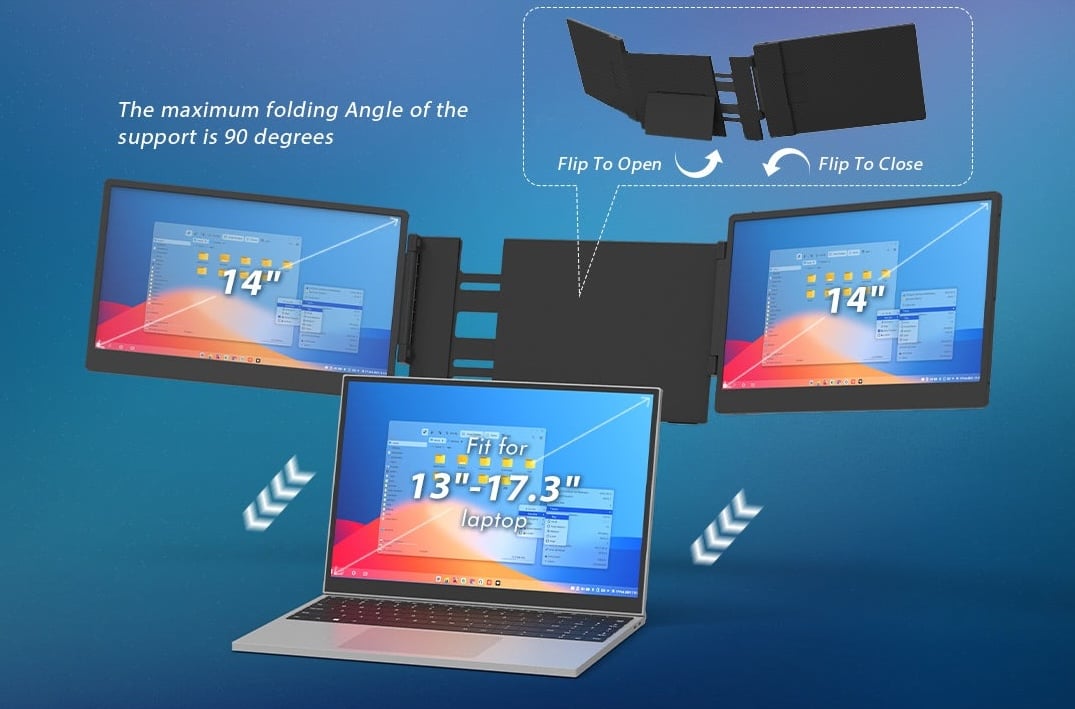
Despite having just one screen, you don’t miss out on portrait mode, as the screen can stand on its support in vertical orientation and act as an extended portrait screen. A dedicated kickstand is good enough to provide added support for the setup. Another great aspect of the Kefeya laptop screen extender is its compatibility with the latest MacBooks. It also supports Windows, Chromebooks, Android, Linux, PlayStation, Nintendo Switch, and more. Kefeya also bundles a nice carry bag to secure the screen while traveling, which is a thoughtful addition.
In terms of real-world use, I can’t stress about the kickstand and lightweight design enough, albeit it’s not a great choice if you have a heavy laptop.
Key takeaway: Kefeya is a strong value pick for productivity and multitaskers on the go, but if you’re into creative work demanding high colour fidelity or a very bright display, you may feel the gap.
The Kefeya Laptop Screen Extender is available for $119.99 on Amazon.
Teamgee Laptop Screen Extender
Pros:
- Well-built setup
- Ideal screen specifications for the price
- Packaging includes a good-quality case
Cons:
- An additional docking hub may be required for compatibility with the latest MacBooks
The Teamgee laptop screen extender is a no-nonsense, rightfully priced option. It features a standard clip-on mechanism coupled with a kickstand to support laptops ranging from 13 to 17 inches in size, which is ideal. The panels are well-built and feature a carbon-fiber-like texture, which certainly gives them a premium feel. While the screens offer 180-degree rotation, they are restricted to landscape mode only, which could be a bummer for those who rely on them. On the bright side, there are built-in speakers, which is a nice addition.
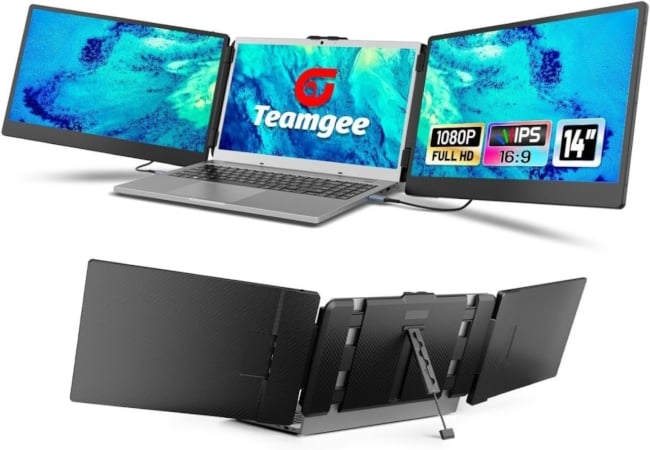
The Teamgee laptop screen extender features a 14-inch screen with a 1,920 x 1,080p resolution, a 1,000:1 contrast ratio, 300 nits of peak brightness, a 72% NTSC color gamut, and a 16:9 aspect ratio, which is a standard affair in this price bracket, and this one checks it. Although some reviews suggest it’s compatible with the latest MacBooks, Teamgee recommends using an external docking hub if it’s incompatible with your MacBook. The package also includes a nice case and every necessary cable, including USB Type-C and HDMI cables.
In terms of real-world use, I found that the built-in speaker will not convince audiophiles, but for an on-the-go scenario, it adds a bit of richness. I feel this is ideal for remote work or travel, where you don’t need ultra-premium visuals but want a plug-and-play extension.
Key Takeaway: If you want an easy, reliable extender for general productivity and travel, Teamgee is a strong choice. But don’t expect a creative-grade display or an ultra-slim build.
The Teamgee Laptop Screen Extender is available for $179.99 on Amazon.
Uperfect Laptop Screen Extender
Pros:
- Insanely good screens
- Sturdy build quality
- Lightweight and compact form factor
Cons:
- Quite pricey at $319.99
- No speakers despite the high price
- Partial incompatibility with specific laptop models
If budget isn’t an issue and all you need is a set of outstanding screens to work at your best, then look no further than the Uperfect laptop screen extender. For starters, it’s very well-built and features a modern look comprising thin bezels all around the screens. Thanks to its patented hinge mechanism, the screens can be oriented in many ways, with the ability to rotate 360 degrees vertically and 210 degrees horizontally. The screens can, of course, be rotated to portrait or landscape modes to enhance productivity, depending on your workflow.
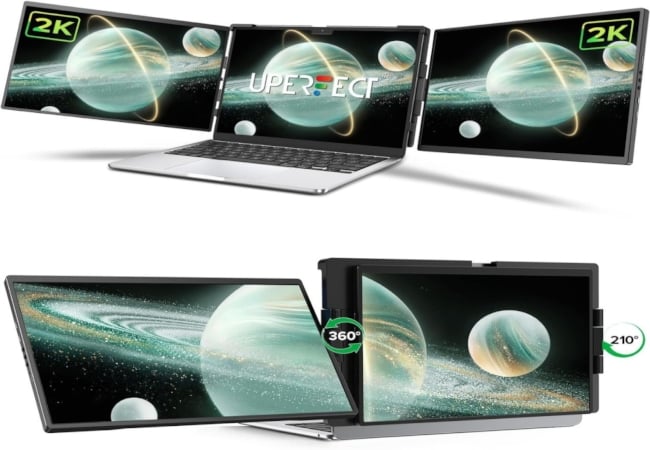
The most noteworthy aspect of the Uperfect laptop screen extender is its 14-inch screen. For starters, you get 2,240 x 1,400p (QHD) resolution paired with 400 nits of peak brightness, which is already higher than most laptops, and a 100% sRGB color coverage with a 16:10 aspect ratio to top it off. It doesn’t get any better than that, unless you go down the portable monitor route, which features high-refresh-rate panels coupled with OLED technology. Unfortunately, some laptops, including specific MacBooks, Galaxy Books, and Surface laptops, are incompatible with it, so you can only use one of the two screens. However, for most other users, the screens alone are compelling enough to consider getting the Uperfect laptop screen extender.
Uperfect is useful when switching between work and gaming or design tasks. The higher resolution and aspect make it more versatile. Because this model is in the “premium laptop screen-extender” bucket, you see the benefits — sharper text, better comfort when used for hours. But the cost is higher, and compatibility/size considerations become more important (weight, hinge strain, port support).
Key Takeaway: If you’re using your laptop as a quasi-desktop and expect to spend long sessions working/gaming and want more than basic extension, this is one of the better picks. Just check your laptop’s lid/hinge strength and I/O ports.
The Uperfect Laptop Screen Extender is available for $319.99 on Amazon.
Magicraven Laptop Screen Extender
Pros:
- Affordable price tag of $89.97
- Good specs for the price
- Three-year warranty is a huge plus
Cons:
- Relatively weak build quality
- The screen’s color output is a bit dull
The Magicraven laptop screen extender is an adequate option for those looking for an affordable option. At under $90, there’s nothing much to miss in the Magicraven laptop screen extender. Because it’s a single-screen device, you can only enjoy a dual-screen setup at best, which is fine for most basic workflows. The screen snaps onto your laptop’s back like most other options and includes a kickstand to support its added weight. However, it’s only suitable for a 14 to 16.5-inch laptop, which you should keep in mind before purchasing it. Despite its low price tag, the Magicraven includes a rather generous three-year warranty.
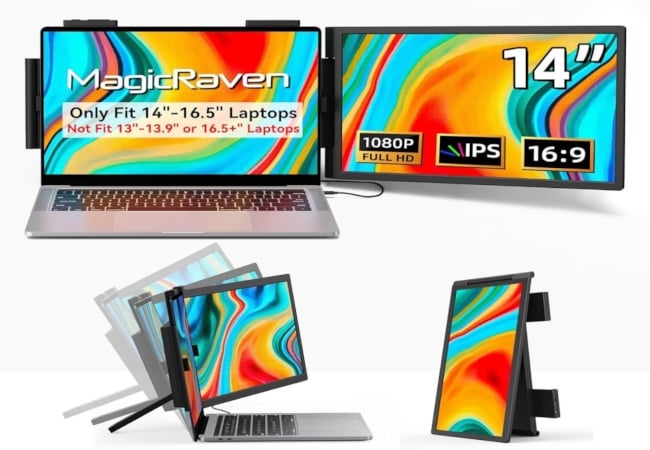
The screen is a standard 14-inch IPS LCD panel featuring a 1,920 x 1,080p resolution, a 16:10 aspect ratio, 300 nits of peak brightness, a 1,000:1 contrast ratio, a 60Hz refresh rate, and 100% sRGB coverage. Despite the high sRGB coverage, several reviews suggest the screen is a little dull in reality, lacking the pop expected from its color output. Albeit the screen is of sufficiently good quality for most usual tasks. The Magicraven laptop screen extender can be powered using a USB Type-C or HDMI port, and several reviews mention its compatibility with the MacBooks.
In a hotel or temporary WFH setup, it offered a dual-screen feel, but portability suffered a bit due to weight and hinge-strain concerns. But the good thing is, it folded small enough to put into a small backpack that also has my 15″ laptop.
Key takeaway: For budget-conscious buyers, this gives multi-screen pickup, but if you already have a bright premium laptop screen, you may feel the extension is visibly weaker.
The Magicraven Laptop Screen Extender is available for less than $90 on Amazon.
Flytocca Laptop Screen Extender
Pros:
- Larger 16-inch screen size
- Packaging includes the dongle required to make the latest MacBooks compatible
- The dedicated stand enables a lot of screen orientations
Cons:
- Expensive at $328.98
- FHD resolution may result in a loss of screen sharpness when viewed closely
All other laptop screen extenders on this list feature a 14-inch panel, which may feel a little small when placed next to a laptop with a larger screen. In that case, the Flytocca laptop screen extender with its dual 16-inch screens makes a lot more sense. Their advantage is not just to feel less out of proportion when placed beside a large laptop screen, but to provide a much bigger screen estate to work on. In addition to the option to clip to your laptop’s lid, the package includes a standalone stand that supports a broader range of screen setups and orientations.
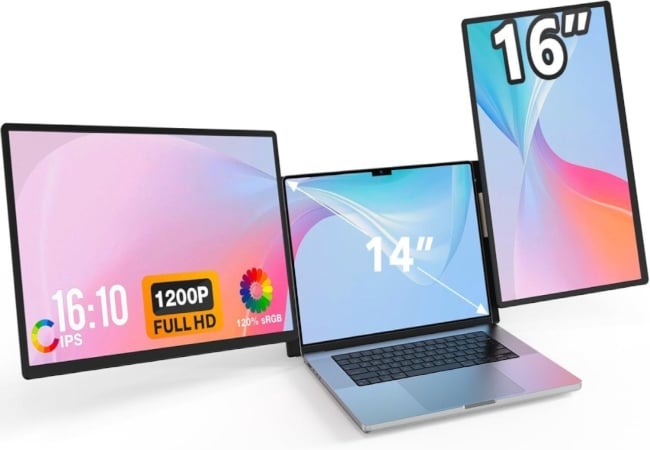
Both screens are 16-inch IPS LCD panels featuring 1,920 x 1,200p (FHD) resolution and a 16:10 aspect ratio. Other aspects of the screens are relatively standard, with a peak brightness of 300 nits, a 60Hz refresh rate, and a 1,000:1 contrast ratio. To top it off, there are thin bezels around the panel, giving it a modern look. The screens can work off USB Type-C and HDMI ports. The Flytocca laptop screen extender’s compatibility issues with the latest MacBooks can be addressed by using the included dongle and installing the proprietary driver manually.
The Flytocca feels like a step up if you need larger secondary screens. The dual 16-inch panels give a noticeably more balanced visual when paired with a 15″ or 16″ laptop, so the setup looks intentional rather than tacked on.
I’d say it’s great for content managers or data analysts who travel between client sites and need a near-desktop-sized workspace without hauling a full monitor. On a train or hotel desk, it feels more like a workstation than a quick extension.
Key Takeaway: Best when you want serious extra screen area while keeping a single portable unit.
The Flytocca Laptop Screen Extender is available on Amazon for around $330.
Buy on Amazon
Elevate Your Workflow With These Laptop Screen Extenders
This concludes our guide on choosing the right laptop screen extender, along with a few suggestions. It’s essential to get your priorities right, as there’s no shortage of laptop screen extenders on the market. You must have a few things decided, including your budget and use case. Since the screen is the most crucial aspect of a laptop screen extender, the obvious best on our list are the Kefeya and Uperfect laptop screen extenders, which are bang for the buck. The Flytocca and Magicraven laptop screen extenders are also worth considering for their size and price, respectively. The Forka laptop screen extender is an excellent alternative if you don’t want to put a lot of stress on your laptop’s lid and hinge.

