

In Summary
- iPhone: Apple Intelligence is available on iPhone 15 Pro and iPhone 15 Pro Max, and on all iPhone 16 and newer models running iOS 18.1 or later.
- Mac: All MacBooks running on the latest Apple M‑series silicon processors support Apple Intelligence.
- iPad: iPad models with an M1 chip or later (iPad Pro M1+, iPad Air M1+) and also iPad mini with A17 Pro support Apple intelligence.
Apple introduced Apple Intelligence in iOS 18.1, macOS 15.1, and iPadOS 18.1. However, it is limited to a select set of eligible devices running on Apple silicon hardware.
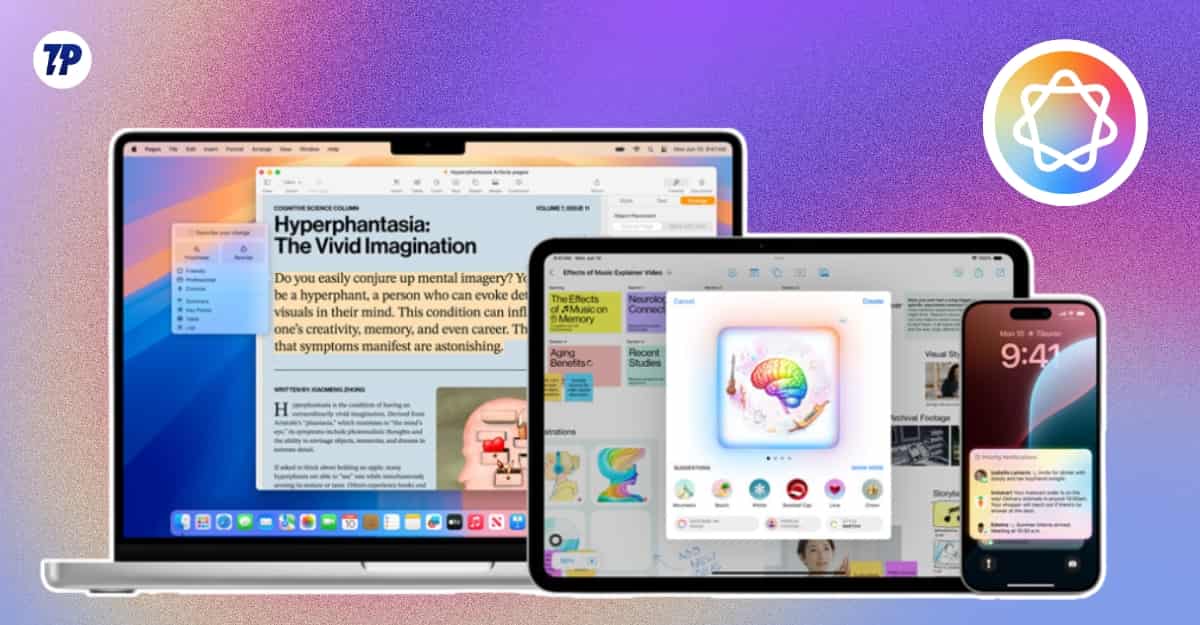
Apple did not mention this limited device support anywhere in their marketing videos and materials. In fact, all the highlighted features in iOS 18 and other OSes during WWDC 2024 revolved around the new Apple Intelligence features.
So, if you own an iPhone and are wondering whether your device supports it, or if you are looking to buy a new Apple device and wondering whether that supports Apple Intelligence or not, you have come to the right place. In this guide, you are going to learn about a list of all devices that support Apple Intelligence.
Table of Contents
Apple Intelligence Supported Devices: Full iPhone, Mac, and iPad List
Apple Intelligence supported iPhones
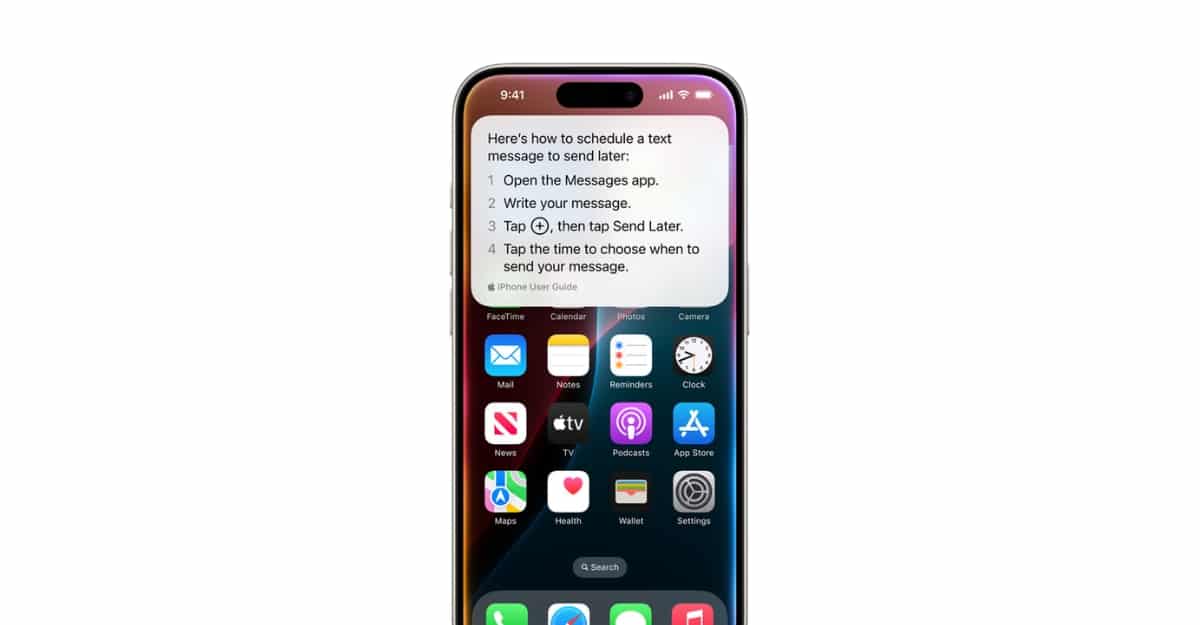
iPhone 15 Pro or later models running on iOS 18.1 or later are eligible for Apple Intelligence. The minimum hardware requirement is the A17 Pro chip, which is why older iPhones running on the A16 Bionic chip and below are not compatible. Here are the list of iPhones that support Apple Intelligence.
Apple intelligence-compatible iPhones:
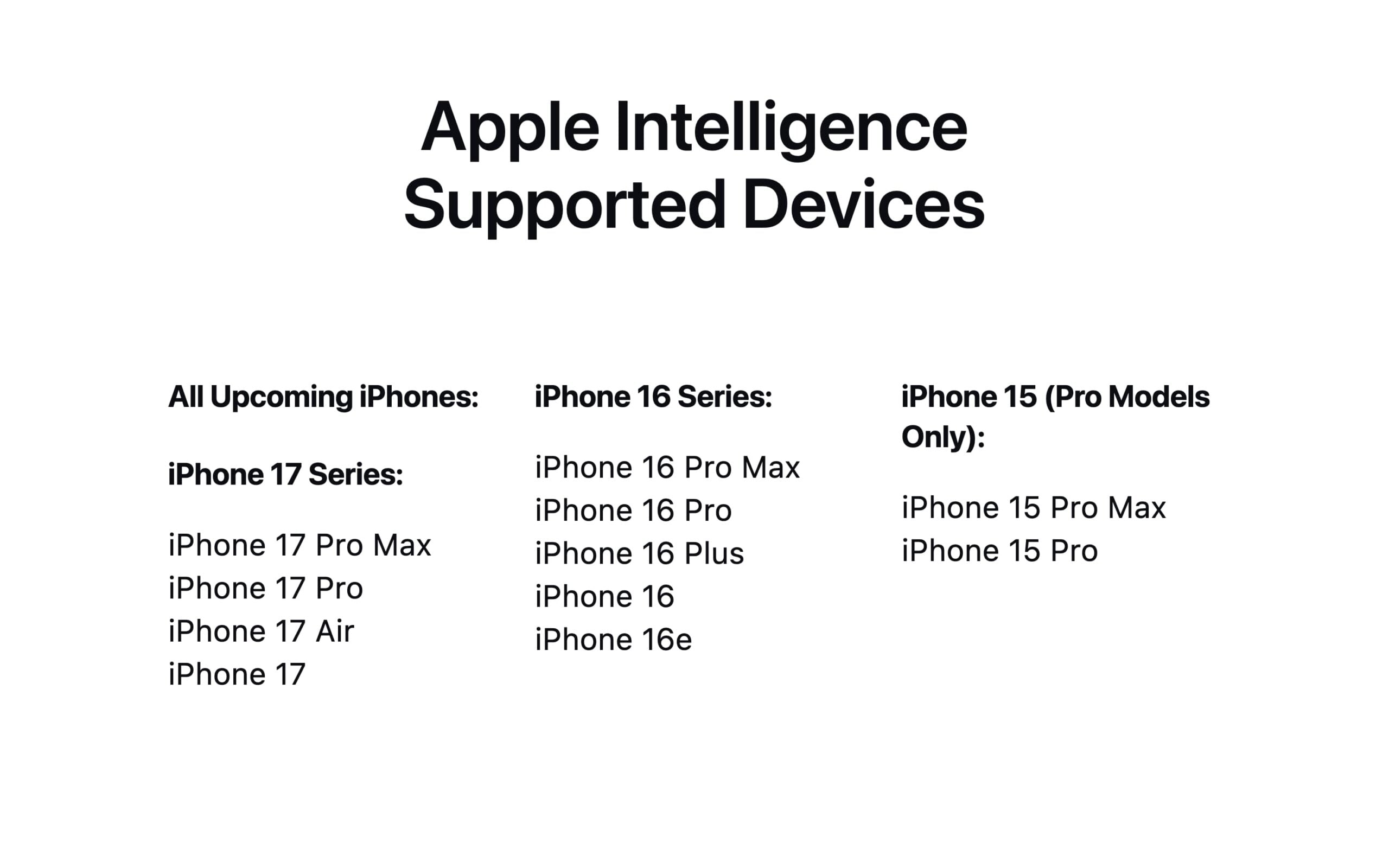
iPhone 17 Series:
- iPhone 17 Pro Max
- iPhone 17 Pro
- iPhone 17 Air
- iPhone 17
iPhone 16 Series:
- iPhone 16 Pro Max
- iPhone 16 Pro
- iPhone 16 Plus
- iPhone 16
- iPhone 16e
iPhone 15 (Pro Models Only):
- iPhone 15 Pro Max
- iPhone 15 Pro
If you are wondering whether the standard iPhone 15 supports Apple Intelligence, the answer is no. Only the iPhone 15 Pro and iPhone 15 Pro Max from the iPhone 15 lineup are compatible. The standard iPhone 15 and iPhone 15 Plus do not meet the hardware requirement.
Phones that are not compatible with Apple Intelligence
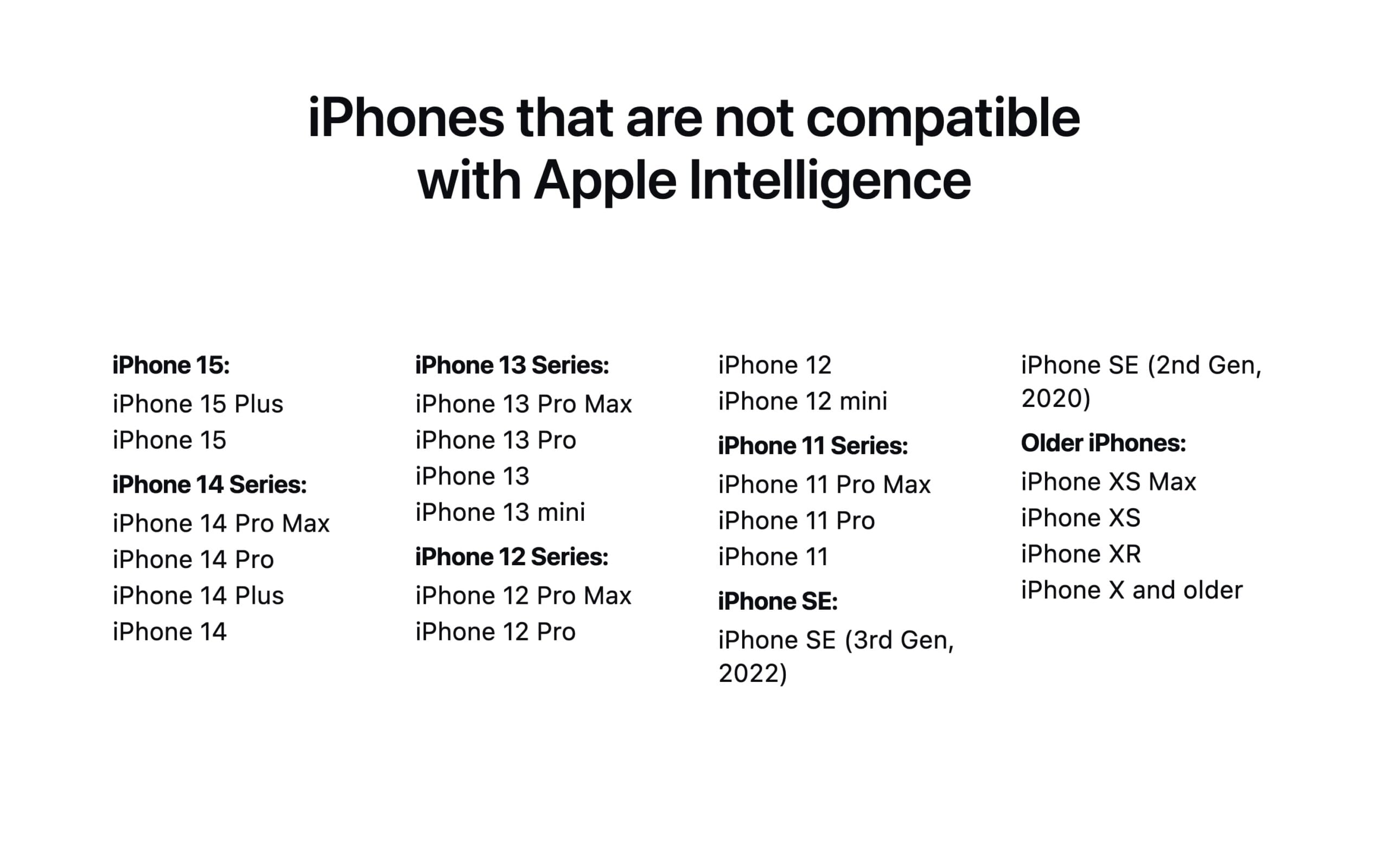
iPhone 15 (Standard Models):
- iPhone 15 Plus
- iPhone 15
iPhone 14 Series:
- iPhone 14 Pro Max
- iPhone 14 Pro
- iPhone 14 Plus
- iPhone 14
iPhone 13 Series:
- iPhone 13 Pro Max
- iPhone 13 Pro
- iPhone 13
- iPhone 13 mini
iPhone 12 Series:
- iPhone 12 Pro Max
- iPhone 12 Pro
- iPhone 12
- iPhone 12 mini
iPhone 11 Series:
- iPhone 11 Pro Max
- iPhone 11 Pro
- iPhone 11
iPhone SE:
- iPhone SE (3rd Gen, 2022)
- iPhone SE (2nd Gen, 2020)
Older iPhones (Not even iOS 26 compatible):
- iPhone XS Max
- iPhone XS
- iPhone XR
- iPhone X and older
If you are also checking iOS 26 compatibility, here is our iOS 26 supported devices list.
Don’t worry if you are using an older iPhone. You can get almost all Apple Intelligence features on any older model. Those features are mostly cloud-based, so they do not run on-device and are not as integrated as Apple’s native features, but you can still get most of the tasks done.
Apple Intelligence supported Macs
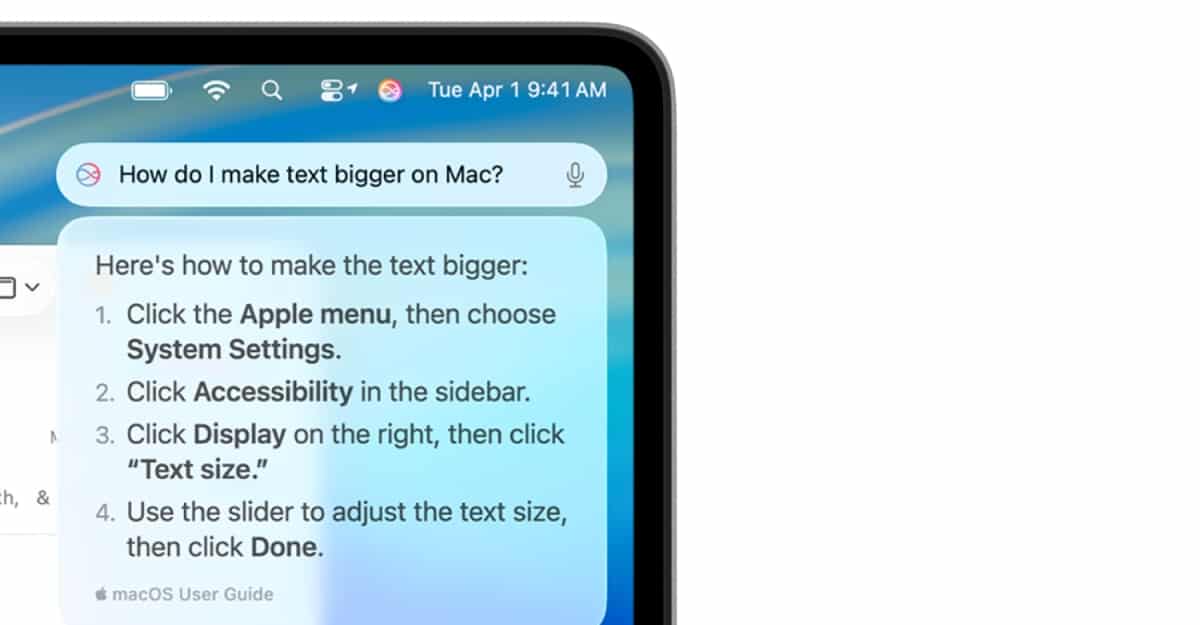
All MacBooks running on the latest Apple M-series silicon processors support Apple Intelligence. These include the very first Apple M1, which was announced first in the Apple MacBook Air in 2020, and all later models. If you want to make the most of it, check out our guide on Apple Intelligence Mac features and setup tips.
Apple Intelligence-supported MacBooks:
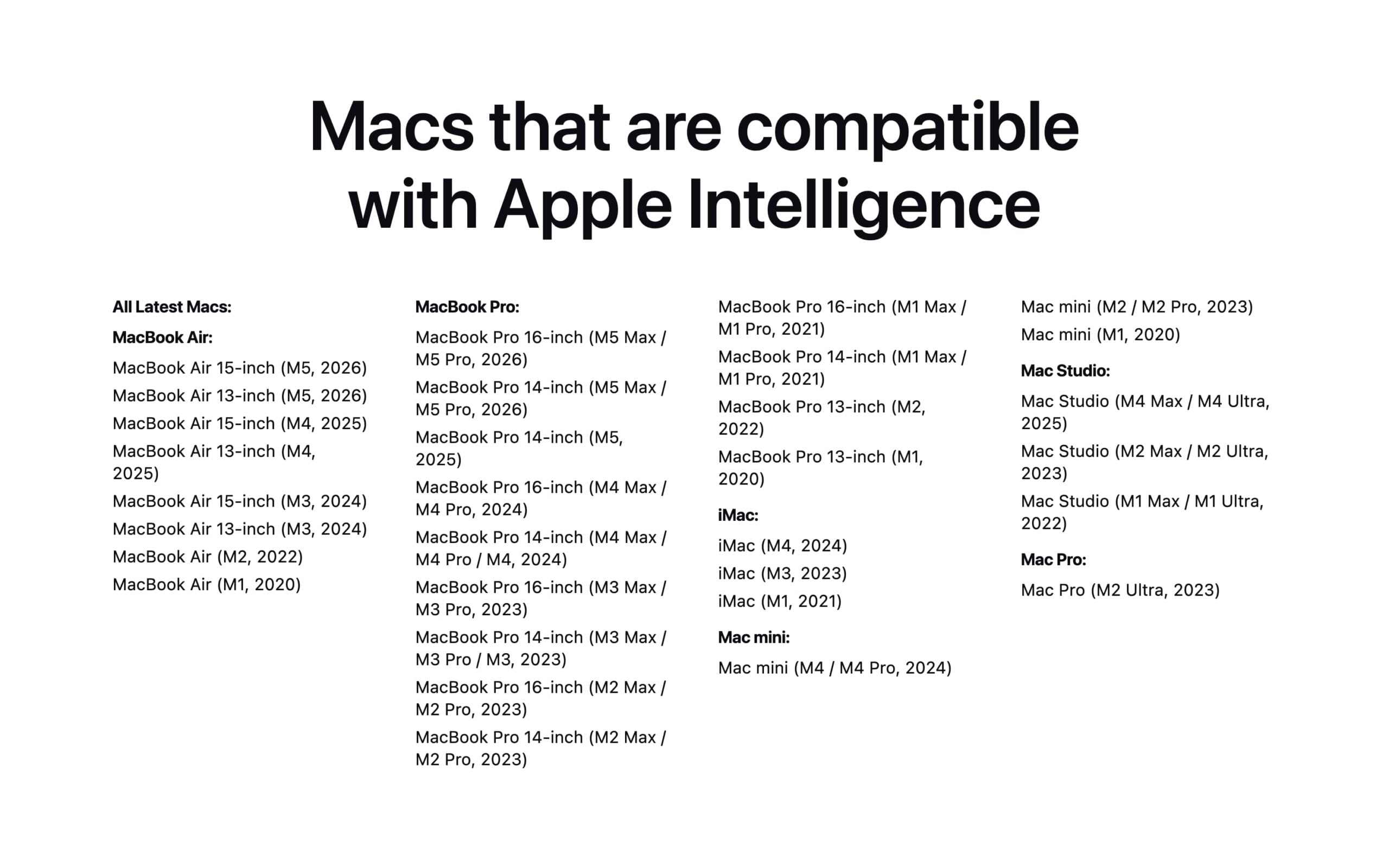
MacBook Air:
- MacBook Air 15-inch (M5, 2026)
- MacBook Air 13-inch (M5, 2026)
- MacBook Air 15-inch (M4, 2025)
- MacBook Air 13-inch (M4, 2025)
- MacBook Air 15-inch (M3, 2024)
- MacBook Air 13-inch (M3, 2024)
- MacBook Air (M2, 2022)
- MacBook Air (M1, 2020)
MacBook Pro:
- MacBook Pro 16-inch (M5 Max / M5 Pro, 2026)
- MacBook Pro 14-inch (M5 Max / M5 Pro, 2026)
- MacBook Pro 14-inch (M5, 2025)
- MacBook Pro 16-inch (M4 Max / M4 Pro, 2024)
- MacBook Pro 14-inch (M4 Max / M4 Pro / M4, 2024)
- MacBook Pro 16-inch (M3 Max / M3 Pro, 2023)
- MacBook Pro 14-inch (M3 Max / M3 Pro / M3, 2023)
- MacBook Pro 16-inch (M2 Max / M2 Pro, 2023)
- MacBook Pro 14-inch (M2 Max / M2 Pro, 2023)
- MacBook Pro 16-inch (M1 Max / M1 Pro, 2021)
- MacBook Pro 14-inch (M1 Max / M1 Pro, 2021)
- MacBook Pro 13-inch (M2, 2022)
- MacBook Pro 13-inch (M1, 2020)
iMac:
- iMac (M4, 2024)
- iMac (M3, 2023)
- iMac (M1, 2021)
Mac mini:
- Mac mini (M4 / M4 Pro, 2024)
- Mac mini (M2 / M2 Pro, 2023)
- Mac mini (M1, 2020)
Mac Studio:
- Mac Studio (M4 Max / M4 Ultra, 2025)
- Mac Studio (M2 Max / M2 Ultra, 2023)
- Mac Studio (M1 Max / M1 Ultra, 2022)
Mac Pro:
- Mac Pro (M2 Ultra, 2023)
Macs that are not compatible with Apple Intelligence:
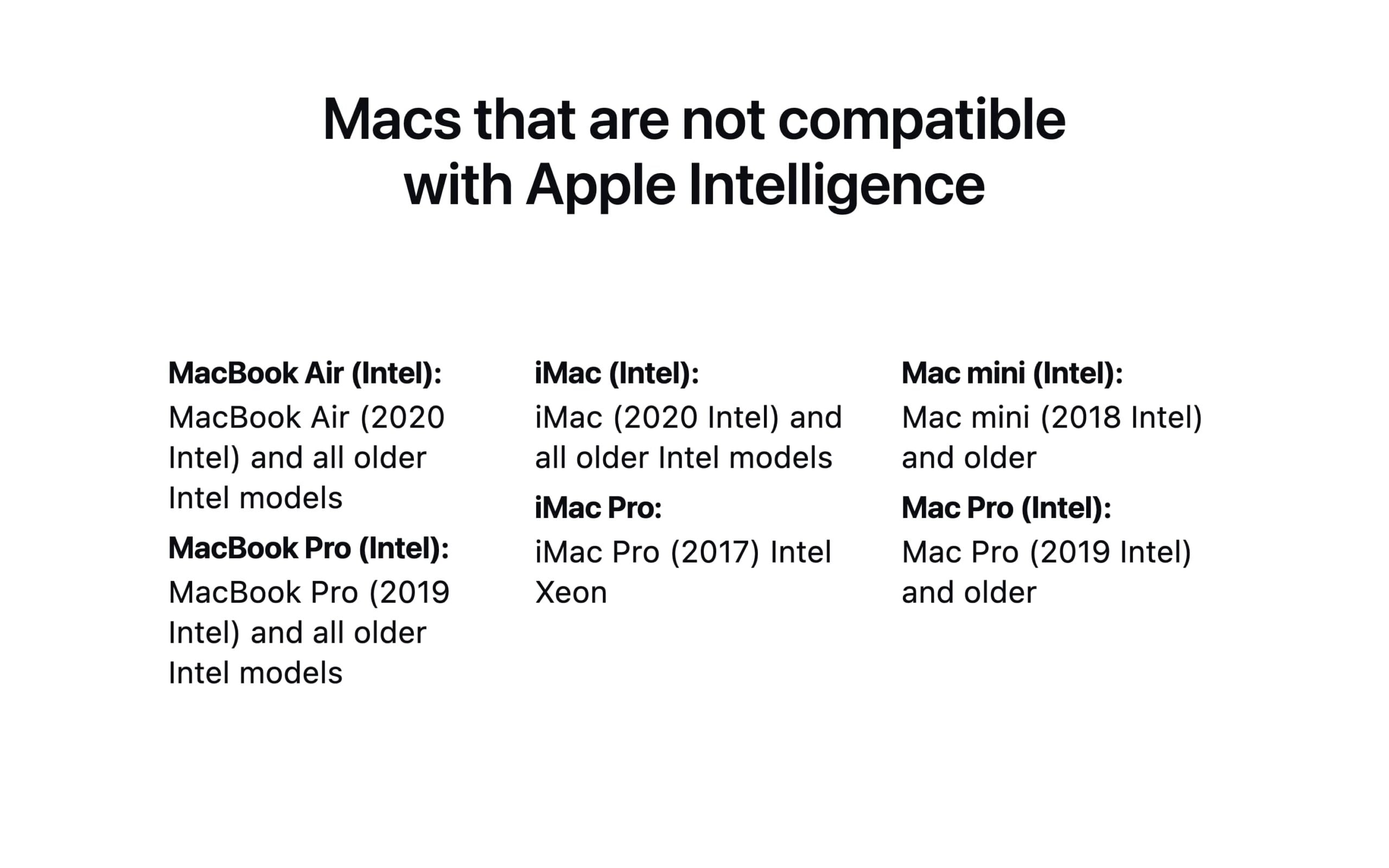
MacBook Air (Intel):
- MacBook Air (2020 Intel) and all older Intel models
MacBook Pro (Intel):
- MacBook Pro (2019 Intel) and all older Intel models
iMac (Intel):
- iMac (2020 Intel) and all older Intel models
iMac Pro:
- iMac Pro (2017) Intel Xeon
Mac mini (Intel):
- Mac mini (2018 Intel) and older
Mac Pro (Intel):
- Mac Pro (2019 Intel) and older
Apple Intelligence Supported iPads

iPads running on Apple A17 Pro or later devices support Apple Intelligence, and iPads running on Apple M series processors also support Apple Intelligence features (similar to the iPhones).
iPads with Apple intelligence Support:
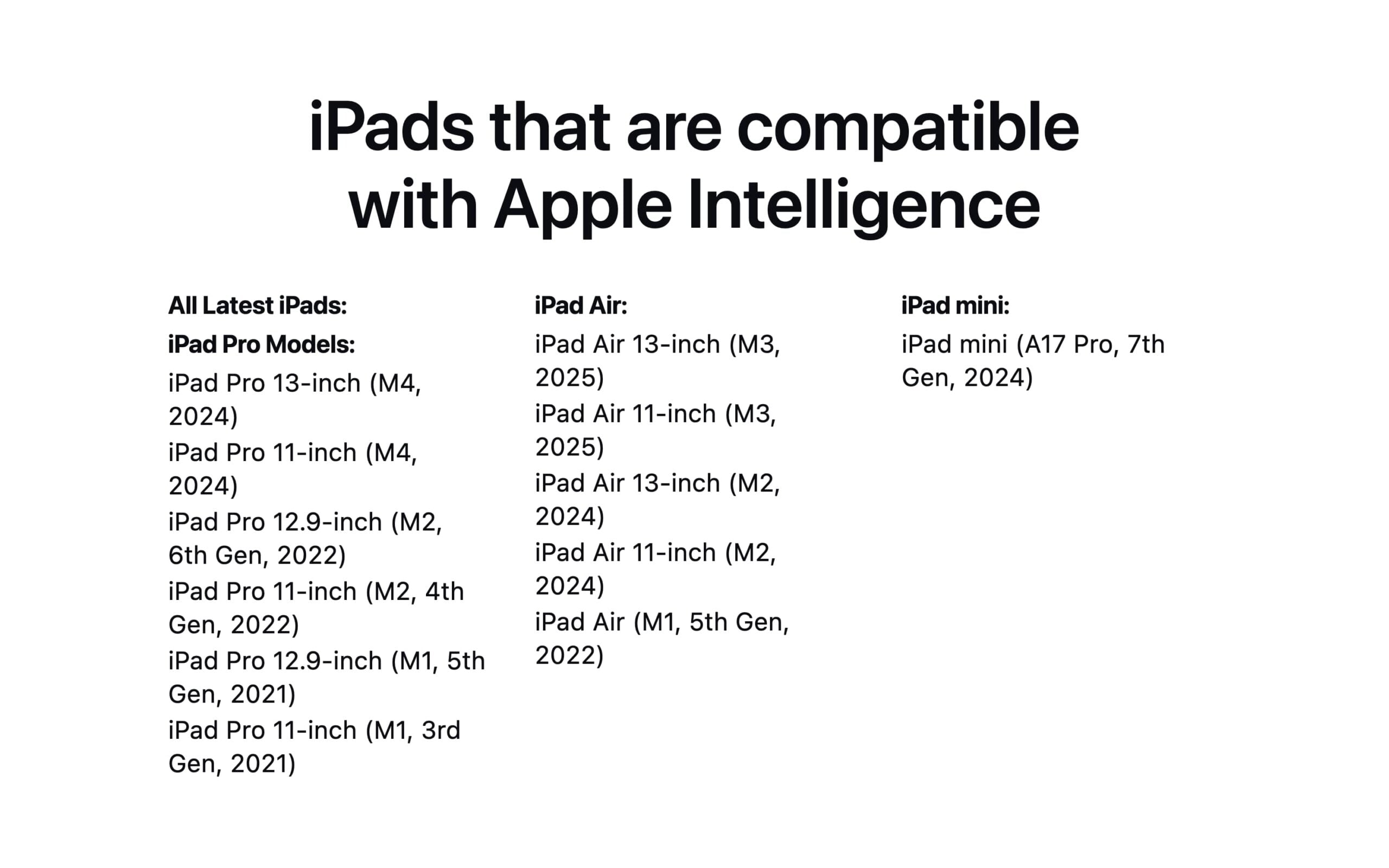
iPad Pro Models:
- iPad Pro 13-inch (M4, 2024)
- iPad Pro 11-inch (M4, 2024)
- iPad Pro 12.9-inch (M2, 6th Gen, 2022)
- iPad Pro 11-inch (M2, 4th Gen, 2022)
- iPad Pro 12.9-inch (M1, 5th Gen, 2021)
- iPad Pro 11-inch (M1, 3rd Gen, 2021)
iPad Air:
- iPad Air 13-inch (M3, 2025)
- iPad Air 11-inch (M3, 2025)
- iPad Air 13-inch (M2, 2024)
- iPad Air 11-inch (M2, 2024)
- iPad Air (M1, 5th Gen, 2022)
iPad mini:
- iPad mini (A17 Pro, 7th Gen, 2024)
iPads that are not compatible with Apple Intelligence
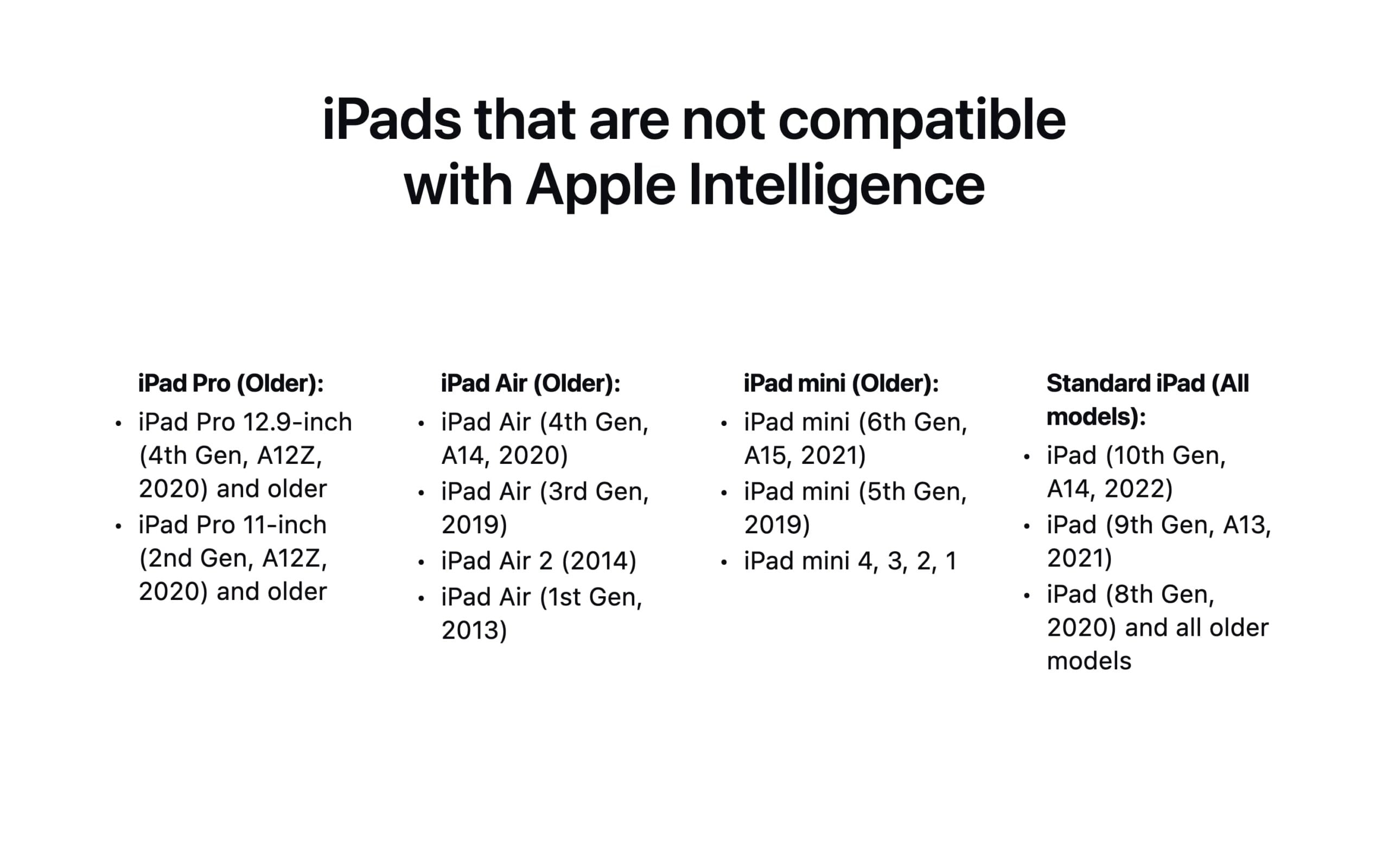
iPad Pro (Older):
- iPad Pro 12.9-inch (4th Gen, A12Z, 2020) and older
- iPad Pro 11-inch (2nd Gen, A12Z, 2020) and older
iPad Air (Older):
- iPad Air (4th Gen, A14, 2020)
- iPad Air (3rd Gen, 2019)
- iPad Air 2 (2014)
- iPad Air (1st Gen, 2013)
iPad mini (Older):
- iPad mini (6th Gen, A15, 2021)
- iPad mini (5th Gen, 2019)
- iPad mini 4, 3, 2, 1
Standard iPad (All models):
- iPad (10th Gen, A14, 2022)
- iPad (9th Gen, A13, 2021)
- iPad (8th Gen, 2020) and all older models
So, those are the list of Apple devices that officially support Apple Intelligence. One thing worth noting is that Apple Intelligence is completely free to use on all compatible devices and does not require any subscription. Apple processes most tasks on-device for privacy, and for tasks that need more computing power, it uses a system called Private Cloud Compute, which keeps your data secure without storing it on Apple’s servers. We update this post regularly to help you decide and check whether your device supports Apple Intelligence or not.
Devices launched later and beyond this list will support Apple Intelligence right out of the box. Additionally, depending on future availability, some of the upcoming Apple Intelligence features might not be supported on older devices. If you are looking to know about a specific feature and whether your device supports it or not, you can comment below, and I will be happy to guide you.
Does Apple Intelligence Work on Vision Pro, Apple Watch, and HomePod?
No, Apple Intelligence is not available on Apple Vision Pro, Apple Watch, or HomePod. Apple has limited Apple Intelligence to iPhones, iPads, and Macs only. There is no official timeline on when or if these devices will receive support.
Apple Vision Pro: Apple Vision Pro runs visionOS, which does not support Apple Intelligence at this time. Even though the device is powered by an M-series chip that meets the hardware requirement on Macs, Apple has not extended Apple Intelligence support to visionOS.
Apple Watch: No Apple Watch model currently supports Apple Intelligence. Apple Watch runs watchOS, and Apple has not included Apple Intelligence in any watchOS release so far.
HomePod: Neither the HomePod (2nd generation) nor the HomePod mini supports Apple Intelligence. HomePod runs audioOS, which is a separate operating system from iOS, and Apple has not added Apple Intelligence support to it.
So if you were wondering whether your Vision Pro, Apple Watch, or HomePod supports Apple Intelligence, the answer is no, at least for now.
How to Enable Apple Intelligence Features on Your Device
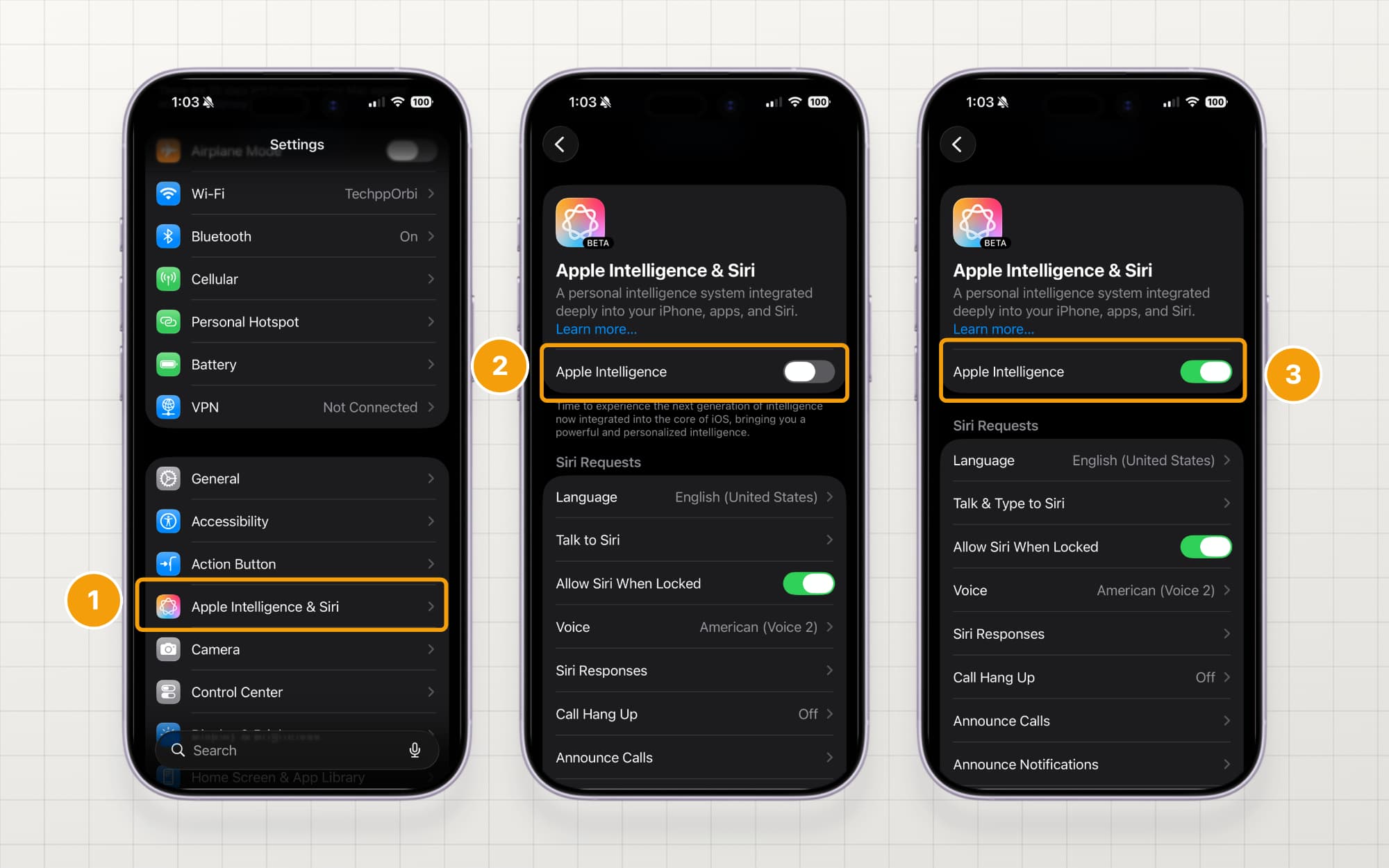
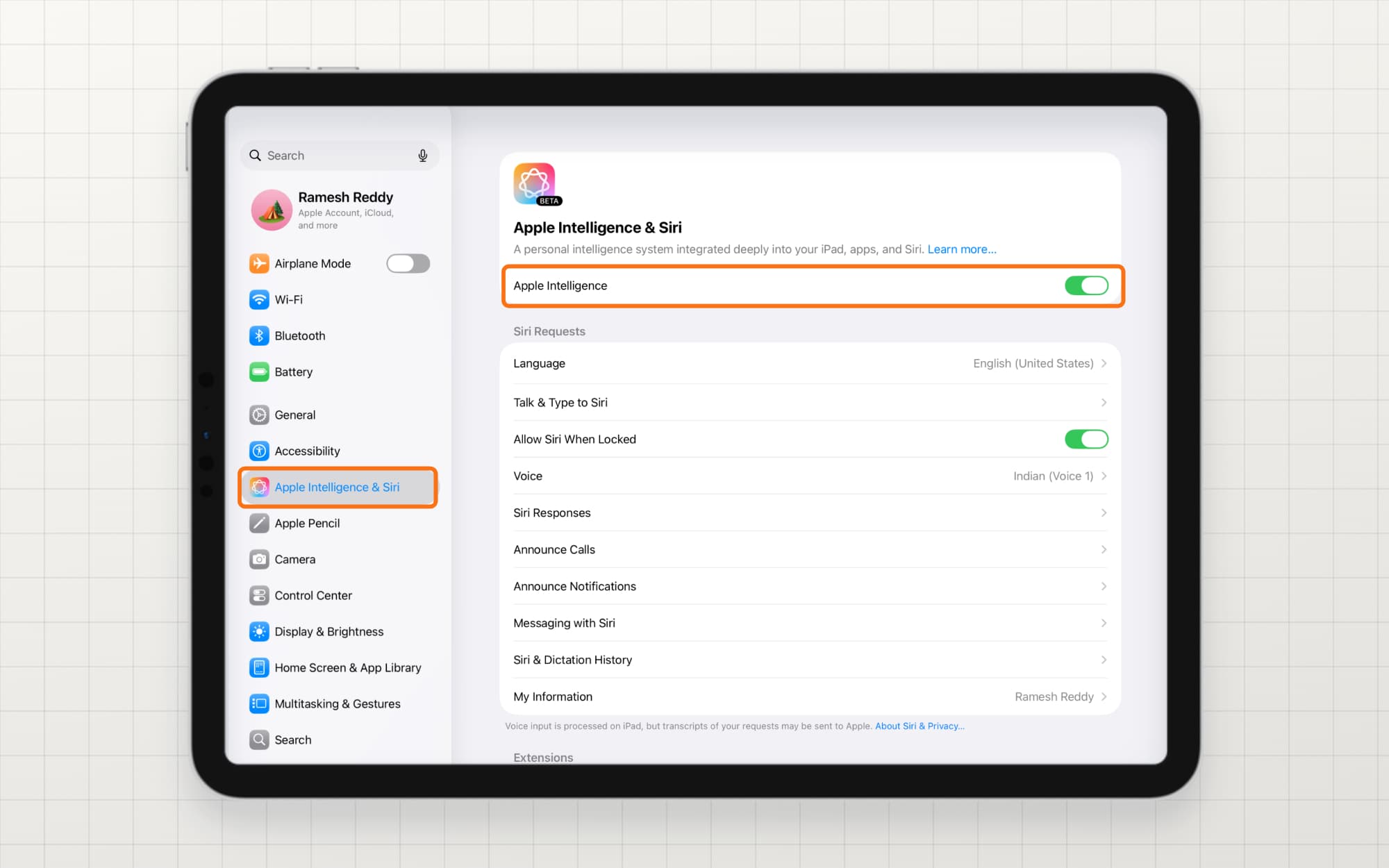
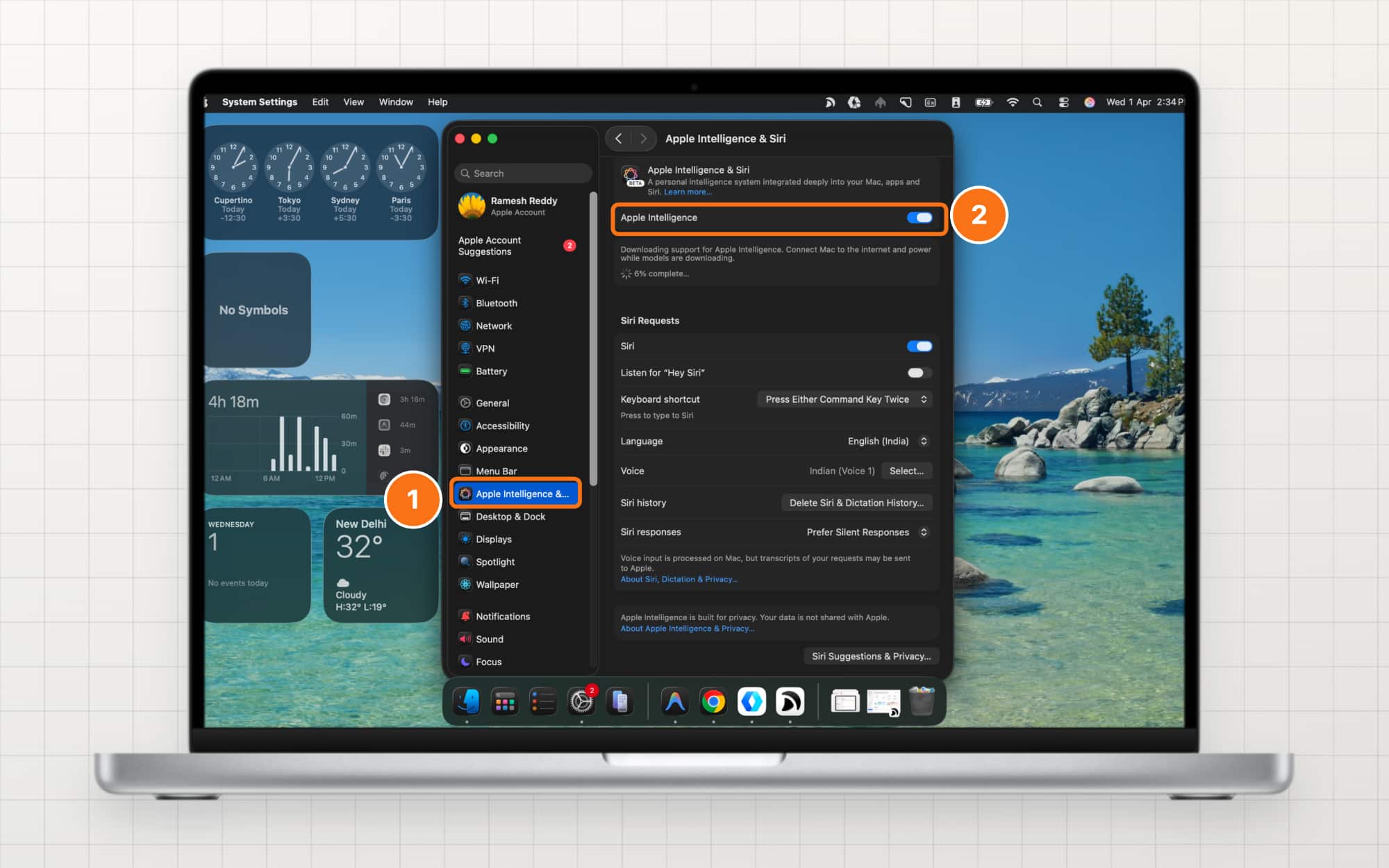
If your device already supports Apple Intelligence, here is how to enable Apple Intelligence on your device. Remember that if you don’t see the Apple Intelligence & Siri option in the settings itself, that means your device doesn’t support Apple Intelligence. If your device is in the supported list but you don’t see that option there, ensure your device is running on iOS 18.1, iPadOS 18.1, and macOS 15.1 or later. You can also check Apple’s official support page for additional help.
On iPhone:
Go to Settings on your iPhone, scroll down, and tap on the Apple Intelligence & Siri option. From here, you can see Apple Intelligence; if the toggle is turned off, turn it on.
On iPad:
Open Settings on your iPad, scroll down, and tap on the Apple Intelligence & Siri option. From the right, enable the option that says Apple Intelligence.
Related: Top 5 Apple Intelligence Features to Enhance Your iPad Experience
On Mac:
Go to System Settings on your Mac, scroll down, and tap on Apple Intelligence & Siri option, and from the right, enable the option that says Apple Intelligence.
Final thoughts
Those are the list of devices that support Apple Intelligence. Initially, Apple Intelligence launched with features like Writing Tools, Image Playground, and Genmoji, along with a promise to roll out more features gradually through software updates.
However, that didn’t go as planned for Apple. Even today, at the time of writing this article, Apple has yet to deliver some key features that the company promised when it was first announced, the most notable being Siri 2.0. That’s hopefully going to change in iOS 27, MacOS 27, and iPadOS 27. Apple is going to fix all the Apple Intelligence features in the upcoming iOS 27, which is expected to be announced at WWDC 26.
Some of the notable upgrades include a dedicated Siri chatbot, a Siri app for chat-based conversations, and extension support for agentic tasks. In the meantime, if you want a smarter Siri experience on your current device, check out how to integrate ChatGPT with Siri on iPhones without Apple Intelligence. We have been tracking all the latest updates. You can check our iOS 27 timeline post here.
FAQs Apple intelligence support on Apple devices

If I buy an iPhone 15 Pro mainly for Apple Intelligence, how future-proof will it be for upcoming features?
The iPhone 15 Pro is still a great device if you can get it at a reasonable price. However, you can also opt for the iPhone 16 or 17 standard variants, which are the overall best picks and will also have better software support.
What is the cheapest Apple device I can buy right now that gives me the full Apple Intelligence experience?
The iPhone 17e is the cheapest Apple device that you can get to experience full Apple Intelligence features and is also future-proof. You can also opt for the iPhone 17 if you can get it at an even lower price.
If my device supports Apple Intelligence, will turning it on affect battery life or performance in a noticeable way?
Yes, since Apple Intelligence should run in the background constantly, it will affect your battery life and also the performance.
How long is Apple likely to keep Apple Intelligence support on current compatible devices before leaving them behind?
Most of the current Apple Intelligence features should work on all supported devices without any issues. However, in the future, if Apple brings any new feature that is resource-heavy, only the latest iPhones will be compatible. However, I don't think this scenario will arise anytime soon since most of the devices are powerful enough to run most of the tasks.
Is Apple Intelligence free, or does it require a subscription?
Apple Intelligence is completely free to use on all compatible devices. There is no subscription or extra charge involved. All you need is a supported device running iOS 18.1 or later, iPadOS 18.1 or later, or macOS 15.1 or later.
What languages does Apple Intelligence support right now?
Apple Intelligence currently supports several English variants, including English (India), English (US), English (UK), English (Australia), and a few others. Apple has also added support for languages like French, German, Italian, Japanese, Korean, Portuguese, Spanish, and Chinese in recent updates. Support for Indian regional languages is expected to be added in future software updates.
Explore More Apple Intelligence Guides
Now that you know which devices support Apple Intelligence, here are a few guides to help you get more out of it. If you are on a Mac, check out our Apple Intelligence Mac features guide. If you use an iPad, here are the top Apple Intelligence features to try on your iPad. And if you own an older iPhone and want a taste of AI features, we have a guide on how to get Apple Intelligence-like features on older iPhones as well.

