

Quick Answer
For offline translation, Google Translate is the best app, with extensive language support and an easy-to-use interface. Microsoft Translator is great for Android users and works well for real-life conversations offline. iTranslate is excellent for travelers with dialect options. Apple Translate is great for iPhone users. If you focus on Asian languages, Naver Papago is also a good option. Other top apps include Speak and Translate for real-time voice translation, Linguee for contextual understanding, and ChatGPT for creating custom phrase lists.
Whether taking a vacation or only going on a business trip, it’s important to know some phrases in the local language of the place you visit. Doing this will enrich your experience, and the locals will appreciate your efforts to make yourself understood.
A little dictionary or a book with the most common phrases may be handy to ask where the bathroom is, read a menu, or ask for directions on the street, but unfortunately, they can be bulky and can take much time to search through. Luckily, most app stores contain several translating apps ranging from simple dictionaries to voice recognition software that can even talk in your place. But are there any offline translator apps that can work without the Internet? Read on to know more.
Table of Contents
Top 10 Offline Translator Apps for Android and iOS
S.no | App Name | Best For | Available On |
|---|---|---|---|
1 | Google Translate (Free) | Best all-around translation app | Android, iOS |
2 | Microsoft Translator (Free) | Group conversations, solid offline features | Android, iOS (no offline support for iOS) |
3 | Apple Translate (Free) | Best for iPhone users | iOS |
4 | iTranslate Translator (Free/Paid) | Best for offline voice conversations | Android, iOS |
5 | Translate Now (Free/Paid) | Quick iOS translations | iOS |
6 | Speak & Translate (Free/Paid) | Syncing across Apple devices | iOS |
7 | Naver Papago (Free) | Best for Asian languages | Android, iOS |
8 | Linguee (Free) | Best for contextual translations | Android, iOS |
9 | ChatGPT/Gemini (Free) | Learning phrases, preparing offline content | Android, iOS |
10 | BK Translate app | Light weight multiple language translator apps | Android |
1. Google Translate: Best for Quick and Easy Translations

Highlights:
- Price: Free.
- Supported Languages: Over 59 languages offline.
- Offline Support: Text, voice, and camera translations.
- Extra Features in Offline Mode: Handwriting recognition and instant camera translation.
- Accuracy of Offline Translations: Best but struggles with complex phrases and regional dialects.
Google Translate is one of the best apps for translations. It supports text translations in over 100 languages and allows you to translate between them effortlessly. Moreover, the app offers offline translations, which means you can translate between languages even when you don’t have an internet connection. However, offline translations are limited to only 59 languages, and the number is expected to increase very soon. In addition, the Google Translate app also provides the ability to translate bilingual conversations on the fly in around 43 languages.
Besides text and conversation translations, the Google Translator app offers features like handwriting recognition, which recognizes handwritten content in a foreign language, and instant camera translation, allowing you to point your device’s camera at things you want to translate into your native language. Google Translate is also the best option if you are looking for an offline voice translator app.
Pros:
- Supports 100+ languages.
- Easy to use with instant translations.
- Also supports camera and voice translation.
Cons:
- Offline translation is limited compared to online mode.
- Some translations sound ‘robotic’.
Why choose Google Translate: It is the best all-around translation app with extensive features, perfect for everyday use.
2. Microsoft Translator: Best for Group Conversations and Offline Use

Highlights:
- Price: Free
- Supported Languages: 60+ languages
- Offline Support: Text, voice, and multi-person conversations
- Extra Features in Offline Mode: Phrasebook, multi-person conversation support
- Accuracy of Offline Translations: Good for common languages but less reliable for lesser-known ones.
Microsoft Translator is another travel companion app that can translate between languages. It offers support for over 60 languages for translation between text, conversations, voice, and photos. The app even allows for offline mode translation, which can turn out to be helpful in situations where there is no network.
Furthermore, the Microsoft Translator app comes with a phrasebook that stores verified translations and pronunciation guides to help you learn different words and phrases in places you visit. Besides this, the app offers another helpful feature: the multi-person conversation translation, which allows you to connect your devices and have in-person conversations with up to 100 people in different languages.
Pros:
- Works offline in 60+ languages.
- Offers multi-person conversation translation.
- Comes with a useful phrasebook.
Cons:
- Offline packs are not available for iOS.
- Fewer languages than Google Translate.
- Outdated UI for Android.
Why choose Microsoft Translator: It is great for group conversations and has solid offline features.
Related Read: 10 Best Language Learning Apps for iPhone and Android
3. Apple Translate: Best for iPhone Users
 Highlights:
- Price: Free
- Supported Languages: 21 languages
- Offline Support: Real-time conversation mode and text translation.
- Extra Features in Offline Mode: Supports text and voice.
- Accuracy of Offline Translations: Reliable for supported languages.
If you’re seeking the best offline translation app for iPhones, check out the new Apple Translate app. Apple developed the app, which presently supports up to 11 languages. The nicest aspect is that Apple Translate may be offline in all 11 languages. The language library isn’t as extensive as Google’s 59, but Apple constantly improves the app and will add new languages.
It supports major languages such as English, Chinese, French, German, and Russian. Apart from that, you may look up definitions of translated words, save translations, and hold a conversation using real-time translation. In terms of feature set, it certainly competes with Google Translate.
Pros:
- Perfect for iPhone users.
- Completely offline in all 11 supported languages.
- Clean interface, simple to use.
Cons:
- Limited to only 11 languages for now.
- Not as feature-rich as Google Translate.
Why choose Apple Translate: If you are an iPhone user, it is the best built-in option for offline translations.
Free
Available: iOS
4. iTranslate : Best for Voice Conversations in Different Dialects
 Highlights:
- Price: Free (Paid version for extra features)
- Supported Languages: 40+ languages offline
- Offline Support: Voice-to-voice conversations, text translations
- Extra Features in Offline Mode: Dialect options, history, dictionary
- Accuracy of Offline Translations: Good for basic phrases but requires a paid version for camera translations
iTranslate Translator is another good option when it comes to translation apps. It features some of the best and most useful features like text translation, voice-to-voice conversations, offline translation, etc., to name a few. One of the interesting features of the lot is the ability to switch between different dialects to help you converse effectively. Not to mention the built-in dictionary and history, which helps you get back to words or sentences that you recently translated or used.
The iTranslate Translator app supports over 100 languages and can listen to translations in male or female voices. Besides these, other features you can get via an in-app purchase include Lens, which allows you to point your camera at things and get live translations, offline translation support in over 40 languages, voice-to-voice conversations, and more.
Pros:
- Offline support for 40+ languages.
- Supports Voice-to-voice translation with dialect options.
- Camera translation is available.
Cons:
- Many useful features are behind a paywall.
- Limited offline support.
Why choose iTranslate: It is the best choice for offline translation and voice conversations, with useful premium options.
Free, Paid (in-app purchase)
Available: Android | iOS
5. Translate Now: Best for Quick iOS Translations with Siri
Highlights:
- Price: Freemium.
- Supported Languages: Limited in offline mode
- Offline Support: Basic text translation.
- Extra Features in Offline Mode: Siri shortcuts, AR translations.
- Accuracy of Offline Translations: Good for simple tasks, but not comprehensive translations.
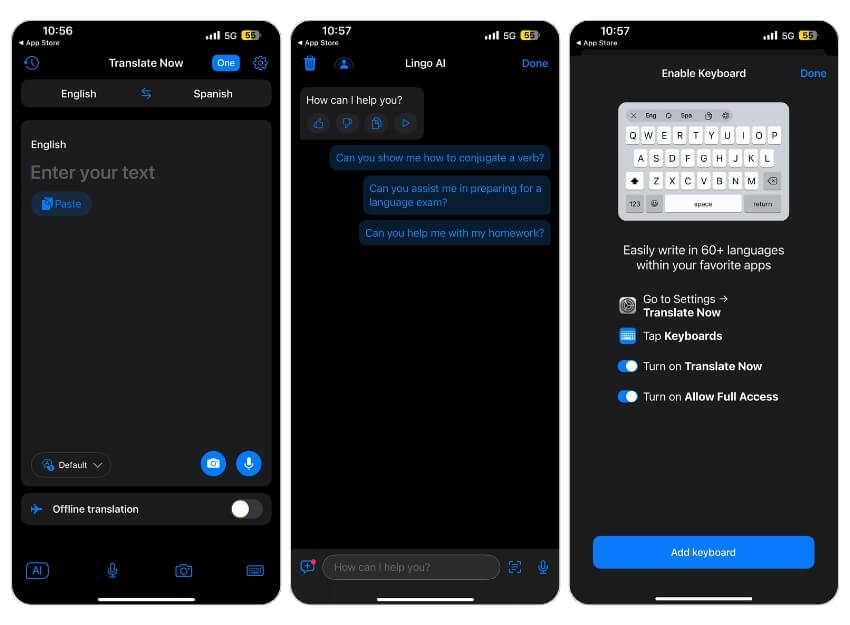
Translate Now – Translator is an iOS-exclusive app that, besides the usual translation features, also comes with various useful add-ons such as dark mode, Siri shortcuts, translation widgets, phrasebook, offline mode, and a few more. For example, with the ability to add a translation widget, you can access the translation feature and get translations for things easily without opening the app repeatedly. Similarly, you can use Siri shortcuts to perform translations quickly and simplify things.
Coming back to core translation features, the Translate Now – Translator app allows voice translations via speak-to-translate, camera translation to easily translate text across signboards, menus, etc., AR translation to get translations in real-time, conversation mode that translates conversation in real-time, and translator keyboard that allows you to write in over 60 languages.
Pros:
- Supports Siri shortcuts for quick translations.
- Has a translation widget for faster access.
- Real-time AR translation.
Cons:
- iOS only.
- Some features require purchases.
Why choose Translate Now: It is great for quick translations and has neat iOS features like Siri shortcuts.
Free, Paid (in-app purchase)
Available: iOS
6. Speak & Translate: Best for Real-Time Voice Conversations on iOS
 Highlights:
- Price: Freemium
- Supported Languages: 54 for voice, 117 for text
- Offline Support: Text and voice translation
- Extra Features in Offline Mode: iCloud sync across Apple devices
- Accuracy of Offline Translations: Limited in the free version but accurate.
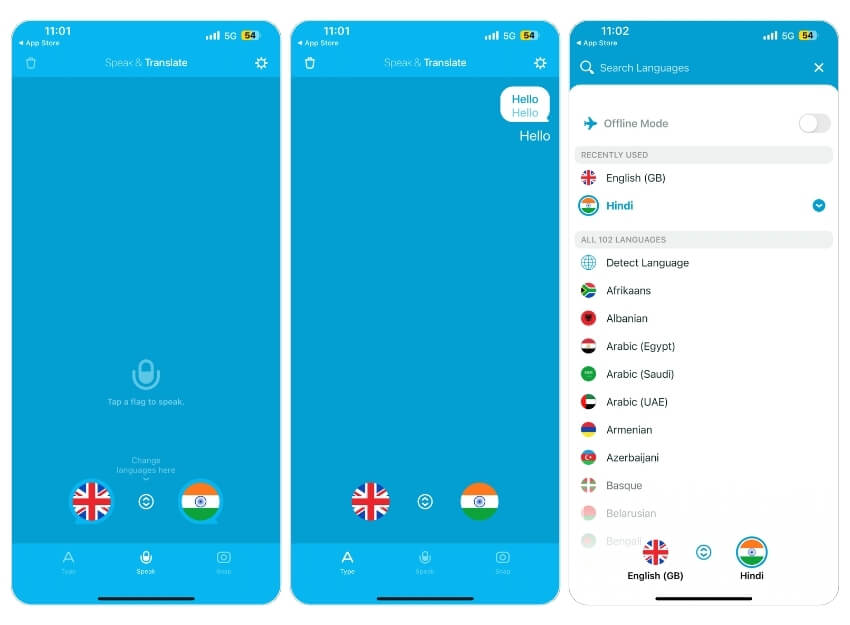
Speak & Translate – Translator is another iOS-exclusive translator app. This one also boasts many useful features (much like the previous app), besides the usual translation ones like iCloud integration that syncs your history across different Apple devices, voice settings to allow you to change voice speed and stench between male and female voice, etc.
In terms of translation, Speak & Translate. Translator offers real-time voice recognition, support for over 117 languages for text translations, around 54 languages for voice translations, along with a text-to-text mode that helps you identify a language and converse better, and an offline mode for performing translations with no internet access.
Pros:
- Syncs history across Apple devices.
- Supports real-time voice recognition.
- Offers 117 text and 54 voice languages.
Cons:
- iOS-exclusive translator app.
- Some translations may be slow.
- Offline features are limited in the free version.
Why choose Speak & Translate: If you want a smooth sync of translation history across Apple devices with real-time translation.
Free, Paid (in-app purchase)
Available: iOS
7. Naver Papago: Best for Translating Asian Languages
 Highlights:
- Price: Free
- Supported Languages: 13 languages
- Offline Support: Text, voice, and image translations
- Extra Features in Offline Mode: Handwriting translation
- Accuracy of Offline Translations: Excellent for Asian languages like Korean, Japanese, and Chinese
Naver Papago – AI Translator markets itself by referencing the linguistic prowess of a parrot. The app supports over 13 languages and offers a limited but useful set of features that help you translate and understand the content in your native language and converse better in a foreign country. Additionally, the app has a built-in dictionary that offers a history of all your previous translations and allows you to look up meanings for different words.
Some of the features that Naver Papago – AI Translator comes with include real-time text translation for words and phrases, image translation that automatically recognizes the content of an image, real-time voice translations in text and audio, conversation translation, and offline translation. Besides this, there is also support for handwriting translation that determines the correct translation for the word you write and website translation that provides a translated version of a website using its URL.
Pros:
- Strong in Asian languages like Korean, Japanese, and Chinese.
- Includes website and handwriting translation.
- Works offline.
Cons:
- Limited to only 13 languages.
- It is not as comprehensive as bigger apps like Google Translate.
Why choose Naver Papago: Ideal for users who need reliable translations specifically for Asian languages.
8. Linguee: Best for Learning Words with Context
 Highlights:
- Price: Free
- Supported Languages: Major languages
- Offline Support: Single-word translations with context
- Extra Features in Offline Mode: Audio pronunciations, contextual sentences
- Accuracy of Offline Translations: Best for individual word translations rather than full conversations
Linguee is a popular offline dictionary app that allows you to translate and even offers context and example sentences along with the translations. Simply put, instead of translating the words or phrases, it shows how words are used in real-life situations.
The app also works offline; you can search for a word, and the app offers the meaning of the word and also gives you an example of how the word is used in different sentences. The app also offers audio pronunciations, so you can listen to the word and check how it can be pronounced in other languages.
The app’s user interface might seem outdated, but you can get used to it over time. It has no ads, and the app is free to use. To enable offline mode, click on the Install Dictionaries option at the top, and then turn on the offline mode if you want to use the app without an internet connection.
Pros:
- Combines a dictionary with example sentences.
- Available offline in many languages.
- Provides context for translations, making it useful for more accurate word usage.
Cons:
- Focuses more on single-word translations rather than full conversations.
- Limited to major languages.
Why choose Linguee: If you need accurate translations with context, especially for specific phrases or words.
9. ChatGPT/Gemini: Best for Creating Custom Phrase Lists
 Highlights:
- Price: Free.
- Supported Languages: Supports all major languages.
- Offline Support: Requires initial internet connection to generate answers.
- Extra Features in Offline Mode: You can use it as custom phrase lists and learning materials
- Accuracy of Offline Translations: This is not designed specifically for translations but is useful for learning phrases.
To clarify, both of these apps require an internet connection, but there is a trick you can use to access them offline. If you haven’t heard of ChatGPT or the Gemini app before, these are generative AI apps that answer your questions based on text prompts. The best part of these apps is that they allow you to use them for multiple purposes in the way you want. In this case, you can use the app to provide the most common words and their meanings in a specific place if you travel to that location.
Or, if you want to learn a language, you can ask these apps to give you a list of 50 words to learn, the phrases you need to know, and more. These apps require an internet connection to function, but you can connect to the internet, use the apps, ask all your questions, and save the information for offline use whenever you want.
Pros:
- Great for learning phrases.
- Create custom lists of words and phrases.
- It can help with more than just translations.
Cons:
- Need an internet connection, but you can view previously saved words and phrases.
- Hard to prompt to get the desired result.
Why choose ChatGPT/ Gemini: To understand more context or wants and interactive language translation.
Free
Download ChatGPT: Android | iOS
Download Gemini: Android | iOS
10. BK Translator: Best for Simple, One-Language Translations
 Highlights:
- Price: Free
- Supported Languages: Single-language apps
- Offline Support: Simple text translations
- Extra Features in Offline Mode: Lightweight and basic
- Accuracy of Offline Translations: Accurate for basic translations.
If you want a lightweight or single-language translation app, try language translation apps from BK Translate. These apps are light and only offer a single functionality. They also work offline. The UI might not be very appealing, but it is straightforward. There are a lot of apps available from BK Translate, and based on your preference, you can download and use them offline.
Pros:
- Multiple language translator apps.
- Simple and easy to use.
- Works offline.
Cons:
- Limited functionality.
- Only translates a single language at a time.
Why choose BK Translate apps: If you want a minimal and quick language translation app for specific language translations.
Free
Download ChatGPT: Android
Those are some of our suggestions for the best translation apps that provide great quality for Android and iOS. To use these apps offline, download the offline language packs you want to use offline and enable offline mode. You can download languages on the language selection page and enable offline mode from the settings. Which apps do you find the most useful? Let us know in the comments below.
FAQs on Offline Translator Apps
1. Which app offers the most accurate complex sentence or slang translations?
The accuracy of these apps depends on many factors, such as the word or the phrase you are using, the languages you have set, and more. If you are looking for the most accurate, I found Google Translate and Microsft Translators apps are the best. Don’t get me wrong, other translator apps also work very well.
2. What’s the difference in storage size between downloading offline language packs across apps?
It depends on the language pack you are downloading. On average, most of these apps have more than 100 MB of language packs.
3. Which app is best for translating images offline?
I found Google Translate and Apple Translate, followed by Microsoft Translator, to be the best in terms of translating images offline.
4. What is the best app for translating regional dialects offline?
iTranslate (Paid Version) is the best app for translating regional dialects offline. The app supports voice-to-voice conversations in multiple dialects.
5. Do any of these apps support real-time voice translation offline?
Yes, iTranslate supports offline voice-to-voice translation, and Microsoft Translator offers offline voice translation. Google Translate also supports voice translation offline, but not as fast as the other two apps in my testing.
Note: Originally written by Alex Serban and updated by Yash Wate in January 2020.

