

With deepfake technology, anyone can create realistic-looking fake videos or audio recordings. You may have seen these super-realistic fake videos on the internet, such as the video of Jimmy Donaldson, also known as MrBeast, using artificial intelligence (AI) to fake an iPhone 15 giveaway, Tom Hanks’ fake promotional video for dental treatments, and many more.

Deepfake technology uses various computer programs that learn from many videos or photos of how someone looks and speaks and uses AI to create new fake videos. Deepfakes can be useful in many ways. For example, they can make movies and TV shows more exciting by letting actors play roles even if they can’t be there in person. For content creators, deepfake is very helpful as it allows them to create lifelike and customizable videos without the need for a real person to be in front of the camera.
Deepfake technology is now widely available through various websites and apps, so almost anyone can create deepfake videos using these tools. But deepfakes also have their downsides. The biggest problem is that they can be used to create fake news or deceive people by making it look like someone said or did something they didn’t do. That’s the biggest problem at the moment. Even though deepfakes have a cool use, it’s important to consider how they’re used.
In this guide, you’ll learn about different websites where you can make deepfake videos. Keep in mind that these sites are listed for educational and personal use only or for legal commercial use. If you use deepfakes to deceive or hurt other people, you can get into trouble, e.g., with a fine or even in prison. Various countries have developed legal regulations to govern the creation and use of deepfakes. You can read the guidelines in the FAQ section below.
Table of Contents
Best Apps and Websites to Make Deepfake Videos
- Deepswap.ai: The best website for swapping faces in videos, photos, and GIFs. It offers a free version and a premium subscription for advanced features.
- Synthesia.io: This website lets you create AI-driven videos with different avatars and voices in multiple languages using customizable templates.
- Hoodem.com: A user-friendly platform for quickly creating high-quality deepfake videos.
- Akool Deepfake: The best tool for creating studio-quality swapped face images and videos, with additional editing features for better customization.
- Unboring by Reface.ai: The website offers funny face-swapping in photos and videos, with features such as animating photos and turning videos into cartoons.
- Roop (Open Source): An open-source tool for face-swapping in videos that requires more technical knowledge and offers detailed customization.
- Deepbrain.ai: Specializes in AI-generated videos with multilingual text-to-speech capabilities and PowerPoint conversion to create diverse content.
- Swapper by Icons8: A creative platform for easy face-swapping in photos, offering many icons and other design tools for enhancement.
- FaceApp: A mobile app for professional photo editing that offers a variety of filters and transformation features for fun and professional use.
- Restyle: An app that uses AI to transform photos into works of art and offers various hairstyle options.
- Avatarify: AI Face Animator: Animates photos with different facial expressions and activities and offers free and premium versions.
- AnyoneSwap: A website for easily swapping faces in photos and videos, with a user-friendly interface and subscription pricing.
- Zoa: An app for swapping faces with characters from movies and TV shows that offers realistic results and easy sharing options.
- Facehub: Offers AI face-swapping in movie clips and photo editing tools for creative content creation, with various subscription options.
- Mimic – AI Photo Face Animator: Turns photos into animated videos with music, available in free and premium versions with different subscription options.
Deepswap.ai

Highlights:
- Face Swap Technology: Advanced AI to swap faces in videos, photos and GIFs.
- AI Girl Generator: Create unique female characters, real or anime-style.
- Quick Photo Editing: One-second face swap photo editor.
- User-Friendly Interface: Easy-to-use platform for creating deepfakes.
- Pricing: A free version with limited features and a premium subscription for advanced use.
Deepswap.ai is a cool website where you can have fun with pictures and videos. On the website, you can create deepfake videos by swapping faces in videos, photos and GIFs. You can swap the faces in the images, create new female characters from the screen, and let them speak.
You can easily swap the faces in the video via the website, and the results look real. You can swap the faces in just one second. This is ideal for creating funny memes or GIFs to share with friends or on social media. The website is super easy to use, and you can swap up to six faces in one video.
Deepswap.ai offers a free trial and a premium subscription. With the free trial, you get a few credits to try out deepfake creation.
Synthesia.io

Highlights:
- AI Avatars: Offers over 140 different options.
- Languages and Accents: AI voices in more than 120 languages and accents.
- Video Templates: Access to over 60 customizable templates.
- Text to Video: Converts text to video efficiently.
- Pricing: Starts at $29 per month for the Starter plan.
Synthesia.io is another cool website where you can make videos using AI. You can choose from many AI avatars or digital characters to appear in your videos. The website also offers AI voices in over 120 languages, so your videos can be spoken in different accents, and you can create educational content and other explainer videos in particular.
The website makes it super easy to create videos with ready-made templates. You can even make your own AI avatar that looks just like you. You can also turn written text into a video, which is pretty handy. The site is ideal for team projects because everyone can work on it together. This site is suitable for all kinds of videos, e.g., for teaching, marketing, or even customer service.
Synthesia has three different plans. The Starter plan costs 29 US dollars per month and is good for beginners and cheaper if you pay for a year. The Creator plan is for professionals and small teams and costs $89 per month with an annual discount. The Enterprise plan is for large organizations with pricing based on their needs.
Hoodem.com
Highlights:
- Face Swapping Feature: Swap faces in videos for fun and entertainment.
- High-Definition Videos: Creates deepfake videos in HD quality.
- Simple Process: Easy three-step process to create deepfakes.
- Privacy Compliant: Respects user privacy and adheres to data protection laws.
- Entertainment-Oriented: The site is solely focused on creating entertaining content.
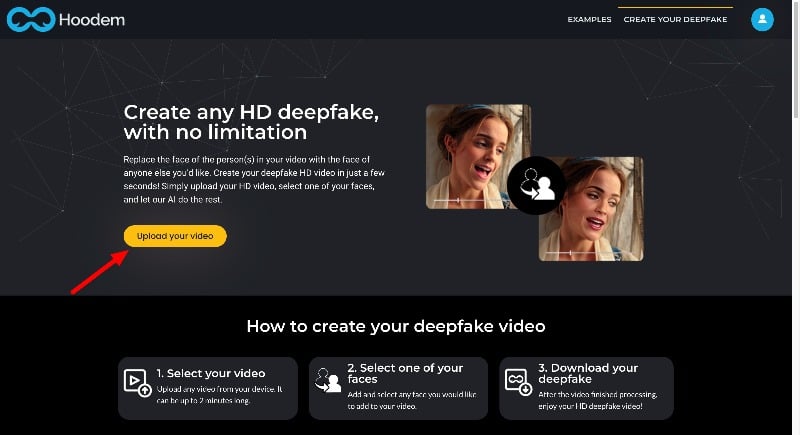
Hoodem.com is another popular website for creating deep fake videos. On the website, anyone can create deepfake videos in less than two minutes. It produces high-quality deepfake videos.
Using the Hoodem.com website is pretty simple: you upload a video, choose the face you want to use, and create a video. As with other websites, you need credits to create deepfake videos. The website doesn’t offer free credits. You need to buy the credits to create a deepfake video. You can click on the link below, visit the website, upload the video, and create deepfake videos.
The website’s user interface is clear and clean. Anyone, even beginners, can easily generate deepfake videos with the website.
Related Read: How to Detect AI Images
Akool Deepfake

Highlights:
- Professional Studio Creation: Allows users to create studio-quality images and videos.
- Character Transformation: Provides the ability to transform into movie characters or create personalized avatars.
- User-Friendly Interface: The user interface is user-friendly, saves time, and simplifies face-swapping.
- High-Quality Results: Guarantees high resolution and wide-angle for detailed and realistic swaps.
- Facial Beautification Feature: Includes options to enhance and beautify facial features in images.
Akool’s Face Swap tool is a really great website for anyone who wants to have fun with photos and videos. The website allows you to swap faces in videos and make deepfake videos. The website also offers features like the ability to create cool photos in the studio, turn them into your favorite movie character, or even make a personal avatar.
Using this tool is super easy. You upload the image or video you want to change, choose the face you want to swap, and the website does the rest. The website offers hundreds of face swap options. You can select any face that matches the uploaded video or photo and swap the face.
The website also offers various tools to edit the video and photos you have created on the website. You can add filters, adjust photo and video parameters, and much more. Overall, Akool’s Face Swap is a fantastic tool for personal and professional projects. Whether you want to take fun photos or need something more serious for work, this website has you covered.
Unboring by Reface.ai

Highlights:
- AI-Powered Face Swapping: Effortlessly swap faces in photos and videos
- Animate Photos: Add animations to the steady photos.
- Cartoon Video Transformation: Transform real videos into cartoon styles using advanced AI.
- Creative Restyling: Offers unique restyling features for photos and videos
- Pet Cartoonization: Special feature to turn pet photos into cartoon characters.
Unboring by Reface.ai is a super fun website where you can play around with photos and videos using AI technology. Reface is a popular app that lets you swap faces in videos and gifs in a fun and easy way using AI. Unboring is a tool independent of Reface that creates deepfake videos for internet users.
Similar to the Reface app, the Unboring website allows you to swap faces in the videos. You can upload your photo or video and swap your face with that of another person. This is a great way to create fun content, especially if you want to see what you or your friends would look like as other people. Unboring offers several pre-existing faces to swap on the site.
Another great feature is the creation of animated photos. You can animate your photos on the website. You can upload any image to the site, make sure it has a clear face for the best result, and with just one tap, your images can sing or talk, bringing a new level of fun to your pictures.
The website also offers the ability to turn your videos into cartoons. This feature uses many styles to make your videos look cartoon-like. This is perfect for creating unique and entertaining content. On the website, you can also transform your photos and videos together. You can turn them into unique stories and create an entire video.
The website has a special feature for converting cartoons. You can take photos of your furry friends and turn them into cartoon characters. In addition, Unboring is great for uploading long videos. It offers a range of different styles that are updated regularly. And the best thing about it? It’s super fast and easy to use. You don’t need professional editing skills; it works with all kinds of custom content.
To sum it up, Unboring is a great tool for anyone who wants to add a bit of fun and creativity to their photos and videos. The site makes it easy and fun, whether you’re turning yourself into a caricature, swapping faces with a friend, or bringing a photo to life.
Roop (Open Source)

Highlights:
- Open Source Flexibility: Roop offers customizable deep fake creation as an open-source tool
- Technical Skill Requirement: Unlike most deepfake apps, Roop requires more technical know-how.
- Command-Line Interface: Roop is operated via the command line, providing more hands-on and detailed control over face-swapping.
- Integration of Various Tech Tools: Utilizes various technologies and models from different projects.
- Self-Hosted Processing: Because it’s not a traditional app or website, you can run Roop on your
Roop is an open-source tool on GitHub that allows you to share faces in videos. You can upload the video and photo of the face you want, and Roop will create a fake video in which the face is replaced. But remember, unlike other tools, Roop is tricky to use and not really suitable for beginners.
Roop works differently from other tools in this post. You can tell it what to do using commands on your computer, e.g., which video you want to use, which face you want to replace, and where you want the new video to be saved. The tool produces high-quality videos.
It uses a number of different technical tools and models from other projects. This means that there are some rules and licenses from these other tools that you need to follow. So, if you like making funny or creative videos and are up for a bit of a technical challenge, you should give Roop a try. Just remember to use it wisely and have fun!
You can use Roop in Google Collab. Google Collab is a
- Open any browser and click here to visit the tool. Or else copy and paste this direct link: https://colab.research.google.com/drive/1F5qF25SnQnL1SsyZqoBCot68i0anu1S1?usp=sharing
- Click on the Copy to Drive option on the top. (The Copy to Drive Feature duplicates the notebook, makes a copy of a shared or public Colab notebook, and saves it to your own Google Drive. You can edit, run, and save independently of the original.
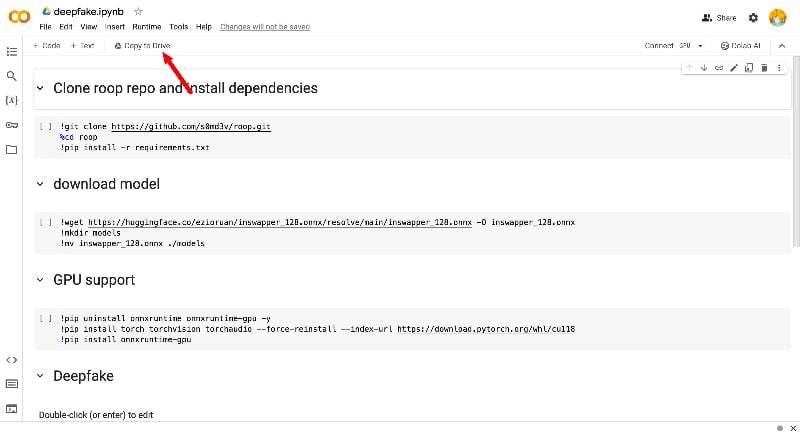
- Now Click on the Connect. The “Connect” feature links your notebook to a computing environment where you can run your code. Depending on your needs, you can choose from different runtime environments, including CPU, GPU, and TPU, to optimize performance for your specific tasks. In this case, leave it as a default.
- Now, clone the repo and install the dependencies. Hover the mouse on the play button on the first code and run the code. Depending on the device, it might take a couple or several minutes to run.

- After you have successfully installed the dependencies, download the model. Don’t worry about the errors that occur when running the code in the first cell. Move the mouse pointer to the play button of the second cell and execute the code.

- After you have successfully executed the code in two cells, click on the folder icon in the left sidebar, click on the upload icon at the top, and upload the video you want to swap faces.

- Now click on the same folder and upload the photo you want to swap Face with. You can see the image and the video in the folder.
- Now scroll down and edit the Python execution code in the deep fake section of the notebook and add the file name to the code or copy the path to the file. (Make sure that the uploaded video and photo don’t have any special characters or numbers in the file name. Please keep them simple. You can also rename the files if you like). Right-click on the file, select Rename, and click on the copy path to copy the file path.

- Click on the play icon to generate a deep fake video

- The deepfake video is generated and saved in the folder. Right-click on the file and click on the download to save the file.

- Now, you can delete the existing files to save storage. If you want to create a new deepfake video, Upload the video and the photo of the Face you want to swap, copy the file path, add the code, and run the code. You can follow the same steps to create all new deep fake videos.
Deepbrain.ai

Highlights:
- AI-Generated Videos: Deepbrain AI specializes in creating realistic AI-generated videos and streamlining content creation.
- Multilingual Text to Speech: Converts text to natural-sounding speech in multiple languages to extend audience reach.
- PowerPoint Conversion: Transforms PowerPoint presentations into dynamic video content, enhancing educational and corporate presentations.
- ChatGPT Integration: Provides script writing support, including idea generation and grammar checking.
- Deepfake and Face Swap Tech: Advanced Deepfake technology lets you create customizable AI avatars that make videos more realistic and creative.
DeepBrain AI is another popular website that allows you to create deepfake videos. This website offers a range of tools for creating deepfake videos. With the AI Video Generator and Editor, anyone can quickly create professional-looking videos. The app also offers the “Text to Video” feature, which converts written text content into engaging videos – perfect for those who prefer writing to filming and for content creators.
You can swap the Face in the video or create realistic AI avatars on the website. Deepbrain AI converts text into natural-sounding speech in different languages. At the time of writing (December 2023), the website supports over 80 languages. You can use this tool to convert text to speech and insert it into the video. The website also makes it easy to convert PowerPoint presentations into dynamic video content. You can easily generate PowerPoint slides for educational and corporate presentations.
The integration of ChatGPT for idea generation and grammar checking is another outstanding feature of the website. It simplifies the scripting process and ensures that your content is visually appealing and linguistically polished.
Deep Brain AI is more than just a tool for creating videos. It can be a great tool to create AI content with perfect videos and voiceovers. With the chatGPT, you can even generate ideas and video scripts.
DeepBrain AI offers different plans for creating AI videos, each with cool features. The Starter plan is ideal for beginners and costs $30 per month. You can make videos up to 10 minutes long with up to 6 scenes. The Pro plan is better suited for small businesses and costs $225 per month. With this plan, you can make longer videos (up to 20 minutes) with up to 25 scenes. It also offers additional benefits, such as faster video processing and API access.
For large companies with special requirements, there is the Enterprise plan. This allows you to make longer videos with more scenes and gives you your own AI avatar. You can also choose from many AI avatars and over 80 languages with each plan, and your videos won’t be watermarked.
Swapper by icons8

Highlights:
- AI-Enhanced Realism: Advanced AI technology ensures highly realistic face swapping and increases the authenticity of your images.
- Diverse Face Collection: Provides a large selection of faces to swap to fulfill different creative needs.
- Instant Transformation: Modifies photos with just a few clicks, saving time and effort.
- Creative Freedom: Enables unique and creative photo models for fun projects or artistic endeavors.
- User-Centric Design: The user-friendly design ensures a smooth and enjoyable face-swapping experience.
Icons8 Swapper is a website with creative tools that are particularly suitable for making deepfakes. The website allows you to swap faces in photos easily and realistically. The website offers a large collection of icons in numerous styles. This is another great website for content creators who want to generate and swap faces in the image using AI.
The website offers various tools for creating AI-generated deep fake photos. It has a huge selection of stock photos for face swapping. The website also offers various handy tools to enhance AI photos. You can improve their clarity or remove unwanted backgrounds, which is great for fine-tuning your images. The website offers a variety of animations that you can add to the image. This is the best option for anyone who wants to add illustrations to their images to make them stand out.
The website offers various AI tools to protect and create unique styles of face swaps. These include an AI anonymizer to protect identities and a Face generator to create unique AI faces. The site also offers royalty-free music to add another layer to your projects. If you’re a developer, you can use Icons8 Swapper’s APIs. These APIs allow you to integrate the features into your apps and projects.
Icons8 Swapper offers different subscription plans tailored to different needs. There is a free plan with limited formats and resolutions. The website also offers an icons plan for $15 per month for 100 icon downloads and similar plans for illustrations and photos for the same price, with limits on downloads and additional costs for extras.
There is also a combo plan for icons and illustrations for $21 per month. The Face Swapper tool, which is perfect for creating deepfakes, offers unlimited swaps and support, monthly or yearly subscriptions, and other options. The website offers a clean and user-friendly interface. Anyone, even beginners, can generate and swap faces in the AI images without any technical knowledge.
FaceApp

Highlights:
- Photorealistic Filters: Offers over 60 advanced filters for professional-looking photo enhancements.
- Style Transformation: Allows you to experiment with different hairstyles, colors, and makeup options.
- Age Alteration Effects: Features the ability to visually age or de-age a person’s appearance in photos.
- Facial Feature Adjustments: Allows detailed adjustments to facial features, such as smoothing wrinkles or changing eye color.
FaceApp is a popular mobile app for editing and generating images. The app is really handy if you want to turn your normal photos into professional-looking ones. It’s perfect for people who want to make their normal photos look professional and use them as profile pictures on professional websites like Twitter and Linkedin.
This app offers more than 60 photo-realistic filters. You can use it to set filters, change your hairstyle and color or add trendy make-up. It also includes creative lighting effects, tools to remove acne and blemishes, smooth wrinkles, and adjust facial features such as zoom in or zoom out to edit your pictures. The app is easy to use and suitable for beginners who want to create professional-looking images.
FaceApp isn’t just about creating professional images. It also offers a variety of fun filters and photo transformation features. You can experiment with a gender swap to see what you’d look like as a different gender, try the “Old” and “Young” filters to age or rejuvenate your look, and much more.
Overall, FaceApp offers an enjoyable and easy photo editing experience, whether you want to enhance your selfies or not. With the app, you can easily enhance your photos and give them a professional touch, making them perfect for your professional online presence.
Restyle
Highlights:
- AI-Powered Art Transformations: Transform your photos into AI-generated artworks with different styles.
- Hair GenomeTM Technology: Offers a vast collection of hairstyles to experiment
- Dynamic Morph Tool: Creates videos that showcase various hairstyles and colors in action.
- Edit Hairstyle Feature: This allows fine-tuning your current hairstyle, adding volume, or changing color.
- Creative Exploration: Ideal for those looking to explore new looks or create unique, AI-enhanced images for social media or personal use.
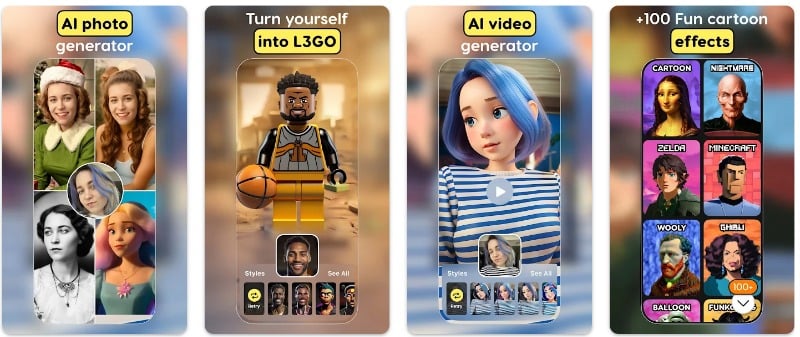
RE/STYLE is another popular app from Reface for creating AI artwork with AI. The app uses AI to turn your photos into AI-generated art. The app offers various AI editing tools to edit your photos. It can convert your images into cartoon styles, add backgrounds, and much more.
You can also generate AI-generated videos with the app. With the cool morph tool, you can pick a few styles you like and turn them into a video so you can see what you’d look like with different hair colors or even with bangs. And if you don’t want a complete makeover but just want to tweak your current style, there’s a tool for editing hairstyles, backgrounds, and more.
You can also use the app to add more volume or change your hair color to give your current look a little more oomph. Overall, Restyle is the best app if you want to enhance your look with the tool. You can use different styles in the app to transform yourself into AI art or add different hairstyles to your Face. The app is free and available for Android and iPhone.
Avatarify: AI Face Animator

Highlights:
- Advanced Neural Networks: Animate still images
- Facial Activity Options: Allows photos to mimic activities such as singing, talking, or laughing and adds dynamism to static images.
- Wide Range of Filters and Songs: With a wide range of built-in filters and songs to enhance animations.
- Trending Content Access: A dedicated section with popular celebrities, shows, and memes ensures up-to-date and relevant content.
- User-Friendly Interface: The user-friendly interface allows even beginners to create animated photos quickly and effectively.
Avatarify is an AI-based facial animation app that allows you to animate photos. The app animates photos using advanced neural networks and allows you to apply different facial activities, such as singing, talking, or laughing, to your pictures. The app is available free of charge for iOS, and you can try it out with a free trial version. For those who want more, Avatarify offers premium versions with additional features and songs.
The app has a range of built-in filters and songs to choose from. Simply tap on a photo and add animations to the photo with a matching song. You can also customize your pictures with these filters. The app has a trending section with celebrities and popular shows, memes from social media, and old photos with songs from the 70s, 80s, and 90s. You can use these templates and add your photos.
However, it’s important to know a few things about Avatarify. While it offers popular songs and filters and allows you to share edited photos on social media, it does have some limitations. In the free version, you can’t download custom images, and the downloaded images are watermarked. You also only have three attempts per day. The premium version offers different plans, including weekly, monthly, and yearly subscriptions, each with a 3-day trial period.
Using the Avatarify app is easy. The app offers a clear and easy-to-use interface. You can install the app, select a photo, set expressions from GIFs, record a video, and then save or share your animated video. It’s a fun app for anyone who likes to experiment with facial animations and share their creations online. The app is available for both Android and iPhone.
AnyoneSwap

Highlights:
- AI-Driven Face Swapping: Utilizes advanced AI algorithms for seamless Face swapping in photos and videos.
- High-Quality Results: Ensures natural-looking swaps with high-resolution output, maintaining the quality of the original media.
- Rapid Processing: Offers quick face-swapping capabilities, ideal for efficient content creation.
- User-Friendly Design: Offers a simple and easy-to-use interface.
- Flexible File Support: Accepts a wide range of file types and sizes
AnyoneSwap is the perfect website for anyone who likes to play with photos and videos, especially if you’re into deepfakes. The website uses artificial intelligence to swap faces in your photos. It’s very simple: with one click, you can replace any face in your photo with a different one. This is ideal for anyone who wants to take funny pictures without spending a lot of time editing.
AnyoneSwap also lets you swap faces in videos. The artificial intelligence ensures that the swap looks natural, making your video look pretty cool. Whether for fun or for artistic projects, you can easily swap faces in the video with the website. You can upload different types of files, but there are size limits. For videos, you can upload files up to 500 MB, but they shouldn’t be longer than 100 seconds. If you upload an image, it can be up to 50 MB in size. For GIFs, the limit is 100 MB, and they shouldn’t be longer than 10 seconds.
As for pricing, AnyoneSwap offers a free plan that gives you two credits for swapping faces in a few images or a 15-second video. The site also offers a monthly subscription for $19.99, which gives you 80 credits. The premium subscription also removes the 120-second video limit. The website is designed to be user-friendly. You get two free points when you create an account. AnyoneSwap is an accessible and affordable option.
Zao (Android)

Highlights:
- Movie and TV Show Integration: Allows users to superimpose their faces onto characters from popular TV shows and movies.
- Generative Adversarial Networks (GANs): Offers advanced GANs for creating impressively realistic deepfake videos.
- Simple User Interface: Offers a user-friendly platform
- Third-party Download: Not available on mainstream app stores, it requires downloading from alternative sources.
ZAO is a cool app that allows you to swap your Face with characters from movies and TV series. The app contains many scenes from famous movies and TV series such as ‘Titanic’ and ‘Game of Thrones’ in which you can put your face in the place of the characters. The results are pretty amazing.
The app allows you to save the videos you create on your phone or share them with others via the app or social media. ZAO works on iPhones, Android phones, and even computers. The app is not officially available in the app stores. To get ZAO, you need to download it from the official Zoa website and install it manually on your device.
Overall, Zao is the best option to swap faces and create funny deepfake videos that you can share with your friends and on social media. Remember to be careful when downloading apps outside of the official store to keep your device safe. You can download the app from Zoa’s official website. You can install the app directly on your Android device. To install the app on iOS, you have to do some workarounds.
Facehub: Face play face video
Highlights:
- AI-Powered Face Swapping: Swaps faces in videos using AI technology for realistic transformations.
- Diverse Video Template Collection: Offers various movie and TV show clips for face morphing and personalization.
- Photo Editing Tools: Includes AI photo editing capabilities with various styles like artistic and sci-fi and more
- User-Friendly Interface: Designed for ease of use
- Flexible Subscription Models: Provides various subscription options
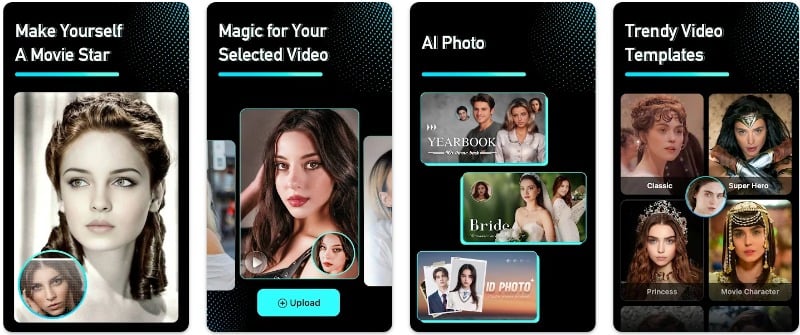
Facehub is another popular app if you want to create and share funny deepfake videos with your friends. The app uses AI to swap the faces in the video. The app has a huge collection of movie clips where you can change your Face into scenes from movies or TV shows. The app also has an AI photo editing tool that allows you to make AI photos and apply styles such as art, sci-fi, comics, Barbie princesses, and ID photo effects.
The user experience is clear and clean. The app offers a collection of short video templates on the home screen, including classic movie clips and trendy short videos. You can easily create deepfake videos by taking a selfie and selecting a template. The output is good. You can save the video to the gallery or share it on social media. The app is also said to update its collection of video templates to keep up with the latest trends.
FaceHub offers three different subscription plans: a $5.99 package for ten credits, a mid-level option at $49.99 for 150 credits, and a higher tier at $79.99 for 300 credits. These packages include benefits such as priority editing, access to all pro models, the ability to upload unlimited faces, no watermarks, and support for images up to 10 MB. All these packages have a lifetime validity of credits. You buy them once and can use them at any time.
The app also offers a weekly subscription. These cost $9.99 for 20 credits, $39.99 for 150 credits and $69.99 for 350 credits and offer similar features to the package options.
Download app: Android
Mimic – AI Photo Face Animator
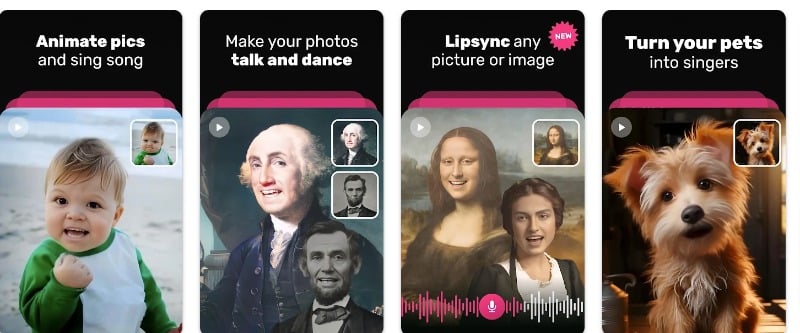
Highlights:
- Photo-to-Video Animation: Transforms photos into animated videos, making images appear as if they are singing or talking.
- Diverse Music Library: Offers a wide selection of songs to accompany the animations, enhancing the fun and engagement.
- Simple Interface: User-friendly design makes it easy for anyone to create animated videos from photos.
- Variety of Subscription Options: Provides flexibility with a one-time payment option and a weekly subscription model, catering to different user needs.
- Creative Exploration: Ideal for creating humorous or entertaining content, perfect for sharing on social media or with friends.
Mimic is a great app for anyone who likes to create cool, funny videos. The app uses AI to turn your photos into videos where it looks like the people or pets in the pictures are singing or talking. You simply select a photo from your gallery, choose a song from a large music list and the app does the rest. You can use it to make all kinds of funny videos.
The Mimic app is free and offers two main subscription options for additional features. First, a one-time payment option for $41.68 is ideal if you use the app often. The weekly subscription for $8.00 is a good choice if you want to try out the premium features for a shorter period of time.
Overall, Mimic is the best app if you want to make funny and in-depth fake videos. With the app, you can turn photos into funny videos. The app is available for Android, and you can download it from the Google Play Store.
Download app: Android
How To Choose The Best Deepfake Website
As with any other website, here are the features you should look for when creating and choosing the best deepfake websites
- Ease of Use: The website should be user-friendly, with clear instructions and an intuitive interface that makes it easy for beginners to make deepfakes.
- Quality of Output: Look for a website that produces high-quality, realistic deepfakes. The better the quality, the more convincing the deepfake will be.
- Speed of Processing: Most deepfake websites will allow you to generate deepfake videos in a matter of minutes. The best sites should offer fast processing times so you don’t have to wait too long to see your deepfake.
- Privacy Policies: Make sure the website has a strict privacy policy. Your data should be handled securely and ethically, especially the images and videos you upload to the site. You can visit the website’s privacy policy page to find out more.
- Legal Compliance: The website should comply with legal standards and regulations for the creation and distribution of deepfakes.
- Editing Tools: Look out for websites that allow you to edit your deepfakes for better results.
- Cost: Most deepfake websites use credits to create videos. Pay attention to the cost of using the website. Some offer free services with limitations or paid options for advanced features.
Website/App | Ease of Use | Quality of Output | Speed of Processing | Privacy Policies | Editing Tools | Pricing | Platform Availability |
|---|---|---|---|---|---|---|---|
Deepswap.ai | High | High | Fast | Strong | Limited | Free, Premium Subscription | Website |
Synthesia.io | High | Very High | Fast | Strong | Advanced | Subscription Starting at $29/mo | Website |
Hoodem.com | High | High | Fast | Strong | Basic | Credit-based | Website |
Akool Deepfake | Moderate | High | Moderate | Moderate | Advanced | Free Plan, Pro Plan ($30-$200/mo), Max Plan ($500-$3000/mo) | Website |
Unboring by Reface.ai | High | High | Fast | Moderate | Moderate | Starting at $9.99/month | Android, iOS, Windows, macOS |
Roop (Open Source) | Low | Variable | Depends on user | High | Advanced | Free (Open Source) | Website |
Deepbrain.ai | High | Very High | Fast | Strong | Advanced | Subscription Starting at $30/mo | Website |
Swapper by Icons8 | High | High | Moderate | Strong | Basic | Subscription and Free options | Website |
FaceApp | High | High | Fast | Moderate | Advanced | Free, In-app purchases | Android, iOS |
Restyle | High | Moderate | Fast | Moderate | Basic | Free, In-app purchases | Android, iOS |
Avatarify | Moderate | High | Fast | Moderate | Basic | Free, Premium Subscription | Android, iOS |
AnyoneSwap | High | High | Fast | Strong | Basic | Free, Subscription at $19.99/mo | Website |
Zoa | Moderate | High | Moderate | Moderate | Basic | Free | Android (Unofficial) and iPhone |
Facehub | High | High | Fast | Moderate | Advanced | Subscription-based | Android |
Mimic | High | Moderate | Fast | Moderate | Basic | Free, Premium Subscription | Android |
FAQs on Creating Deepfake Videos
1. How can I tell if a video is a deepfake?
Recognizing whether a video is a deepfake can be a little tricky, but there are a few signs you can look out for. First, check the quality of the video. Deepfakes often have strange-looking skin or hair. The lighting on the Face may not match the surroundings. Also, pay attention to the person’s facial expressions and movements. These can look unnatural in a deepfake video. Also, pay attention to the voice. It could sound robotic or simply not be right. Lip-syncing could also be faulty if the mouth movements don’t match the words perfectly. You can also use online tools like Deepwave to find deepfake videos.
2. Can Deep fakes be used for positive purposes?
Yes, you can use deepfake in many postivites. Here is the list of areas where deep fakes can be helpful
- Learning: You can use Deepfake to create realistic training videos for doctors, firefighters, or soldiers. It’s like practicing with real-life scenarios, only safer.
- Movies: Filmmakers can use Deepfake to show historical figures or deceased actors. This makes movies more real.
- Art: Artists can use deepfakes to mix different styles or make new types of art.
- Old Photos and Videos: Deepfake can make old pictures or movies look moving and alive. It can also improve the quality of the photo.
- Talking in Different Languages: Deepfakes can change a person’s mouth movements in videos to match a different language and look natural. This is useful if you want to dub content into other languages.
- Ads and Customer Help: Deepfake videos can be used in advertising or customer service to speak to people in a way they understand and like.
3. Can anyone create a deep fake, or does it require technical expertise?
Thanks to advances in technology, anyone can now create deepfake videos. Deepfake tools are available through websites and apps. You can install them or visit the website and create deepfake videos without any technical expertise.
4. Are there legal concerns associated with creating Deep fakes?
Yes, creating deepfakes can raise legal issues, such as
- Privacy: If someone uses your photo or video to make a deepfake, false information, lies, or fake news can be spread, which is a big problem. Deepfakes can also lead to someone impersonating someone else with a deepfake.
- Copyright: if deepfakes use copyrighted material such as movies or songs and more. Some countries have already established rules for deepfakes and their ethical use.
Deepfake Guidelines:
- India Deepfake Guidelines: Business Today – Deepfakes in India
- China Deepfake Guidelines: The Diplomat – China’s New Legislation on Deepfakes
- Canada Deepfake Guidelines: Canada.ca – Deepfakes: A Real Threat to a Canadian Future
- European Union Deepfake Guidelines: European Parliament – Tackling deep fakes in European policy
- South Korea Deepfake Guidelines: TechPolicy.Press – Exploring Legal Approaches to Regulating Nonconsensual Deepfake.

