

You may have come across screenshots of Instagram chats that went viral on the platform that looked too real but never actually happened. For example, the DM screenshots of famous celebrities replaying fan messages or embroiled in controversy. If you read memes and posts like these and wonder how to create fake Instagram DM chats, you’ve come to the right place!

It’s not a difficult task. In fact, it’s very simple and straightforward, thanks to certain apps and websites. In this blog, we’ll introduce you to some of the best apps and platforms that you can use to create fake Instagram DM chats easily.
Table of Contents
Top 5 Apps and Websites for Creating Fake Instagram Messages
There are many apps and websites that claim to be the best for creating fake Instagram DM chats, but few deliver what they promise. To offer you only the best, I’ve tried them all and compiled the following list of the best apps and websites to create fake Instagram DMs.
Best Fake Instagram DM Apps
Funsta – Post and Direct Prank for Android
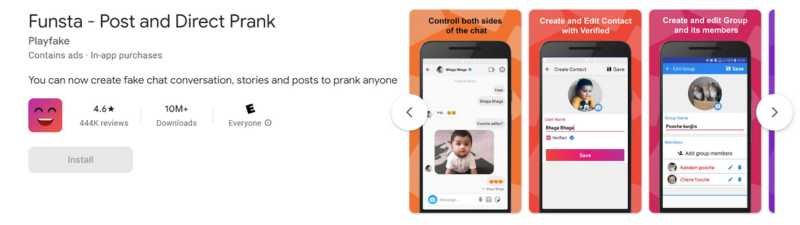
Features:
- Realistic Instagram interface
- Make fake posts, comments, and likes for posts
- Provides a Meta-verified icon
- Create stories and switch to dark mode
Drawback:
- Ads
- Watermark
Funsta is like a replica of Instagram that lets you create much more than just fake Instagram DM chats. The app is similar to the original Instagram app in all aspects. Therefore, you get solid, authentic-looking fake DM chats.
It offers a variety of customization options, such as a meta-verified icon, control over both sides of the chats, adding images and emojis, and even responding to messages. You can also create fake posts, stories, comments, and much more! The platform has a simple and intuitive user interface that is equally user-friendly for all users.
The only downside of the app is the advertising. Every time you launch the app, you’ll see ads, which can be annoying. But you can always opt for the pro version, which also offers advanced auto-answers, more sticks, and themes. The app is just perfect for playing pranks on your friends and family.
iFake – Funny Fake Messages Creator for iPhones
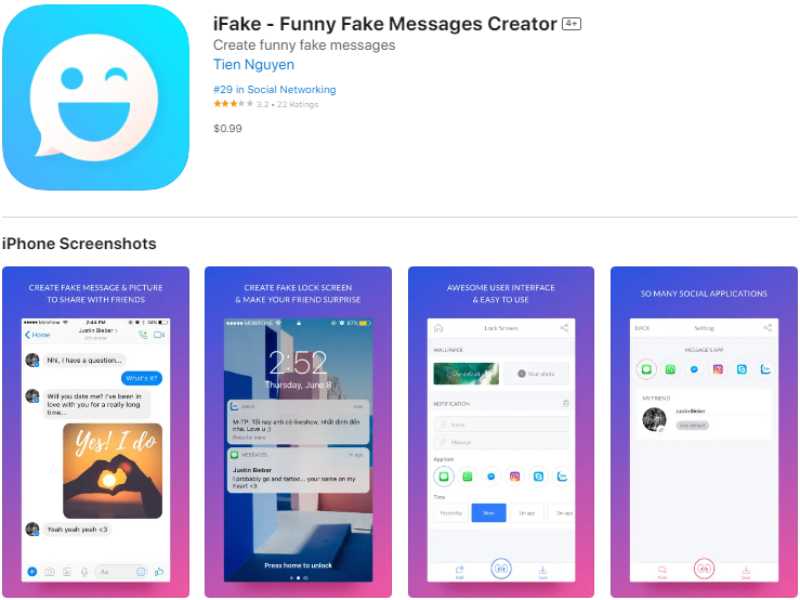
Features:
- Multiple social media platforms
- Allows you to switch to dark mode
- Realistic iPhone lock-screen notifications
- Ads are removed in the Pro version
Drawbacks:
- Ads
- Watermark
- The watermark is not removed in the Pro version
Download for iPhone Download for Android
iFake is another great platform to mimic conversations on various popular social media platforms such as Instagram, Telegram, Snapchat, iMessage, and many more.
With the app, you can create authentic-looking fake messages by customizing chat backgrounds, adding emojis, attaching files, changing the status and time of the message, etc.
This app is especially suitable for iPhone users as it can create fake notifications in the style of the iPhone lock screen, which looks realistic and convincing. With the many features and customization options the app offers, you can create realistic Instagram DM chats in seconds.
Like Funsta, iFake is also riddled with ads, which can be annoying. However, you can upgrade to the premium version and remove the ads. The app is available for both iPhones and Androids. We recommend it to iPhone users because it can create realistic iPhone lock screen notifications.
Related Read: How to Reply to a Specific Message on Instagram
Fake Messenger – Fake Chat Without Watermark

Features:
- Most realistic fake chats
- No watermark
- Wide range of customization options and themes
- The pro version removes ads
Drawbacks:
- Some options cannot be customized
- No Meta-verified icon.
If you use Facebook Messenger to cross-message with your Instagram friends, you can create realistic Messenger chats with the Fake Messenger app. The app offers various customization options, including fake group chats, video calls, audio messages, emojis, stickers, and everything else you see in Messenger.
The app has a user-friendly interface and appealing design, making it easy to create convincing fake chats. All you have to do is create a contact with their own name, profile, gender, online status, etc. You can also attach files and stickers to make your chats even more authentic.
However, the app doesn’t offer a meta-verification icon, and some options, such as the time and date you connect with the person, cannot be changed. Apart from that, it’s a great app for creating fake DM chats as there is no watermark on the screen like in other apps.
Related Read: How to Disable Instagram Read Receipts
Create Fake Instagram DM Chats Online
In addition to mobile apps, there are many online tools and platforms you can use to mimic the Instagram conversation. Some of the best generators for fake Instagram DMs are presented below.
Fake Details
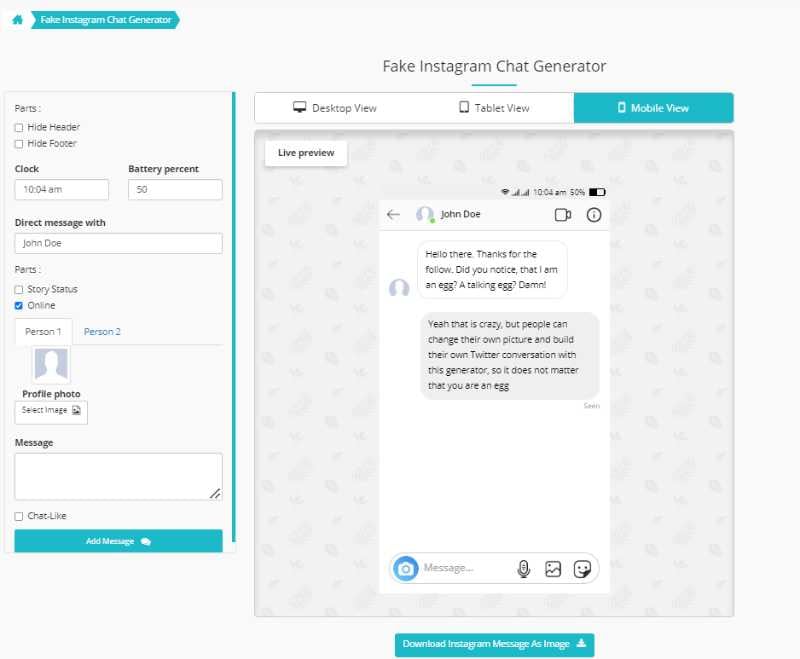
Features:
- Easy and clean interface
- Support different screens – PC, Tablet, and Smartphone
- No watermark
Drawbacks:
- No dark mode
- No Meta-verified icon
- No group chats
- No emojis
Fakedetail is one of the easiest online tools for creating fake Instagram DM chats. Creating a fake chat on this platform is very simple. All you have to do is fill out the form on your screen, and you will get real-time updates in the descending live view.
The platform only allows you to add the name, profile picture, time, and status of the person you are talking to. It does not offer meta-verified icons or stickers.
Zeoob

Features:
- Allows the addition of image files
- Decent customization
- No watermark
Drawbacks:
- No dark mode
- No Meta-verified icon
- No group chats
- No emojis
Zeoob is similar to Fakedetail but also allows you to add image files to your fake DM chats. The platform offers good customization options such as the person’s name and profile, online status, time of message, viewed status, etc.
However, it doesn’t offer Meta-verified accounts or the use of stickers. Overall, it’s a good platform to create realistic Instagram DM chats without watermarks.
Create Your Own Fake Instagram DMs

That’s it! These are the best apps and online platforms to create fake Instagram DM chats. With the above apps and platforms, you can easily create realistic and convincing Instagram conversations and prank your loved ones.
We recommend Funsta for Android users and the iFake app for iPhone users, as these apps offer a variety of customization options and are user-friendly. And if you’re looking for fake DMs for desktop screens, the Fakedetails platform is just the thing!
Only use these apps and platforms for fun. Don’t use them to hurt anyone or spread hate or rumors. Pranks should be harmless and just for laughs, not to hurt or harass others.
FAQs about Fake Instagram DM Chats
1. Is there any legal action for Fake Instagram DM Chats?
If they are used for entertainment purposes, such as pranking friends, creating memes, or just having fun, there are no legal consequences for creating fake Instagram DM chats. However, suppose they are used for illegal activities such as extortion, spreading misinformation, phishing, or other actions that break the law or violate the rights of others. In that case, there may be serious legal consequences. It is important to use fake Instagram DM chats responsibly and ethically and to respect the privacy and well-being of others.
2. What are the best fake Instagram DM apps for iPhones?
There are many fake Instagram DM apps for iPhones, but not all of them are equally good. Some of the best fake Instagram DM apps for iPhones are:
3. What are the best fake Instagram DM apps for Androids?
There are hundreds of apps in the Google Play Store that you can use to create fake Instagram DM chats. Some of the best fake Instagram DM apps for Android are:

