

TikTok offers a download function that allows you to easily save videos locally on your devices. However, this convenience has one drawback: the downloaded TikTok videos are marked with the TikTok watermark. So how can you download TikTok videos without a watermark?

While most TikTok downloaders keep the watermark with your videos, there are a few online downloaders that remove it. I’ve tested several online downloaders and have found the four best options that allow you to download TikTok videos without a watermark.
Being a long time TikTok fan, I’ve also added a method you can use to remove watermarks from your TikTok video after you’ve downloaded it with a watermark. Let’s dive right into the details.
Table of Contents
Is it Permissible to Download TikTok Video Without Watermark?
Yes, it’s allowed to download TikTok videos without a watermark. This is because TikTok doesn’t own the copyright to your videos. Therefore, it’s your right to remove the watermark.
TikTok adds a watermark to downloaded videos to encourage viewers to return to the platform. However, if you want to use your TikTok video on another platform that doesn’t allow the TikTok watermark, you can remove it.
How to Download TikTok Videos Without Watermarks?
These are the possible methods you can use to download TikTok videos without watermarks:
Use TikTokNoWatermark
TikTokNoWatermark is the top downloader that allows you to save videos from TikTok without watermarks. It offers a straightforward TikTok video download using its URL.
When I tested the downloader, it kept my video in the original quality (best download) compared to some of its alternatives. This is the only standout feature that TTNW offers. However, you don’t have the option to choose a lower video quality.
Here is how to use TTNW to download a video without a watermark on TikTok:
1. Visit TTNW on your browser.
2. Copy the URL link of the video you want to download on TikTok.
3. Paste the URL in the provided box on TTNW and click Download Video.
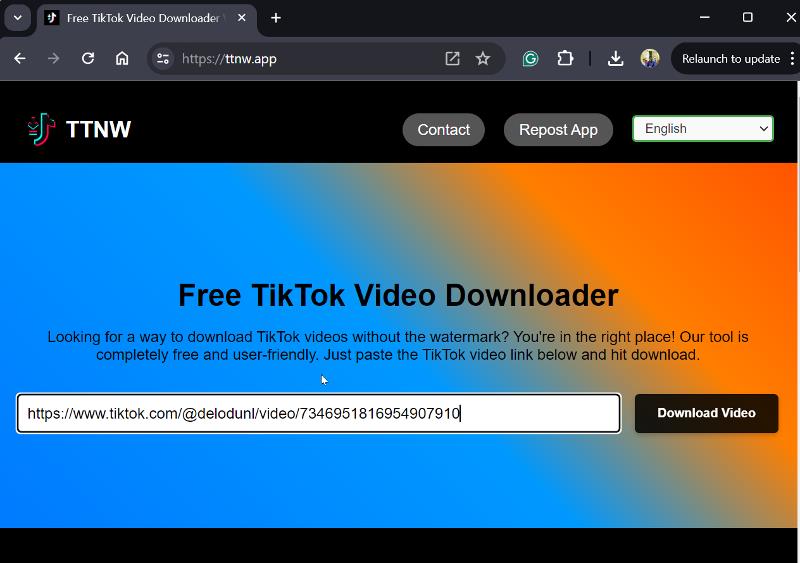
4. Next, the downloader will analyze the video URL and the download should start in a jiffy.
Download With SnapTik
SnapTik is a downloader tool that enables users to save TikTok videos without watermarks. It’s both free and speedy. While it slightly reduces the download quality from the original, it maintains HD resolution.

In addition to the web platform, which is accessible via any browser, SnapTik offers special Android and iOS apps. In both cases, SnapTik ensures a seamless experience for users.
Use SSSTik Online Downloader
If you are still looking for how you can download videos from TikTok without watermarks, I recommend you use SSSTik. It turns out to be a well-featured web app that downloads TikTok videos in their original quality like TTNW.

After pasting the video URL, SSSTik allows downloading with or without a watermark, giving users flexibility in their preferences. SSSTik is also characterized by the fact that it allows users to download TikTok videos in MP3 audio format.
This downloader also offers mobile apps with more features to help you better manage your downloads. But I wouldn’t recommend the mobile app because of the intrusive ads.
TikSave – Online Downloader

TikSave is the last video downloader I recommend you use to download TikTok videos without watermarks. It offers a seamless download process, although it slightly reduces the quality by compressing the original video. You can also download TikTok videos as MP3.
Edit with Video Tools
Here’s an extra tip for downloading TikTok videos without the watermark. You can use video editing software to edit your videos and remove the watermarks from the TikTok videos. With the video editor, you can cut out the area with the watermark or apply a blur effect to it.
Final Thoughts
You can download TikTok videos without watermarks using the web applications discussed in this article. Mobile apps are mentioned as an alternative, but are often flooded with ads. Web platforms, on the other hand, usually have fewer ads and are therefore preferable. I hope you find this article useful.
FAQs about Downloading TikTok Videos Without Watermark
1. Does TikTok watermark your videos?
Yes, TikTok adds a watermark to every video you download from there. This watermark shows the TikTok logo together with the username of the uploader. So regardless of whether you use TikTok’s download function or an external video downloader, the watermark will be embedded in your video unless you use downloaders like the ones mentioned in this article.
2. Why is TikTok watermark on downloaded videos?
TikTok adds a watermark to the downloaded videos in order to attribute them to both the uploader and the platform. This practice serves to avoid copyright issues and is likely aimed at driving users back to TikTok.
3. Which TikTok downloader has no watermark?
The downloaders presented in this article allow you to download videos from TikTok without watermarks. These include TTNW, SnapTik and SSSTik.
Further Reading:
- How to Download Instagram Private Reels: 3 Best Methods
- How to Get More Views on TikTok
- How to Reduce Photo File Size on iPhone
- How to Unsend Messages on WhatsApp: A Step-by-Step Guide

