

Quick Tips
- The easiest way to disable ‘Sign in with Google’ prompt on websites is to make changes to your Google account settings. While this used to work across all websites and devices, Google seems to have restricted this to work only with Android devices for now.
- The other way is to install uBlock Origin extension and add a filter to block the prompt.
Certain websites you visit on the internet display a Sign-in with Google prompt on your screen. This prompt lets you quickly sign in to the website with your Google account, so you don’t have to create a separate account.

However, if you prefer to browse websites without an account, the Sign-in with Google prompt is pointless and a huge annoyance since you’ve to close it every time you visit a website that shows the prompt. Thankfully, it’s possible to turn it off.
Follow along, and we’ll teach you two ways to disable the “Sign-in with Google” prompt on websites.
2 Ways to Block ‘Sign in with Google’ Prompt
Sl. No. | Method | Pros | Cons |
|---|---|---|---|
1 | Changing Google Account Settings | - Easy to do for Android users. - Disables prompts across all browsers on Android devices. | - Only works on Android devices. - Does not work when signed out of Google account. |
2 | Using uBlock Origin Extension | - Effective on all devices and browsers that support the extension. - Works regardless of Google account sign-in status. - Blocks prompts universally. | - Requires installation and setup of a third-party extension. - May block other Google-related scripts unintentionally. |
Disable the Sign-In With Google Prompt by Changing Your Google Account Settings
For the longest time, Google has offered an easy way to disable Sign-in with Google prompts on websites by changing your Google account settings. Although it still works, Google has changed the devices it now affects.
Earlier, the method used to disable Google’s sign-in prompts on all websites across all your devices signed in with the same Google account, be it your computer or mobile phone. But as of the time of writing, it does so only on Android devices.
As such, if you’re on an iPhone, the only way to avoid the Google sign-in prompts is to open the website in Incognito or Private mode. Or if you want to do so on your computer, you’ve to check the second method we have discussed later.
Follow the steps below to disable Google’s sign-in prompts on your Android device:
- Go to your Google account page and sign in if you haven’t already.
- Select Security from the left pane.
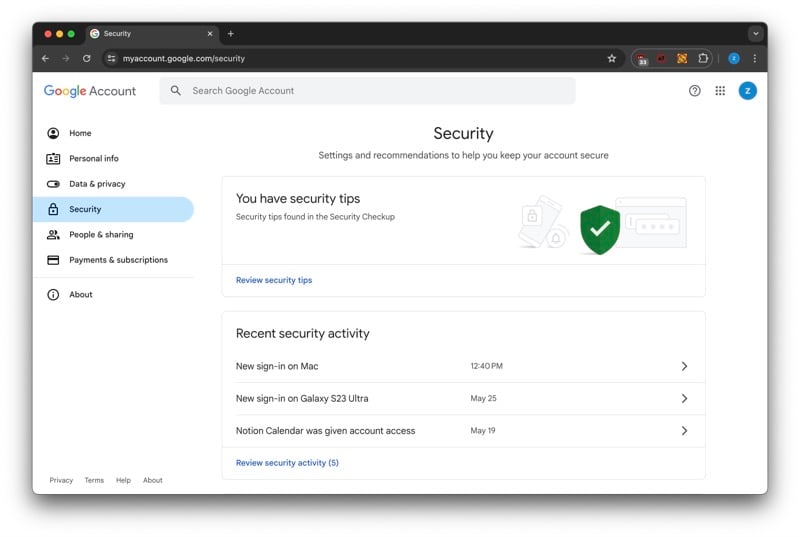
- Scroll down to the Your Connections to Third-Party Apps and Services section and click on See All Connections.

- Click the Settings button (with the gear icon) on the next page.

- Finally, toggle off the option for Sign-in Prompts.

Once you do this, you won’t see Google’s sign-in prompts on websites on your Android device.
Disable the Sign-In With Google Prompts Using uBlock Origin
uBlock Origin is a popular extension that helps you block ads and filter content in your web browser. It’s free to use and works on most browsers, including Chrome (and other Chromium browsers), Firefox, Opera, and more. We’ll use its content filtering functionality to disable Google’s sign-in prompts.
Here’s what you need to do:
- Downloading and add the uBlock Origin extension to your preferred browser.
- Click the uBlock Origin icon in your browser’s toolbar and click the three-gear icon in the bottom-right corner of the pop-up to open the Dashboard.
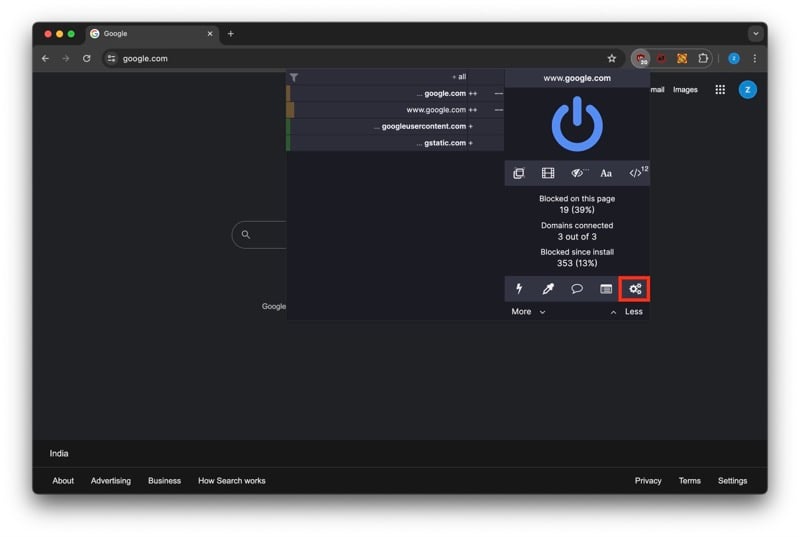
- Go to the My Filters tab, paste the following line, and hit Apply Changes:
||accounts.google.com/gsi/*$xhr,script,3p
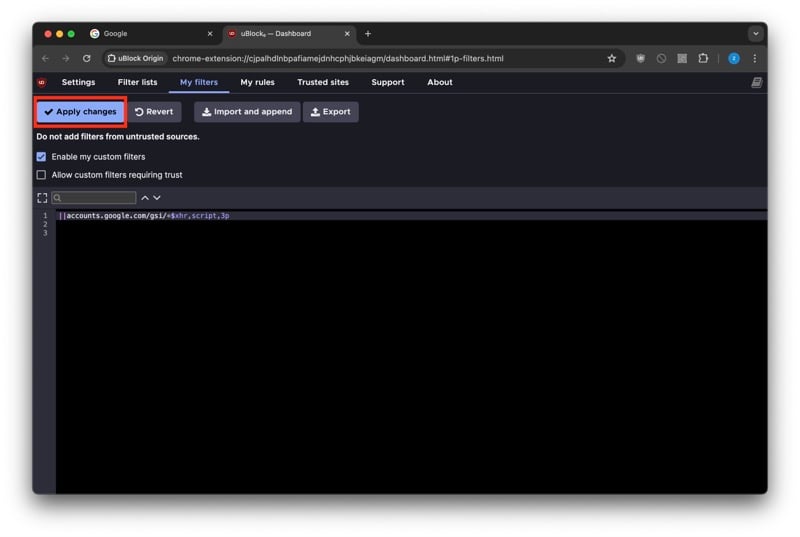
- Head back to the tab with the website that prompted you to sign in to your Google account and reload it.
Subsequently, Google’s sign-in prompt will disappear and won’t crop up on any websites you visit going forward.
The best part about this method is that it works irrespective of whether or not you’re logged in to your Google account and manages to prevent the prompt from appearing on your screen without fail.
Enjoy an Uninterrupted Browsing Experience Online
Disabling the Sign-in with Google prompt helps reduce clutter on your screen and saves you the hassle of closing them manually every time you visit a website. That way, you can focus on the website’s content better and enjoy an uninterrupted browsing experience. Going forward, if you change your mind and want the convenience of Google’s prompt, you can undo the steps, and that’ll restore the prompts on your devices.

