

Quick Answer
Save this number (1-800-2428478) in your phone contacts or scan the QR code given in the article to chat with ChatGPT on WhatsApp. You can use ChatGPT on WhatsApp for Android, iPhone, or WhatsApp Web. It currently only supports text-based conversations.
As part of a 12-day announcements series, OpenAI announced on day 10 that ChatGPT would be available through phone calls and WhatsApp, making it reach a wider audience.

At launch, ChatGPT on the phone is limited to 15 minutes and is only available in the US. However, ChatGPT on WhatsApp is available for all regions without any limitations. It uses the GPT-4o model, and as you can expect, you can ask questions and get answers directly from the WhatsApp interface without leaving the app, installing a separate ChatGPT app, or even signing up for your account. In this guide, you will learn how to use ChatGPT on WhatsApp.
Table of Contents
How To Use ChatGPT on Your Mobile WhatsApp
To use ChatGPT on WhatsApp, You need an active WhatsApp account on Android, iPhone, or WhatsApp web.
- Save this number (1-800-2428478) in your phone contacts.
- Alternatively, you can scan the QR code below to chat with ChatGPT on WhatsApp.

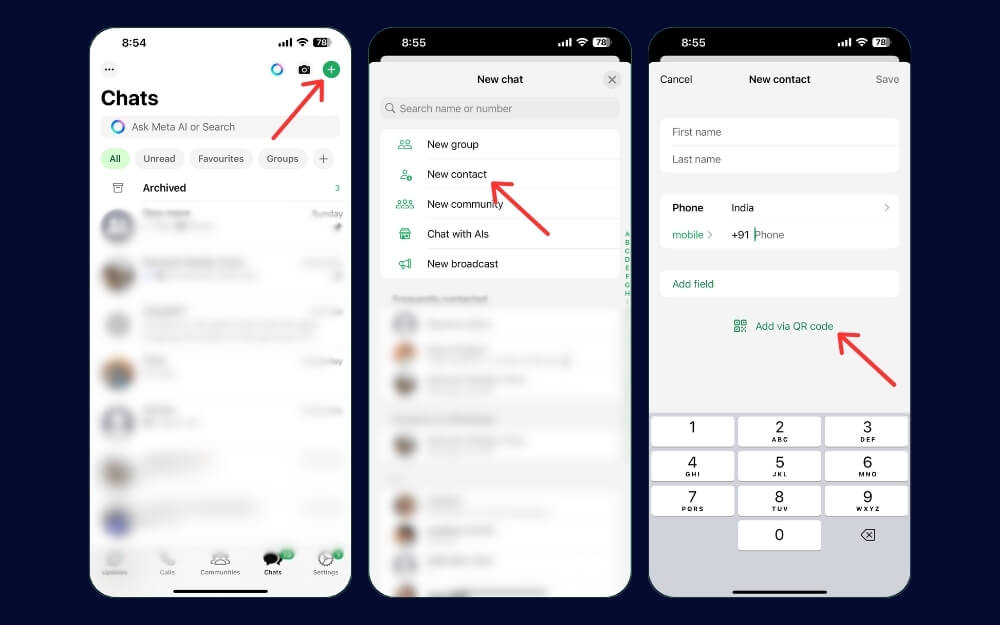
- To scan the code, open WhatsApp, click on the chat icon, click on the new contact, and tap Add via QR code. Now, scan the code below to use the app, and click Continue and Chat. This works for both Android and iPhone.
- And that’s it. You have almost finished the setup and are ready to chat with ChatGPT.
- Go to the ChatGPT contact and enter your text prompt to chat. An internet connection is required to chat with ChatGPT.
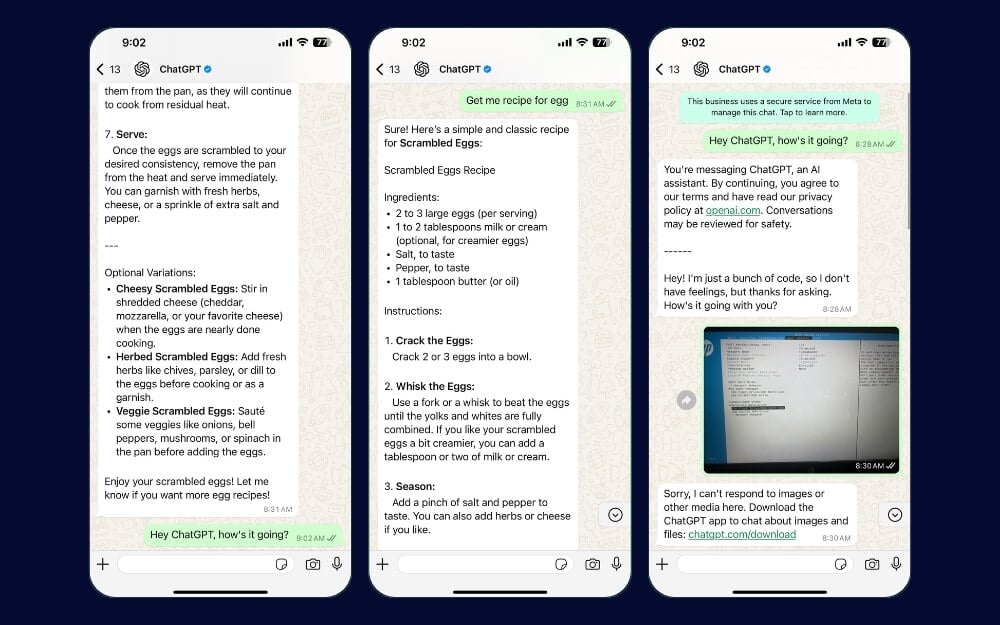
At launch, ChatGPT currently only supports text-based conversations; when you try to upload an image or a PDF file, ChatGPT replies with a message stating that ChatGPT doesn’t support these file types.
The accuracy is similar to that of the ChatGPT web and the mobile app. However, it is not as fast as ChatGPT on the web and its competitor Meta Chat. It is a great addition for someone looking to chat quickly with ChatGPT without installing the app and using WhatsApp as a primary messaging app.
FAQs on Using ChatGPT on WhatsApp
Can I use ChatGPT on WhatsApp without saving the phone number?
Yes, you can use ChatGPT without saving the number. You can scan the QR code on Android and iPhone to get ChatGPT. On Android, click the chat icon, tap the QR icon next to the new contact, and then scan the code above. Similarly, click the plus icon on your iPhone, click New Contact, and tap Add via QR code.
Do I need a unique app or account to use ChatGPT on WhatsApp?
No, you can use ChatGPT without creating an account or installing the ChatGPT app. However, you require an active internet connection to chat.
Can I use ChatGPT on WhatsApp via WhatsApp Web?
Once you have saved the mobile number, you can continue the chat on WhatsApp Web.
Why is ChatGPT not responding to my messages?
Initially, when I tested, ChatGPT responses were slow. Also, various Factors like your internet connection and current ChatGPT traffic might influence ChatGPT's response time. If you are having issues, you can restart your device, check if your device has an active internet connection, or delete and re-enter the ChatGPT contact to chat again.
How do I end the WhatsApp ChatGPT session and backup chat?
You don't need to end the chat session manually with ChatGPT. You can stop messaging, and the session will automatically close. You can back up your WhatsApp chat with ChatGPT using regular WhatsApp backups.

