

Since ChatGPT is open to the public, I use it for almost all my tasks. I find it particularly helpful as a grammar correction tool.
Correcting grammar while writing is beneficial, especially when it comes to making your texts clear, correct and easy to understand. One prominent name that pops up when it comes to correcting grammar is the Grammarly tool. It is a popular and most used tool.

Before ChatGPT, Grammarly was my go-to tool for correcting my grammar. But recently, I replaced Grammarly with ChatGPT, and I have to say that the experience with ChatGPT is better than Grammarly in most cases. ChatGPT can help you fix grammar faster and create customized grammar guides. In this guide, you’ll learn how to use ChatGPT as a Grammarly alternative and build your own personalized grammar correction tool. When you’re ready, let’s get started.
Table of Contents
ChatGPT vs. Grammarly

For beginners: ChatGPT is a language learning model, basically a chatbot that can generate AI content based on text prompts. Grammarly, on the other hand, is a writing tool that helps you write better. It looks for grammar, spelling, punctuation and style errors in text and makes suggestions for improvement.
Using Chatgpt for grammar correction offers benefits such as the ability to customize grammar assistance with your commands, restructure sentences and offer advanced grammar corrections that were previously only available in the premium version of Grammarly and more.
However, there are also drawbacks, such as ChatGPT cannot offer real-time writing help and feedback, provide explanations for suggested corrections, and does not integrate with other apps.
Detailed comparison between Grammarly vs ChatGPT
Feature | Grammarly Free | Grammarly Premium | ChatGPT |
|---|---|---|---|
Fixing Grammar Mistakes | Yes | Yes | Yes |
Improving Sentence Tone | Yes | Yes | Yes |
Suggestions for Tone | Yes | Yes | Yes |
Advanced Writing Suggestions | No | Yes | Yes |
Vocabulary Enhancement | No | Yes | Yes |
Writing Style Improvement | No | Yes | Yes |
Clarity and Conciseness | Yes | Yes | Yes |
Human-like Conversation | No | No | Yes |
Provide explanations for suggested corrections | Yes | Yes | Yes |
Multiple Language Support | Yes | Yes | Yes |
Real-time writing assistance and feedback | Yes (Basic) | Yes | No |
Plagiarism Detection | No | Yes | No |
Device Support | Web, Desktop, Mobile | Web, Desktop, Mobile | Web, Mobile (via browser) |
How to Use ChatGPT as a Grammarly Alternative
Using ChatGPT to fix grammar is very different from using Grammarly to correct errors. These tools work completely differently. With ChatGPT, you have to manually train the chatbot to help you fix the errors.
1. Getting Started with ChatGPT
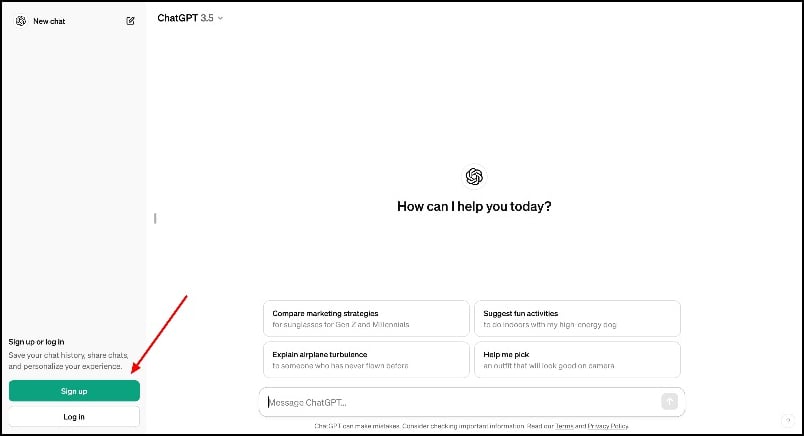
If you are an existing ChatGPT user, go to chat.openai.com and log in to your account; if you are new, visit chat.openai.com and sign up for the account. This is free of charge. Since the last update, you can use ChatGPT without creating an account; however, we recommend creating an account for a better experience.
2. How to use ChatGPT for grammar check
To use ChatGPT like Grammarly,
- Visit chat.openai.com.
- Paste the text you want to correct and enter the prompt: ‘Fix the grammar‘. That’s it.
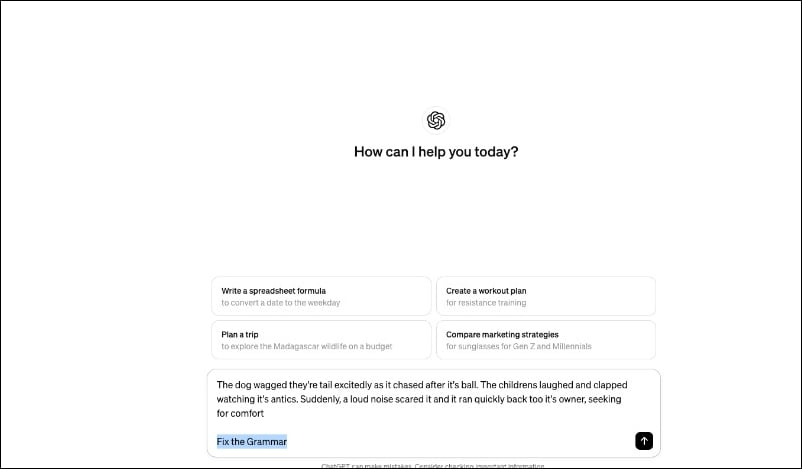
This is the basic version of chatGPT, which allows you to fix the grammatical errors in the sentences or paragraphs; if you are looking for a full replacement, follow the advanced steps.
Advanced Grammar Assistance With ChatGPT
Unlike Grammarly, which comes with pre-built features, ChatGPT requires you to develop your own version of the grammar assistant. Let’s try to build an advanced version of ChatGPT that replicates the use of Grammarly. Let’s take a look at how we can incorporate these features into ChatGPT.
1. Clarity
Sentence clarity helps to make your sentences more transparent and easier to understand. The Sentence Clarity feature is only available in the premium version of ChatGPT, but you can get it for free via ChatGPT. Add a simple ‘fix grammar’ prompt that corrects your grammar. For example, here’s the text prompt you can use.
[Enter your Paragraph here]Add the Prompt:
- Fix Grammar in this paragraph.
- Make the sentences clearer and easier to understand.
- Display changes made to the paragraph in another section.

2. Tone Detection
Tone Detection in Grammarly helps you analyze the tone of your writing and identify emotional cues. The function is useful in various writing and communication contexts. For example, if you are drafting an email, the tone should be polite or formal. On the other hand, if you’re writing a letter to your family or want to share your happiness, Grammarly can help you adjust the tone of your paragraph. Find out how to access tone detection:
To get tone detection in ChatGPT, you can access it through a prompt. Enter your text to get the tone detection for the sentence.
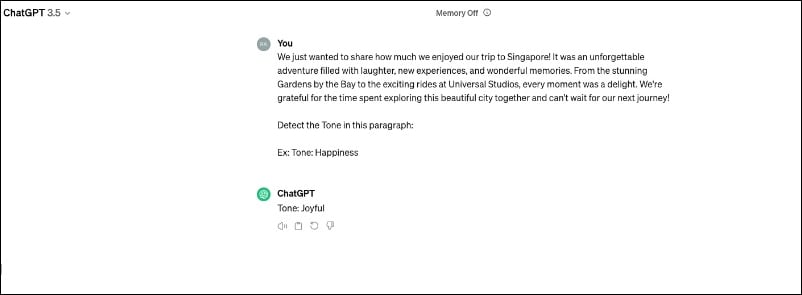
Add these Prompts:
- Detect the Tone of the paragraph and give me the output in this structure: ex: Tone: Polite.
- (Instead of giving you the whole sentence explaining the paragraph, the chatGPT tells you the sentence’s tone in a single word)
3. Style Guide
ChatGPT can deliver different results depending on the prompt. Depending on whether you are using the free version of ChatGPT or the premium version, there are two ways to get a consistent style in ChatGPT.
Using the free version of ChatGPT:
In the free version, you can ensure consistency in two ways. First, you can use the same prompt for all future grammar corrections. Here is the prompt template that you can copy, but you can also customize your prompt to your liking. Make sure that your text does not override the ChatGPT generator. There is a high probability that your text will be completely overwritten. To prevent this, you can highlight the changes in the prompt.
If you don’t want to use the prompt every time to fix the grammar, you can use the same conversation and edit the text. When you create a conversation for the first time, ChatGPT automatically creates a new conversation chat. The next time you want to fix the grammar, you can use the same chat and enter the text. ChatGPT automatically remembers what you want to do, corrects the information and displays it. You can also ask ChatGPT to do this for all current and upcoming texts.

Using the premium Version:
If you subscribe to ChatGPT Premium, you can build your grammar assistant with Custom GPT. Instead of typing in the text and manually prompting each time, Custom GPT eliminates these steps and can be tuned and trained with your data for better performance. Building ChatGPT is the easiest step. We have a detailed guide for creating your own ChatGPT; you can use the guide and follow the steps to develop your Grammar Assistant GPT.
- Step 1: Visit the ChatGPT website and click on the Explore GPT. Click on the plus icon and add your GPT.

- Step 2: Now, enter the text prompt to train your GPT. First, enter the name and generate the proper picture

- Step 3: Now paste the previous text commands we shared here and click on save. You can save the GPT publicly or publish GPT to the store.

You can also use the version of the grammar assistant GPT we built using ChatGPT. You can access it through this link. It is free to use.
4. Integration
The biggest advantage of Grammarly compared to ChatGPT is its integration with other apps. Grammarly integrates with various platforms such as Microsoft Word, Google Docs and web browsers and provides real-time writing assistance, whereas with ChatGPT you have to manually copy and paste the text into ChatGPT, fix the grammar and then paste the text back in. After testing different methods, I found Universally.chat, a Google Chrome extension that allows you to use ChatGPT on any website. Here’s how to use the extension and fix errors on any website.
- Step 1: Open Google Chrome, visit the universally.chat extension page, and add the extension to Google Chrome.

- Step 2: Open any website and click on the extension or enter the shortcut (Alt+u (Alt key is on Mac: ⌥ or option) to launch ChatGPT.

- Step 3: Ensure you are logged into the ChatGPT account on the main ChatGPT website. Now, copy the text, enter the site, and fix the website.FAQs on how to use ChatGPT for grammatical errors.
Fix Your Grammar with ChatGPT
Using ChatGPT for fixing grammar has several advantages over Grammarly for fixing grammar. It allows you to tailor queries for specific needs, unlike Grammarly, which provides corrections based on preset rules.
ChatGPT can also generate content and customize the tone of voice and writing style based on user requests. It can learn your tone of voice and get better over time. Overall, ChatGPT’s grammar assistance is fast and offers personalized grammar corrections.
FAQs on Using ChatGPT as a Grammarly Alternative
1. Is ChatGPT completely free to use for grammar checks?
Yes, ChatGPT is free for grammar checking. However, you will need a premium version if you want to create a custom GPT.
2. How does ChatGPT compare to Grammarly in terms of accuracy?
Accuracy can vary greatly depending on the prompt and type of output you expect. Unlike Grammarly, where you can use pre-built templates, you can increase or decrease the accuracy of ChatGPT. In some cases, ChatGPT’s error correction is fast and also better than Grammarly’s, and there are no false positives. However, in the worst case, ChatGPT may need help to understand the sentence in the paragraph.
3. Can ChatGPT be integrated into writing software like Microsoft Word or Google Docs?
ChatGPT cannot be integrated directly into writing software such as Microsoft Word or Google Docs. However, you can use the Universally Chat plugin to access ChatGPT on any website and correct your grammatical errors with ChatGPT via the Universally Chat plugin.
4. How can I ensure my privacy when using ChatGPT for grammar corrections?
You can opt out of having your data used to train the model if you want more privacy. Unlike Grammarly, ChatGPT stores your conversations. If you are concerned about your privacy, you can delete your conversations in ChatGPT.
5. What are the limitations of using ChatGPT for grammar assistance?
ChatGPT cannot be integrated with other programs such as Microsoft Word or Google Docs. While it can highlight errors in its interface, it cannot provide real-time grammar correction and fix errors in other software. There are also limitations such as manual training and the creation of custom prompts to fix the errors, which can be time-consuming. However, once this is done, it can save you time and correct errors faster than Grammarly.

