

Quick Answer
SMRY.ai is the best and reliable alternative to 12ft.io with an easy-to-use interface, unlocks almost all paywalled content and is open source and free to use. Archive.is is perfect for students and power users to unlock stronger paywalled content. The Remove Paywall extension saves time by eliminating the hassle of copy-pasting links between websites. Freedium is the go-to solution for unlocking Medium’s premium content, and finally, the Bypass Paywalls Clean extension is a powerful option that lets you read content from the original website without redirections.
12ft ladder has been my go-to tool to remove paywalls for any website; however, the site is not loading now, which could be a sign of a shutdown. Fortunately, it didn’t take me long to find its best alternatives, in fact, some of which are even better than 12ft ladder in some cases.
These alternatives can handle advanced paywall restrictions and also work for almost all websites that have blocked 12-ft ladder. In this guide, you will learn about the five best alternatives to 12ft.io. Even if you already rely on other pay-all removers, these websites can serve as a backup when one service fails.
Table of Contents
5 Best 12ft Ladder Alternatives
Tool | Why its better |
|---|---|
Best reliable alternative to a 12ft ladder, unlocks the majority of the paywall content, has a modern interface and uses AI summaries |
|
Unlock hardpaywalled sites, and it is also a great option if you are a student, researcher, or anyone who needs long-term access to paywalled content. |
|
It eliminates the need for copy-pasting content with extension support and iOS Shortcuts. On Android, you can use any extension-supported browser. |
|
Best tool to unlock any medium paywall content. |
|
Bypass-paywalls-chrome-clean (see guide below) | Powerful extension that unlocks any paywall content, however requires initial setup and requires others to install it on their device to access the content |
SMRY
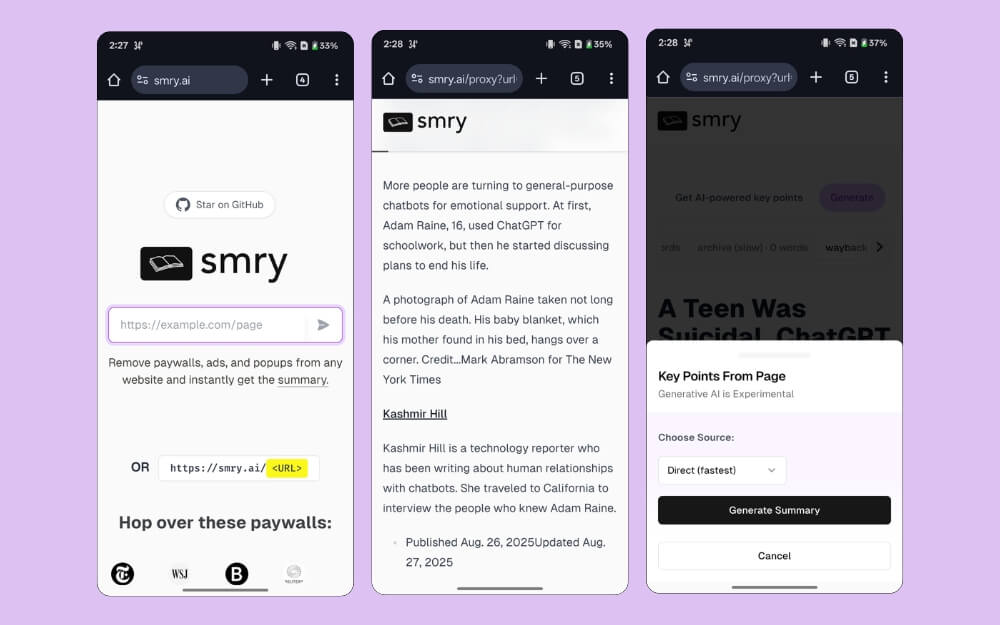
SMRY is the best reliable 12-ft alternative. It lets you easily unblock almost all websites with soft paywalls, including overlaid paywall restrictions and JS-based popups, and even pulls cached versions, which work great for older articles that were recently put behind paywalls.
Since it is an open-source tool, it is not only free to use and doesn’t consist of any ads; in addition to this, the modern interface makes the reading experience delightful. You can simply input the URL, and the website generates the paywall-free content.
You can switch between different formats if one fails to load the content. It also comes with a useful AI-generated summary in different formats, including generating it from the Wayback Machine without any limitations.
While the site removes all the distracting elements from the site, including ads, for a better reading experience, it doesn’t allow you to customise your reading experience, meaning you are limited to the single default font from the website, which is different from the font used on the website you are reading.
Pros:
- Best reliable option to 12ft ladder
- Unlock paywall content from almost any website
- Modern and easy-to-use interface
- Open-source, ad-free and free to use
- Useful AI summary option
- Share article links with others
Cons:
- Requires manually copying and pasting between sites.
- Some sites may not load
Archive.is
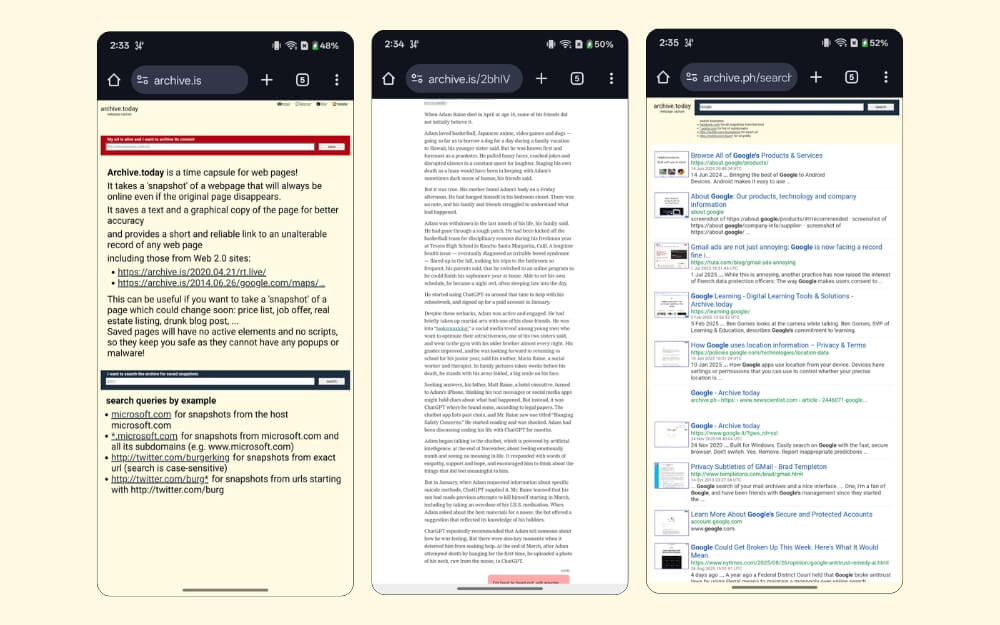
Archive. is is a great option if you want to unblock websites with strong paywalls. It is especially useful for students or researchers who want to include paywalled free articles as citations.
Not only does Archive bypass paywalls, it also saves a permanent snapshot of the page, making it remain accessible even if the site deletes it or edits it later.
Since Archive.is uses crawlers to fetch content; most sites allow it without restrictions. Because of this, Archive works for most sites, including the strong paywalled ones that usually fail to load using other tools.
The only drawback is that the site isn’t optimized for mobile, so the reading experience can feel cluttered on mobile. Fortunately, it retains the same font and style used on other sites. It also strips ads and other distracting elements from the page.
Another advantage is that you can also share the unpaywalled version using a link without worrying about others hitting the paywall content.
Pros:
- Unlocks content from websites with sticker paywall controls.
- Easy to use
- Free
Cons:
- Not optimized for mobile
- The reading experience isn’t that great
Remove Paywall
Remove paywall. com lets you easily unblock sites without dealing with copy-pasting links between sites. It is available as an extension for Google Chrome and a shortcut on iOS. Once you set up, you can simply share the link to the shortcut, and you will automatically be redirected to the paywall-free version.
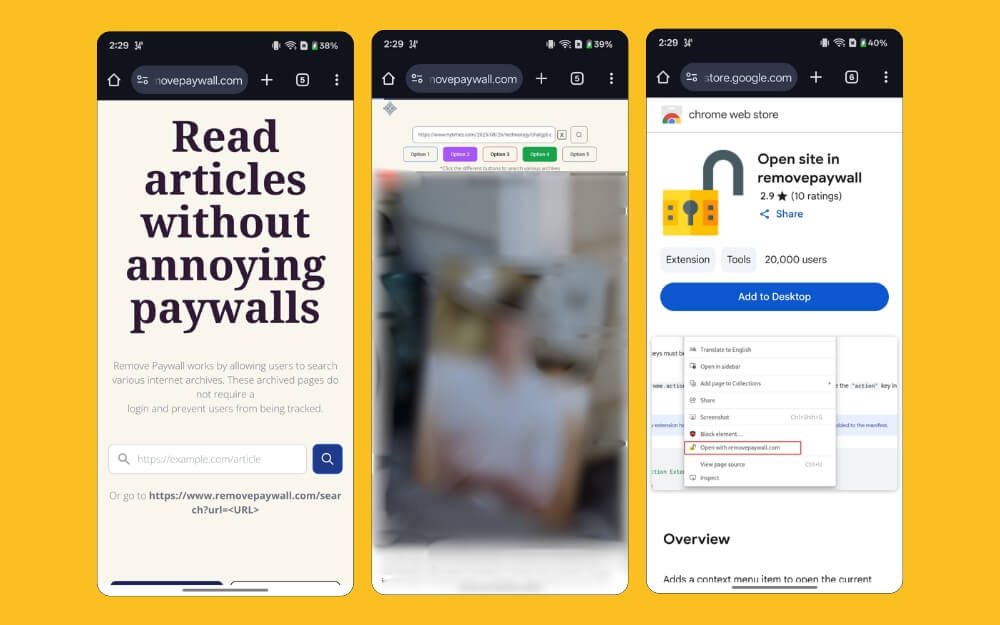
The tool works by using an archive.is to remove paywalls. Since Archive.is is already effective at better bypassing most paywalls; you get a similar function here.
However, it also carries the same drawbacks. The site is not mobile-friendly, and reading articles might feel somewhat cluttered. But on the plus side, and the same as Archive, it retains the style and font of the website. It also removes the ads and other distracting elements.
Android users still need to rely on manually copying and pasting links unless they use a browser with extension support. You can install the same Chrome Web extension on mobile and get similar functionality.
On iOS, you can install the shortcut, share the link, and select this shortcut, and you will automatically be redirected to this website with the paywall removed.
Pros:
- Remove the hassle of copy-pasting between sites
- Use extension and shortcut support on websites
- Simple and easy to use
- Unlock content from any website
Cons:
- Still redirects you to external sites
- Requires you to install an extension for Chrome and a shortcut for Android
- Android users need to use a dedicated browser with extension support.
Feedium
If you want to unlock Medium, Feedium is the go-to tool that you should be using.
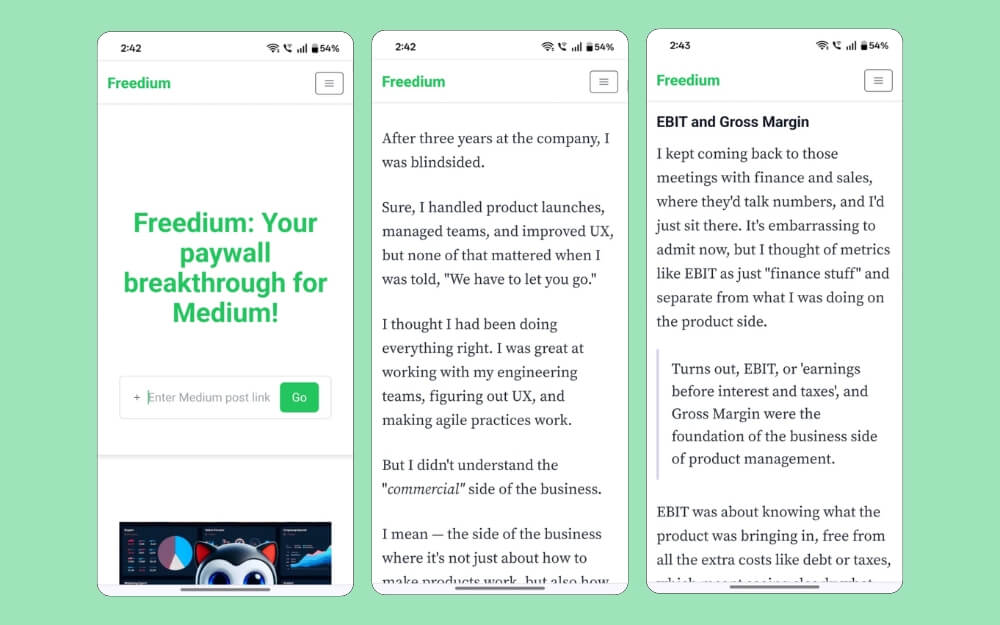
Most paywall remover tools struggle with Medium restrictions; Freedium does it with ease. The site works for almost all paywalled Medium articles that you might come across. All you need is to copy the URL and paste it into the site, and you get a paywall-removed version in minutes. And there is no limit on how many articles you can unblock.
A big advantage of the tool is that you get a similar experience with the same Medium font style and layout, so the reading experience feels familiar. However, you can’t adjust the size and theme.
Since it runs on the web version, the experience isn’t as smooth as the one you get on mobile, but it is a handy way to save a couple of bucks if you often hit Medium’s paywall limits.
Pros:
- Unlock any medium paywalled content.
- Uses the same font and Medium layout to offer a similar experience
- free to use
- unlimited unlocks
Cons:
- Requires you to copy and paste links between sites.
- Only works for medium articles
Bypass-paywalls-chrome-clean
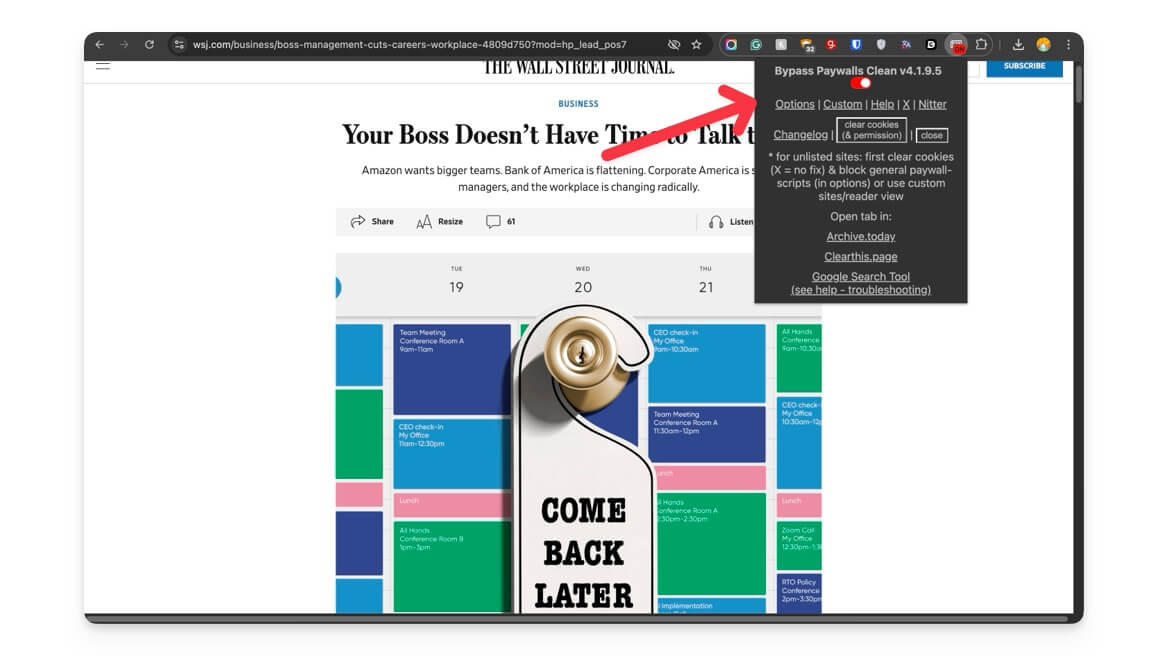
Bypass Paywalls Clean is one of the most powerful paywall removers available today. It eliminates the limitations of all other tools in this list.
First, it works for almost every site thanks to its multi-layered rule engine, which uses different paywall unlocking methods to remove paywalls.
Next, you don’t need to copy and paste the links between tools; the extension lets you read articles directly on the site without redirecting to any external website.
However, because of its popularity, browsers like Google Chrome and Firefox removed it from the platform. That means you will need to install it manually. The extension is available on all major platforms, including mobile; however, since it requires manual steps, you need to follow different complex steps to set up on the devices.
Another limitation is that the extension works locally; you cannot share paywall-free versions with others. They will also need to install the extension to read the paywall-free version from their end. Despite these limitations, since it is a one-time setup, it works seamlessly for everyday use without dealing with links.
Here is how you can set it up on Android, Chrome, and iOS.
Chrome:
- Download the Chrome extension on your device, whether Windows or Mac.
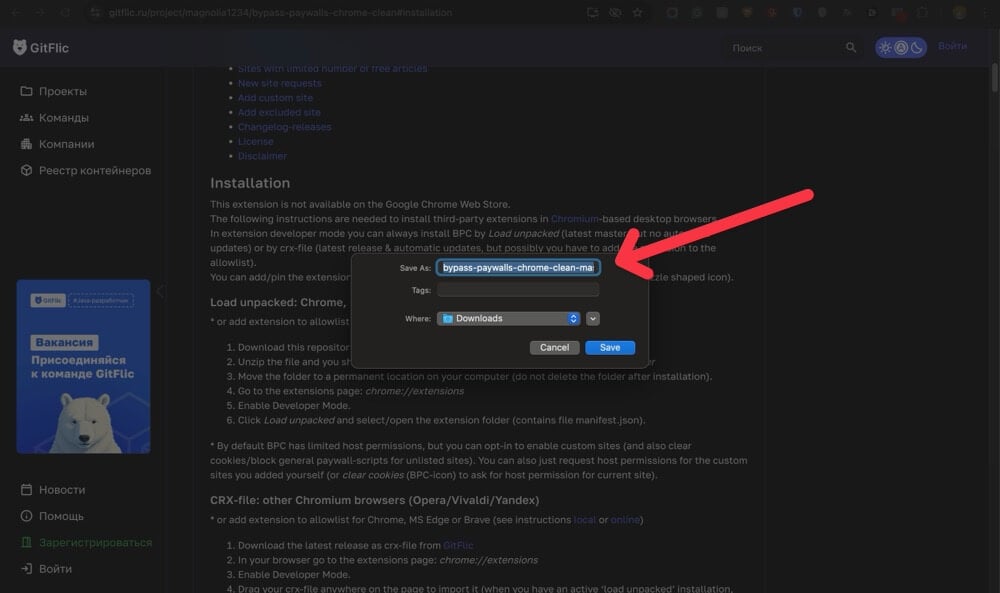
- Extract the extension and save it in a secure folder. Ensure you don’t accidentally remove this from your device.
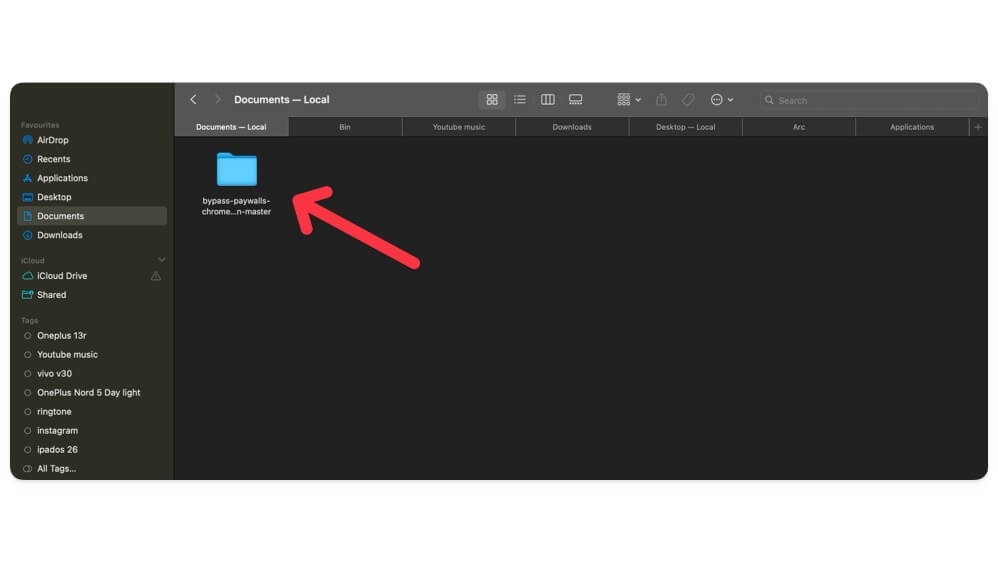
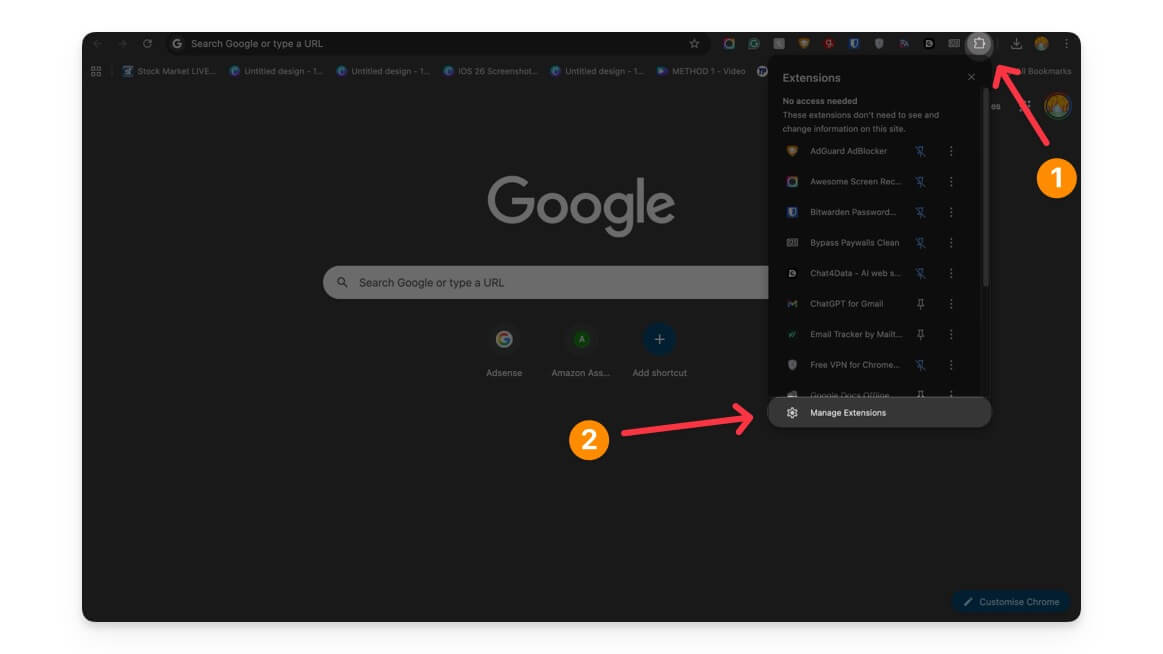
- Open Google Chrome and click on the extension icon, and then tap on Manage Extensions.
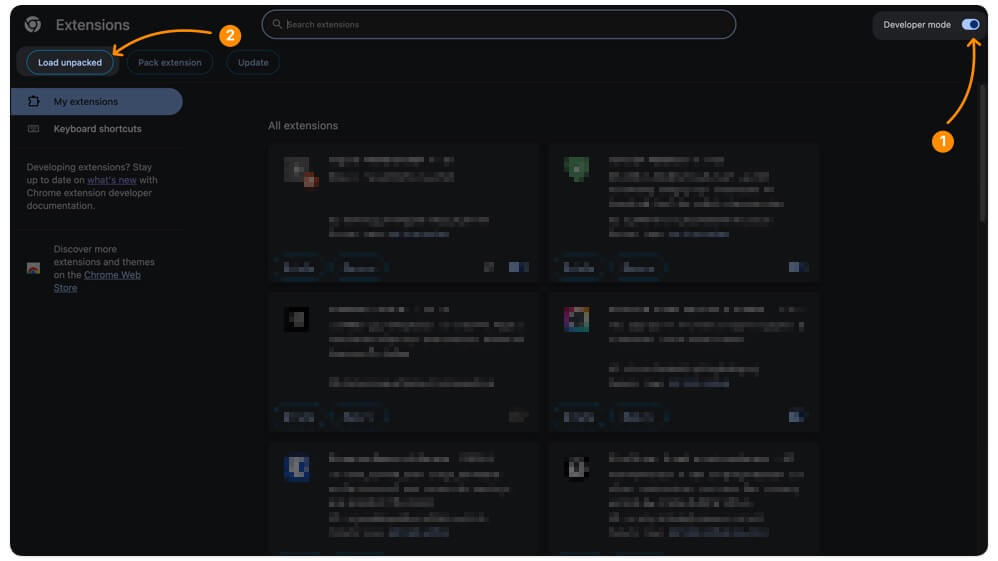
- Enable developer options from the top right corner, and then click on the load unpacked.
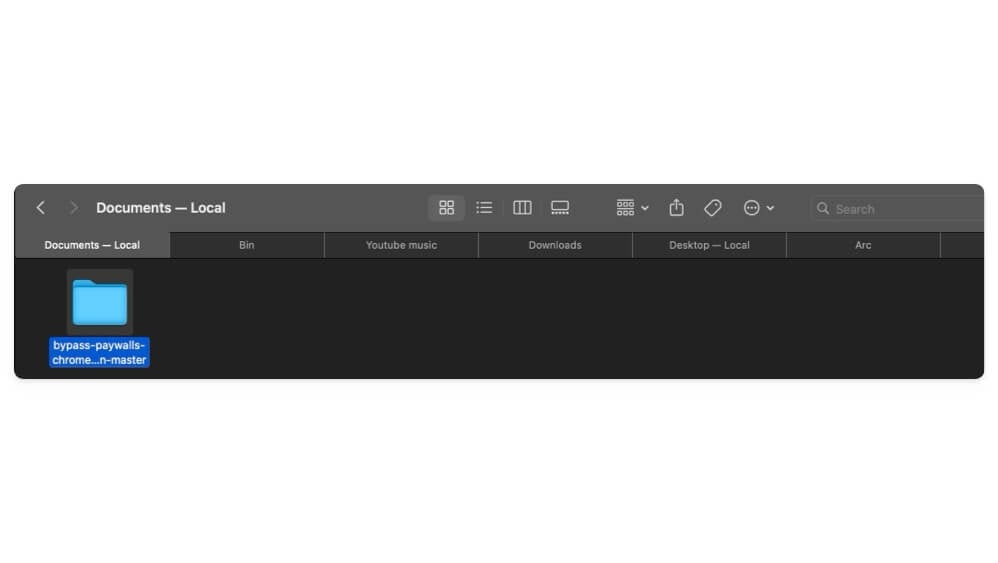
- Select the folder you saved in a secure location.
- Now select the extension, that’s it. Now you can visit any website and remove paywalls for any website. To manage the extension here you can enable or disable it to get more control. Pin the extension to the extension bar and tap on it to adjust the settings.
Android:
To use this extension on Android, you need to use a browser with extension support. There are plenty of Android browsers that support extensions; however, Quetta browser is the best option, which is also recommended by the developer.
- Install the app on your Android smartphone. Google Play Store link.
- Now download this extension file and save it locally on your device.
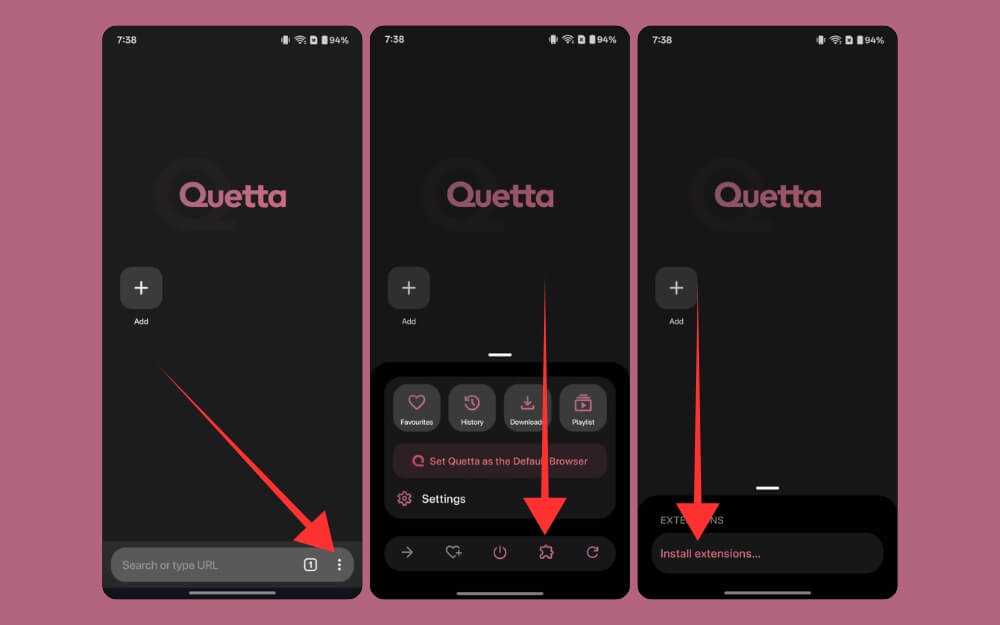
- Open the browser, click on the three-dot menu, tap on the extension icon, and then select the Install extensions option.
- Click on the developer options and ensure the developer option is enabled, and tap on the from.zip option.
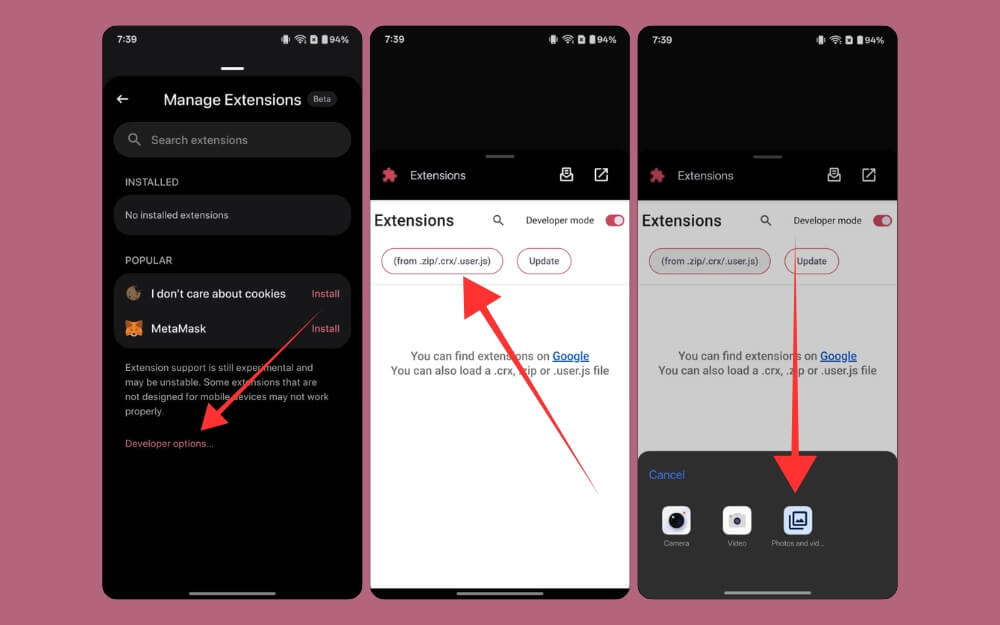
- Now select the extension and load it onto your browser, and enable it. You can visit any website, and it should work without any issues.
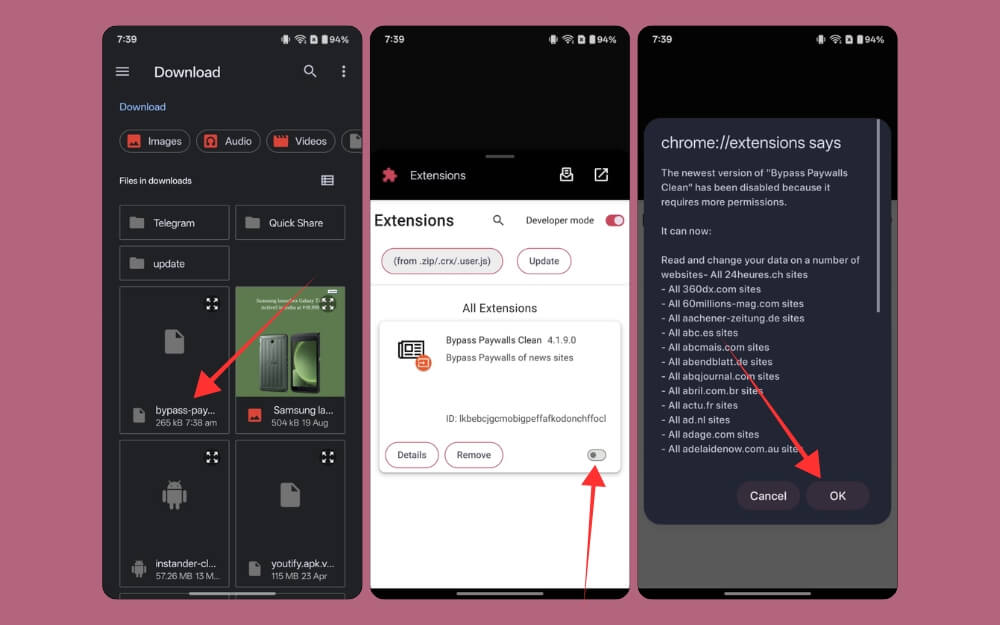
iPhone/iPad:
For iOS, you can use any adblocker with custom instructions and paste the following installation into the adblocker and access the site without any paywall limitations. However, for a better experience, it is recommended to use the shortcut on iOS.
Pros:
- Hands down, the paywall remover extension
- Read content from the original website without redirections
- works for almost any site
Cons:
- Requires going through a complex setup initially.
Those are the five best tools, extensions and websites you can use to remove paywalled content for almost any website. SMRY is the best and reliable alternative to 12ft ladder, and the Bypass Paywalls Clean extension is a powerful option, letting you read content from the original website without redirections.
We at TechPP recommend these methods for educational purposes only. It is worth remembering that these websites depend on subscription revenue for their existence. Ensure that you use these extensions fairly without hurting the revenue of our small publishers. To support us for more helpful guides like this, you can add our website to your preferred source on Google to view our latest updates.
FAQs on Best 12ft Ladder Alternatives
1. Do they work on both text and multimedia (like embedded videos or images inside articles)?
Yes, most of these tools also work for both text and multimedia.
2. Which option is the fastest for everyday use?
Bypass Paywalls Clean (number 5) is the best option. It does not require you to copy text and links between websites, and it lets you read in the same page without any extra steps, which saves a lot of time; however, it requires you to set up extensions manually on your device.
3. Which one is the easiest for non-technical users to set up?
SMRY is the best option; it comes with a simple and easy-to-use interface. You can simply insert the link, and the website removes the paywalls; it also works for websites with strong paywalls.
4. Can these tools also download or export the full article for offline reading?
You can use Google Chrome or any browser’s built-in download option to download the webpage and read it offline. To download, click on the three-dot menu and click on the download page or the save page offline option.
5. Can these tools interfere with other browser extensions (like ad-blockers)?
By default, these tools strip out ads and other elements on the website, giving an ad-free reading experience. You can also use an adblocker extension alongside without any issues.

