

Quick Answer
AI videos are now hard to spot, but you can still verify them using tools like Google Gemini, Hive Extension, and Tencent’s detector, or by manually checking for unnatural motion, eye blinking, repetitive gestures, odd lighting, and soft skin tones before trusting or sharing any video.
AI video generator models have significantly improved over the last few years. Now it’s almost hard to differentiate between a normal and an AI-generated video these days, and since these models are available for everyone, many users are using these tools to generate videos and post them on social media.

Lately, my entire social media feed is filled with AI-generated videos. While people who are aware that AI videos can distinguish between real and fake videos, most people who are not familiar with AI are falling for those AI videos, believing they are true.
Even my mother’s entire YouTube feed is also filled with AI slop, and unlike me, she believes everything that she sees.
Fortunately, there is a way to detect AI videos. In this guide, you are going to learn how to identify AI-generated video and 5 helpful tools that you can use to easily distinguish between whether the video is real or AI-generated.
Table of Contents
Best AI Tools to Detect AI-Generated Videos
Google’s Gemini App
Google Gemini is one of the most popular and widely used AI models right now, and Veo 3.1 is their latest video generation model.
Many people use it or generate AI-generated videos; however, fortunately, while it has strict policies and prevents users from generating misleading content, since it is an AI model, users can still trick it and produce misleading content.
Fortunately, Google embeds a synthetic ID for all videos and images generated using any Google model, and now they have verification tools to check whether it’s an AI-generated video.
And very recently, Google has also brought this support to the Google Gemini app. While the feature is designed to identify AI videos created by using Google models, in the testing, I also found it also works for videos generated using other models and even videos with high edits, which is designed to make it look real.
Wow!!! Google's AI video detector is very good at identifying AI videos. It also identifies videos that were not generated by Gemini models pic.twitter.com/QRf85O34w7
— Rameshreddy🏁 (@rameshreddy71) December 19, 2025
Here’s how you can use Google Gemini to find whether it’s an AI-generated video or not
Step 1: Open the Google Gemini app on your phone, and sign in with your Google account. You can also access Gemini on the web.
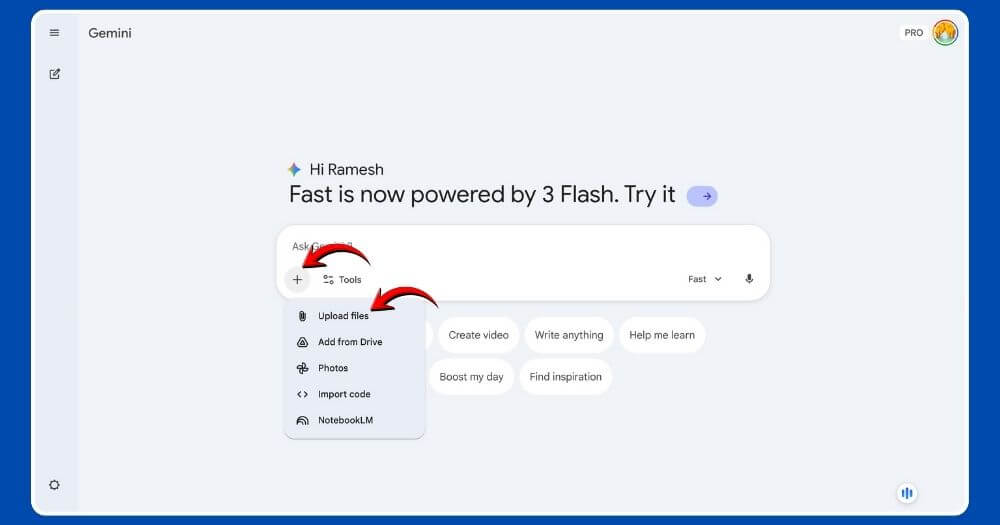
Step 2: Click on the plus icon and select the ” Upload file option, and upload the video to the AI. Wait until it uploads.
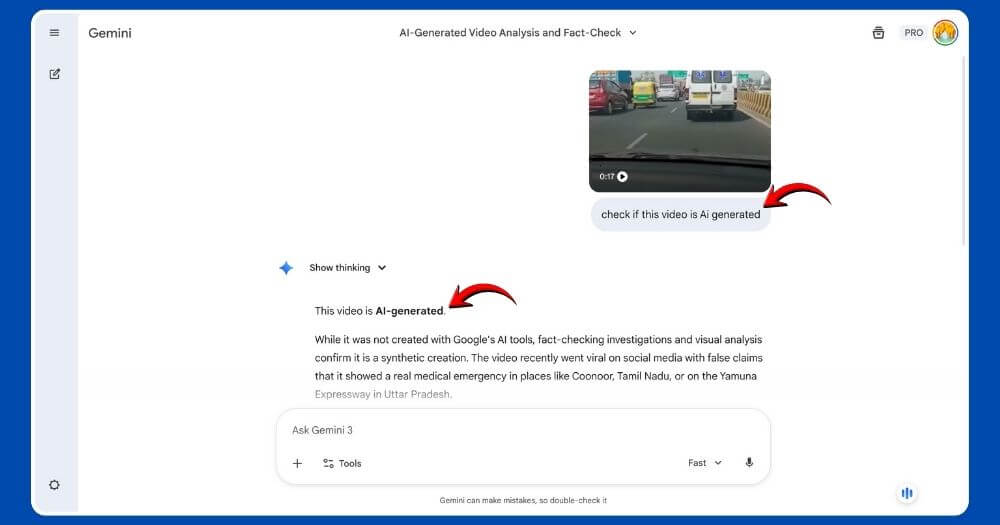
Step 3: And enter this prompt: “Is this video generated by AI?” The Gemini app will identify that it’s an AI-generated video.
Test Results:
| Video Type | Result | Accuracy |
| Gemini Video (Watermarked) | Detected | Pass |
| OpenAI Sora (Watermarked) | Detected | Pass |
| Viral Fake Video | Detected | Pass |
Download Links:
- Gemini Web: gemini.google.com
- Android App: Google Play Store
- iOS App: Apple App Store
Hive Chrome Extension
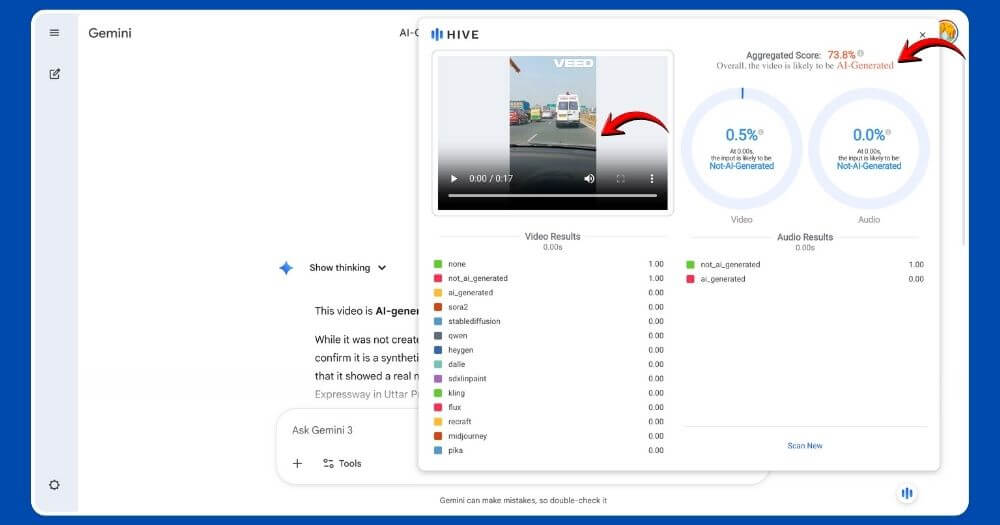
Most of the video detectors are available as web-based tools or apps, but Hive is available as a Google Chrome extension. The advantages of using extensions are that they are available on almost any webpage and are easy to access.
Hive can detect AI-generated text, images, videos, and even audio. You can simply tap the hive icon on any website, which you can control and place anywhere on the screen if you find the default position annoying, and the video detector is also very accurate in identifying AI-generated videos.
I have tested with three samples, and it passes all the tests. You can also try their standalone tool to identify fake AI-generated videos.
Test Results:
| Video Type | Result | Accuracy |
| Gemini Video (Watermarked) | Detected | Pass |
| OpenAI Sora (Watermarked) | Detected | Pass |
| Viral Fake Video | Detected | Pass |
Tencent AI Video Detector
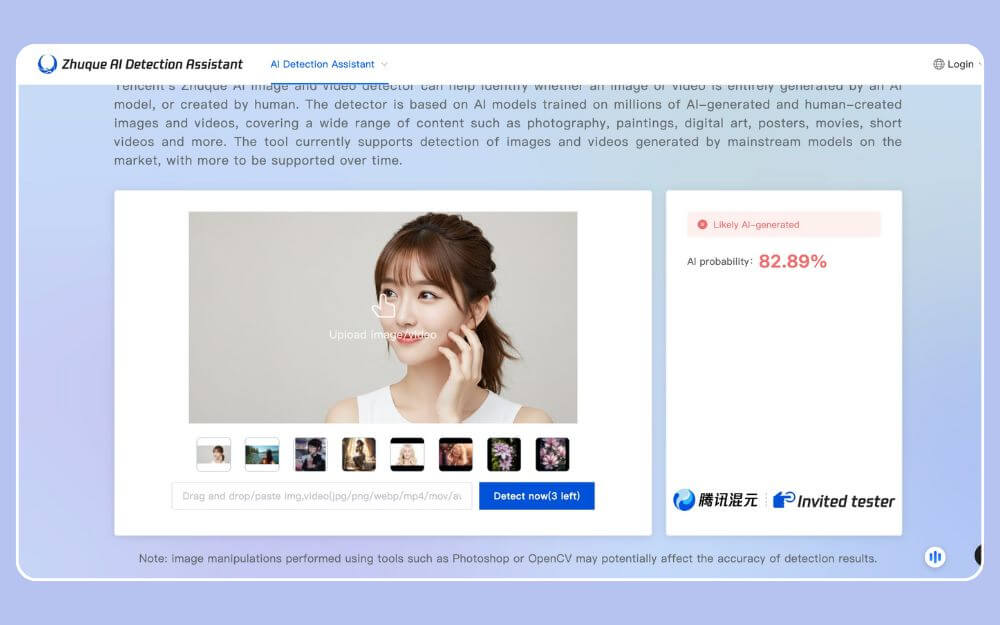
Tencent is a popular company in China that owns WeChat and also other popular games. It also offers a minimal AI detection tool that can detect AI videos, images, and text. Unlike most video detector tools, this tool just works, but it is not as accurate as the other tools that have been listed above.
For example, it failed to detect the AI-generated videos without any watermark, and only the video passed the test. It showed that the video wasn’t AI. It is free to use, and it offers 5 free credits per day to help you detect AI-generated content, images, and videos.
Test Results:
| Video Type | Result | Accuracy |
| Gemini Video (Watermarked) | Detected | Fail (in some cases) |
| OpenAI Sora (Watermarked) | — | Unable to upload |
| Viral Fake Video | Not Detected | Fail |
Those are the three best working tools you can use to detect AI-generated and deep fake videos. There are hundreds of tools that claim to be AI video detectors, but most of them don’t work and require a paid plan for use.
Since AI generation models can improve every day, depending on these tools, it may not be a safe bet, although there is still a possibility of removing the ideas and modifying the video to look more natural. You can still spot AI-generated videos thanks to their limitations.
Since AI video generation is evolving very fast, here are some manual techniques you can use to identify errors and inconsistencies and flag them.
How to Manually Detect AI-Generated Videos
Find any natural moments: Check basic moments in the video. While AI models have significantly improved this over the years, they still struggle to produce exact physics moments in the real world. You can observe the objects’ moment and how they are moving.
Unnatural eye moment and blinking: If you want to identify deep fake videos, look at the eye moments of the human character in the video. Deep fakes are known to blink faster, slower, or at specific time intervals. If you find any eye moments unusual or if the character doesn’t blink at all, the video might be a deepfake.
Also check for any respective and robotic gestures: Check for any repetitive moments, this is the most common way to detect any fake or AI-generated, especially when using a single character, also look for any robotic movements like eyes, hands, lips, and more
Look at the skin tones: Most of the AI-generated videos, which consist of humans, have softer skin tones, and also check the lighting and background to find any unusual activity.
Fact check before sharing information: AI videos are going viral in minutes; however, before sharing them with anyone, fact-check the source before sharing it on social media.
Conclusion
Those are the tools and manual methods you can use to detect AI-generated videos. Since AI video generators are becoming powerful, it’s high time for brands to create a new way to easily detect and label them, so that users can find them easily and differentiate between what’s fake and what’s AI-generated. I hope you find this guide helpful. Out of all the tools, Google Gemini works the best, followed by Hive. If you still have questions, see the FAQ section below.
FAQs on Detecting AI-Generated Videos
1. Can AI video detectors ever be 100% accurate, or will there always be false results?
No AI detector is 100 percent accurate, unless there is a way to track AI and find if it’s an AI-generated video. For example, for every video, Google adds a synthetic ID, which allows it to identify whether it’s an AI-generated video; however, users can still modify the clip, erase the ID and make the video unpredictable. So, for now, no AI detector can detect the AI-generated videos 100 percent.
2. Do social media platforms like YouTube, Instagram, or Facebook automatically check videos for AI generation?
Currently, there are no social media platforms that check for AI-generated videos; all platforms currently allow users to manually label the AI content before publishing.
3. Are there any privacy risks when uploading personal videos to AI detection tools?
Yes, since they use different models to detect the videos, tools may use your videos to train their models. So, it is recommended not to upload any personal videos to these AI video detection tools.
4. Is there any way to detect AI-generated videos offline without uploading them anywhere?
Yes, you can manually find AI videos by observing key details such as eye movements, hand movements or any other object movements to find if it’s an AI-generated video.
5. What’s the safest way to double-check a suspicious video before believing or sharing it?
As always, before sharing, fact-check the video. You can use the above tools to check whether the video is fake or real.

