

Quick Answer
- Open the phone camera and scan around the room for any unusual blinking lights.
- Turn off Wifi and check for strange network names.
- Install a hidden camera detector app and follow the on-screen instructions to find the spy camera.
- Finally, turn on the flashlight and shine it around the room, looking for reflections from camera lenses.
While going out is supposed to be fun, when you stay in a hotel, use public restrooms, or even go to trial rooms in clothing stores, it’s good to ensure there aren’t any hidden cameras. While authorities and many organizations are working their best to ensure you won’t face such bad experiences, we still have to check and ensure there aren’t any hidden cameras before using them.
Luckily, if you have your smartphone, it’s easy to find all those cameras and have peace of mind. So, how can you detect hidden cameras using your smartphone? Read along to find out.
Table of Contents
9 Ways To Detect Hidden Cameras With a Smartphone
Sl No | Method | How to Do It |
|---|---|---|
1 | Phone Call Detection | Make a phone call and listen for any unusual buzzing or crackling sounds, then trace the source. |
2 | Using Smartphone Camera | Open the camera app and scan around the room for any unusual blinking lights that appear on the screen. |
3 | Wi-Fi Scanning | Turn on Wi-Fi and check for strange network names that could be linked to hidden cameras. |
4 | Using Hidden Camera Detector Apps | Install a hidden camera detector app and follow its instructions to scan for hidden devices. |
5 | Flashlight Reflection Test | Turn on the flashlight and shine it around the room, looking for reflections from camera lenses. |
6 | Observe the Room with Lights Off | Turn off all lights, close curtains, and look for IR lights typically used by night vision cameras. |
7 | Physical Inspection | Check for any unusual devices or items placed suspiciously around the room. |
8 | Using Dedicated Detection Devices | Use RF detectors or other specialized devices designed to detect electronic signals from hidden cameras. |
9 | Consult TSCM Professionals | If unsure, hire experts in Technical Surveillance Countermeasures to conduct a thorough sweep of the area. |
Find a Hidden Camera in the Room by Making a Call From Your Smartphone
Remember those old speakers that make a specific sound when you receive a phone call and are placed next to it? That sound was because of the electromagnetic disturbances caused by the signals from the phone and some components inside the speaker. Well, guess which device can be found with this sorcery? Follow these steps to find out:
- Make a phone call with your iPhone or Android.
- Now, observe for any buzzing or crackling sound.
- If you find any, look for the source of the sound.

Even if you don’t find any device, contact the respective people and ask about the source of the sound.
Use a Phone Camera App To Detect Hidden Cameras
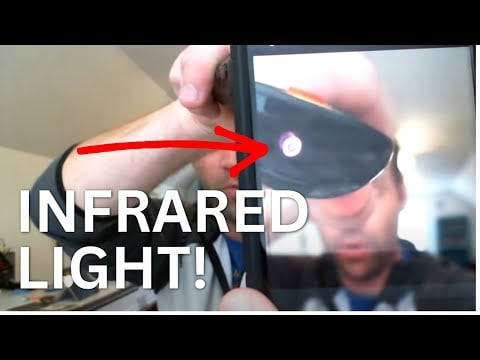
Cameras are called photographer’s eyes, and this eye will guide you from those creepy hidden eyes. How? Usually, these hidden cameras use IR to capture data. While they can’t be seen through the naked eye, you can spot them using your smartphone’s camera app:
- Open the camera app on your smartphone
- Start to look around the place through the camera.
- Check if you can see a blinking light source that wasn’t visible before.
- If you do, then look at the area to see if there are any hidden cameras.
Here is the video demonstrating how IR light looks from a smartphone camera. Point your smartphone camera at different places in your room. If you detect any hidden IR light source, it could be coming from a hidden camera. However, not all hidden cameras have IR.
Detect Hidden Cameras by Scanning Wi-Fi With a Mobile Phone
To do its pesky activities efficiently, many hidden cameras must be connected to Wi-Fi to transfer the data to their creepy owners. Check if you can find any unusual hidden cameras detected nearby.
- Turn on Wi-Fi on your smartphone.
- Visit the Wi-Fi page and look for any unusual names.
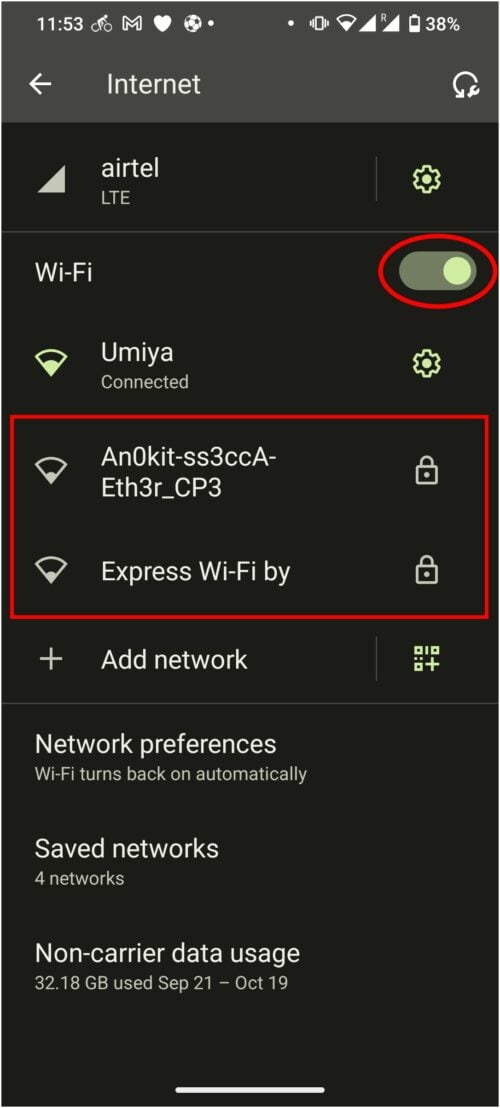
Even if you find unusual names, they may not be hidden cameras since some people’s creative minds are at much higher levels than appreciable. But follow the rest of the guide to discover more ways to spot hidden cameras using your Android or iPhone.
Use Third-Party Hidden Camera Detector Apps

While cameras can help you find IR cameras, they still can’t be considered the best app to detect hidden cameras since it was never its purpose. For that, you need apps that are built for this purpose. While many apps claim to do the same, we think the hidden camera detector is the best for detecting hidden cameras.
Install the app and check various options and instructions for detecting hidden cameras with the app. In addition to what we have suggested, you can find many options from the Play Store and App Store.
- Hidden Spy Camera Detector (Android)
- Hidden Camera Detector – Spy Camera Finder (Android)
- Hidden Camera Detector (iPhone)
- Spy Hidden Camera Detector (iPhone)
- Electromagnetic Detector EMF (iPhone)
- Hidden Spy Camera Finder (iPhone)
Turn On the Flashlight To Find Hidden Cameras

Lenses’ primary nature is to reflect when exposed to a light source. We will use this characteristic to spot hidden cameras. Turn on the flashlight and flash it around the room. Be sure you are close to objects while checking since the hidden camera lens will be comparatively small, and so will its reflection. To spot them, you need to be closer to them.
Specifically, look at smoke detectors, electrical outlets, power strips, wall hangings, clocks, clothes hooks, etc.
Bonus: Other Ways To Detect Hidden Cameras
While smartphones are one of the best ways to detect hidden cameras, there are other ways to protect your privacy.
Check if There Are Any Unusual Devices or Items in the Room
Wherever you go, check thoroughly to ensure everything is safe. Look around for any suspicious object or even a thing. If you feel uncomfortable or suspicious about a particular item, contact the relevant people and clarify your doubts.
Switch Off All Lights and Observe the Room
As mentioned, many hidden cameras use IR sensors to capture data. Please turn off the lights, draw the curtains, and use the camera on your smartphone to spot them. This is specifically helpful in detecting night vision cameras.
Use the Help of Experts To Detect Hidden Cameras
Despite all the methods mentioned above, you might still be unable to detect hidden cameras in the bathroom or other spaces. So it is best to take the help of experts (Technical Surveillance Countermeasures (TSCM) specialists or sweep professionals) to spot all of them and ensure peace of mind. A quick search on the internet can easily help you find many experts who can detect hidden cameras for you.
Since we are hiring someone for their service, it might not come cheap. But if you can afford one, this might be one of the best ways to ensure your privacy.
Scan for Hidden Cameras Using Dedicated Devices

While smartphones are mostly useful for detecting hidden cameras, devices for this use case can give better results. If you travel frequently, investing in such a device is a good idea.
Specialized RF detectors can be used to detect secret recording devices. The detector is very sensitive to the radio waves wireless cameras emit. The detector gives audible signals that get more frequent as you move closer to the source.
What Are Hidden/Spy Cameras?
A hidden or spy camera is a small video camera that records people without their knowledge. They can be used for security purposes, such as monitoring a home or business, or they can be used to record people for personal use secretly. Hidden cameras usually have an infrared (IR) LED to record clear images in low-light or dark conditions.
While hidden cameras can be used for positive purposes, they have also been abused by people who use them to invade the privacy of others. In some cases, hidden cameras have been found in public bathrooms and changing rooms, where people are recorded without consent. This has led to concerns about personal privacy and the misuse of hidden camera technology.
What Does a Hidden Camera Look Like?
There are various types of hidden cameras, each with its specific purposes. Some common types of hidden cameras include smoke detectors, screws, USB chargers, and routers. Hidden cameras can come in various shapes and sizes disguised as almost anything. It is important to know how someone could be spying on you and take steps to protect yourself from hidden cameras.
Where are Hidden Cameras Usually Located?
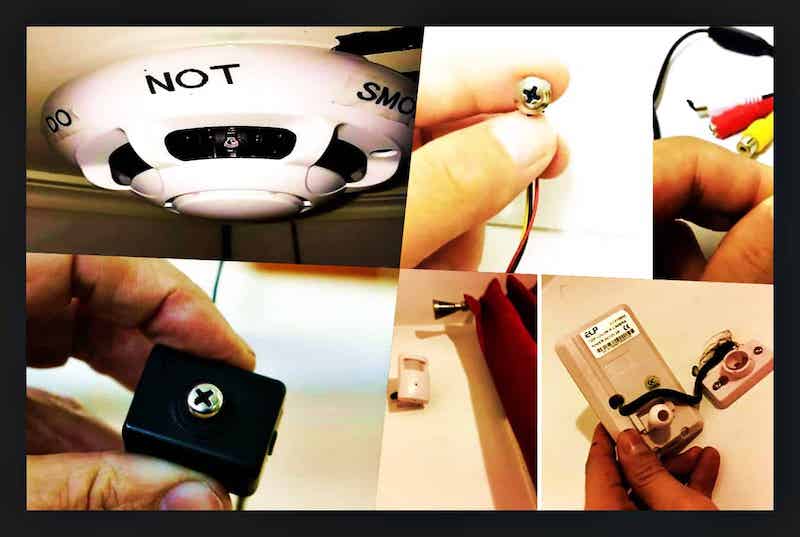
Hidden cameras are usually located in these areas:
- Electronic Devices like phones or USB sticks. They can be hidden in many places, including power outlets and telephones.
- Smoke Detectors and Alarms
- Mirrors
- Toilets and bathrooms – on the ceilings, in the air vents, under the sink, or behind the toilet.

What Do You Do if You Find a Spying Device?
When you find a hidden camera, the first thing to do is not to freak out. Using your smartphone, take a picture or video of the device and contact the Police. Be sure not to touch or interact with the device, and let it stay where it is until you get law enforcement support.
That’s it!
It’s a shame we must still be concerned about cheap things like hidden cameras in public spaces. With this guide, I hope you can have peace of mind when using an unknown place; let’s hope people’s mentality to use hidden cameras will end eventually. According to you, what measures do the authorities need to take to end this? Let us know in the comments.
FAQs Around Detecting Hidden Cameras

How to detect a hidden camera in a mirror?
To detect hidden cameras in mirrors, check around the mirror to see if you can spot any wires or blinking lights. Slightly press against the mirror and see if there's any gap between the glass and the reflective surface. If you couldn't spot any, then it might be a two-way mirror. And someone from the other side may be able to view what's happening on your side. You can also flash your smartphone's torch light and see if there are any camera lenses.
How to detect hidden cameras from the light bulbs?
To detect hidden cameras from the light bulbs, turn off the lights and see if you can see any glow from those bulbs. If you notice anything suspicious, report it to whomever it is concerned.
How to Detect Hidden Cameras in Smoke Detectors?
To detect hidden cameras in smoke detectors, see if you see any kind of darker glass on them. Check to see if you can notice any kind of glow around the smoke detector. But never ever dismantle or unwire anything inside a smoke detector.
What is the easiest way to find a hidden camera?
There are a number of ways to detect hidden cameras using your smartphone. One way is to make a call and walk around the room, looking for any devices that may be recording you. Another way is to download an App that can help you detect hidden cameras. There are a number of different Apps available, and they vary in accuracy and features. However, most of these Apps are fairly reliable and can help you find hidden cameras quickly and easily.

