

Quick Answer
There are plenty of offline GPS navigation maps available for Android or iPhone. Google Maps is a top pick for just about anywhere you want to go. Sygic is ideal if you’re driving a lot and need traffic updates. MAPS.ME is perfect for globetrotters and Avenza is the best option for importing custom maps and more. Pick one that suits your needs.
Digital maps have completely changed the way we explore and connect with the world around us. Today, if you want to go somewhere, you can simply type in the address, and the map will show you the way with clear step-by-step directions.

Maps have made it easy to explore new places and provide instant access to a wealth of information with just one click. Most of us use maps online. But what happens when we’re in a place where the Internet signal is weak or when we have no Internet connection at all?
Don’t worry, many apps allow us to use GPS even when we are offline. In this blog post, we will introduce you to the 10 best offline navigation apps. These apps offer turn-by-turn directions, plan routes, and provide information such as points of interest, landmarks, and restaurants without the need for an internet connection.
Table of Contents
Best Free Offline GPS Apps for iPhone and Android
Sl No | App | Map Coverage | Update frequency | Ease of Use | Additional Features |
|---|---|---|---|---|---|
1 | Google Maps | Extensive (220+ countries) | Maps expire after 15 days; Need network connection to update | Very High | Turn-by-turn navigation, limited traffic info offline |
2 | Apple Maps | Limited availability | Regular | High | Turn-by-turn navigation, integrates well with iOS |
3 | Sygic GPS Navigation & Maps | Extensive | Updates 3 times a year for free | High | Real-time traffic, speed limits, dashcam, voice navigation |
4 | NaviMaps | Regional (South Asia) | Regular | Moderate | Voice-guided in multiple languages, detailed local data |
5 | Maps. Me | Very High (Also covers islands) | Once in a month | High | Simple interface, searchable POIs, route planning |
6 | OsmAnd — Maps & GPS Offline | High | Regular | Moderate | Plugins for additional info, customizable |
7 | HERE WeGo | High for specific needs | Regular | High | Simple navigation, real-time traffic online |
8 | Avenza Maps | High | Updates and publishes new maps | Moderate | GPS tracking, custom map import, geared toward outdoor use |
9 | Waze | High | Realtime updated with community | Very High | Real-time traffic, community-driven alerts, gas prices |
10 | MapFactor Navigator | High (Community based) | Regular | High | TomTom maps for premium, Android Auto, night mode |
Google Maps
Highlights:
- Default navigation app on most of the Android devices.
- Available in 220 countries and territories.
- Download and save any location on the Map for free.

Google Maps is the default navigation app on Android devices and is also available for iPhones. The app supports offline maps. You can download a specific area or place, like a city or town, indoor maps including hotels, airports, and more, and save locally on your device. Google Maps is available in over 220 countries and territories, You can search and save any location on the map.
While you use maps offline, You can search for places, find businesses, and get driving directions. Features such as bike routes, walking directions, and traffic information are unavailable when you use Google Maps offline. However, the turn-by-turn feature is supported in offline mode.
The offline maps are automatically updated with the new information when you reconnect to the Internet. If you’re using Android, Google Maps is the default map app, You can download it from the app store for iPhone. Google Maps is also available on Windows, Mac, web, and even Apple CarPlay.
Offline maps expire after 15 days. You must connect to the Internet and enable automatic updates to continue using it offline. If your device supports a microSD card, you can transfer data to your SD card. Go to Profile icon > Offline maps > Gear icon > Storage Preferences and select Device on the SD card.

Pros:
- Extensive coverage in over 220 countries.
- User-friendly interface with reliable turn-by-turn navigation.
- Ability to save locations and use navigation offline.
Cons:
- Offline maps expire after 15 days and require internet to update.
- Limited functionality offline; no real-time traffic updates or complex route options.
How to use Google Maps offline:

- Step 1: Open the Google Maps app on your smartphone.
- Step 2: Tap on your profile picture in the upper right corner.
- Step 3: Tap “Offline Maps. “
- Step 4: Tap on “Select Your Map.”

- Step 5: Move the rectangle over the area you want to download. You can easily drag the rectangle and zoom in and out of the map area you want to download.
- Step 6: Click “Download.” The map area will be downloaded and will be added to the downloaded maps section. By default, downloads happen only over the WiFi network. You can go to the settings > Offline maps settings > Download preferences and then select Over Wifi or mobile network and click Save to download maps over the cellular network as well.
Apple Maps
Highlights:
- Default navigation app on iPhone.
- Download and save any location on the map for free.
- Currently limited to a few locations and requires a device running on iOS 17 or later.

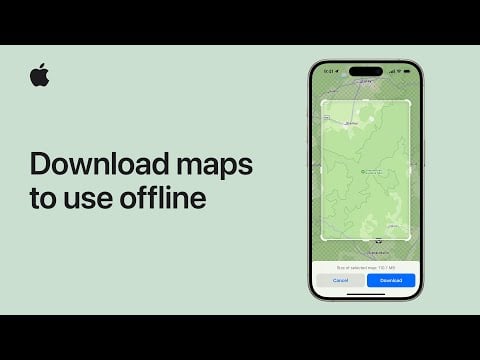
Apple recently introduced support for offline maps in Apple Maps. Similar to Google Maps, in iOS 17, you can download parts of the maps and get turn-by-turn navigation, find places nearby, get directions, and more.
You can search for a specific area in the app or a location and download it offline. At the time of writing this article, Apple’s offline map support is limited to a few locations (Update May 2024, Still it is limited to a few areas). You can check the availability of offline maps for your location from the settings. Open Apple Maps, Tap on the avatar, select the area or location, and click download to save the map offline. You can see all downloaded maps in the Downloads section on the map.

We have a detailed guide on how to use Apple Maps offline. You can visit the guide for a more detailed step-by-step process. To save you time, here are some quick steps you can follow to download Apple Maps on your iPhone.
Keep in mind that Apple Maps offline support is only available on devices running iOS 17 or later. If your device doesn’t meet the requirements, you can use the alternatives like Google Maps. There is no alternative method to download and use Apple Maps offline without iOS 17.
Pros:
- Seamless integration with iOS devices.
- Recent support for offline maps, enhancing utility.
Cons:
- Offline maps are available only in limited areas.
- Requires iOS 17 or later, limiting availability to users with older devices.
How to download and use Apple Maps offline
- Open the Apple Maps app on your iPhone.
- Tap your profile avatar in the bar and then press the new “Offline Maps” button.
- Select “Download New Map”.
- Search for the area you want to download. The app will automatically suggest your home area.
- In the preview, the app will show you how much storage space you need to save the map. Confirm with the “Download” button, and the map will appear in the “Downloaded” list.
Sygic GPS Navigation & Maps
Highlights:
- Best app for commuters and professional drivers.
- The app offers real-time traffic updates to avoid congestion, speed limit warnings, and more. The app is designed for offline.
- The built-in dashcam mode allows you to record videos and offers real-time navigation and sign recognition.

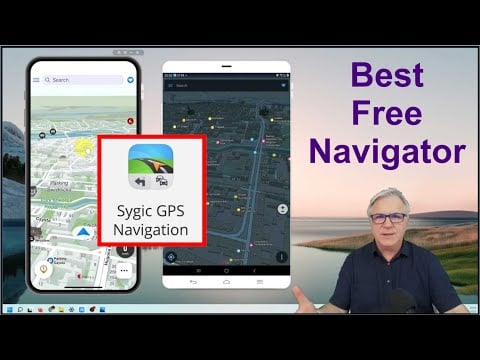
The Sygic app is best for commuters and professional drivers. It has real-time traffic information, the fastest route correction, and other features like speed limit warnings, a dashcam, a head-on display, voice navigation, a mobile speed camera, and more.
The map also works offline without an internet connection. You can choose from maps for over 200 countries and save locations like landmarks, restaurants, and more locally on your device. Features such as high-quality offline maps, millions of points of interest, and route calculation software are also available in the offline mode. The app also offers offline voice-guided turn-by-turn directions. You can enable this feature to get voice instructions when you navigate to a specific location.
Sygic is available for both iOS and Android platforms. The Sygic app comes in a free and a premium version. The free version of the app comes with features like offline maps, search, route calculation, places of interest, alerts of static speed cameras, and more. You can download unlimited maps offline for free but You can update them only 3 times a year for free.
Pros:
- Real-time traffic information and speed limit warnings.
- Includes a dashcam and head-on display for enhanced driving safety.
Cons:
- Premium features require a subscription.
- Limited offline updates (only three times a year for free).
NaviMaps
Highlights:
- Navimaps is built for offline use, ideal for travelers in India, Bangladesh, Bhutan, Nepal, and Sri Lanka.
- Unlike many navigation apps that depend on user-generated content, Navimaps uses data collected by a team of over 400 surveyors.
- Offers voice-guided directions in both English and ten regional languages.
- The app is available for both Android and iPhone.
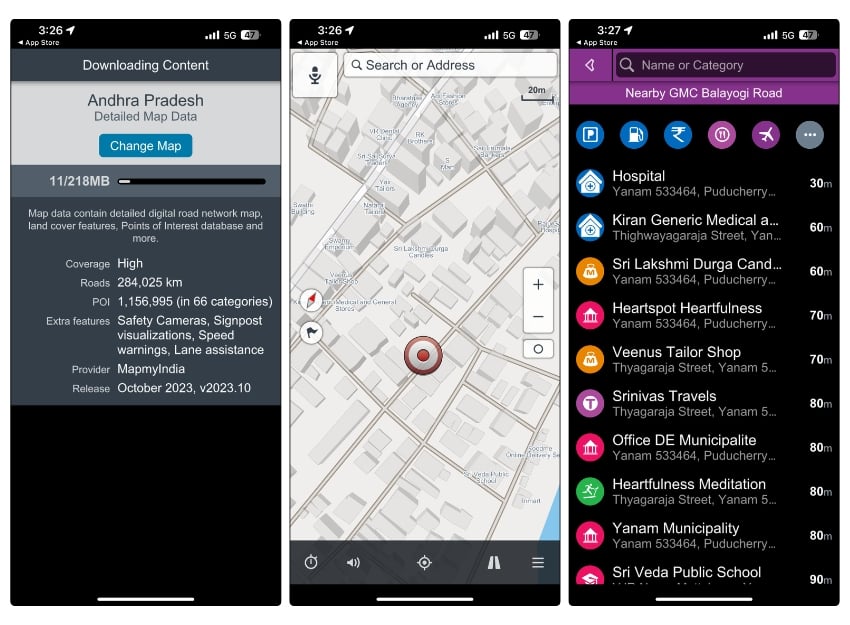
Navimaps by MapmyIndia is an app designed specifically for offline use. The app allows you to download maps and use them offline. Currently, NaviMaps only supports offline maps of India, Bangladesh, Bhutan, Nepal, and Sri Lanka, including 3D landmarks, terrain models, city models, and more.
Unlike Google Maps or other popular apps we’ve reviewed that rely on user-uploaded data, NaviMaps has a team of over 400 surveyors who visit locations and collect data about each place.
You can simply select the country and state and download the map. You’ll need an internet connection to download the map. NaviMaps offers free lifetime map updates, but the frequency of these updates is not mentioned. The offline maps include points of interest, such as gas stations and parking lots. The app also offers voice-guided navigation in English and 10 regional languages when you use the app offline.
The app is simple and easy to use. NaviMaps is available for both iOS and Android platforms. The free version of the app includes features like offline maps, offline search, route calculation, places of interest, live traffic data, and more. The premium offers additional features like voice turn-by-turn directions, lane assistance, speed alerts, POIs along the route, automatic rerouting, house number search, 3D landmarks, and more.
Pros:
- Specifically designed for users in India, Bangladesh, Bhutan, Nepal, and Sri Lanka.
- Data collected by a team of surveyors and more accurate.
Cons:
- Limited geographical coverage outside the mentioned countries.
- It’s not so visually appealing.
Maps.Me
Highlights:
- Best offline map app for international travelers. You can access maps from 345 countries and islands.
- The app uses data from OpenStreetMap, which is updated daily by millions of contributors worldwide.
- Offers clean user interface.
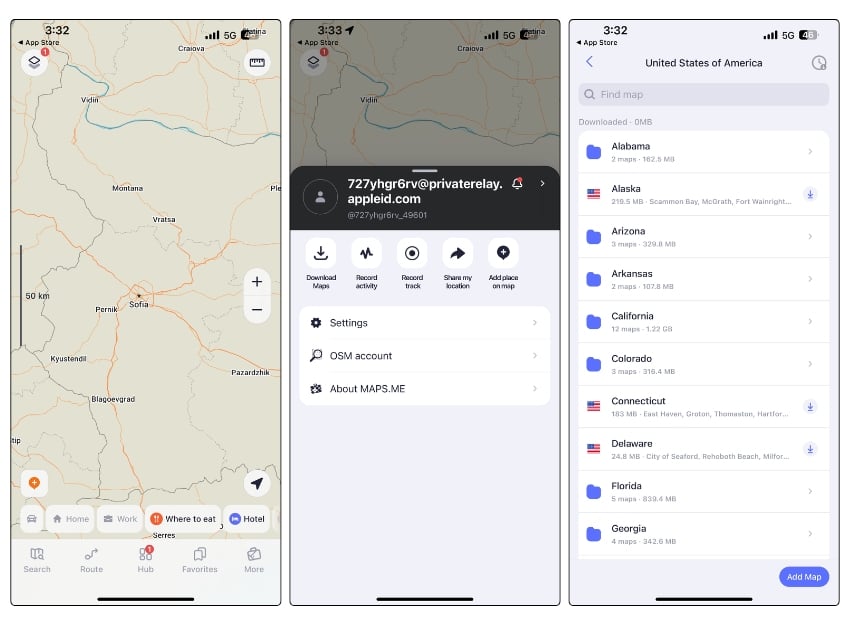
MAPS.ME is another popular map app for offline use. The app is free and provides offline maps based on OpenStreet Maps data and is updated daily by millions of OpenStreetMap contributors. It lets you add, save, delete, import, and export favorite places or destinations.
You can check and download maps from all over the world. MAPS.ME is available in 345 countries and islands around the world. With the app, you can select driving, biking, or hiking routes in offline mode. You can search for a specific location and download the maps for offline use.
You can find a lot of interesting places with trails and routes. You can do a quick search on the offline map, for example, for restaurants, shopping centers, national parks, beach resorts, amusement parks, and much more. The app allows you to sort places by categories.
The app is free to use, and you can download unlimited maps for free. The app detects your location and downloads the offline map for the detected location. You can also search and download specific locations.
Pros:
- Access to maps from 345 countries and islands.
- Maps are updated nearly every month.
Cons:
- Based solely on OpenStreetMap data, which may not be as detailed in less populated areas.
- No real-time navigation or traffic updates.
OsmAnd — Maps & GPS Offline
Highlights:
- Best app for travelers. Supports offline maps with voice-guided, turn-by-turn navigation.
- Supports plugins where you can get more information about the place or route including weather forecasts, topographic lines, and more.
- Offline Wikipedia is handy if you want to know about a particular place.
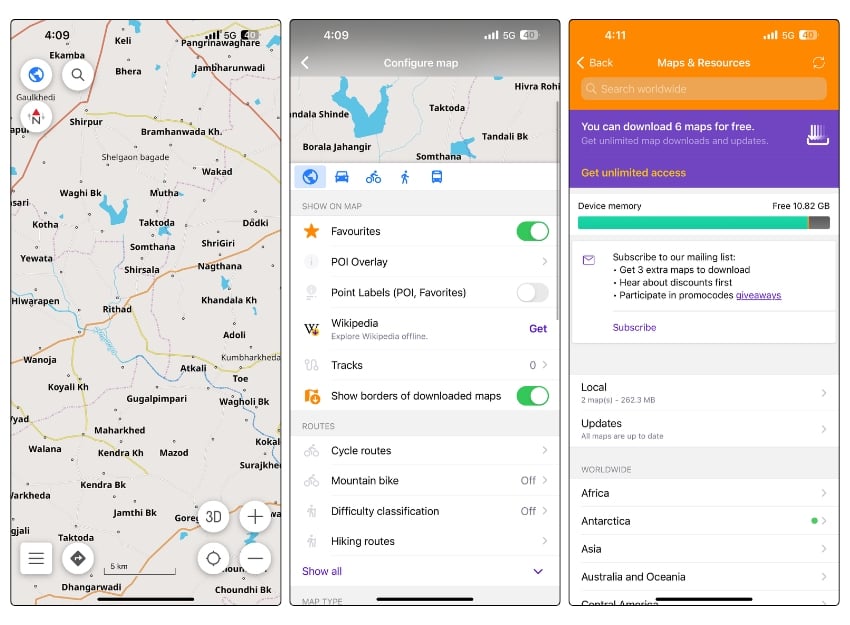
OpenStreetMap (OSM) is best for offline maps for travelers. The app offers high-quality offline maps and voice-guided turn-by-turn navigation and provides millions of points of interest in offline mode. Similar to other apps, you can download and save the map data offline and use the map when you don’t have an active internet connection.
You can plan a route to a location without an internet connection. The app offers customizable navigation profiles for different vehicles, including cars, motorcycles, bicycles, public transportation, and more. It also provides information about the route, such as distance, speed, remaining driving time, distance to turn, and more. You can tap on any place or popular landmark to get more information about the place or specific landmark and plan your trip.
The user interface is simple and easy to use. The app also supports plugins that allow you to extend the app and add additional features. Popular plugins in the app include weather support, adding contour lines, slopes, hillsides, and more. You need a premium subscription to install the plugins. The app also has a travel guide feature that lets you get detailed trip reports in the app and Wikipedia offline support which you can use to know more about the places offline.
Pros:
- Allows downloading of maps for entire countries.
- Simple user interface.
- Useful features of travelers.
Cons:
- Offline features are limited to basic navigation.
- Real-time features like traffic information are only available online.
HERE WeGo
Highlights:
- Simple and easy-to-use app with offline support.
- Download the map for the entire country in one go.
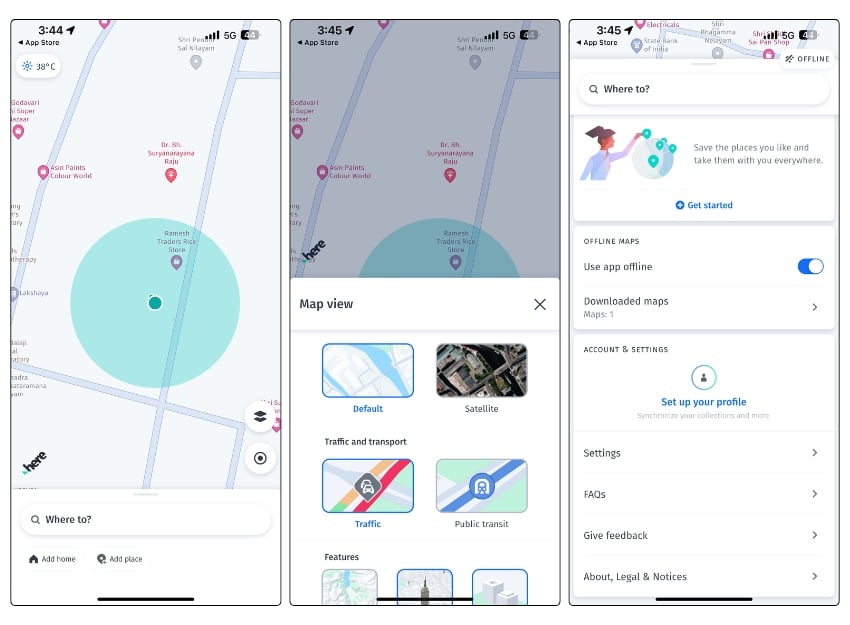
HERE WeGo is another simple navigation app that supports offline maps. The app offers a simple and easy-to-use interface. You can download offline maps for the whole country or maps for a specific location.
The app allows you to plan routes offline. You can set your location, and navigate to a destination using the offline maps. The offline mode also has the support for turn-by-turn navigation. Currently, the app only supports offline maps for car, walking, and bike routes. Moreover, in offline mode, the map also shows fuel stations, restaurants, parking garages, and more.
The app is available on both iOS and Android platforms. You can download maps for offline use by going to the “Download Maps” section in the app’s settings. There you can select the regions you want to download. If you don’t have an internet connection, the app will automatically switch to offline mode. You can also turn on the offline map feature manually.
Pros:
- Allows downloading of maps for entire countries.
- Simple user interface.
Cons:
- Offline features are limited to basic navigation.
- Real-time features like traffic information are only available online.
Avenza Maps
Highlights:
- Best app for travelers who enjoy hiking, biking, or outdoor activities.
- Includes a Map where you can download a wide range of maps. You can also import custom maps using URLs, cloud storage, or directly from your device.
- Save memories. You can record GPS tracks, draw, measure distances, and add photos and notes to specific locations on maps.

With Avenza Maps, you can import and download your custom maps based on OSM map data. You can manage and view all offline maps in a single place. In addition, Avenza Maps includes its own map store that contains various maps such as hiking, topographic, cycling, city, nautical, travel, and trail maps from publishers such as National Geographic, National Park Service, and the US Forest Service and more. Maps are downloaded offline and added to your map list.
Avenza Maps recently added support for OSM Basemap, which is still in beta as we write this article. With the free version of the app, you can find your location, record GPD tracks, draw on the app and measure the distance between places, take photos, and, most importantly, download the maps for offline use.
Similar to Google and Apple Maps, you can select a specific area on the map and download the map. The app will tell you how much data is needed to download the app. The downloaded maps are automatically added to your offline map list.
You can import maps from the URL, cloud store, or directly from your device. The app also supports layers and offers the ability to add custom layers to maps. You can add photos and notes to any location on your map. Avenza Maps is simple and easy to use, but it might take a bit for users to understand how to import and use the maps effectively.
Pros:
- Ideal for outdoor activities with features like GPS tracking and custom map imports.
- Extensive map store including offerings from National Geographic.
Cons:
- Some advanced features are locked behind a paywall.
- Not designed for urban navigation or driving.
MapFactor Navigator app
Highlights:
- Support for TomTom professional maps. TomTom maps offer better accuracy and more detailed navigation compared to OpenStreeMaps.
- TomTom professional map is only limited to the premium subscription. Free users can use OpenStreetMaps
- The premium version also supports a Heads-Up Display. The app projects navigational details onto the windshield.

MapFactor offers free and professional versions of offline maps. The free version of the maps on the app comes from OpenStreetMaps contributors and consists of offline maps for more than 195 countries. You can use the free version of the maps to navigate to different places, find your coordinates, plan routes, set navigation, add places to your favorites, and more.
For premium users, Mapfactor uses TomTom professional maps and offers features like alternate routes, head-up display, no ads, app color themes, live HD traffic information (over 80 countries), online search, remote control, and more. You can upgrade to the premium version to get access to professional maps.
Similar to other apps, you can select the area and download the map. You can also browse different countries and states and download an offline version of the app.
You can also connect to Android Auto and use the app. You can switch between day and night map modes. You can save your favorite routes and locations for quick and easy access in the future. The app warns you about speed limits and cameras.
Pros:
- Offers free offline maps with the option to upgrade to TomTom professional maps.
- Supports Android Auto.
Cons:
- Some advanced navigation features are only available in the premium version.
- Interface and user experience might not be as polished as more popular apps.
Waze
Highlights:
- Waze uses real-time data contributed by its users.
- This community-driven approach allows the app to provide up-to-the-minute traffic updates, road conditions, and alerts about obstacles like accidents or road closures.
- Waze doesn’t have direct offline support as it uses real-time data from the community, but it can offer basic navigation offline.
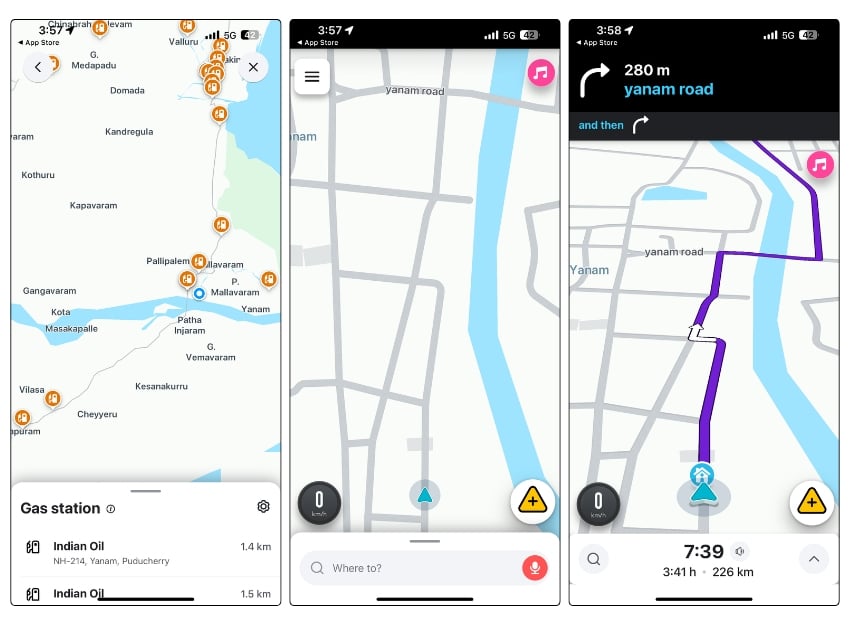
Waze is another popular navigation app available for both iPhone and Android. The app is mainly used for navigation to various destinations. It displays information like real-time traffic, turn-by-turn directions, average speed, real-time gas prices, and more while you use the app. The app uses crowd-sourced information and provides real-time traffic info from other users to help you find the best route and reach your destination.
Unlike other apps that support offline maps, Waze does not have offline map support. However, you can still use Waze without an internet connection. You can select your destination while you have an internet connection. When you go offline, the Waze app will still provide basic navigation features. Waze will still guide you to your destination, much like the offline maps in Google Maps. However, you won’t be able to take advantage of many of the Waze benefits, such as real-time traffic alerts and information or updated routes.
Pros:
- Real-time crowd-sourced traffic updates and alerts.
- Community-driven, often providing the most current road conditions.
Cons:
- Lacks offline map support; only provides basic navigation without the internet.
- Dependent on active community participation for the most accurate data.
Benefits of Using Offline Navigation Apps
- Don’t Need Internet: The biggest advantage of using maps offline is that you don’t need an internet connection to use them. You can easily download the maps and navigate to different places, plan routes, and much more without needing an internet connection.
- Saves Your Data: Offline maps are downloaded and stored locally on your device, so you don’t have to use up your data allowance to view specific locations or plan a route.
- Loads Fast: Compared to online maps, offline maps load very quickly. You don’t have to wait for them to download over the Internet.
- Saves Battery: When you use navigation maps, the battery usually drains faster. If you use maps offline, you can save a little battery life.
- More Private: Some apps like Google Maps store your location history. When you use offline maps, you’re not sending your location over the internet. So it’s a little more private.
The Final Destination: Offline vs. Online GPS Navigation
Offline maps are handy, especially in areas with poor or no internet connection. Popular apps like Google Maps and Apple Maps offer offline maps that allow you to search and download the specific area on the map. Apps like Maps.me, Sygic Maps, and NaviMaps are designed for offline use. You can download the entire country or state map offline with these apps. Finally, apps like Avenza let you import maps from different places and manage them in a single place.
The advantages of offline maps are obvious, but they also come with some limitations, such as the lack of real-time updates like traffic, road closures, and other dynamic changes in the location, the storage space required to download the map, the frequency of updates, limited navigation features, and more.
Ensure you update offline maps frequently so you don’t miss any important map changes. I hope you find this guide helpful. If you have any other suggestions, feel free to share them with us in the comments below.
FAQs about the Best Free Offline GPS Apps

Can offline GPS apps still show real-time traffic updates?
No, offline maps do not show real-time traffic updates. Since your smartphone is not connected to the internet, the map app cannot get real-time traffic information. You can reconnect to the Internet to view real-time traffic updates.
How often should I update the offline maps?
That depends on the offline map updates provided by each app. If you use the apps frequently for navigation, it is recommended to update the offline maps once a week. However, some apps allow you to update the offline maps only a few times a year, and some apps update the map location as soon as you are connected to the Internet.
Can I use these offline GPS apps outside my home country?
Yes, most of the apps listed in this post support offline maps worldwide. You can search for a specific location or select a specific map area and download it for offline use.
How much storage space do offline maps typically require?
Most apps specify the amount of storage required before downloading the map. It varies from app to app. The size of offline maps depends on the length of the area you download. You can always check the required storage space before downloading the map.
What are the drawbacks of using offline GPS apps?
The main drawbacks of using offline GPS apps are:
- Map updates: Offline maps may not be as up-to-date as online maps.
- Size: Offline maps can take up a lot of space on your device's storage.
- Features: Some offline GPS apps may not offer all of the same features as online navigation apps.
Which offline GPS app is right for me?
The best offline GPS app for you will depend on your individual needs and preferences. Here are a few factors to consider when choosing an offline GPS app:
- Features: Consider the features that are important to you, such as 3D maps, lane guidance, or public transportation directions.
- Map coverage: Make sure the app offers maps of the areas you'll be traveling to.
- Size: Consider the size of the app's offline maps and how much storage space you have on your device.
- Price: Some offline GPS apps are free, while others offer premium features for a fee.
Can I use offline maps apps for hiking and outdoor activities?
Yes, many offline maps apps offer specialized features for outdoor activities, including hiking trails, topographic maps, and points of interest related to outdoor recreation.

