

Before most people switched to Instagram, Facebook was the platform where people shared fun moments from their lives. Although Facebook isn’t the most happening social network around, there are still many who use the platform.

On Facebook, you share your photos or videos with your friends, and if someone likes your post, that information is visible to everyone, depending on your privacy settings. For some, the number of likes may not matter, but many use Facebook as a tool to show their reach, and in such cases, the number of likes and dislikes can matter a lot to them.
The good thing about Facebook is that it is constantly adding new features to improve the user experience and give users more flexibility to control how information about a post is handled. If you’re annoyed that your posts are getting fewer likes, you can hide the number of likes. In this guide, we’ll show you how to hide the number of likes on your Facebook post.
Table of Contents
Why would you want to hide likes on Facebook?
While Facebook is generous enough to give you the option to hide the number of likes on your posts, the question is, why would you even want to? Well, as mentioned earlier, the pressure on social media numbers is constantly growing in the modern world, and if your profile is showing less engagement, that could be pretty bad for your business if you’re on Facebook for that purpose. Furthermore, even a regular user can be affected by the low like numbers for his or her posts.
These are just some of the scenarios where hiding the Like count on Facebook can be useful. We have compiled a list of some important reasons why you should hide likes on Facebook:
- Many users refrain from posting content on social media platforms simply because they don’t get enough likes. There is a chance that you could be sharing something important or an important life update. So if you hide the likes on Facebook, you don’t have to worry about the number of likes.
- If you are an influencer or run a business on Facebook, then a few likes can be a handy metric for people and the platform itself to judge the quality and popularity of the content. However, the number of likes is usually not a real indicator of whether the content is good or not. So, instead of looking at the content, people look at the number of likes and then decide whether to view or skip the post.
- Facebook has created the ability to hide likes in order to create a healthy environment on the platform. Simply put, by hiding the number of likes, you can encourage your audience to judge content by its quality rather than the number of likes.
- Eliminating metrics such as the number of likes can help maintain sanity as you don’t have to engage in the race for more likes that some pay large sums of money for.
Related Read: How to See Liked Posts on Instagram
How do I hide likes on Facebook?
You can configure or optimize the Facebook setting to hide the number of likes on both your PC and cell phone. The best part is that you can not only hide the likes for your Facebook posts, but also for other people’s posts. Here are the steps to do this:
1. Hide Facebook likes on a PC
- Launch the Facebook website on one of your favorite browsers.
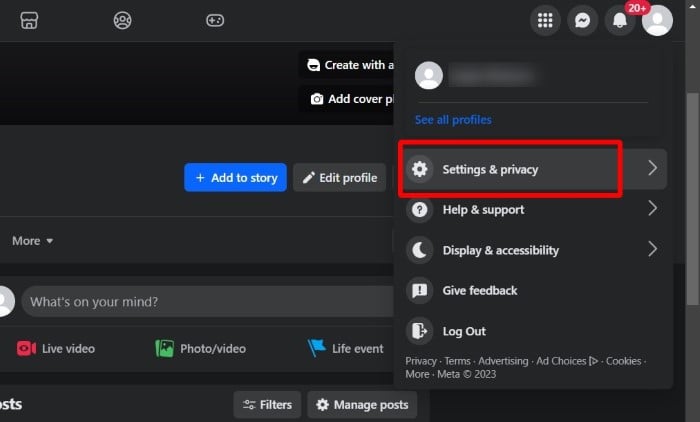
- Click on the Profile icon at the top-right corner and select Settings & Privacy from the list of options that appear.
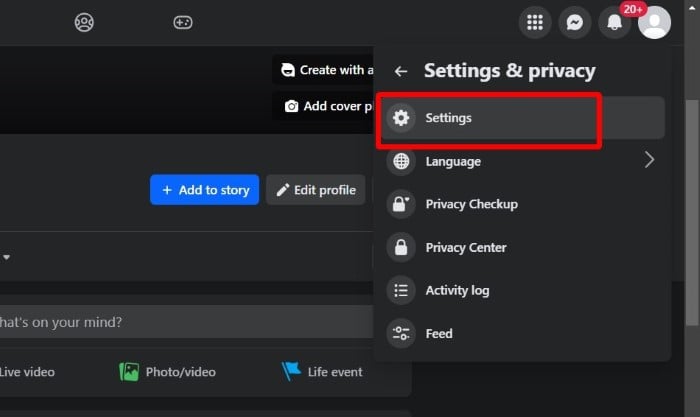
- Choose Settings.
- From the left pane, select the Reaction preferences option.

- To hide the number of likes on your Facebook post, toggle on the On your Posts slider under the Hide number of likes section.
- To hide all reactions, make sure that both the On your posts and On posts from others toggle are turned on.
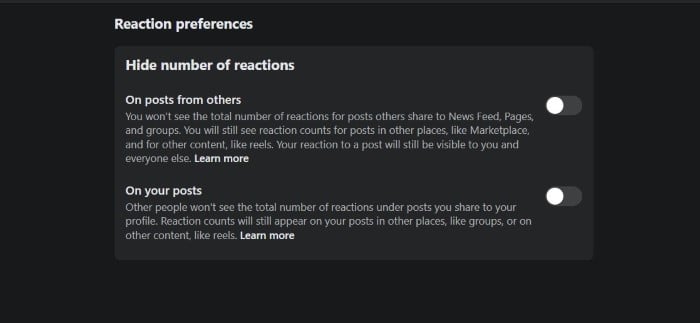
By following the steps above, you can control the number of likes for your posts and the posts of others. The process is simple and will be applied to your account immediately.
Related Read: Psst…Here’s How to Hide Liked Videos on TikTok
2. Hide Facebook likes from a mobile device
You can also hide Facebook likes from a mobile device, which is very handy for many users as we access all of our social media platforms on our phones.
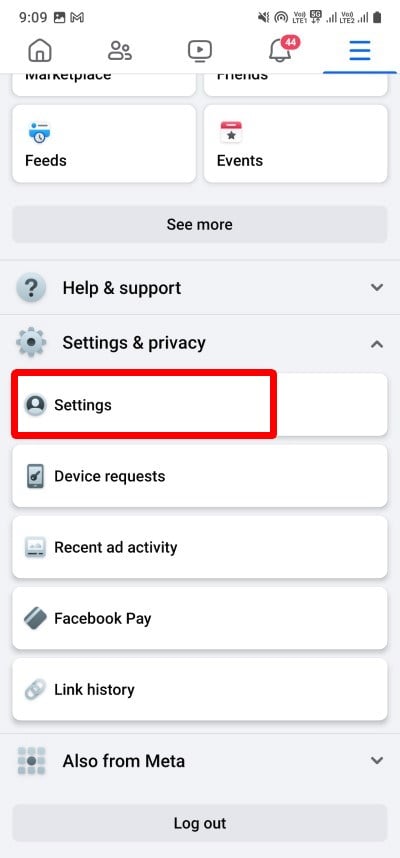
- Launch the Facebook app on your phone and tap on the menu icon at the top-right.
- Scroll down, select Settings & Privacy, and tap on Settings.
- Under Preferences, tap on Reaction Preferences.

- To hide the number of likes on your posts, toggle on On your Posts option.
- To hide reactions to other’s posts, toggle on On posts from others option.
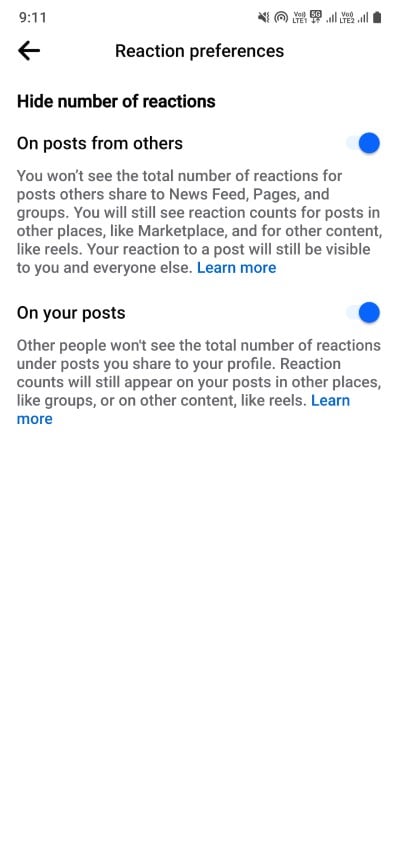
- If you wish to hide all reactions, ensure both options are turned on.
Similar to PC, once the options are enabled, they will be turned on immediately, and you will not see any likes for your posts. Note that you do not need to repeat the process on another device once you have activated the options on one device.
Related Read: What Happens When You Restrict Someone on Facebook
How do I hide likes on Facebook Pages?
Another thing you can or should hide is the likes on the Facebook pages of people you are interested in. If you like a Facebook page, the information is available for everyone to see. This way, they can understand your interests based on the pages you have liked. If you don’t want to share this with anyone, follow the steps below to hide the likes of the Facebook pages you have liked.
- Visit the Facebook website in a web browser.
- Click on your Profile icon.
- Click on the More drop-down and select Likes.

- Select the 3-dot menu icon and click Edit the Privacy of Your Likes.

- A list of genres will appear. Click on the world icon next to a genre you want to adjust.

- Select Only me, then choose Save.
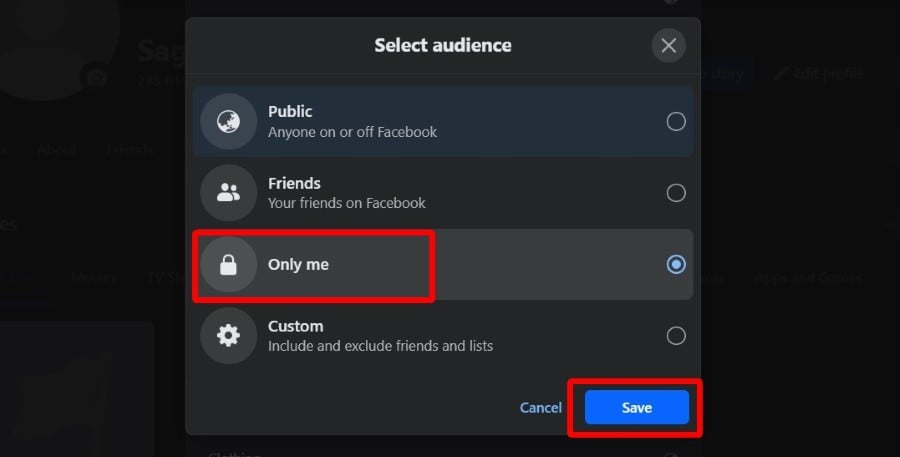
By following the above steps, you will be able to restrict everyone from viewing the Facebook pages you like, which will ultimately hide your interests, and you will be able to explore Facebook freely.
FAQs about hiding likes on Facebook
1. Who can view your likes on Facebook?
By default, your friends and followers on Facebook can see the number of likes for your posts. However, if you have adjusted the privacy settings as described above, you can restrict who can see the number of likes. You can even hide all reaction numbers. This guide also tells you how to hide your likes on any Facebook page.
2. Is hiding Facebook page likes possible on Android?
At the moment, the option to hide Facebook page likes is only available via the Facebook website in a browser. You can’t do this in the Facebook mobile app. However, you can always use a web browser on your phone and hide Facebook page likes.
3. Can you hide a comment on Facebook?
You can hide a comment on Facebook, but it will be visible to the person who wrote it and their friends, but not to you. Replies are also hidden to prevent unwanted conversations.

