

You are a private person and use social media apps to stay with the trend or keep yourself updated on interesting topics. You love appreciating others on TikTok and probably have liked several videos. When you like a video on TikTok or any other social media app for that matter, it is a nice way to tell the creator that you liked their content and also show the app what type of content you enjoy. Based on your liked videos, TikTok will suggest videos similar to them.

However, you might be worried about whether other people who follow you can see your liked videos or not. It depends on you, as your liked videos will somehow make their way to others’ feeds as well and show that you liked that particular video. More often than not, some of our favorite videos aren’t something that we wish everyone to see.
Thanks to a privacy setting, you can hide liked videos on TikTok. In this guide, we will give you the steps that you need to follow to hide liked videos on TikTok. Let’s jump right into it.
Table of Contents
How to hide liked videos on TikTok?
Similar to other social media platforms, the videos that you like on TikTok are visible to others who are following you on the platform. If you want to keep your likes hidden and don’t want anyone to know what kind of content you are after on TikTok, then you can turn on a privacy setting to hide liked videos on TikTok. Here’s how you can do it:
The below steps are shown using the TikTok app on an Android phone. But the procedure is pretty much the same on iPhone as well.
- Open the TikTok app on your phone.
- Tap on the profile button at the bottom-right corner of the homepage.

- Tap on the three-line menu icon on the top-right.

- From the list of options, scroll down and select Settings and privacy.
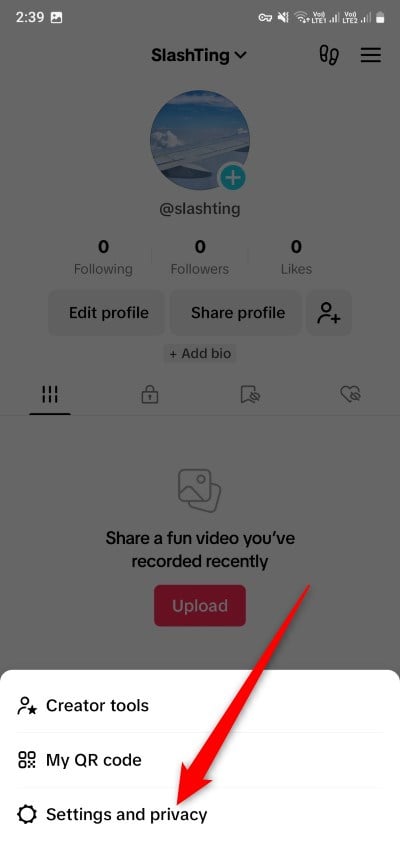
- Under Account, select Privacy.
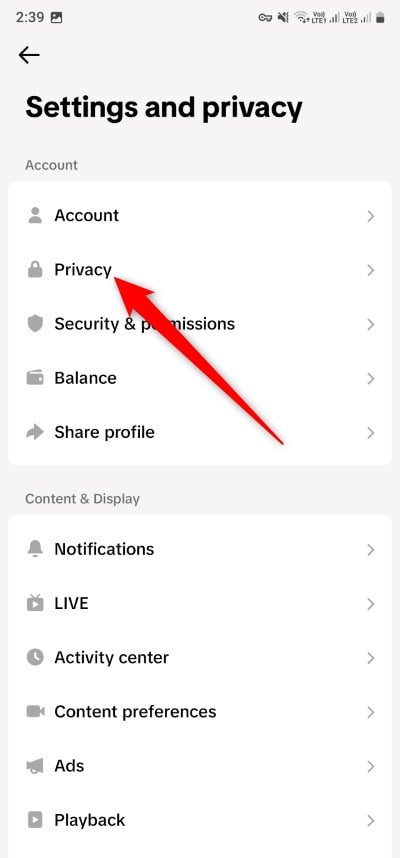
- Scroll down and tap on Liked videos.

- You will see a question Who can watch your liked videos to which you need to select the Only you radio button.

- Then tap on the cross (X) to dismiss the menu and save changes.
After you have done the above, no one can see your liked videos on TikTok. You can confirm this by returning to your TikTok profile, and you will see a heart symbol that represents your liked videos, which will turn into a heart symbol with a line on it, depicting that the liked videos are no longer visible.
Related Read: How to Find Songs Used in TikTok Videos
Don’t let anyone know what you like on TikTok
Well, the above steps will help you hide liked videos on TikTok. All liked videos will be visible only to you on your profile page under the liked videos tab. There are other options that you may want to have a look at, like who can watch your followers list, etc. This will make your account more secure, and without your permission, they won’t be able to know more about you. Go give a read to our guide that will help you secure your TikTok account. Also, here’s our guide that shows three different ways to watch TikTok videos without using the app.
FAQs about TikTok liked videos
1. Can my friends see what videos I liked on TikTok?
When you like a video on TikTok, people who are your followers can see your liked videos in their feeds. This feature is enabled by default, and you need to follow the above steps to hide your liked videos from being visible to your followers.
2. Can I hide TikTok videos from someone?
If you don’t wish to make your videos visible to everyone, then in this case, we would suggest you either make your account private or block that particular person. This will ensure that your videos aren’t visible to them.
3. Can you see how many times someone viewed your TikTok profile?
TikTok doesn’t give you information on how many times someone has viewed your profile. But if that doesn’t bother you and you would like to know the profile that visited your TikTok profile, then under the Profile view history feature, you can view who visited your profile.
4. How do you know if someone blocked you on TikTok?
In your profile, you can easily check if someone has blocked you on TikTok by opening the Following list and searching for that particular person. If the profile of that person doesn’t pop up in the Following list, then that person might have blocked you.

