

Video content has become an integral part of our lives in today’s digital age. Whether you’re a budding filmmaker or just want to enhance your vacation videos with the family, reliable and user-friendly video editing software is essential. Fortunately, the world of video editing has evolved, and there are now a variety of free video editing programs to suit a wide range of needs and skill levels.

In this article, we’ll introduce you to the 10 best free video editing software that will help you maximize your video editing potential without breaking the bank.
Let’s get started.
Table of Contents
Top 10 Free Video Editing Software To Download
Video editing software usually costs a lot of money, but there is also very good video editing software available for free. We have listed the 10 best video editing programs we could find that are free to use. Some of them are purely online, so you’ll need an active internet connection to use them.
Here is our list of the 10 best free video editing programs:
- DaVinci Resolve
- Adobe Premiere Rush
- Wondershare Filmora
- iMovie
- Movavi Video Editor
- HitFilm
- Adobe Express Cloud
- Canva
- Openshot
- Clipchamp
DaVinci Resolve
DaVinci Resolve is one of the best free video editing software on the market for several reasons.
First and foremost, it offers an incredibly powerful and professional editing experience that rivals even some paid software. The feature-rich toolkit includes advanced color correction and grading tools that make it the first choice for filmmakers and colorists. DaVinci Resolve has a user-friendly interface aimed at both beginners and experienced editors, making it accessible to all. The software does not compromise on performance either, as it can easily process high-resolution material. The software also integrates seamlessly with its companion software, Fusion, for advanced visual effects, and Fairlight, for professional audio editing.

The regular updates and active user community make DaVinci Resolve the best free video editing software, which is constantly evolving to meet the demands of the modern video editing landscape. DaVinci Resolve is available as a free download for PC, Mac, and iPad.
Related Read: 9 Best Video Editing Apps for iPad
Adobe Premiere Rush
Adobe Premiere Rush is a versatile and easy-to-use video editing software that caters to a wide range of creatives, from beginners to experienced editors. One of its standout features is its seamless integration with other Adobe applications, allowing for easy project transfer and cross-platform collaboration. The intuitive user interface simplifies the editing process and makes it accessible to those with little editing experience.

Adobe Premiere Rush offers a range of powerful editing tools, such as multi-track editing, color correction, audio enhancement, and the ability to add motion graphics and text overlays. It also provides access to a library of built-in templates, audio tracks, and royalty-free materials that simplify content creation. Whether you’re editing videos for personal use or creating professional content for online platforms, Adobe Premiere Rush gives you the tools and flexibility you need to bring your video projects to life easily and efficiently. It is available for download on Windows, macOS, iOS and Android.
Wondershare Filmora
Wondershare Filmora is a widely recognized and user-friendly video editing software that meets a variety of video editing needs. What sets Filmora apart is its balance between simplicity and functionality. It offers a simple and intuitive user interface, making it an excellent choice for beginners and those who want to produce high-quality videos quickly.

Filmora’s extensive library of preset effects, transitions, and text overlays allows users to add a professional touch to their projects without much learning curve. It also offers advanced features such as color correction, audio editing, and support for 4K video, making it versatile enough for experienced editors.
Apple iMovie
iMovie is an easy-to-use and versatile video editing program designed for Apple users. iMovie integrates seamlessly with macOS and iOS devices, making it accessible and convenient for beginners and experienced video editors alike. With iMovie, users can easily import, edit, and enhance their video footage, add creative transitions, titles, and effects, and even incorporate a soundtrack to give their projects a polished and professional look.

The intuitive user interface simplifies the editing process and allows users to cut, trim, and arrange clips with ease. Whether you’re creating a home movie, a YouTube vlog, or a school project, iMovie offers a wide range of tools and features to help you create the best video possible. Its ease of use and accessibility on all Apple devices make it a good choice for most users. The only downside is that it’s only available on Apple devices, but it’s completely free.
Movavi Video Editor
Movavi Video Editor is a versatile and user-friendly video editing program that is very popular due to its simplicity and robust features. Whether you’re a beginner or an experienced video editor, Movavi offers an intuitive interface that makes it easy for you to create professional-looking videos. With the numerous editing tools and effects at your disposal, you can trim, cut, merge, and enhance your videos with ease.

Movavi also offers various filters, transitions, and titles to add the finishing touches to your creations. Movavi also supports many video and audio formats, ensuring compatibility with your media files. Whether you want to create family videos, YouTube content, or creative projects, Movavi Video Editor is a reliable and accessible solution for all your video editing needs. It is available for free download for PC and Mac.
HitFilm
HitFilm is a versatile and powerful video editing and visual effects software that is popular with filmmakers, content creators, and video enthusiasts. This application combines video editing and compositing features, allowing users to create stunning movie effects and professional-quality videos.
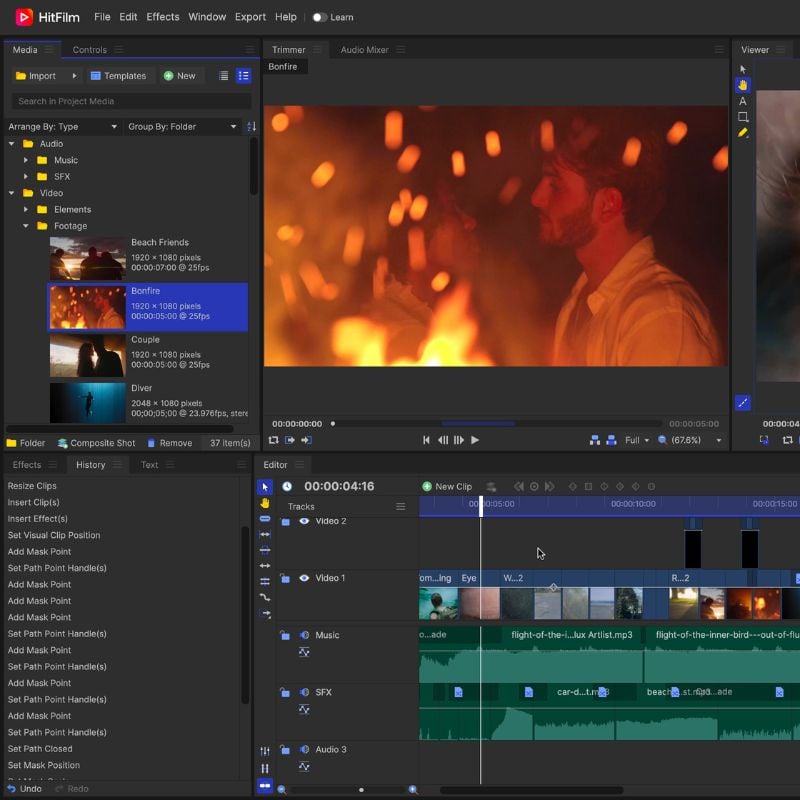
With a user-friendly interface and a wide range of tools and features, HitFilm offers both beginners and experienced editors the ability to create the most visually stunning videos. The unique combination of editing and VFX features makes HitFilm the first choice for anyone looking to add special effects, green screen compositing, or even 3D animation to their videos. Whether you’re editing a simple vlog or working on a complex film project, HitFilm offers a comprehensive suite of tools to help you achieve your desired results.
Adobe Express Cloud
Adobe Express Cloud, or Adobe Spark as it was formerly known, is a web-based video editing platform that focuses primarily on short-form content. It is available as a web app, iOS app, and Android app. The free version has the most basic editing tools you need to edit your videos without much effort. The only requirement is a good internet connection if you are using the web app.

You can use it to trim videos, add music, text, and images, resize to different aspect ratios for your favorite social media platform, and much more. The user interface is simple and easy to use, even for beginners. Adobe Express Cloud is mostly free to use, but you can sign up for a premium subscription if you need cloud storage and syncing with other Adobe Creative Cloud products. While it’s not the best option out there, it’s certainly one of the better ones.
Canva
Canva, primarily known as a versatile graphic design tool, has expanded its capabilities to include video editing, making it a valuable all-in-one platform for content creators. It is a web-based application that requires a good internet connection to function properly. With the video editing features, users can easily create compelling videos. The user-friendly interface with drag-and-drop functionality allows seamless integration of multimedia elements such as images, text, and music. The free version includes several resources, and you can get by with the free version alone. Canva adds new resources daily, but most are only available to premium users.
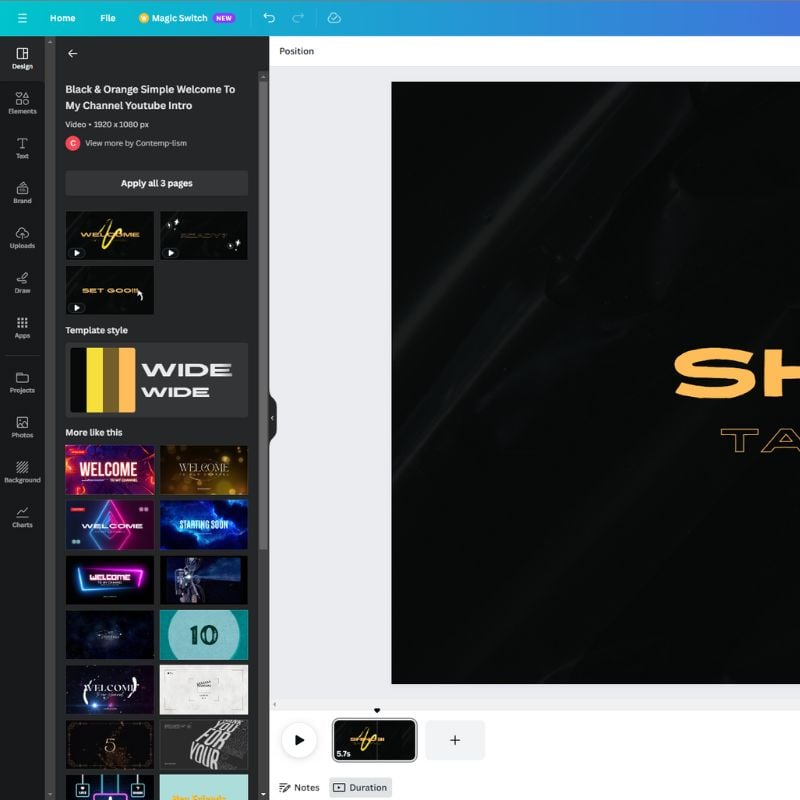
Canva also offers a wide range of templates, stock footage, and customizable animations, making it suitable for beginners and experienced video editors alike. Whether you’re creating content for social media, marketing videos, or classroom presentations, Canva’s video editing features allow you to produce engaging and polished videos without advanced technical knowledge, making it a valuable addition to your creative toolbox.
Openshot
OpenShot is a versatile and user-friendly video editing software that is popular with both beginners and experienced video editors. What makes OpenShot special is its open-source nature, which makes it accessible to a wide range of users without having to carry a hefty price tag. With a simple and intuitive user interface, it offers a wealth of features such as multi-track editing, keyframe animations, advanced video effects, and support for a variety of video formats.

OpenShot also offers powerful audio editing tools, 3D animations, and a range of transitions and effects to enhance your videos. The active community and regular updates ensure that users have access to the latest features and bug fixes. While OpenShot is sometimes a little jerky and not the most powerful editing software on the market, it’s definitely better because it’s an open-source application and well-supported by the community.
Download OpenShot Video Editor
Clipchamp
Clipchamp is a versatile and user-friendly online video editing platform that has gained popularity due to its accessibility and robust features. Suitable for both beginners and experienced video producers, Clipchamp offers a range of tools for video editing, such as trimming, cutting, voiceovers, adding transitions, and applying filters and effects. The only requirement for it to work properly is a good internet connection.
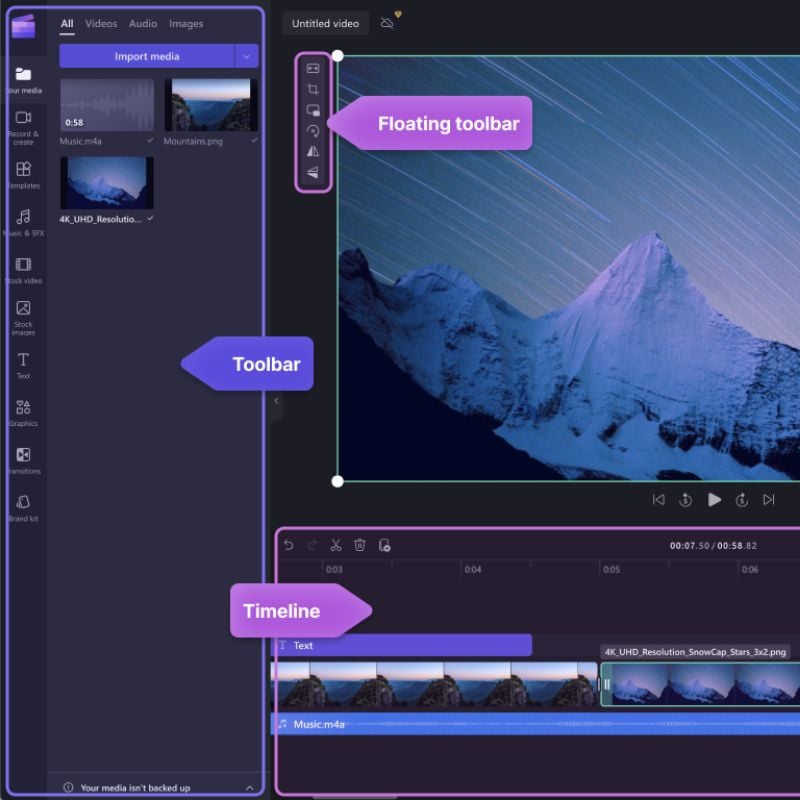
One of the outstanding features is the ability to edit videos directly in the web browser, so there is no need to install complex software. Clipchamp also supports various video formats and resolutions, making it suitable for a wide range of projects, from simple social media clips to more elaborate video productions. Whether you are a vlogger, marketer, or hobby filmmaker, Clipchamp allows you to realize your video ideas easily and efficiently.
Best Free Video Editing Software to Download

The world of video editing has never been as accessible as it’s today, thanks to the many free software options available. Each of the tools featured in this article offers unique features and capabilities to suit a wide range of needs and abilities. From the user-friendly interface of HitFilm Express to the versatility of DaVinci Resolve and the simplicity of Adobe Express Cloud, there’s a free video editing software for everyone.
Ultimately, the best choice depends on your specific needs and preferences. Whether you’re a budding filmmaker, a social media enthusiast, or just someone who wants to improve their video content, these free editing programs will help you reach your full creative potential without breaking the bank.
Our favorite is DaVinci Resolve because of its versatility and wide range of features. Which program will you download? Let us know in the comments.
FAQs about Best Free Video Editing Software to Download Now
1. What are the key advantages of using free video editing software?
The main advantage of free video editing software is the cost savings. It gives you access to powerful editing tools without having to invest in expensive software licenses. Free software also promotes accessibility and makes video editing more accessible for beginners and people on a budget.
2. Can I use these free video editing tools for professional projects?
Yes, many of these free video editing software, such as DaVinci Resolve and HitFilm Express, are also suitable for professional projects. They offer advanced features and capabilities that meet the needs of filmmakers, content creators, and businesses.
3. What operating systems are these free video editors compatible with?
Compatibility varies depending on the software. While some are available for multiple operating systems, such as Windows, macOS, and Linux, others are more platform-specific. It’s important to check the system requirements for each software before you download it.
4. Are there any limitations to using free video editing software?
Free video editing software may have limitations compared to their premium counterparts. These limitations include watermarked exports, lower export quality, fewer advanced features, and less customer support. Still, many free programs offer solid editing features.
5. Do I need a powerful computer to run these free video editors?
System requirements vary from software to software. While some programs run smoothly on less powerful computers, others require more hardware for optimal performance. Always check the software’s system requirements to ensure it is compatible with your computer.
6. Is there a learning curve associated with these free video editing tools?
Yes, video editing usually comes with a learning curve with both free and premium software. However, many free video editing tools offer user-friendly interfaces and tutorials to help beginners get started. The more advanced features may take some time to master.
7. Can I use these free video editors for commercial purposes?
That depends on the software and its license terms. Some free video editing programs may have restrictions on commercial use, while others may allow it. Always check the software’s license terms to ensure it is suitable for your intended use.
8. Are there any hidden costs associated with these free video editing software options?
Free video editing software is usually truly free to download and use. However, some offer premium add-ons or subscriptions for additional features or support. Be careful and read carefully before making any in-app purchases.
9. Which free video editing software is best for beginners?
For beginners, user-friendly programs like Openshot and HitFilm Express are a good choice. They offer important editing features and are relatively easy to learn and use.
10. Where can I download these free video editing tools mentioned in the article?
You can usually download these free video editing software directly from the official websites or trusted software distribution platforms. Always use official sources to ensure the authenticity and security of the software.

