

There is no shortage of instant messaging apps on the market today. But in this vast sea of apps, WhatsApp still stands at the top, offering you more than you’d want from a messaging app. It’s no longer just an app you can use to message your friends or family, but now also offers the ability to contact them via voice and video call. There are also lots of fun and innovative ways to communicate with your loved ones and keep up to date. If you love WhatsApp too much, check out our guide on how to set up multiple WhatsApp accounts.

Speaking of fun, if you’re looking for something out of the ordinary and want to play a little prank on your WhatsApp contacts, then you’ve come to the right place. In this guide, we’ll show you the steps you need to take to send blank messages on WhatsApp. Yes, you can send blank messages on WhatsApp, and there are different methods. So, let’s take a look at them.
Related Read: How to Send Fake Location on WhatsApp
Table of Contents
3 Ways to send blank messages on WhatsApp, Instagram, and others?
There are several ways to send empty messages on WhatsApp, which we have discussed in this section. Let’s discuss one by one:
Use the special Unicode character
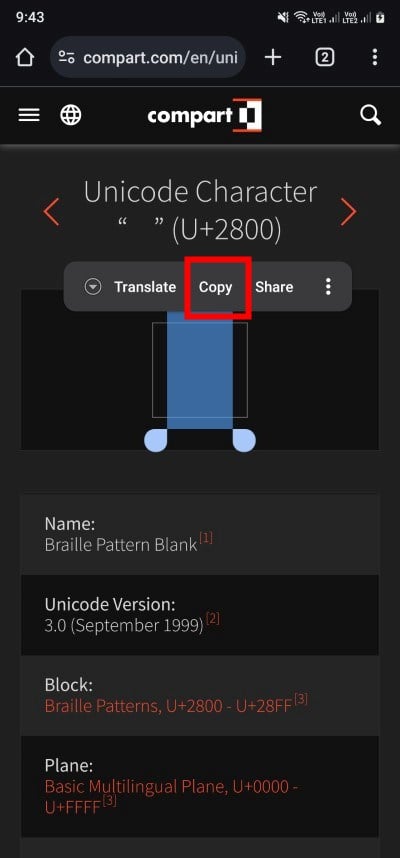
One of the best ways to send blank messages on WhatsApp is to use a special Unicode character. We’re talking about the Unicode character Braille pattern U+2800, which is read as a character by websites and apps, but it’s a blank space. This means that if you copy and paste this character into WhatsApp, the message you send will be delivered as a blank message. Find out how to use it here:
- Open any web browser on your Android phone and visit this Unicode website.
- Long press on the Unicode character and copy it if you are on mobile, or double click on the character on a desktop, right-click on it, and select Copy.
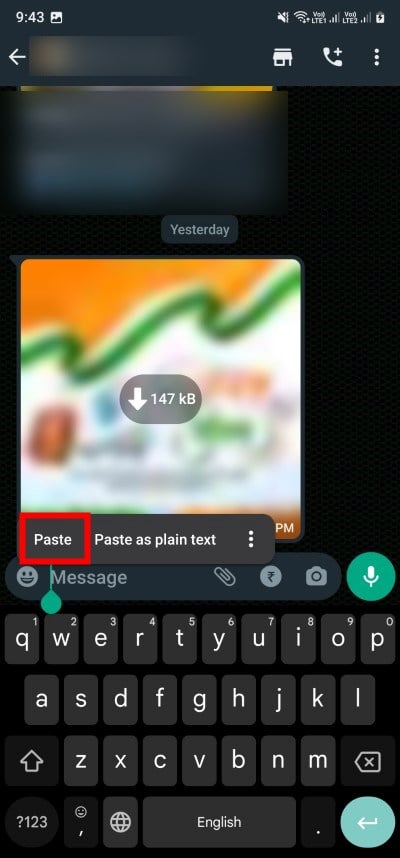
- Open the WhatsApp app on your cell phone or WhatsApp Web on your desktop.
- In the message bar of the contact of your choosing, paste the character that you have copied.
- Hit the Send button to send a blank message on WhatsApp.
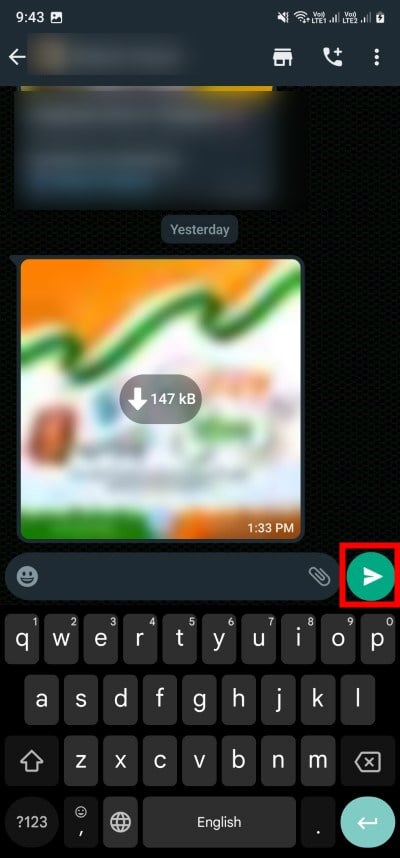
The person receiving the message will see a blank message, and voila! You’ve just played a prank on your friends. You can use and send blank messages multiple times with this method.
Use an empty space generator website
While you can copy the special Unicode character to send blank messages on WhatsApp, there are several websites that generate spaces to send such blank messages. On such websites, you need to enter the character you want to convert into a blank text, generate it, and then send it to WhatsApp. WhatsApp will read this message as a character, but the recipient will receive a blank message.
Here’s how to use it:
- Visit this website on any of your favorite browsers.
- Insert the word or character that you wish to convert to empty text. Then click on Generate.

- Once the empty text has been created, click on Copy.

- Open WhatsApp and click the specific contact to whom you want to send empty messages.
- In the message box, long-press and paste the empty text that you just generated and hit the Send button.
The same process is also applicable to WhatsApp Web. The person who receives the text will receive a blank message.
Use third-party apps
Even though you can find numerous apps on the internet for sending blind texts, we recommend that you use the Google Play Store to be extra safe and avoid downloading malware or viruses to your phone when using a cell phone. There are several apps in the Play Store that you can use to send blank messages on WhatsApp. Some of them are listed below:
- Blank Message for WhatsApp
- Blank Text & Invisible Text
- Blank Text – Empty Character
- Blank Messenger – Empty text
Here is an example of how you can use one of these apps. In our case, we use the app “Blank Text & Invisible Text”.
- Open Play Store and search for Blank Text & Invisible Text.
- Install the app on your phone and launch it.

- Select the language.
- Tap on the Invisible Text button at the top of the home page of the app.

- Enter the row number and also the character number. Here, row number means how many rows you want your blank messages to be, and the character number means the length of the blank message. The max that you can select is 99.

- You will see three buttons, i.e., WhatsApp, Copy, and Share button. You can use the WhatsApp button to directly send the blank message to any of your WhatsApp contacts. If you wish to send blank messages on another messaging app, then you can choose the Copy button.

- Select the WhatsApp contact and send a blank message to them.
That’s it! You now know the different ways to send blank messages on WhatsApp, Instagram, Telegram, and other messengers. So, what are you waiting for? Grab your phone or laptop, send your friends or family members blank messages on WhatsApp, and have fun.
FAQs about sending blank messages on WhatsApp
1. Can blank messages be deleted on WhatsApp?
If you send a blank message on WhatsApp using one of the methods mentioned above, it will be sent as a normal message. Therefore, you or someone who has received the blank message can simply delete the message in the normal way.
2. Can I use the same methods to send blank messages on other messaging apps?
Yes, you can try the above methods to send blank messages in other messaging apps as well. Since you can copy spaces and use them as characters with the above methods, all other messaging apps will also read these spaces as text and send blank messages to the recipient.

