

WhatsApp is a versatile app used by billions of people around the world. It helps us stay in touch with our loved ones, and the most important thing you need to use this app is an active internet connection. You can even set up multiple WhatsApp accounts, allowing you to manage your privacy better. WhatsApp is not only used to share files, contacts and other content, but also allows you to share your location. Location sharing is very useful anyway and has many use cases.

However, if you want to prank someone on WhatsApp, you can send them blank messages, or you can play around with your friends by sending them fake locations. Yes, WhatsApp doesn’t officially allow you to send fake locations to your contacts, but in this technology-driven age, almost anything is possible. Let’s take a look at how you can send fake locations on WhatsApp.
Table of Contents
How to send fake location on WhatsApp
There are a few prerequisites involved before you can send fake locations on WhatsApp, which we will go through one by one.
1. Install and set up a GPS spoofing app
The only way to send fake locations on WhatsApp is to spoof your device’s GPS with a third-party app on your phone. There are several apps in the Play Store that allow you to track your device’s GPS. To do this, you must first activate the developer options on your smartphone by following the steps below.
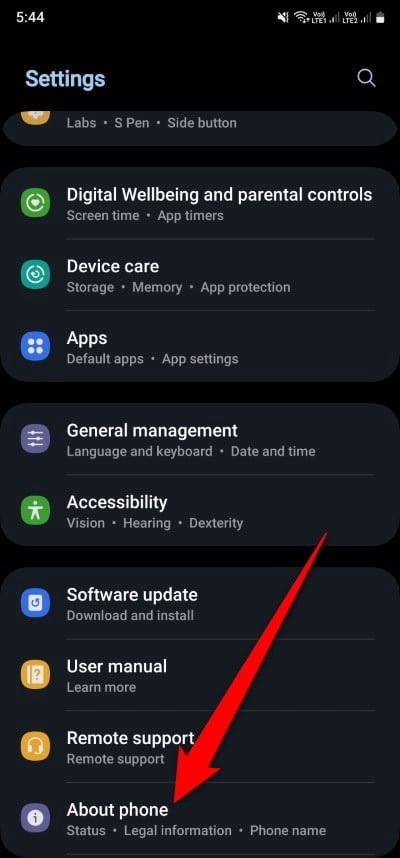
- Open Settings on your phone.
- Tap on About phone.
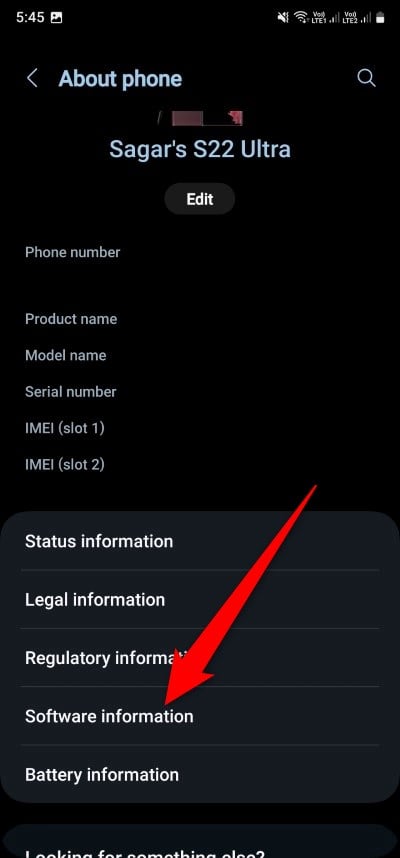
- Choose Software information.
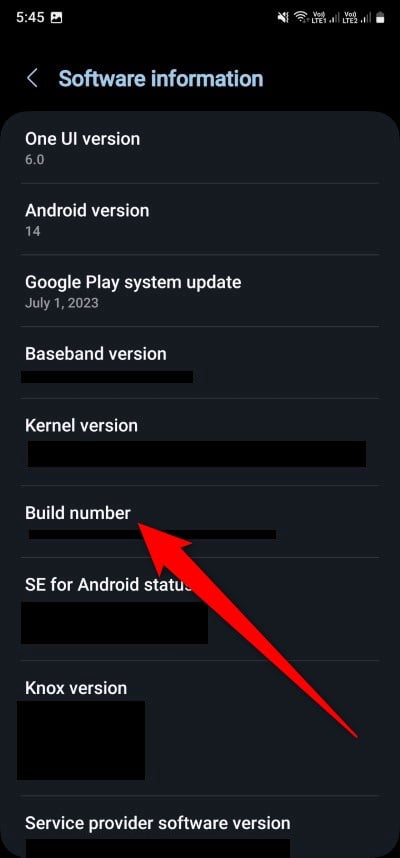
- Tap seven times on the Build number until you see a toast message “You are now a developer.”
- Go back to the Settings page and scroll down to see Developer options.
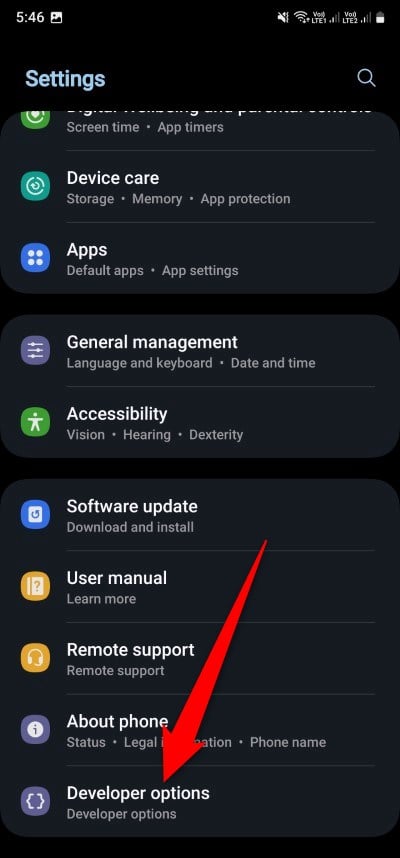
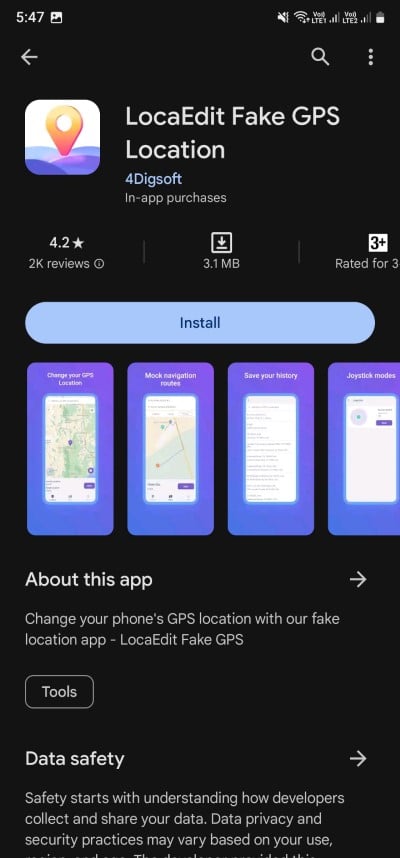
Now that the developer options are enabled on your phone, you need a fake GPS app. Follow the steps below to install it.
- Open the Play Store on your phone.
- Search for LocaEdit Fake GPS Location and install the app.
- Go back to Developer Options, and under the Location section, tap on Select mock location app.
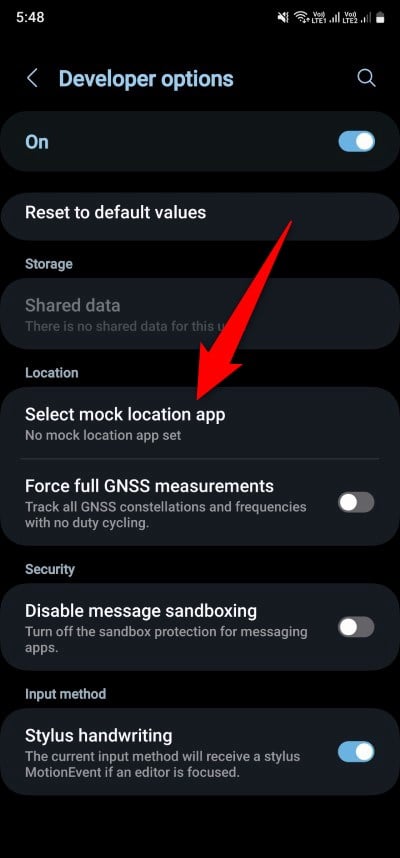
- Choose the LocaEdit app.

After you have followed the steps, you are now all set to send fake location on WhatsApp.
Related Read: WhatsApp Live Location Not Updating on Android [Fixed]
2. Send fake location
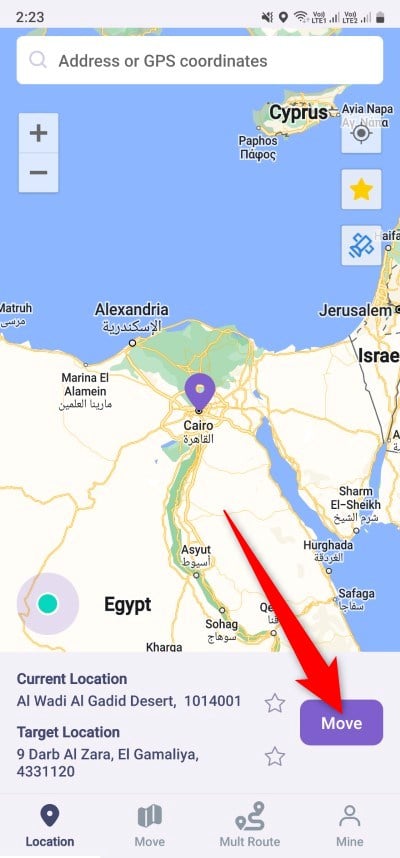
- Open the LocaEdit GPS app on your phone.
- Choose any location in the world and hit the Move button. Your fake location is now set.
- Open WhatsApp on your phone.
- Choose any contact and select the option to share your location.
- You will see the exact location you have set in the LocaEdit app in your WhatsApp location-sharing menu. Simply share the location and enjoy.

The above example shows how my original location, i.e. India, was spoofed using the LocaEdit Fake GPS Location app and displayed as somewhere in Egypt. We used a Samsung Galaxy S23 Ultra and the LocaEdit app to show you how to send a fake location on WhatsApp.
The reason for choosing this app is that its user interface is easy to use and vibrant, you can easily select your favorite location and more importantly, the app is responsive unlike other fake GPS apps. Plus, you can even create fake navigation with the LocaEdit app, which is really great if you want to take your prank to the next level.
Spoof your location and prank your friends
We would advise you that spoofing your location is good only when done in a healthy environment. And also ensure that once you are done with your prank, you turn off your fake location app, because when you want to share the correct location, you won’t be able to. If you are into pranks and understand the seriousness of them, then we have a list of some of the best prank apps for Android and iOS.
FAQs about sending fake location on WhatsApp
1. What are the other fake GPS apps on WhatsApp?
Apart from LocaEdit, you can also make use of some of the apps, such as Fake GPS Location by Lexa, Fake GPS by ByteRev, Fake GPS Location Spoofer by IncorporateApps, and many more.
2. Is it possible to fake GPS location on WhatsApp for iOS?
Unfortunately, there are some strict permission and developer settings on iOS, which is why you can’t send a spoofed location on WhatsApp. Apple doesn’t allow GPS spoofing on its devices.

