

Meta has added a handful of features on WhatsApp in the past few months. From the new text formatting options to the one that improves your privacy by preventing others from taking a screenshot of your profile picture, these new features are an effort to keep WhatsApp at the forefront of the messaging space.

Building on the momentum, Meta has now updated WhatsApp for Android to introduce a feature that’s long been available on its iOS, Mac, and web versions—the ability to search conversations by date.
Here’s everything you need to know about WhatsApp’s Search by Date feature.
What Is the Search by Date Feature in WhatsApp?
Search by Date, as the name implies, lets you find specific messages or media (photos, videos, and documents) in your WhatsApp conversations from a particular day by simply specifying the date. It’s a handy feature for when you want to find something in your old conversations.
For instance, say you want to find photos a friend sent you from last year’s trip. Instead of manually scrolling your chats to a year back, specifying the month or the date (if you know it) will take you directly to that conversation with the photos, saving you time and effort.
Search by Date works in both one-to-one conversations and group chats.
How to Search Your WhatsApp Conversations Using the Search by Date Feature
Finding WhatsApp messages using the Search by Date feature on Android is easy enough, as you can see below. You can also follow these steps to find messages on your iPhone; you’ll need to look for the buttons (you need to click) at different positions on the screen, though.
- Open the WhatsApp chat or group in which you want to look for a message or media.
- Tap the three-dot icon in the top-right corner and select Search.

- Hit the calendar button in the top search bar.

- When this brings up the calendar, select the date (along with the month and the year) for which you want to find the conversation.
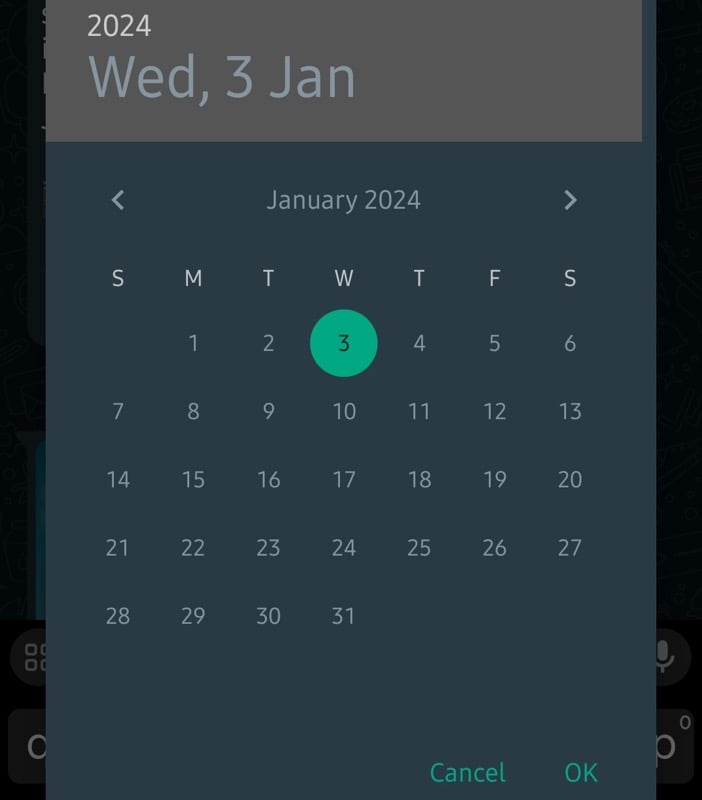
- Hit OK.
WhatsApp will now take you to your conversation for the specified date and highlight the message.

If no message or media exists for that date, it’ll show you the conversations from the previous and the following dates. You can then scroll through the conversations to find the message you need.
Related Read: Backup WhatsApp Messages Without Using Google Drive
Find Old WhatsApp Conversations Effortlessly
Search by Date is a much-needed feature on WhatsApp that can help you find old WhatsApp conversations effortlessly. It isn’t the only search feature on the platform, though. WhatsApp also offers several filters to help you find specific messages or media with little effort.

