

Spotify, a leading music streaming platform, offers its users numerous lucrative and interesting features. One of these unique features is Spotify Blend. It allows users to collaborate with their friends and create a personalized playlist. This playlist is a blend of your favorite songs and those of your friends and is regularly updated based on the music tastes and preferences of the participants.

If you think you need a Spotify Premium subscription to use this feature, we can prove you wrong – you— don’t. This feature is available to all Spotify users. In this blog, you’ll learn how to create a Spotify blend and share music with your family and friends.
Table of Contents
How to Make a Spotify Blend?
Creating a Spotify Blend is an easy and straightforward process. You don’t need to use rocket science or be tech-savvy to use this feature. It can be easily done from your smartphone and desktop as well. We will walk you through the steps for creating a Spotify Blend on both platforms so you can start sharing music with your loved ones in no time.
But before that, let’s take a quick peek at Spotify Blend and how it works.
What is Spotify Blend & How Does It Work?
In August 2021, Spotify introduced Spotify Blend, a unique feature that enables users to collaborate with their friends to create a playlist based on their listening preferences. This feature combines the music tastes of all individuals to create a personalized playlist that all users can enjoy.
Spotify’s Blend feature allows you to collaborate with up to ten people and create your all-unique Spotify playlist. The best part about this feature is that you don’t need a Spotify Premium subscription to use it, nor do your friends.

Here are some key features of Spotify Blend:
- It allows users to merge their musical tastes into one shared playlist.
- The Blend playlist is updated daily and adapts based on what users stream.
- The experience includes taste match scores to see your listening preferences compared to your friends.
- It uses complex algorithms to analyze the listening habits, preferences, and histories of users involved.
- It allows up to 10 users to create a collaborative playlist.
- The feature is accessible to both Premium and non-Premium members.
2 Ways to Make a Spotify Blend
Whether you have an Android, iOS, or desktop, the process of creating a Spotify Blend is straightforward and similar. However, finding where to create a Spotify Blend is a bit trickier as there’s no direct button for it on the main screen.
We will share two ways you can create a Spotify Blend with your friends.
Method 1: From Search Icon
- Launch the Spotify app and go to the “Search” icon.
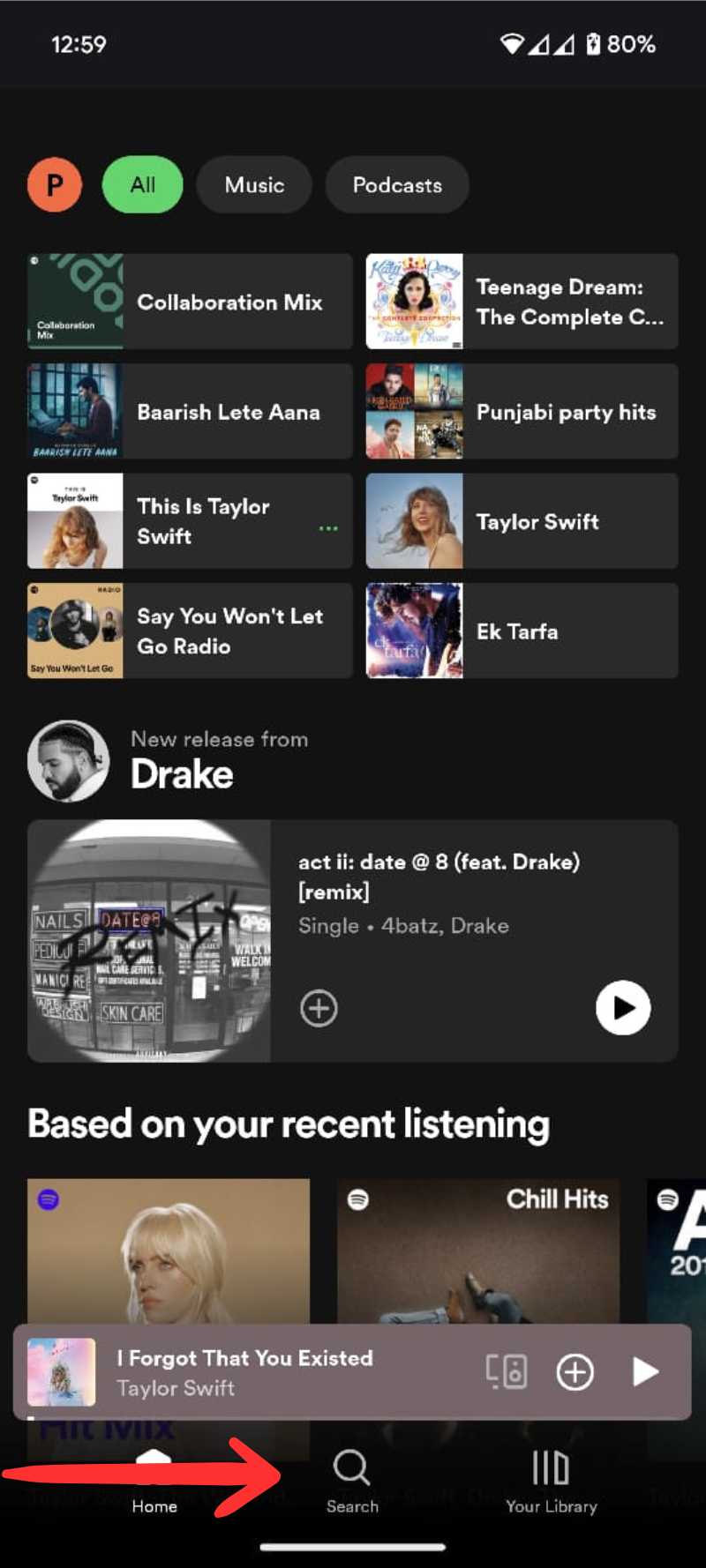
- Type “Blend” into the search field.
- Now, select “Blend Genre” from the results.

- Then, tap on “Create a Blend.”

- Tap on “Invite” and share the link with your friends via available methods such as WhatsApp, Messaging app, Email, etc.

- Once your friends accept your invite and join via the shared link a Spotify Blend playlist will be created based on the participant’s music taste.
Method 2: From Your Library Section
- Launch the Spotify app and go to the “Your Library” section.

- Now, tap on the “Plus Icon (+)” on the top right corner of your smartphone’s screen.

- Then, select “Blend.”

- Tap on “Invite” and share the link with your friends via available methods such as WhatsApp, Messaging app, Email, etc.

- Once your friends accept your invite and join via the shared link, a Spotify Blend playlist will be created based on the participants’ music tastes.
Where to Find Your Blend Playlist?
Finding your Blend playlist is easy! Your Spotify Blend playlists can be easily found in Your Library section. Here’s how you can find your Blend Playlists.
- Launch the Spotify app and go to the “Your Library” section.

- Go to “Playlists” and scroll down to find your Spotify Blend playlists.

- You can also go to the “Made for Us” section in the search tab.

How to Add a Friend to Your Existing Blend Playlists?
If you have an already existing Spotify Blend playlist, you can easily add more friends (up to 10) to the playlist. Here’s how you can add more friends to your Spotify Blend playlist.
- Launch the Spotify app and go to “Your Library.”

- Tap on “Playlists.” and scroll down to find the Blend Playlist to which you want to add more friends.

- Tap on the “Plus (+) Person Icon“.

- Then select “Invite more” and share the link with your friends via available methods.

How to Create a Spotify Blend with Your Favorite Artist?
In addition to creating a Blend with your friends, Spotify also allows you to create a Blend Playlist with your favorite artists. However, the process is much trickier than adding friends to your Blend playlist.
Fortunately, there’s another way to create a blend with your favorite artist. Spotify has created a list of all the artists and creators that allow you to create a Blend playlist with them. Simply go to this blog – “Here’s All the Artists, Creators, and Athletes You Can Blend with on Spotify,” to find out if your favorite artist is on the list.
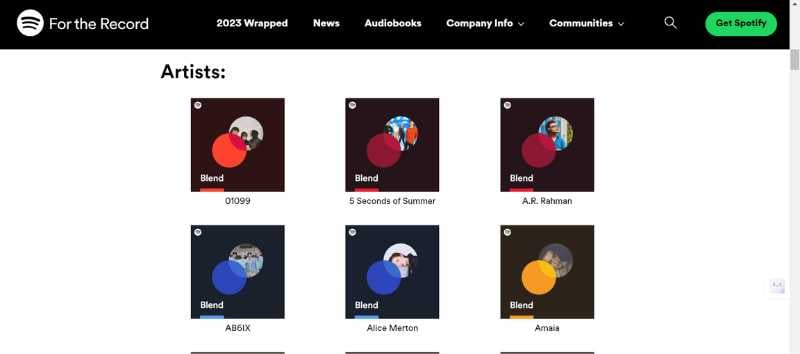
Once you find them, you can simply tap on the link and create a blend with your favorite artist.
Wrap-Up: Share Music With Your Friends With Ease
Spotify Blend lets you collaborate with your friends and favorite artists, discover new music, and share your favorite tracks effortlessly. This feature enriches your music streaming experience and makes it even more fun. Now that you know how to create a Spotify Blend with your friends and favorite artists, you can expand your music library, collaborate with your friends, and share your musical tastes with others.
We hope our guide has been helpful. If you have any questions or doubts, feel free to contact us using the comment section below. Happy blending!
FAQs about Spotify Blend
1. Can I download a Blend for offline listening?
Yes, you can download a Blend for offline listening. However, you will need to have a Spotify Premium account in order to download Spotify songs. Just tap the download toggle on the top right corner of the playlist. You can also add songs from a Blend to your other playlists or your liked songs.
2. How can I edit the name, remove a song, or leave a Blend?
You can easily edit, delete, or remove yourself from a Blend. Simply go to your Playlist and find your Blend.
- To edit the name of the blend – tap on the “three-dot menu” in the top right corner of the playlist and tap on “Edit name.” Type the name you want and hit “Done.”
- To remove a song – tap on the “three vertical dots” next to the song you want to remove, then select “Remove from this playlist.”
- To remove yourself from the Blend – tap on the “three-dot menu” in the top right corner of the playlist and tap on “Leave Blend.”
3. How is the taste match score calculated in Spotify Blend?
The taste match score is a percentage that indicates how similar your taste in music is to the other participants in a Blend. It is calculated based on the genres, artists, and songs you both listen to and like. The higher the score, the more similar your musical tastes are. The score also changes depending on your music streaming habits.
Further Reading
- How to Use Spotify Karaoke Mode
- How to Change Payment Method on Spotify
- [Fixed] Spotify Keeps Pausing Randomly
- Spotify Local Files: How to Add Local Music Files on PC & Mac
- What to Do if Spotify Keeps Crashing or Closing Itself

