

Spotify is one of the most popular platforms for listening to music. It offers a wide selection of music from the biggest bands, composers and artists to independent musicians. Another advantage of Spotify is the shareable playlists.

While listening to music on Spotify, if the music keeps on pausing randomly, it can irritate anyone to the core. If it keeps happening repeatedly, one might think of simply shifting to another music streaming platform. If you are facing the same issue of Spotify pausing randomly, this guide is for you. We have some working solutions that can help you fix the issue and get your tracks back on without any pauses or disturbances.
Table of Contents
How to Fix Spotify Keeps Pausing Randomly
Check Your Internet Connection
Spotify relies heavily on the internet to play songs from its servers. If you don’t have any downloaded tracks on your device and the internet connection is poor, this error may occur due to buffering. The tracks will play, pause and play again and again. You need to make sure you have a reliable internet connection and play the music on Spotify. Switch to a stable WiFi network and see if that helps.
Turn Off Data Saver or Low Data Mode

Data Saver and Low Data Mode help you save data on Android and iPhone respectively. If you have turned on Data Saver or Low Data Mode on your devices, it might cause these issues on Spotify or any other platform for that matter. You need to turn them off to get back to listening to music on Spotify without issues.
To turn off Data Saver mode on Android,
- Open the Settings app
- Tap on Connections > Data usage
- Now, select Data Saver and toggle the button beside Turn on now.
To disable Low Data Mode on iOS,
- Open Settings
- Select Cellular and tap on Cellular Data Options
- Turn off Low Data Mode
Adjust Audio Quality on Spotify
If you choose to play the highest quality of audio over mobile data without downloading the songs, you might face this issue. You need to adjust the audio quality to a minimal level that a mobile data connection can handle when you are on the move.
To adjust audio quality on Spotify,

- Tap on your Profile icon at the top-left of Spotify’s home screen
- Select Settings and privacy
- Scroll down to Audio Quality settings and set Mobile streaming to Low or Automatic
- Toggle the button beside Auto-adjust quality. It will help get better quality with a better network
Related Read: What to do if Spotify Keeps Crashing or Closing
Disable In-Ear Detection for Your Earbuds
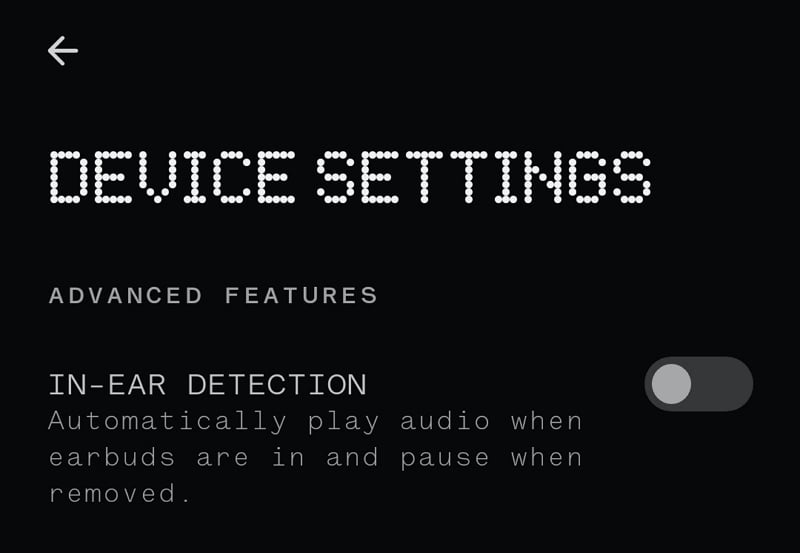
If you are listening to Spotify music on earbuds, the random pauses might be due to the In-ear detection feature on your earbuds. If you are walking or jogging with the earbuds, a slight move of an earbud from your ear might cause a pause. It keeps on happening with each move.
You need to disable this feature if you listen to music on Spotify while you walk, jog, or do any physical activity. To disable the in-ear detection feature, open the app related to your earbuds, find In-ear detection or similar settings on the Settings page, and turn it off.
Clear Spotify’s Cache
A corrupted cache might also cause Spotify to keep pausing randomly. We need to eliminate every possibility for the cause and fix it. Clear the cache on Spotify and see if it helps fix the issue.
To clear the cache on Spotify,
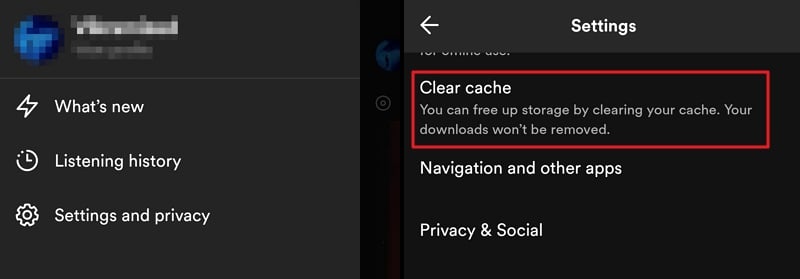
- Tap on the Profile icon
- Select Settings and privacy
- Scroll down and tap on Clear cache
- Tap on Clear cache in the prompt
Sign Out of Spotify
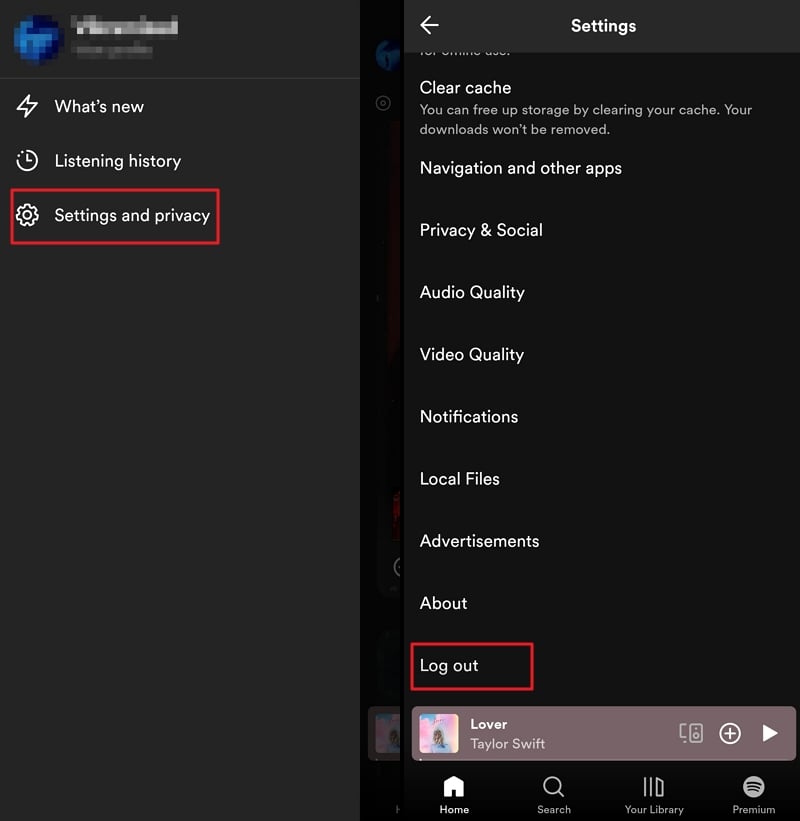
Sign out of Spotify and sign in again to see if it helps fix the issue. If the error is being caused due to some issue with the account, it will be fixed. To sign out of Spotify, click on the Profile icon at the top-left of the Spotify home screen and select Settings and privacy. Scroll down to the bottom of the Settings page and tap on Log out.
Sign in again with your login credentials and use Spotify to listen to your favorite music.
Reinstall Spotify App
If none of the above methods helped you fix the issue, there might be an issue with the app. Uninstall the Spotify app from your device, and reinstall it from the Google Play Store or App Store.
To uninstall Spotify on Android,

- Tap and hold on the Spotify app in the app list
- Select Uninstall to remove it completely from your device.
Now, head to the Google Play Store, search for Spotify, and install the app. Log in with your credentials and enjoy the music.
To uninstall the Spotify app on iOS,
- Tap and hold on the Spotify app in the list of apps
- Select Delete app to uninstall the app
Open the App Store, search for Spotify, and tap on Get to install it. Sign in with your credentials and see if it has fixed the issue.
Random Pauses on the Spotify App
If you are experiencing random pauses on the Spotify app, it might be due to a bad internet connection, an in-ear detection feature on the earbuds, data saver mode, or any other glitch with the Spotify app. Follow the above methods to fix the issue and enjoy the music.
FAQs on Spotify Keeps Pausing Randomly
1. Why does my Spotify keep pausing itself?
If the Spotify music keeps pausing itself, it might be due to the high quality of the music you have opted to play with the mobile data. Other causes include bad internet, features on your earbuds, data saver mode on your device, etc.
2. How do you fix Spotify when it keeps stopping?
Check if the issue is caused by a bad internet connection, data saver mode, corrupted cache, or other issues. Turn off data saver mode, clear the cache, and update or reinstall the Spotify app, if other methods fail to help you. One of the most important yet overlooked methods is to turn off the in-ear detection feature on your earbuds.
3. Why does my Spotify keep stopping a few seconds into the song?
If you have set your music streaming quality to high even on mobile data, it takes time to load the song. Due to the buffering that happens on the bad internet connection, you keep experiencing the song stopping every few seconds or a few seconds into the song to load the song.
4. Why is Spotify pausing every 30 seconds?
It might be due to the buffering that happens when you do not have a stable internet connection. You can fix it by adjusting the audio streaming quality in the Settings of Spotify. It can further be enhanced by turning on the Auto-adjust quality feature.

